

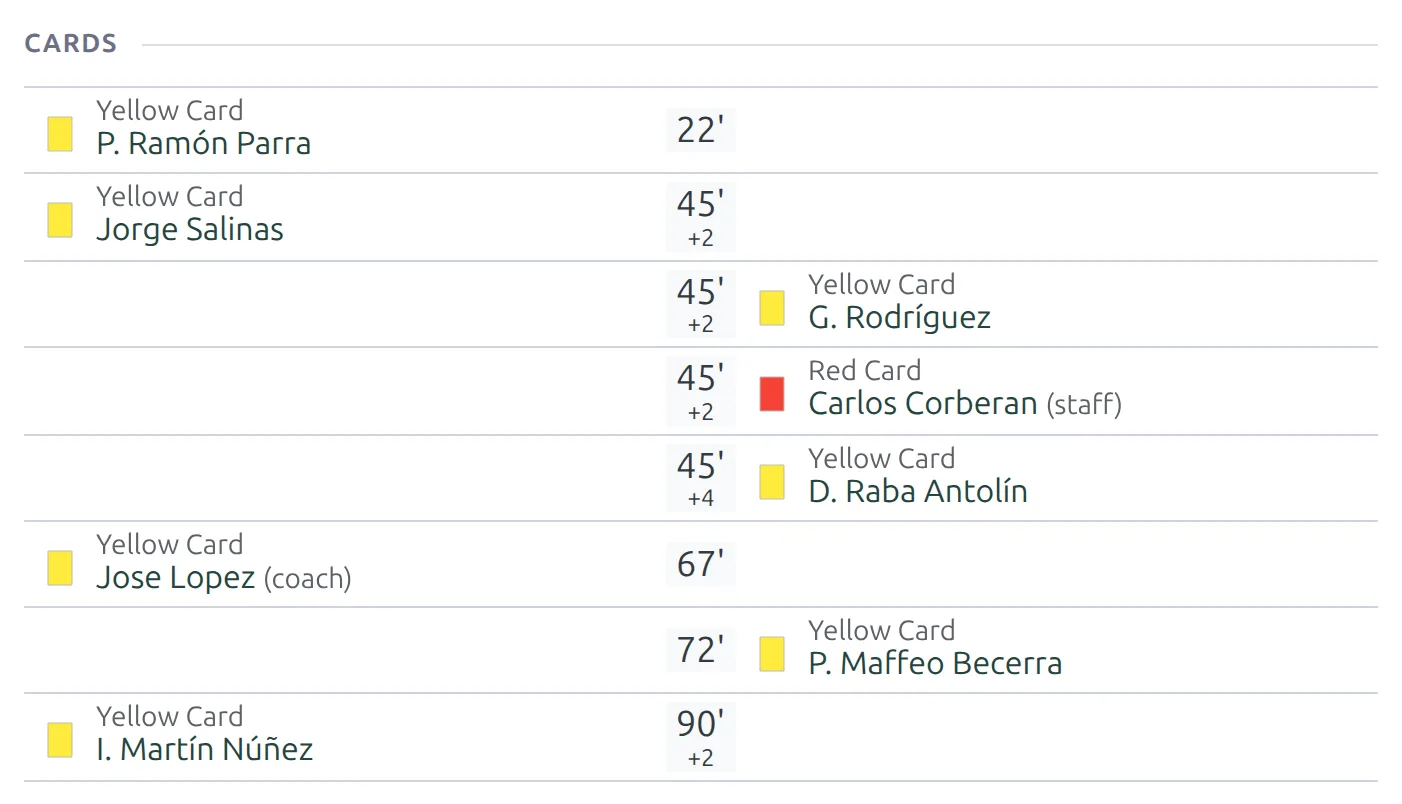
Since 2019 referees can show yellow and red cards to coaches and other team officials, not just players. Football Leagues PRO records these as staff cards: a separate event type you add in the game editor, shown on the game page next to the player cards.
Who can get a staff card
- The game’s head coach – the coach set in the game’s lineups, for either side.
- Any staff member on the club’s staff list for that season – assistants, goalkeeping coaches, team managers, physios.
- A temporary coach – a coach entered by name for this game only, with no staff profile.
People who aren’t on any of those lists can’t be picked. If an official isn’t in the picker, add them to the club’s staff for the season first.
The card values are the same as for players: yellow, second yellow (2nd Yellow > Red) and red.
🚀 Add a staff card
- Edit the game and set the head coaches in the lineups, if you haven’t yet.
- In Match Events, click add event.
- In Select event, pick staff card.
- Set the club, the minute and the Card Type.
- Click Select Staff and pick the person. The head coach is listed first, then the club’s season staff, then the temporary coach.
- Save the game.
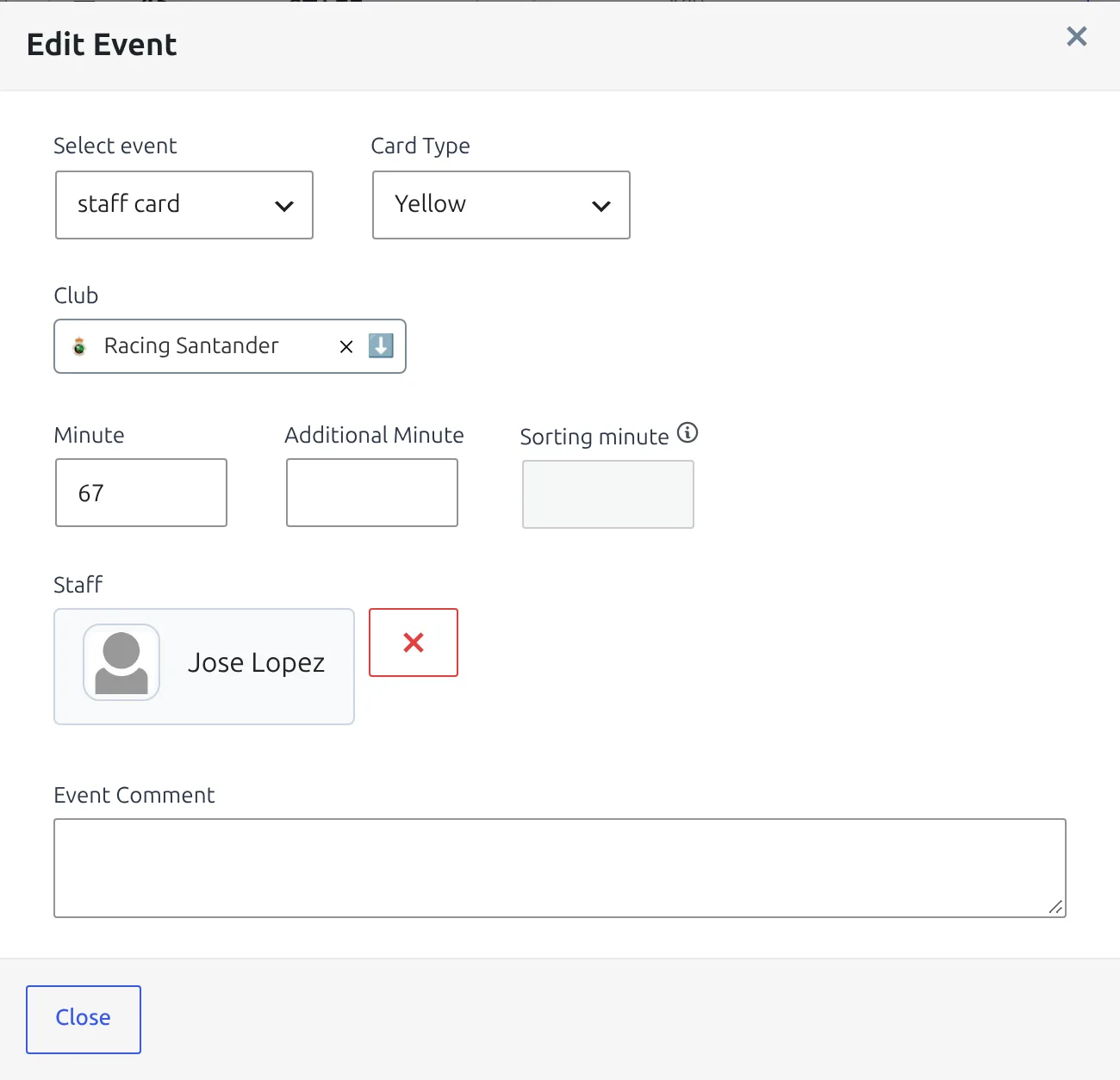
Staff cards are entered in the admin game editor only. The frontend game editor and the live editor show existing staff cards in the event list, but can’t add or change them.
Where staff cards show
| Place | What you see |
|---|---|
| Cards section | Staff cards listed with the player cards, sorted by minute, with “(coach)” or “(staff)” after the name. A game whose only card went to a coach still gets a Cards section. |
| Lineups | A card icon next to the head coach’s name. Other staff aren’t listed in the lineups, so their cards show in the other places only. |
| Match Timeline | A card icon at the minute, with the staff name in the tooltip. |
| Match Commentary | A card entry with the staff name. Live commentary picks it up on the next update. |
| Game Report Email | Listed in %cards_text% with the role after the name. |
| AI Writer | Passed to the AI as a card for that staff member. |
All of these work the same on classic game pages and on game pages built with the Layout Builder.
The word after the name comes from your text strings: “Coach” is the lineups coach label, and “Staff” is a new string you can change in Translations > Text Strings (search for Staff, event “staff card”).
What staff cards don’t change
A staff card is a record of what happened, not a player statistic. So it stays out of every number that counts player cards:
- Team card totals – the club’s yellow and red card counts for the game stay player-only.
- Fair play tiebreaks – the Less Yellow Cards and Less Red Cards standing rules ignore staff cards.
- Player statistics – the staff member never appears in player stats or player lists.
- Card suspensions – automatic suspensions are worked out from player cards only.
Imported games
API-Football doesn’t report cards for coaches, so imported games never bring staff cards in. You can add one by hand to an imported game – a later re-import of that game keeps it.
🆘 Troubleshooting
The person I need isn’t in the Select Staff list
The list shows the game’s head coach, the club’s staff for the game’s season, and the temporary coach. Add the person to the club’s staff for that season, reload the game editor and try again.
The card doesn’t show in the lineups
Lineups only show the head coach. A card for an assistant or another staff member shows in the Cards section, the timeline and the commentary instead.
The card doesn’t show on the live timeline
During a game with live scores from the API, the timeline draws only the events the API sends. A staff card you add during the game appears once the live feed ends.
📚 Related
Apps connected through the REST API can read and add staff cards too – see the staff_card event type there.