

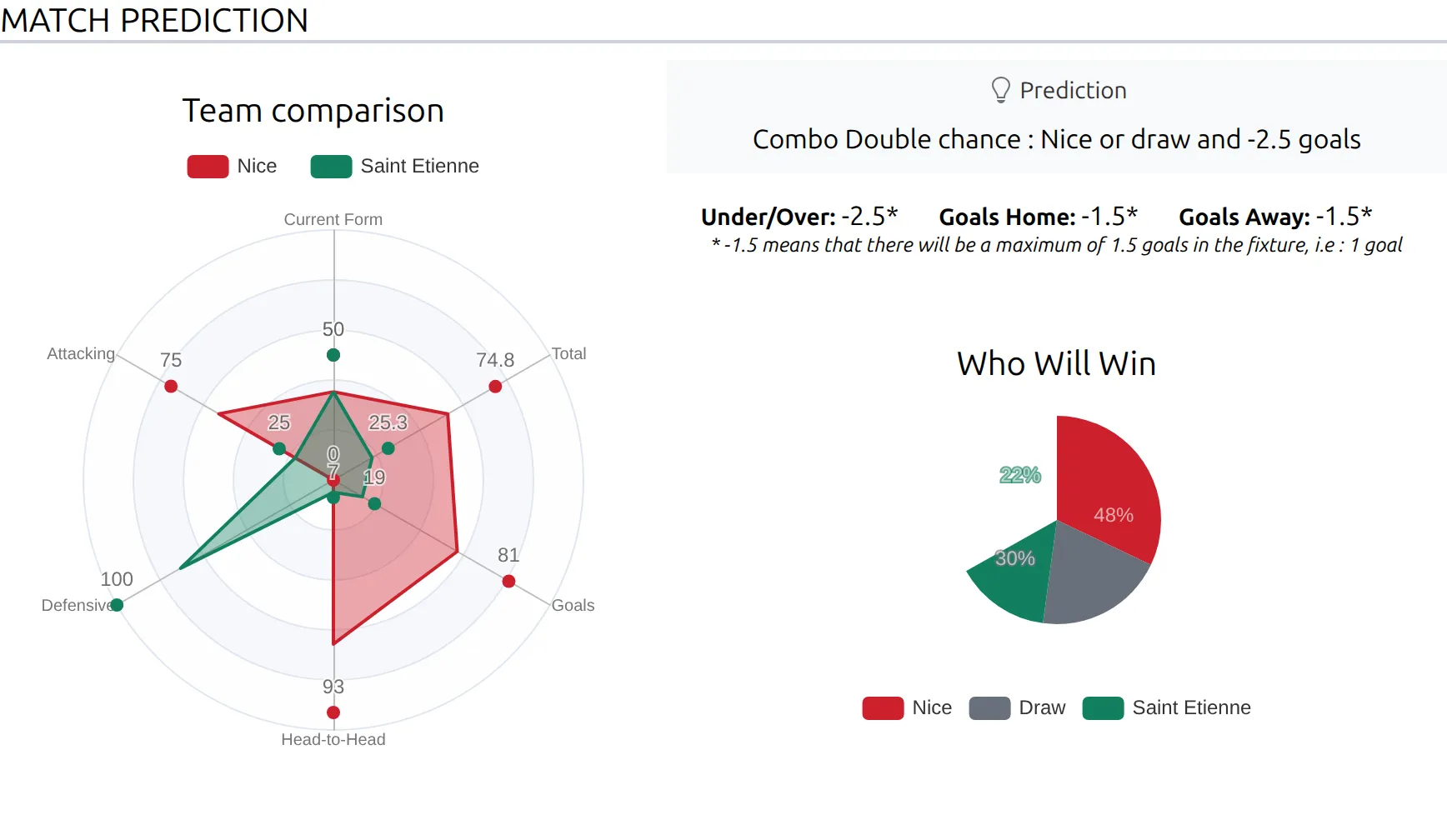
Game Prediction shows who is expected to win an upcoming game: a one-line verdict, a Who Will Win pie chart, and a radar chart comparing the two teams on form, attack, defense and head-to-head record.
The data comes from the Predictions endpoint of API-Football, the provider behind FL API Import. The plugin asks for one prediction per game and stores what comes back. If you want to see exactly what the provider sends, it’s described in the API-Football documentation.
Visitors don’t vote
This isn’t a poll. There’s no voting button and nothing your visitors click is stored. Everything on the page is imported data, or a calculation from imported bookmaker odds. If you want reader votes, that’s a different feature and this isn’t it.
🚀 Two ways to get predictions
Both need an API-Football subscription set up in API Import, but they’re independent and you can use either or both.
| Source | What you get |
|---|---|
| Prediction import | The provider’s own verdict, win percentages, the team comparison radar, and optional under/over and goals lines |
| Odds import | A Who Will Win pie worked out from averaged bookmaker odds, plus a verdict built from the odds spread |
Where both exist, the odds-based percentages win. The pie shows what the bookmakers think, not what the provider’s prediction endpoint said.
One game, both sources
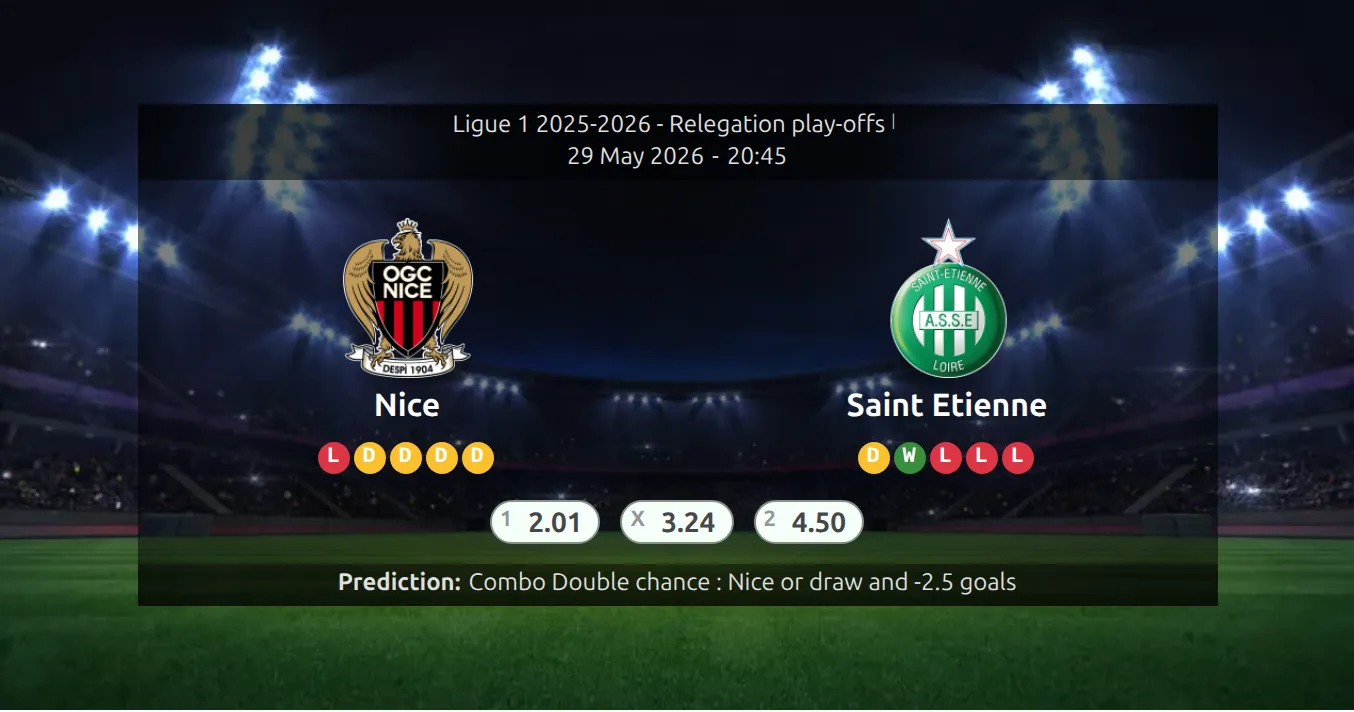
The screenshot at the top is Nice v Saint Etienne with both imports running. The provider’s prediction said Nice 45%, draw 45%, Saint Etienne 10%, with the verdict “Combo Double chance : Nice or draw and -2.5 goals”. The bookmakers, averaged, said 48%, 30% and 22%. The page shows the provider’s verdict and team comparison, and the bookmakers’ 48 / 30 / 22 in the pie.
Turning on prediction import
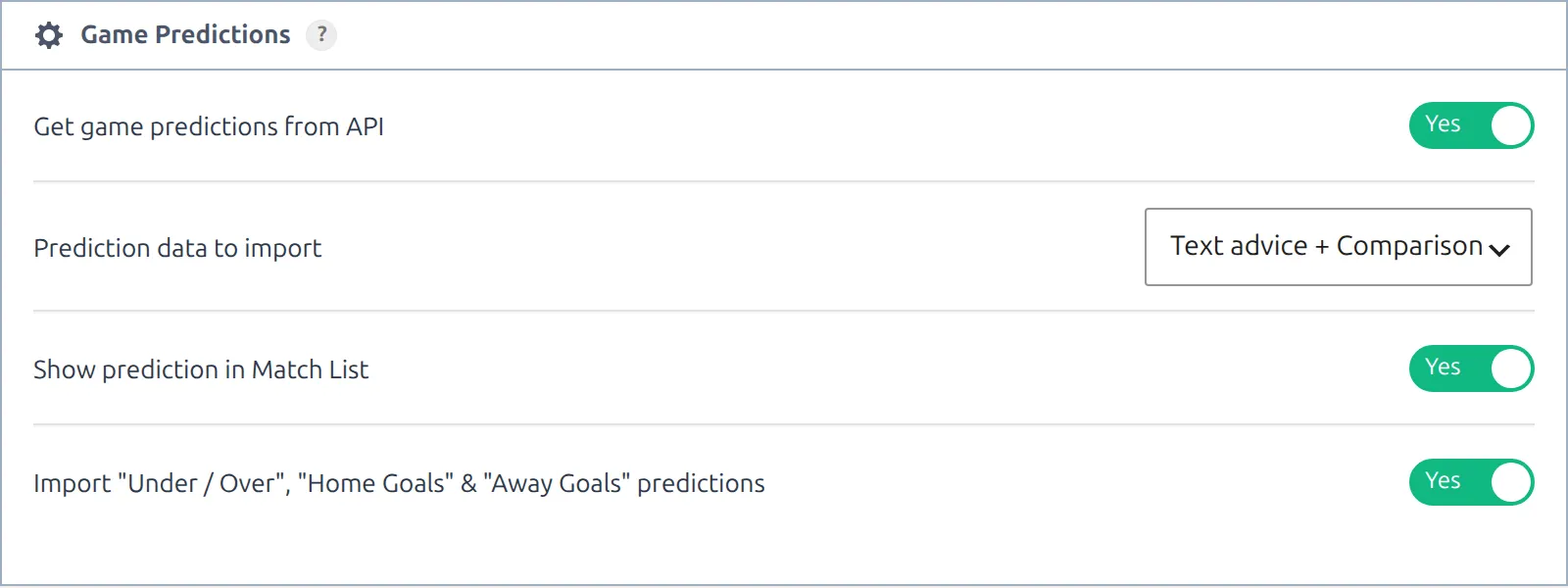
Go to FL API Import > Settings and open the Game Predictions panel, the fourth one down.
| Option | Default | What it does |
|---|---|---|
| Get game predictions from API | No | Master switch. The other three appear once it’s on. |
| Prediction data to import | Text advice | Text advice stores the verdict only. Text advice + Comparison also stores the percentages and the radar data. |
| Show prediction in Match List | No | Adds the verdict line under each game in slim match lists. |
| Import “Under / Over”, “Home Goals” & “Away Goals” predictions | No | Adds the goals lines. Only appears with Text advice + Comparison selected. |
Click Save at the top or bottom of the settings page when you’re done.
Text advice alone gives you an empty section
On the default setting the plugin stores the verdict and nothing else, so unless you also import odds, the Prediction section has no charts to draw and renders nothing at all. Without odds import it also keeps the Prediction block out of the Layout Builder palette. Choose Text advice + Comparison unless you only want the one-line verdict.
Reading the goals lines
With the Under / Over option on, up to three extra values print under the verdict, each marked with an asterisk, with one explanation line below them. A minus sign is a ceiling. In the Nice v Saint Etienne example, Under/Over: -2.5 means at most 2 goals in the game, and Goals Home: -1.5 means Nice score at most once.
Picking competitions and running the import
Predictions are opted into per competition. On FL API Import > Dashboard, the Update Predictions row shows how many of your competitions are included, and the count links to the picker. You can also set it per league under API Leagues, in a league’s Config Actions.

Click Run to fetch predictions now. To keep them fresh, click Schedule in the same row: the status turns ACTIVE and the job repeats daily. Until you do that, nothing updates on its own. If the row says “disabled in API Settings”, the master switch above is still off.
Each run only looks at games that are not yet finished and kick off before 15 days from today, which also includes older games that were never marked finished, such as postponed ones. It makes one API request per game. That adds up. A 20-team league plays 10 games a round, so two rounds inside the window is about 20 requests every day for that one league. If a competition has no upcoming games in that window the import reports that and moves on.
Win probabilities from bookmaker odds
This path arrived in version 0.18.0 and needs no prediction import at all. In the Odds panel of the same settings page:
- Turn on Import Odds (Pre-Match).
- Tick the bookmakers you want in Bookmakers.
- In “Who Will Win” Probability Bookmakers, choose up to five of them. Leave it empty to average everything you import.

The plugin averages the win, draw and away odds from those bookmakers, strips out the bookmaker’s margin so the three numbers add up to 100%, and stores the result. Changing your bookmaker selection triggers a fresh calculation within a minute. Otherwise it recalculates about half an hour after each odds import.
See Import Odds for the rest of the odds setup.
How the odds verdict is worded
A game with odds gets a calculated verdict inside the section when there’s no imported verdict. The same happens when Prediction data to import is set to Text advice, because on that setting the section ignores the imported verdict. The plugin ranks the three percentages and looks at the gap between the top two:
| Home / Draw / Away | Why | Verdict |
|---|---|---|
| 55 / 22 / 23 | A team leads by 10 points or more | Winner : Besiktas |
| 45 / 15 / 40 | A team leads by 5 to 9, and the other team is second | Winner : Besiktas |
| 44 / 38 / 18 | A team leads by 5 to 9, and the draw is second | Besiktas or Draw |
| 36 / 33 / 31 | The lead is under 5 points | Draw |
| 30 / 40 / 30 | The draw is the biggest share | Draw |
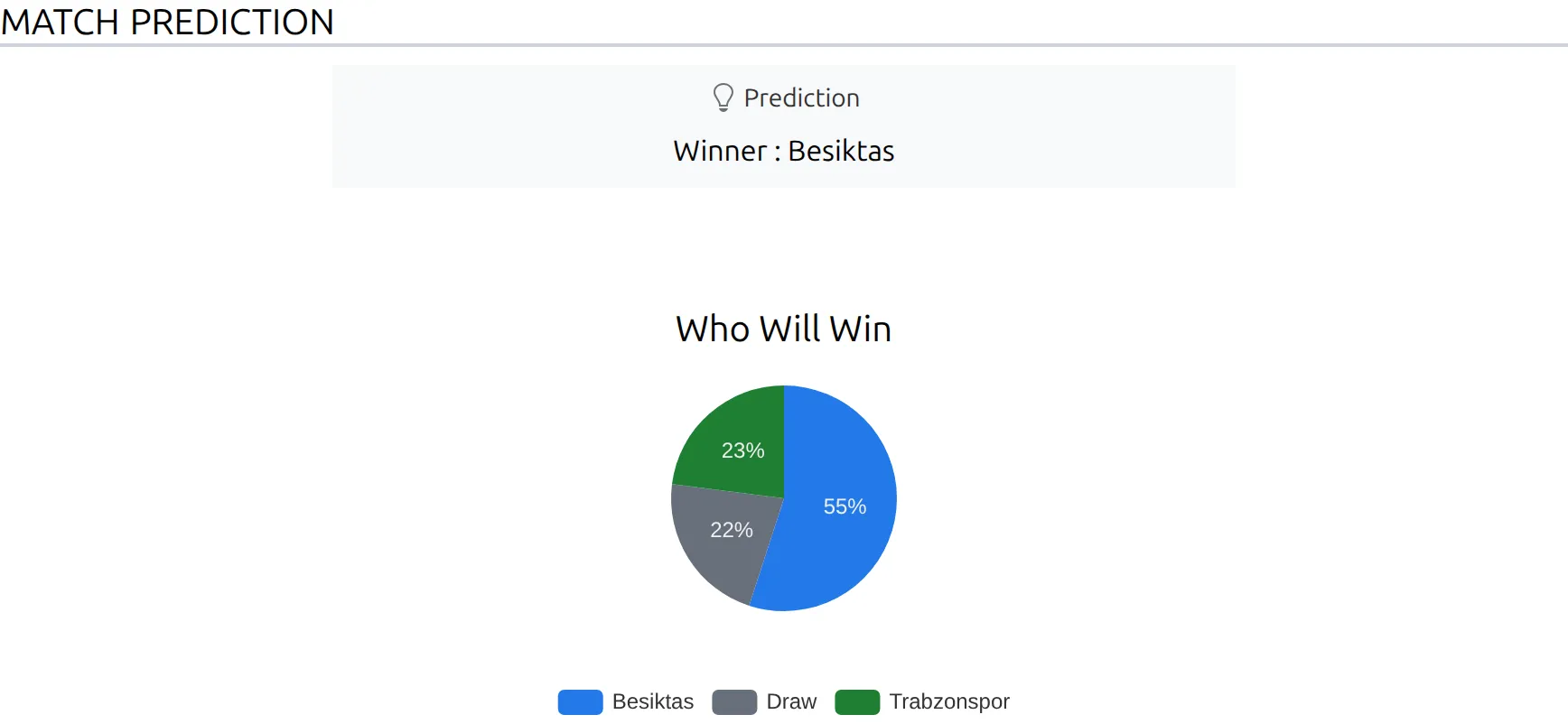
That calculated verdict lives inside the section only. The one-line verdict under the header, on the scoreboard and in match lists always comes from the prediction import, so a site that imports odds but not predictions gets the section and no verdict line. The words Winner, Draw and “or” are the Text Strings of the same name, covered under Changing the wording below.
📍 Putting the section on a page
Importing predictions does not put the charts on your game pages. The Prediction section is not one of the sections a game page draws by default, so you have to place it. What does appear on its own is the one-line verdict, described further down.
Layout Builder
Build a Game layout and add the block whose category is Match and whose name is Prediction. There’s a matching block for LIVE game layouts too.
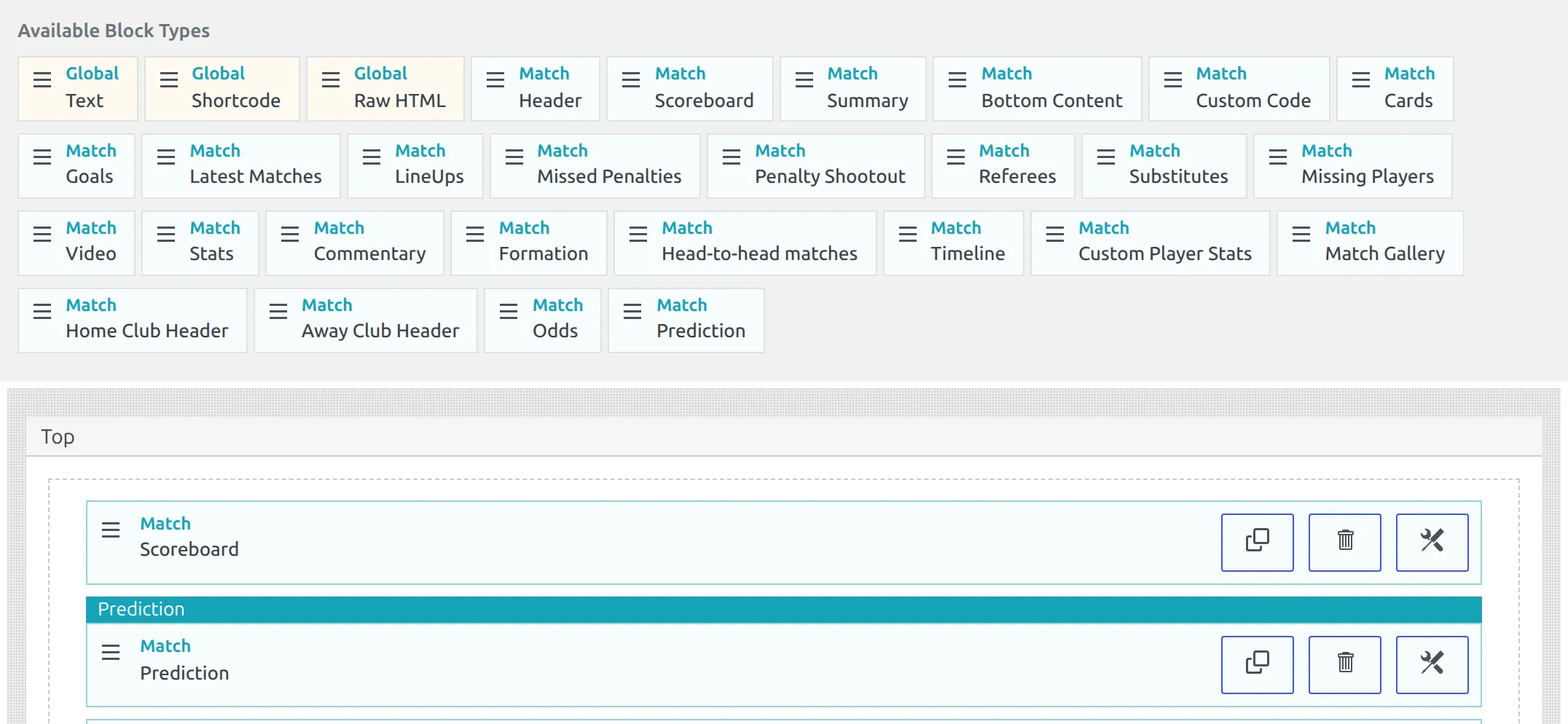
If you can’t find the block in the palette, it isn’t registered yet. It only appears once Prediction data to import is set to Text advice + Comparison, or odds import is on. There’s no message explaining its absence.
The verdict text in your own layout content
Game layouts understand the dynamic variable %prediction_text%. It works in the Shortcode and Raw HTML blocks and in the layout’s SEO Title and SEO Description, which is handy if people search for “Nice vs Saint Etienne prediction”. For example, this SEO Title:
%home_club_title% vs %away_club_title% prediction - %prediction_text%becomes “Nice vs Saint Etienne prediction – Combo Double chance : Nice or draw and -2.5 goals”. It prints the same text as the one-line verdict, including your Alternative Prediction Text, but it doesn’t hide itself on finished games. The full variable list is on the Shortcode block page.
Shortcode
[anwpfl-match match_id="123" sections="predictions" show_header="0" section_header="0"]Copy that line rather than retyping it, and change 123 to your game’s ID. The identifier attribute is match_id, and writing id instead renders a completely blank space with no warning.
Two more things about this one. The shortcode builder’s Sections dropdown doesn’t offer predictions, so you can only get it by typing the attribute yourself. And sections is ignored completely when layout="slim", so don’t combine the two.
For many games at once, use the matches section shortcode, which does list Match Prediction in its dropdown:
[anwpfl-matches-section section="predictions" competition_id="123" type="fixture" limit="10"]With type="fixture" that shortcode only lists games that haven’t been played. A competition whose season is over renders nothing at all, which looks like a broken shortcode but isn’t.
Full attribute lists: the match shortcode and the matches section shortcode.
The one-line verdict
Separate from the section, a short line such as “Prediction: Winner : Real Madrid” appears by itself in three places once you have prediction data:
- Under the header on a game page
- At the foot of the scoreboard
- Under each game in slim match lists, if Show prediction in Match List is on
You’ll see one of the first two, not both. With the image scoreboard switched on it replaces the game header, so the line moves into the scoreboard footer.
In match lists the line only appears on the slim layout, which is the default for the matches shortcode. The modern, simple and plain layouts don’t print it.
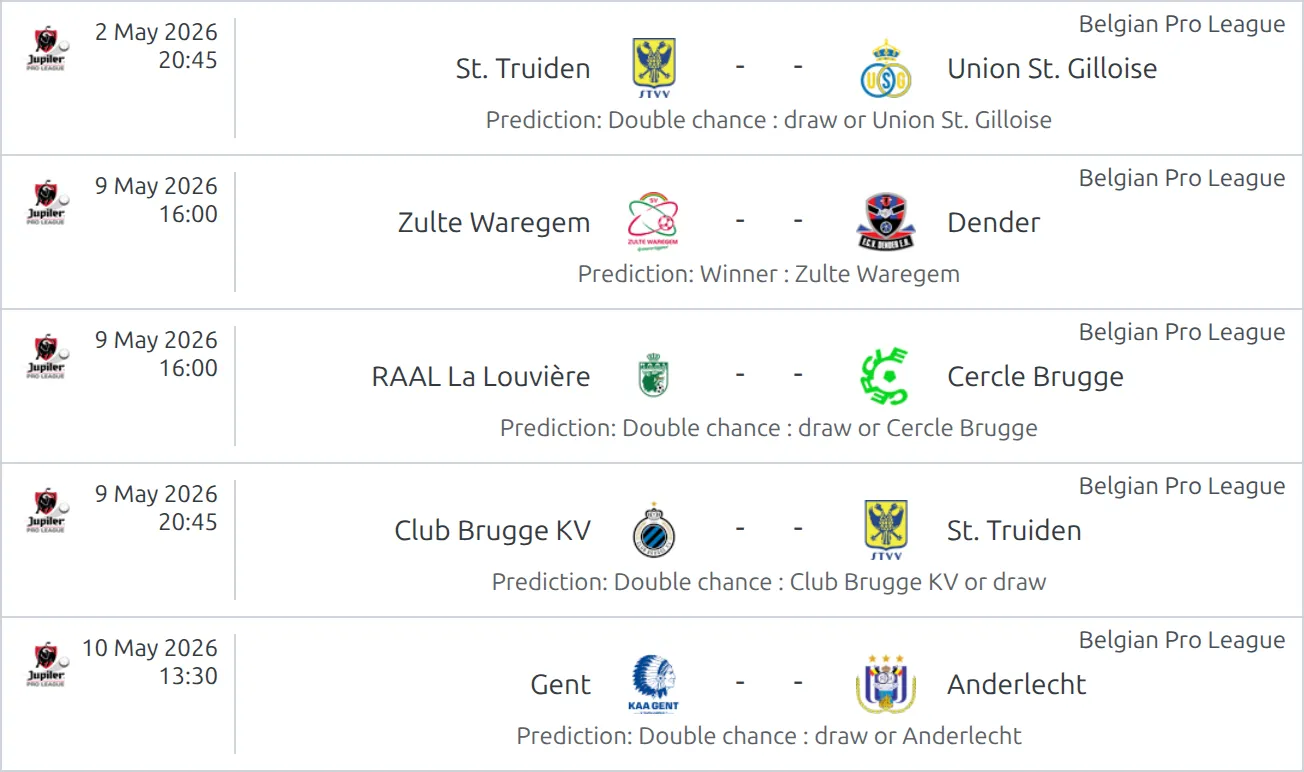
All three hide themselves once a game is finished. The Prediction section does not, so a finished game can still show its charts. If that bothers you, drop the block from your finished-game layout.
In a live match list the line also disappears the moment a game kicks off. To keep it next to the live score, set Show Prediction (Live) in Slim layout to Show, under Settings & Tools > Settings > Display > Match List, in the Premium group. More on that in Live Scores in Match List.
Writing your own verdict
Open a game and look in the premium options for Alternative Prediction Text. Whatever you type there replaces the imported verdict.
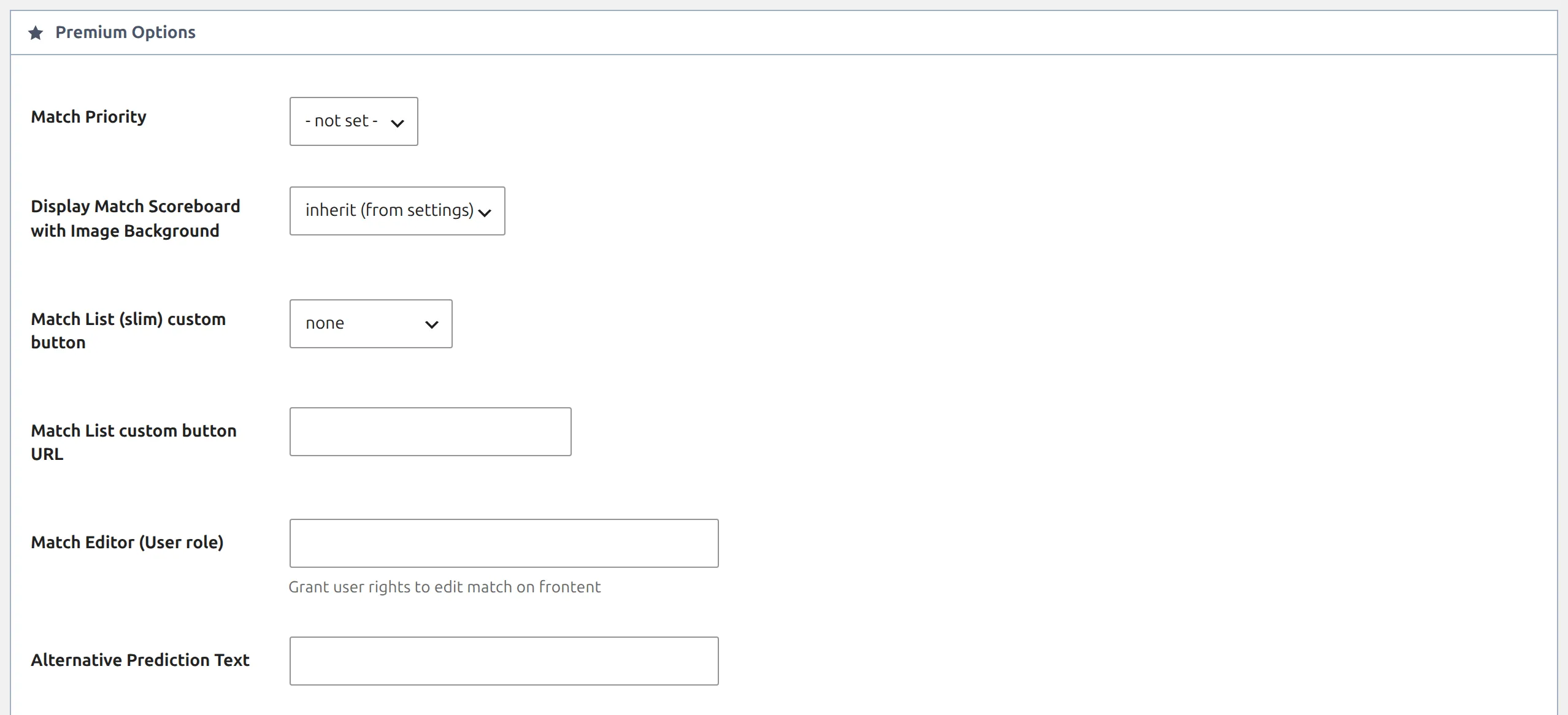
Two limits. The field only exists on games that already have an imported prediction, so it’s missing entirely on a game the import hasn’t reached, and typing into it on such a game saves nothing. And it changes the one-line verdict only. The verdict printed inside the Prediction section keeps showing the imported text.
Changing the wording
Everything the section prints can be reworded from the Translations menu, under Text Strings. The strings sit together in a Prediction group. The Search Text String box matches each string’s own wording, not its group, so “prediction” lists only the ones with that word in them: Match Prediction, Prediction and the API Import - Predictions strings. Search “API Import” for the verdict vocabulary, or a heading such as “Who Will Win” directly.
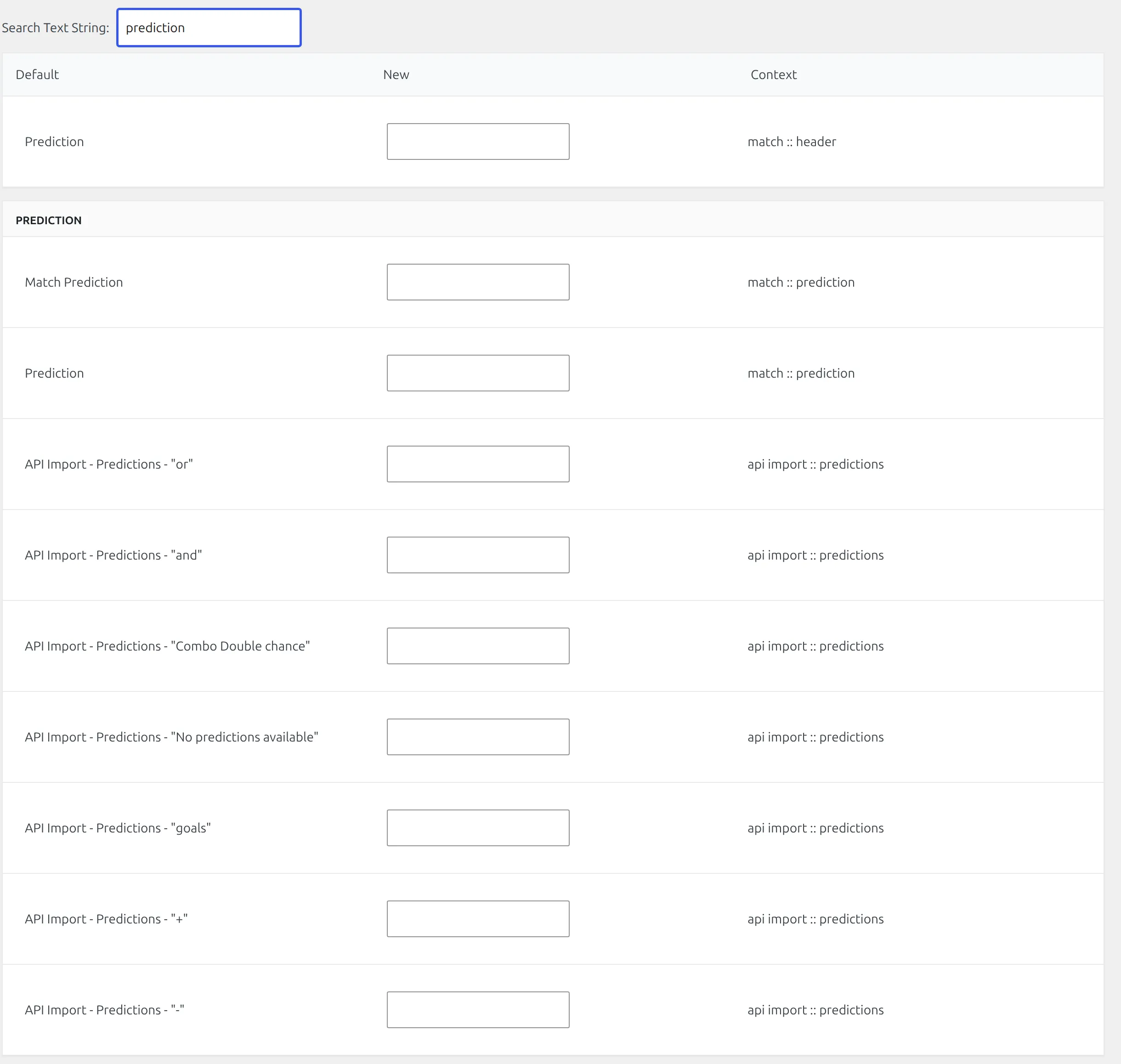
You’ll find the headings first: Match Prediction, Prediction, Who Will Win, Team comparison, Current Form, Attacking, Defensive, Poisson Distribution, Head-to-Head, Goals, Total, Draw, Under/Over, Goals Home, Goals Away, Winner. Below them sits a second group prefixed API Import, which rewrites the raw provider vocabulary inside the verdict itself, including its words for Winner, draw, Double chance, “or” and “and”. That second group is how you translate a verdict such as “Winner : Real Madrid” into your own language.
A worked example in German. Fill in API Import – “Double chance” with Doppelte Chance, API Import – “draw” with Unentschieden and API Import – Predictions – “or” with oder. The verdict “Double chance : draw or Borussia Dortmund” then reads “Doppelte Chance : Unentschieden oder Borussia Dortmund”.
Team names look after themselves. The provider writes its own spelling of the team, and when that team is linked to one of your clubs through the API import, the plugin swaps in your club’s title.
🆘 When nothing shows
The section renders nothing
- Prediction data to import is on Text advice and you have no odds. The section needs the comparison data or the odds percentages. This is the most common cause.
- The import hasn’t reached this game. Only unfinished games kicking off before 15 days from today are fetched.
- The game’s competition isn’t ticked for prediction import.
- Update Predictions was run once but never scheduled, so games added to the 15-day window since then have nothing stored.
The pie shows but the radar doesn’t
Normal when the percentages come from odds rather than from the prediction import. The radar needs the team comparison data, which only the prediction import supplies. It’s also skipped when the comparison values are all zero.
The radar has six spokes instead of seven
Any comparison where both teams score 0% is left off the chart. Nice v Saint Etienne came back with 0% / 0% for Poisson Distribution, so its radar draws the other six.
The prediction line shows in one match list but not another
Check the layout. Only the slim layout prints it. A list that uses the modern or simple layout never will, whatever Show prediction in Match List is set to.
I turned prediction import off and the charts are still there
Turning the master switch off stops future imports and hides the one-line verdict, but the section keeps drawing whatever was already stored. Remove the Prediction block from your layout, or the shortcode from your page, to take it down.
Can I use Current Form, Attacking or Defensive somewhere else?
Not on their own. Those comparison values are stored with the prediction and only the radar in this section draws them. No shortcode, stats table or dynamic variable reads them, so you can’t drop “Attacking 75%” into a custom statistics table. The one piece you can reuse elsewhere is the verdict text, through %prediction_text%. Laying the numbers out differently means overriding the section’s template in your theme, which is a developer job.
The charts appear a second or two late
Expected. The charting library is held back until the visitor interacts with the page, or for three seconds, whichever comes first. That’s the Delay some JavaScript files setting under Settings & Tools > Settings > Configuration > Advanced, on by default. Turn it off to load charts immediately at some cost to page speed scores.

Both teams are the same color
The charts color each team with the club’s own main color. Clubs without one fall back to the site defaults, so two such clubs look identical. Set a Main Color on each club, in the club editor’s Media tab.
📚 Related
- Import Odds – the source of the Who Will Win percentages
- Import Dashboard – where Update Predictions is run and scheduled
- Layout Builder – building the game layout that carries the block
- Shortcode block – every dynamic variable, including
%prediction_text% - Matches section shortcode – predictions for a whole round of games
- Match Scoreboard – the header whose footer carries the verdict line
- API-Football Predictions documentation – what the provider sends for each game