

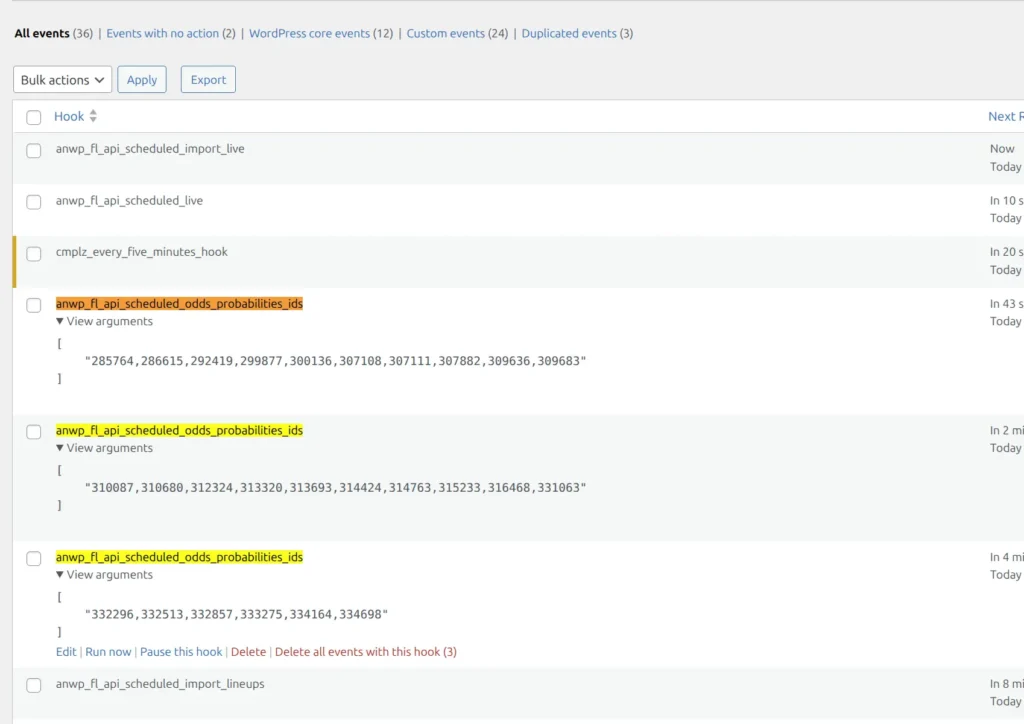
If you use the WP Crontrol plugin to inspect scheduled events, you may see hooks like anwp_fl_api_scheduled_odds_probabilities_ids flagged as “Duplicated events.” These are not real duplicates — they are separate batches of work, each processing a different set of matches.
Why Multiple Events Exist
When the API Hub fetches odds or probabilities data, it may need to update hundreds of matches. Instead of processing all of them in a single request (which could time out or overload your server), the plugin splits the work into smaller batches.
Each batch is scheduled as a separate cron event using the same hook name, but with a different argument — a list of match IDs to process:
anwp_fl_api_scheduled_odds_probabilities_idswith argument"285764,286615,292419,..."anwp_fl_api_scheduled_odds_probabilities_idswith argument"310087,310680,312324,..."anwp_fl_api_scheduled_odds_probabilities_idswith argument"332296,332513,332857,..."
WordPress treats each of these as a completely independent event because the arguments are different. They run one after another until all matches are updated.
Why WP Crontrol Flags Them as Duplicates
WP Crontrol counts events by hook name only and ignores arguments. If the same hook appears more than once — regardless of whether the arguments are different — it reports them all as duplicates.
WordPress core, on the other hand, uses both the hook name and the arguments to identify events. Two events with the same hook but different arguments are completely separate in WordPress.
This is why WP Crontrol shows a false-positive “Duplicated events” warning.
How to verify
Click “View arguments” on each event. If they contain different lists of match IDs, they are not duplicates — each one processes a different batch of matches.
Do I Need to Do Anything?
No. These events are working as intended. They will run automatically and disappear once all batches are processed.
The only time to investigate is if these events keep piling up without ever running. That would indicate a WP-Cron issue on your server, not a plugin problem. See our How to Test if Cron Works Properly guide.