

Entity Links
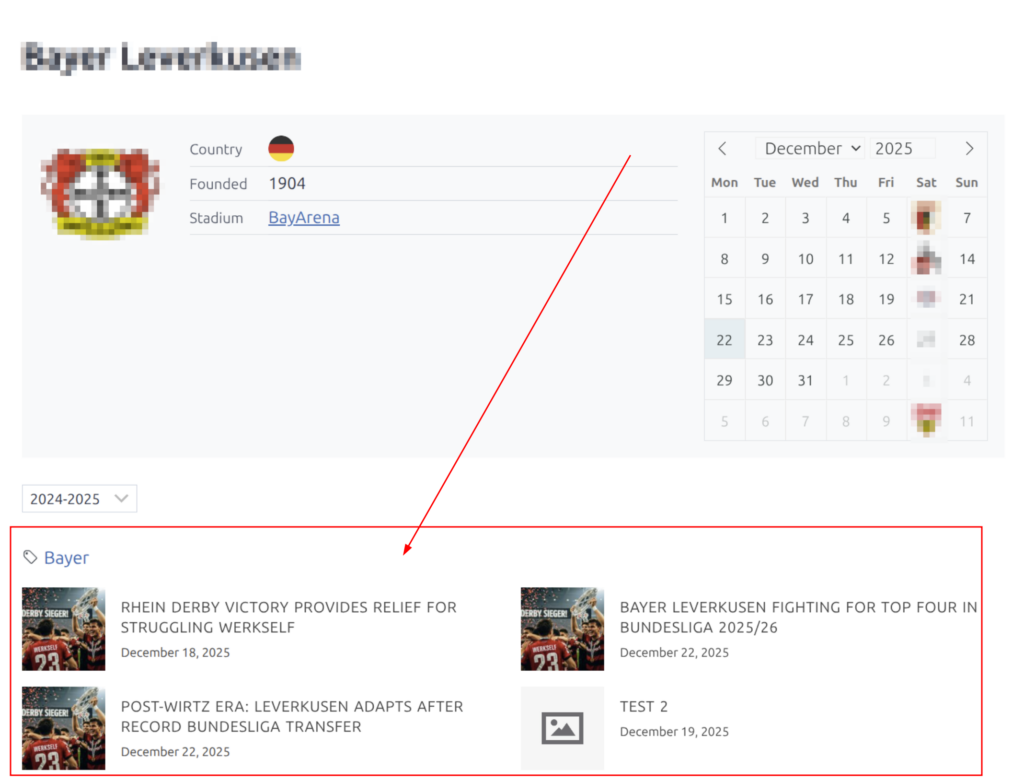
Link your blog posts to Football Leagues entities (clubs, players, matches, competitions, staff, referees) and display related posts on entity pages using the [anwpfl-tag-posts] shortcode.
Two methods available:
| Method | Since | Best For |
|---|---|---|
| Direct Entity Links | 0.17.0 | Precise control, faster workflow |
| Tag-based Links | 0.10.5 | Automatic linking via shared tags |
Both methods work together — posts can use either or both. The shortcode merges results automatically.
Method 1: Direct Entity Links (Recommended)
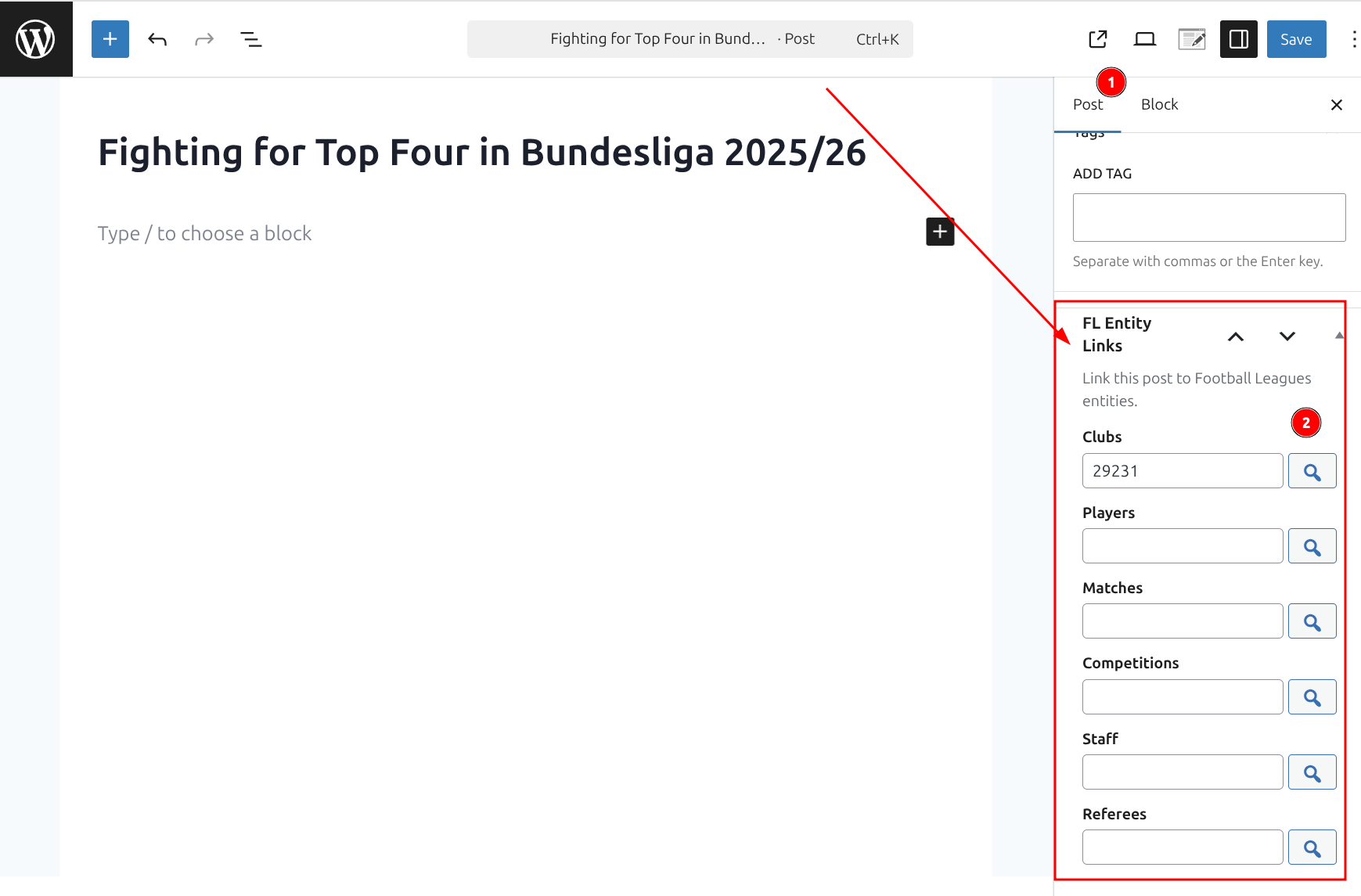
Link posts directly to entities using the FL Selector modal. No tags needed.
How to Use
- Edit a blog post in WordPress
- Find the “FL Entity Links” metabox in the sidebar
- Click the search button next to the entity type you want to link (Clubs, Players, Matches, etc.)
- Select entities in the FL Selector modal
- Save the post
When to Use Direct Links
- Linking specific posts to specific entities with precise control
- Faster workflow without tag management overhead
- Linking to Matches (which don’t map naturally to tags)
- One-off linking scenarios
Supported Entity Types
| Entity Type | Description |
|---|---|
| Clubs | Team/club pages |
| Players | Player profiles |
| Matches | Game/match pages |
| Competitions | League/tournament pages |
| Staff | Coach/manager pages |
| Referees | Referee pages |
Method 2: Tag-based Links
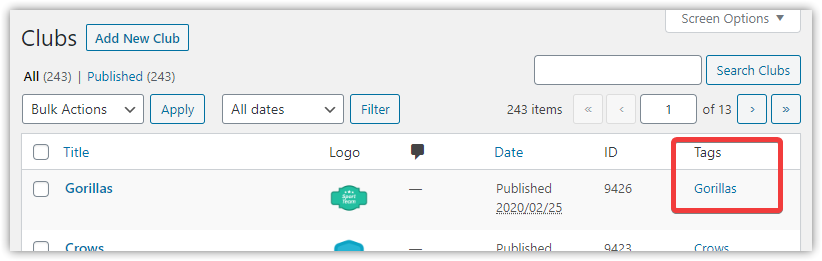
Connect posts to entities through shared WordPress tags. When an entity and a post share the same tag, they are automatically linked.
How to Use
- Create a tag on your entity (e.g., add “manchester-united” to a club)
- Add the same tag to your blog posts
- Posts with matching tags are automatically linked to the entity
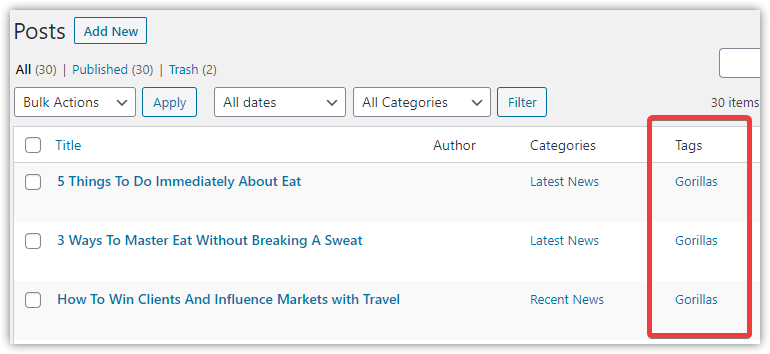
Important
The key requirement is exact tag matching — the tag name must be identical on both the entity and the posts.
Managing Entity Tags
Go to FL Settings & Tools > Entity Tags [PRO] to access the dashboard.
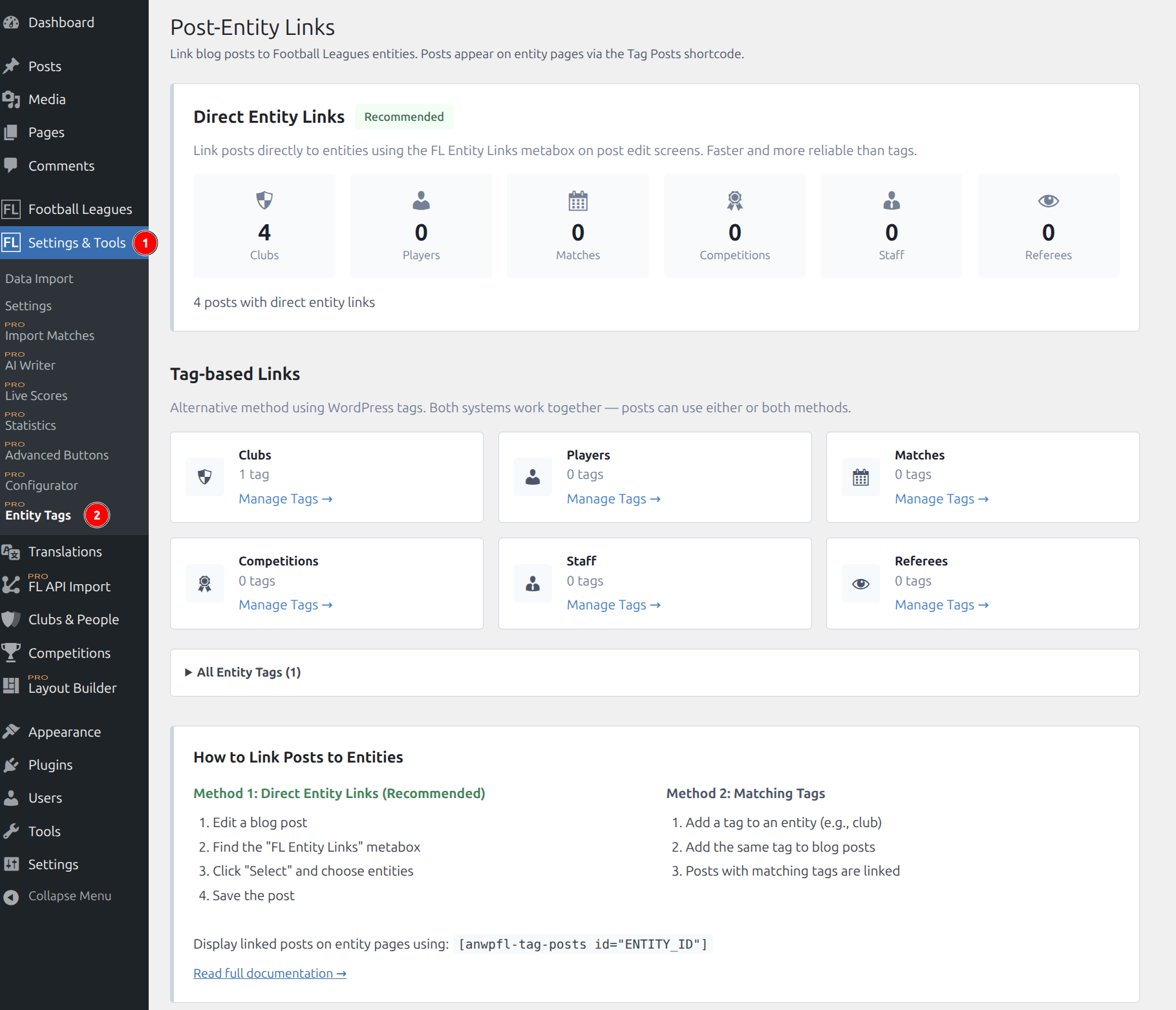
From the dashboard, you can:
- View statistics for both linking methods
- Access tag management pages for each entity type
- See how many posts are linked per entity type
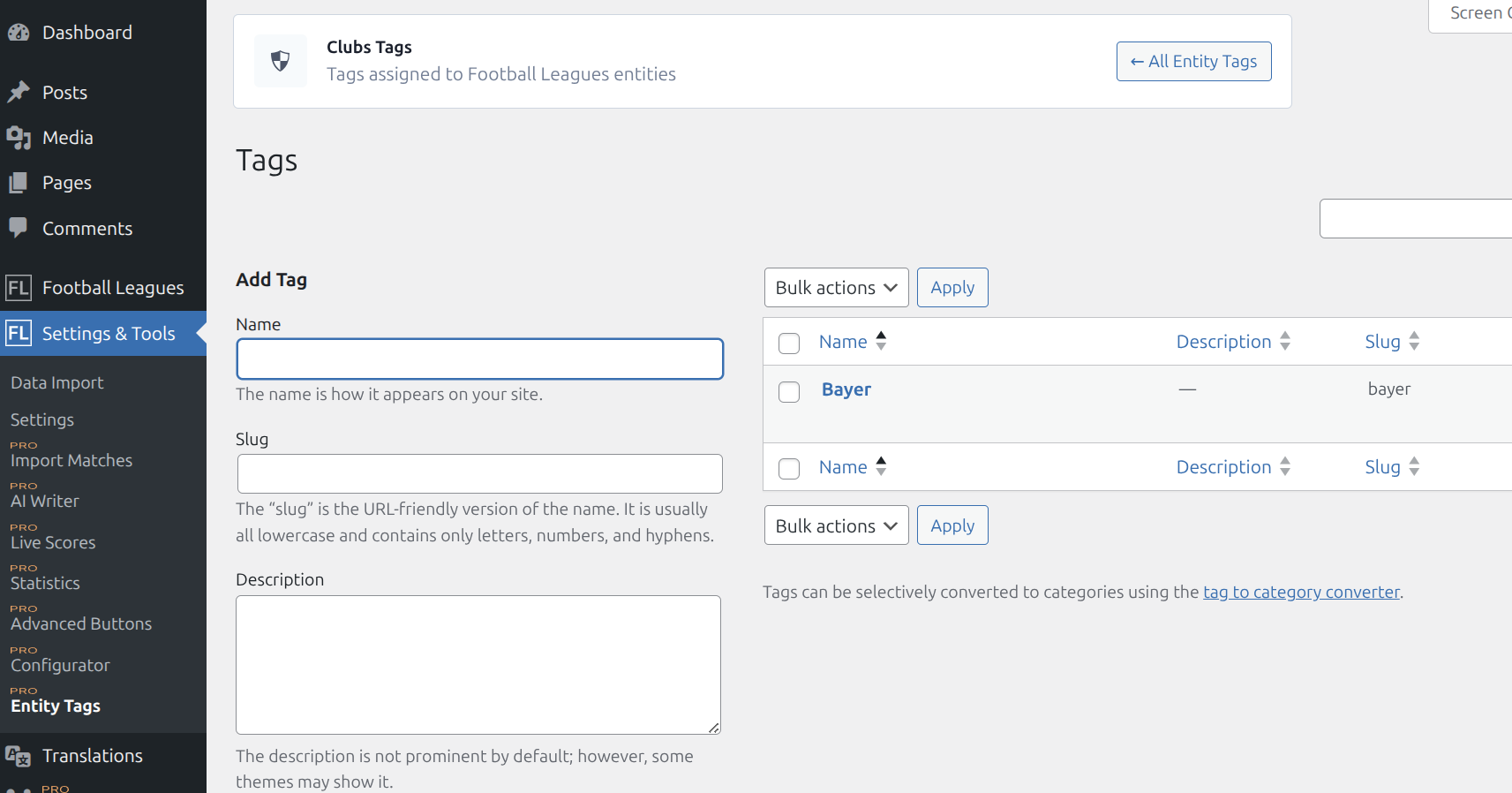
Tip
Use the Quick Edit feature in entity lists for rapid tag assignment.

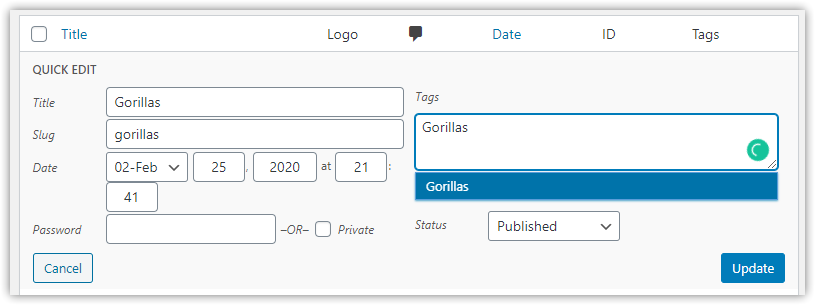
When to Use Tags
- Already have a tag-based content workflow
- Want one tag to connect posts to multiple entities automatically
- Content editors prefer familiar WordPress tags
- Need bulk operations (tag many posts at once via Quick Edit)
Displaying Linked Posts
Use the [anwpfl-tag-posts] shortcode to display posts linked to an entity.
Basic Usage
[anwpfl-tag-posts id="123"]Where 123 is the ID of your entity (club, player, match, etc.).
All Parameters
| Parameter | Type | Default | Description |
|---|---|---|---|
id * | int/string | (required) | Entity ID. Use comma-separated values for multiple entities |
limit | int | 10 | Maximum posts to display (use 0 for unlimited, max 100) |
show_tags | bool | 1 | Show tag links above posts (1 = yes, 0 = no) |
layout | string | grid | Display style: grid (cards) or simple (text links) |
min_width | int | auto | Minimum card width: 150, 200, 250, 300, 350, or 400 pixels |
* = Required
Examples
Basic — display posts for a club
[anwpfl-tag-posts id="123"]Show 6 posts only
[anwpfl-tag-posts id="123" limit="6"]Hide tags, use simple layout
[anwpfl-tag-posts id="123" show_tags="0" layout="simple"]Multiple entities combined
[anwpfl-tag-posts id="123,456,789" limit="12"]Wide cards with custom width
[anwpfl-tag-posts id="123" min_width="400"]Compact text list
[anwpfl-tag-posts id="123" layout="simple" min_width="150"]Layout Options
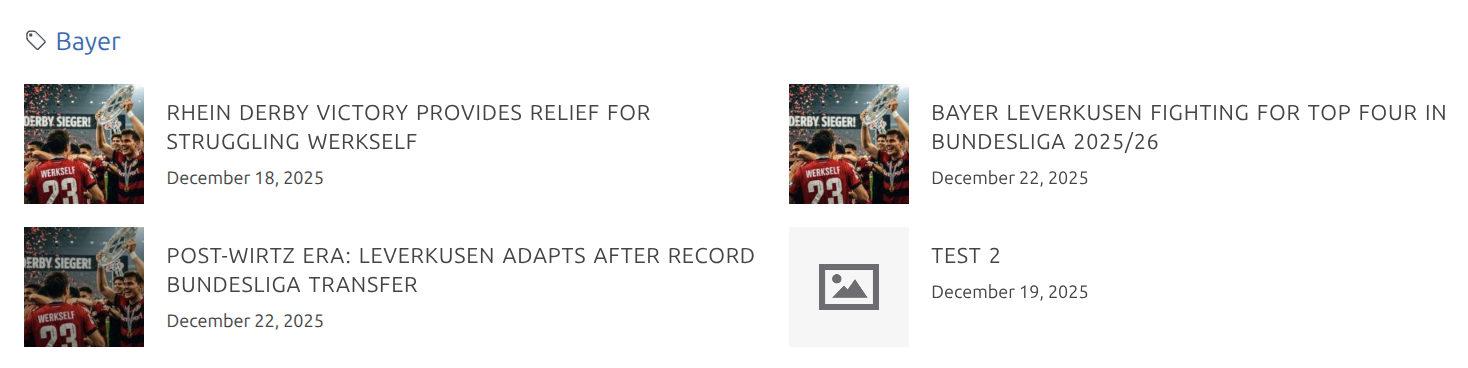
Grid layout (default)
- Cards with featured image thumbnail, title, and date
- Best for visual content presentation
- Default min-width: 350px

Simple layout
- Text links only (no thumbnails)
- Compact, efficient use of space
- Default min-width: 200px

Both layouts use a fluid CSS Grid that automatically adjusts the number of columns based on container width.
Using with Layout Builder
The Tag Posts shortcode can be added to Layout Builder templates:
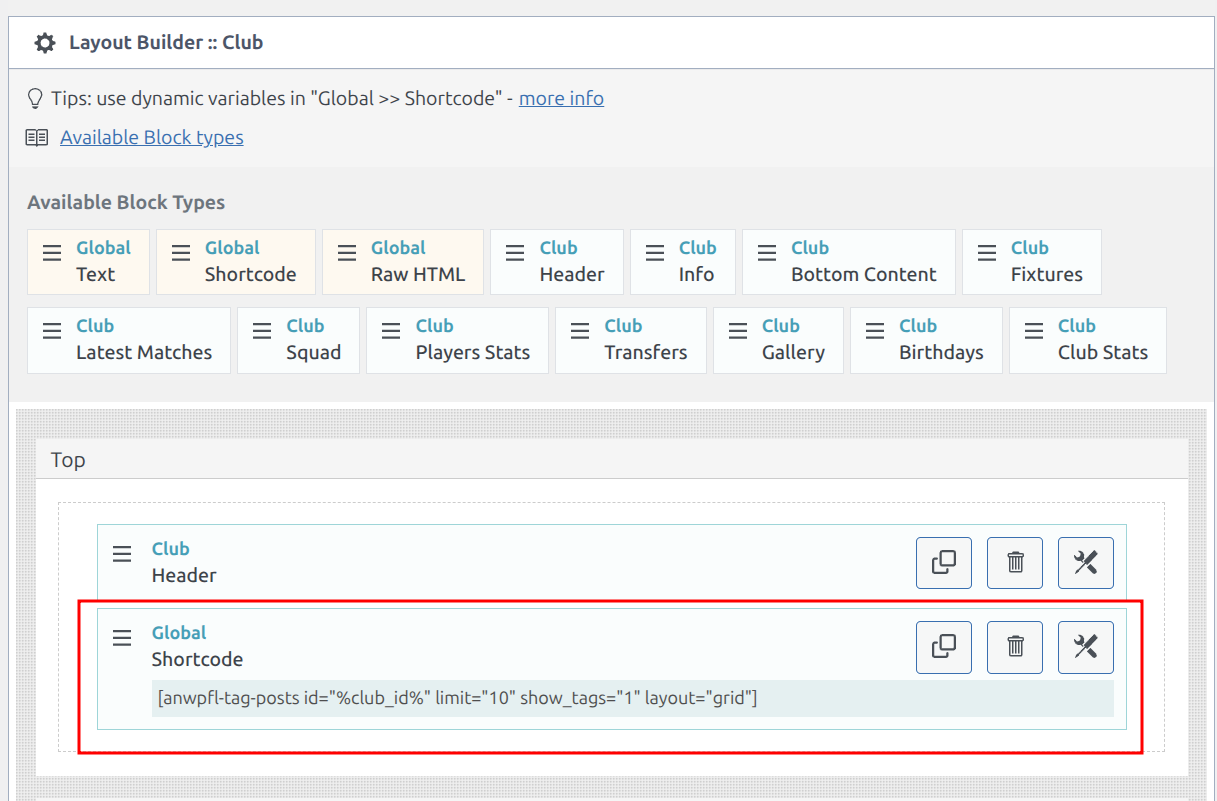
This allows you to automatically display related posts on every entity page without manual shortcode placement.
Comparison: Direct Links vs Tags
| Aspect | Direct Entity Links | Tag-based Links |
|---|---|---|
| Setup time | Faster (no tag creation) | Requires creating tags |
| Precision | Exact control | Depends on tag matching |
| Bulk operations | One post at a time | Tag many posts at once |
| Match linking | Easy (FL Selector) | Awkward (what tag for a match?) |
| Workflow | New approach | Familiar WordPress pattern |
| Automatic linking | No (explicit selection) | Yes (via shared tags) |
Recommendation
Use Direct Entity Links for most scenarios. Use tags when you need automatic bulk linking or already have an established tag workflow.
Troubleshooting
Shortcode shows as text
- In Gutenberg: Use a Shortcode block to wrap the shortcode
- In Classic Editor: Switch to Text mode and paste the shortcode
No posts display
- Verify the entity ID is correct and the entity exists
- Check that linked posts are published (not draft)
- For tag-based linking, confirm the tag names match exactly
- Verify you have posts linked via at least one method
Posts appear on wrong entity
- For tags: Check that the tag isn’t shared with unintended entities
- For direct links: Edit the post and verify the entity links in the metabox
Shortcode doesn’t work in widget areas
- Some widget areas may not process shortcodes
- Use a widget that explicitly supports shortcode execution
- Or use a page builder that processes shortcodes in widget areas
Technical Reference
Related Files:
- Premium:
includes/class-anwpfl-premium-post-entities.php - Shortcode:
includes/shortcodes/class-anwpfl-premium-shortcode-tag-posts.php - Template:
templates/shortcode-premium-tag-posts.php - Dashboard:
admin/views/post-entities-dashboard.php
Admin Menu: FL Settings & Tools > Entity Tags [PRO]
Database:
- Table:
{prefix}anwpfl_post_entities(direct links) - WordPress taxonomy tables (tag-based links)
Developer Hooks
Enable on Additional Post Types
Show the “FL Entity Links” metabox on pages, custom post types, or other content types:
// Enable metabox on additional post types (default: only 'post')
add_filter( 'anwpfl/entity_links/enabled_post_types', function( $types ) {
    return array_merge( $types, [ 'page', 'news' ] );
});
Include Additional Post Types in Results
By default, only standard post type appears in shortcode results. Add custom post types:
// Include additional post types in shortcode results
add_filter( 'anwpfl/tag_posts/allowed_post_types', function( $types ) {
    return array_merge( $types, [ 'news', 'article' ] );
});
Modify Tag Term IDs Before Query
Filter tag IDs before the posts query runs. Useful for adding/removing specific tags:
// Add or modify term IDs before querying posts
add_filter( 'anwpfl/shortcode/tag_posts/term_ids', function( $term_ids, $ids, $data ) {
    // Add a specific tag ID to always include
    $term_ids[] = 42;
    return array_unique( $term_ids );
}, 10, 3 );
Parameters:
$term_ids(array) — Tag term IDs from entity$ids(array) — Entity post IDs from shortcode$data(object) — Shortcode data object
Modify Posts Before Rendering
Filter the posts array after both methods (direct links + tags) are merged. Useful for custom sorting, filtering, or adding posts from external sources:
// Modify posts before rendering
add_filter( 'anwpfl/shortcode/tag_posts/posts', function( $posts, $term_ids, $data ) {
    // Example: Limit to posts from last 30 days
    return array_filter( $posts, function( $post ) {
        return strtotime( $post->post_date ) > strtotime( '-30 days' );
    });
}, 10, 3 );
Parameters:
$posts(array) — WP_Post objects matching entity links$term_ids(array) — Tag term IDs used in query$data(object) — Shortcode data object
Customize Grid Layout
Override the min-width CSS class for custom grid behavior:
// Force specific min-width class
add_filter( 'anwpfl/shortcode/tag_posts/min_width_class', function( $class, $data ) {
    return 'anwp-grid-min-300'; // Force 300px min-width
}, 10, 2 );
Valid classes: anwp-grid-min-150, anwp-grid-min-200, anwp-grid-min-250, anwp-grid-min-300, anwp-grid-min-350, anwp-grid-min-400