

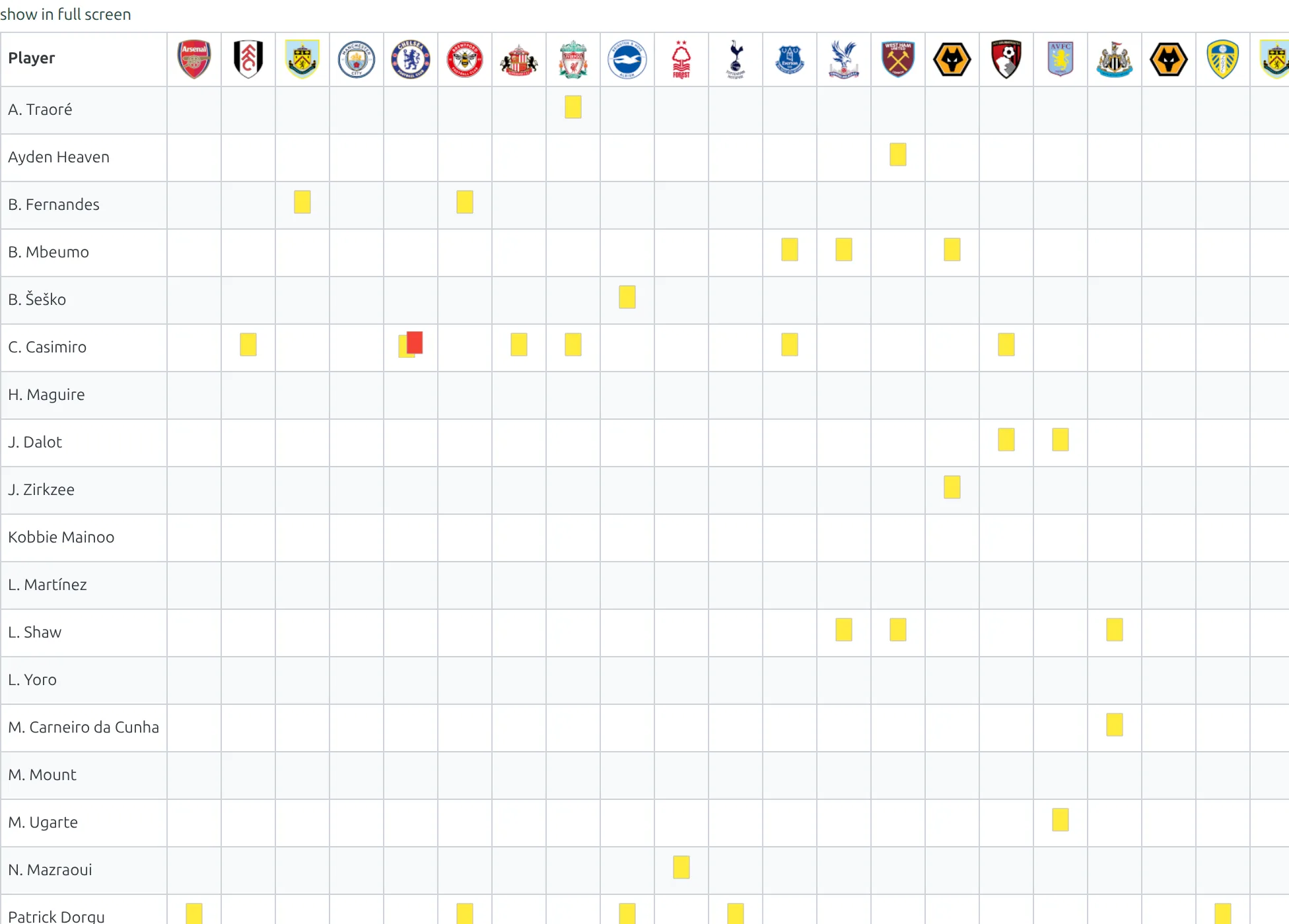
[anwpfl-missing-players] draws one grid for a club: players down the side, matches across the top, and a small icon in each cell saying what happened to that player in that match – injured, suspended, or booked.
It’s the availability view. Use it on a club page, a match preview, or a season round-up.
Premium Feature
This shortcode requires the Football Leagues Premium plugin.
🚀 Basic usage
[anwpfl-missing-players club_id="8" competition_id="12"]Club is always required, plus either a competition or a season. Miss any of that and the shortcode prints nothing at all – see the troubleshooting section.
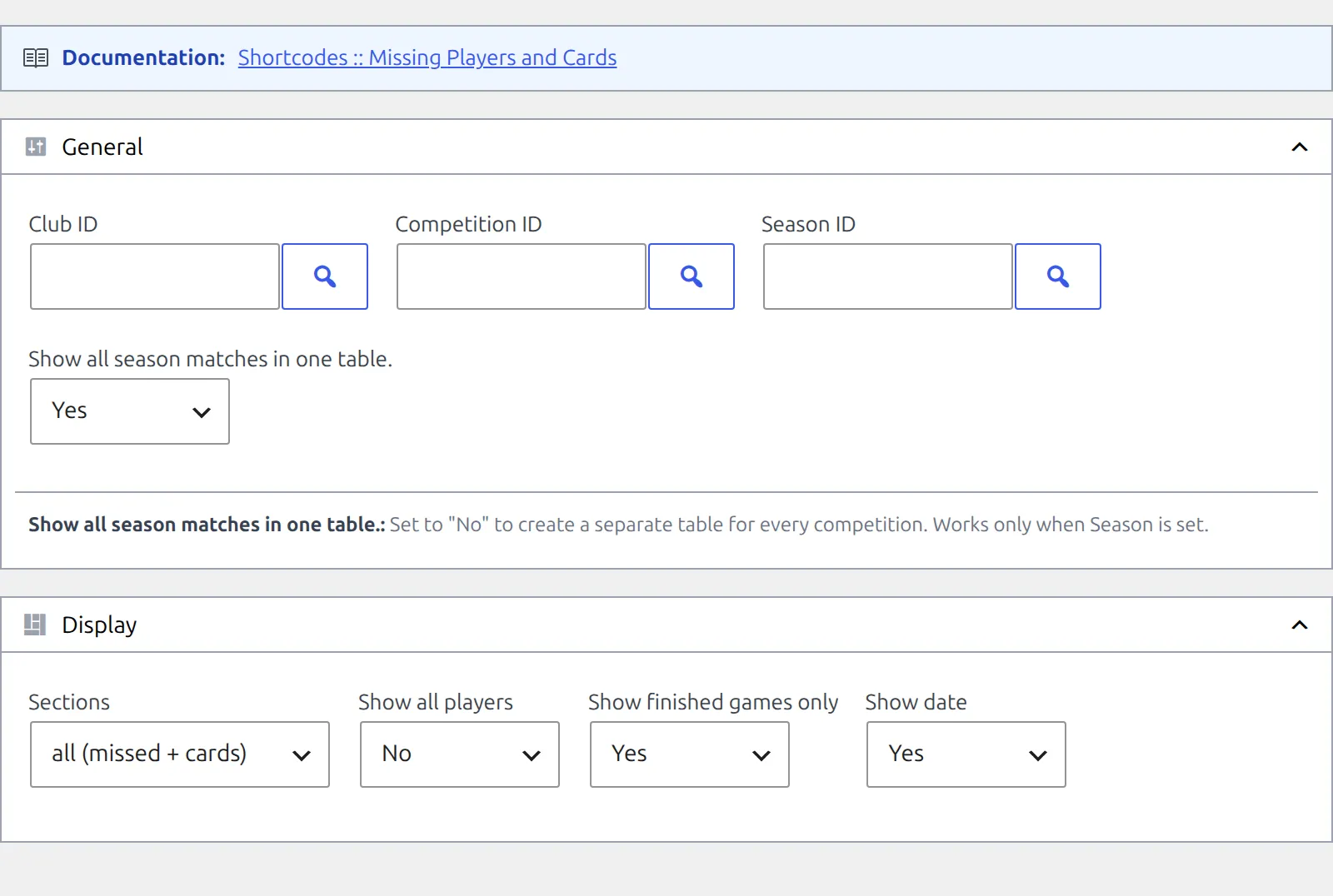
The easiest way to build one is Football Leagues → Shortcodes, which gives you the form below with a live preview.
Where the data comes from
Nothing here is calculated from scratch – the shortcode only displays what’s already recorded. Two separate sources feed it:
Missed matches
Three things write these, and each one gives a reason of injured, suspended or other:
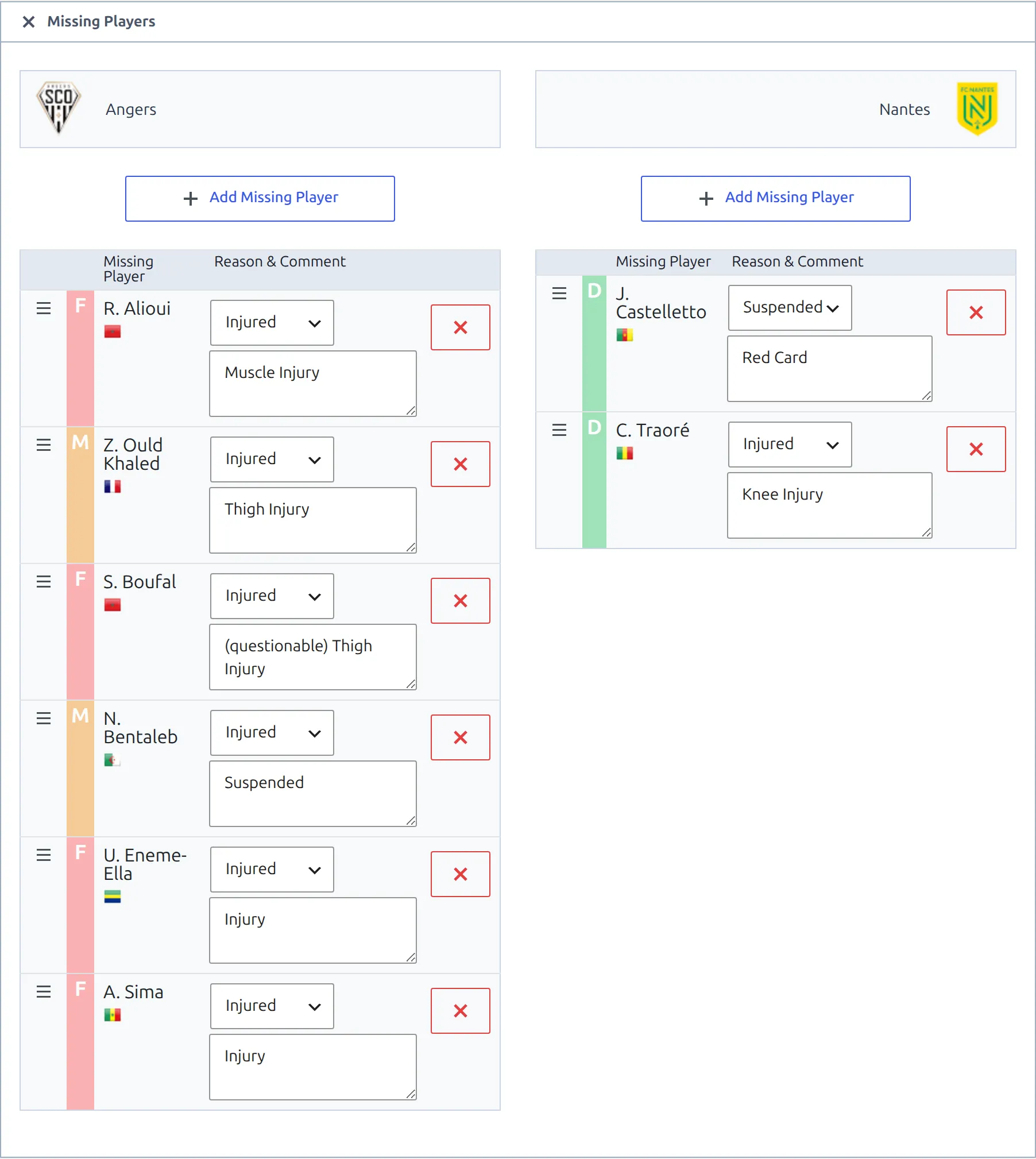
- By hand – the Missing Players block on the match edit screen. Pick a player, pick a reason, and optionally add a comment that becomes the tooltip on the icon.
- Automatically from suspensions – the Suspensions feature adds rows for players serving a ban, with a comment such as “Red card suspension”.
- From the API import – injury and suspension data from the API-Football feed, if you use it.
Cards
Read straight from the player rows you fill in in the match’s Players block. A player has to be in the line-up to have a card here.
Card settings don’t apply here
This grid marks cards, it doesn’t count them, so the yellow-red card settings used elsewhere in the plugin have no effect. A second yellow always shows the yellow-red icon on its own, and two yellows in separate halves of the same match still show a single yellow icon. For counts, use the cards or suspension-risk shortcodes.
Reading the grid
One row per player, sorted by name. One column per match, headed by the opponent’s badge – hover it for a match tooltip. An empty cell means the player was available and picked up nothing.
| Icon | Meaning |
|---|---|
| Yellow card | Booked in that match |
| Yellow-red card | Sent off for a second bookable offence |
| Red card | Straight red |
| Cross in a circle | Missed the match – suspended |
| Plus in a circle | Missed the match – injured |
| Question mark | Missed the match – other |
Where a comment was entered, it appears as a tooltip on the icon. A show in full screen link sits above the table – useful once a season has enough matches to need horizontal scrolling.
Parameters
Typed and built shortcodes behave differently
The defaults below are what you get when you omit a parameter. The shortcode builder always writes season_grouped and show_date out explicitly as 1, so a built shortcode groups the season and shows dates while a hand-typed one does neither. If a copied example behaves differently from yours, this is usually why.
General
| Parameter | Default | Description |
|---|---|---|
club_id | (required) | Club ID. Also accepts the word competition – see below. |
competition_id | (empty) | Competition ID. Required unless season_id is set. Passing a main stage includes every one of its stages. |
season_id | (empty) | Season ID. Required unless competition_id is set. Ignored if both are set. |
season_grouped | (empty = 0) | Only does anything with season_id. 1 puts the whole season in one table; 0 makes a separate table per competition, each with its title above it. |
Display
| Parameter | Default | Description |
|---|---|---|
sections | (empty = both) | missed for absences only, cards for cards only, empty for both. It filters the icons inside the one grid – it does not make two tables. |
all_players | 0 | 1 lists every player who appeared in the line-ups, not just those with something to show. Not the whole squad. |
finished_only | 1 | 0 includes matches that haven’t been played yet. |
show_date | (empty = hidden) | 1 shows the date as 7 Sep. You can also pass any PHP date format, e.g. Y-m-d. |
competition_title | 0 | Prints the competition’s title above the table. |
A date format whose first character is a digit gets replaced by the default 7 Sep style – start custom formats with a letter (d.m works, 1 M doesn’t).
Every club in a competition
Instead of a club ID, pass the literal word competition. You get one grid per club, each headed by the club’s badge and name – a whole-division availability page from one shortcode.
[anwpfl-missing-players club_id="competition" competition_id="12"]competition_idis required in this mode – a season on its own won’t work.- Clubs with nothing to report are skipped entirely rather than rendering an empty table.
season_idandseason_groupedare ignored; the other display parameters carry through.
Type it, don’t look for it
The shortcode builder’s Club field is a picker for real clubs, so competition isn’t in the list. Type the word straight into the Club ID box, or add it to the shortcode by hand afterwards.
Using it in the Layout Builder
Dropped into a club layout, the shortcode can pick up the club it’s being rendered for. Put it in a Global Shortcode block and use a placeholder for the ID.
Team layouts (current Layout Builder)
[anwpfl-missing-players club_id="%club_id%" competition_id="12" season_grouped="1" finished_only="1" show_date="1"]Use a real competition ID here. Team layouts don’t provide a season placeholder – %season_id% stays in the shortcode as literal text and the block renders nothing at all.
Club layouts (Layout Builder v1)
The older builder does supply a season placeholder, so this form works there:
[anwpfl-missing-players club_id="%club_id%" season_id="%season_id%" season_grouped="0" finished_only="1"]Examples
Who’s unavailable right now
[anwpfl-missing-players club_id="8" competition_id="12" sections="missed"]Absences only, no cards. This is also the version to reach for when the default renders nothing – see below.
Discipline record for the season
[anwpfl-missing-players club_id="8" season_id="5" season_grouped="1" sections="cards" show_date="1"]Every card the squad picked up all season in one table, dated.
Season split by competition
[anwpfl-missing-players club_id="8" season_id="5" season_grouped="0"]A separate table for the league, the cup and anything else the club played in, each under its own title.
🆘 Troubleshooting
Nothing renders at all
The shortcode fails silently – no message, no empty table, nothing on the page. Work through these in order:
- The club has injuries but no cards. This is the common one. With the default settings the grid needs at least one card in the selected matches before it will draw anything – so a club with three injured players and a clean disciplinary record renders nothing. Add
sections="missed"and it appears. - A required ID is missing. You need
club_idplus eithercompetition_idorseason_id. - No matches are finished yet. The default only counts played matches – add
finished_only="0"to include upcoming ones. - Using
club_id="competition"without a competition. That mode needscompetition_id; a season won’t do. - No data has been entered. Open one of the matches and check its Missing Players block and its line-up cards.
The season filter seems to be ignored
If both competition_id and season_id are set, the competition wins and the season is dropped. Clear competition_id if you want a season-wide grid.
A player is missing from the grid
Only players with something to show appear. Use all_players="1" to list everyone who was in a line-up – note that this still won’t show squad members who never played.
The table is far too wide
A full season is one column per match, so it scrolls sideways. Point readers at show in full screen, or narrow it with competition_id or season_grouped="0".
📚 Related
- Suspension Risk – who’s one booking away from a ban
- Cards – card rankings across a competition
- Squad – the club roster