

Learn how to efficiently delete multiple matches, players, or other entities at once using WordPress bulk actions.
Bulk Delete Matches
Need to remove many matches at once? Whether you’re clearing test data or deleting an old season, bulk delete lets you remove up to 100 matches per batch instead of one by one.
Step 1: Increase Items Per Page
By default, WordPress shows 20 items per page. Increase this to process more matches at once:
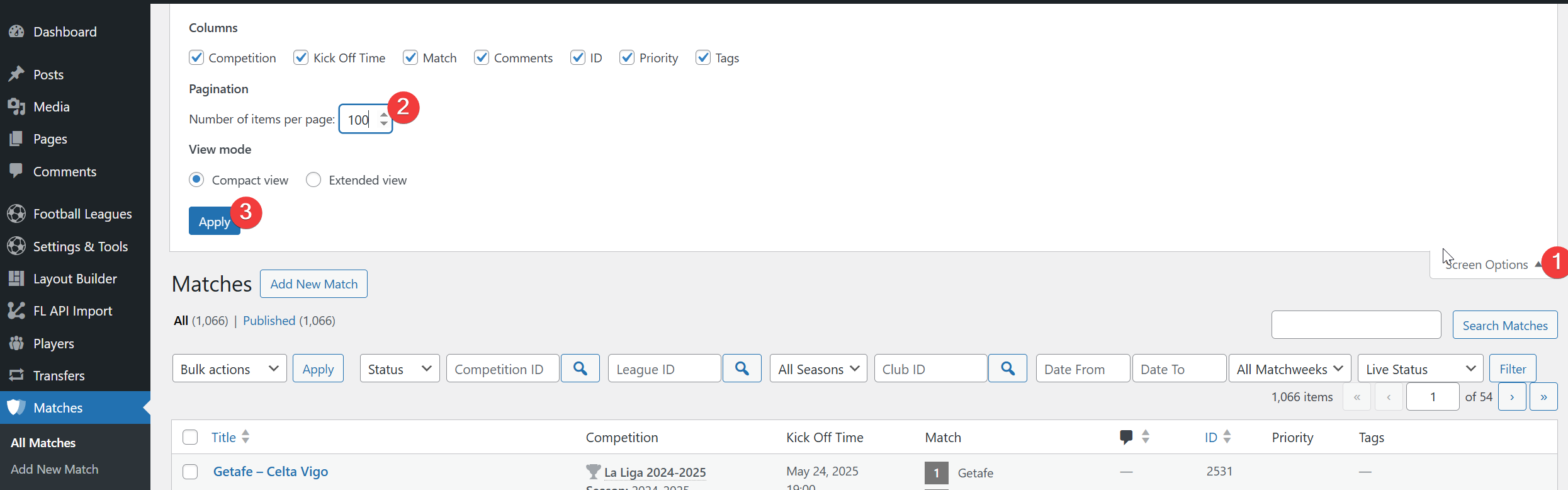
- Go to Football Leagues → Matches
- Click Screen Options at the top-right of the page
- Set “Number of items per page” to
100(or 50 if preferred) - Click Apply
Step 2: Filter Matches (Recommended)
Use filters to target specific matches and avoid accidentally deleting the wrong data:
- Select a League from the dropdown filter
- Optionally filter by Season or Club
- Click Filter to apply

Tip
Always filter first to ensure you’re only deleting the matches you intend to remove.
Step 3: Select and Move to Trash
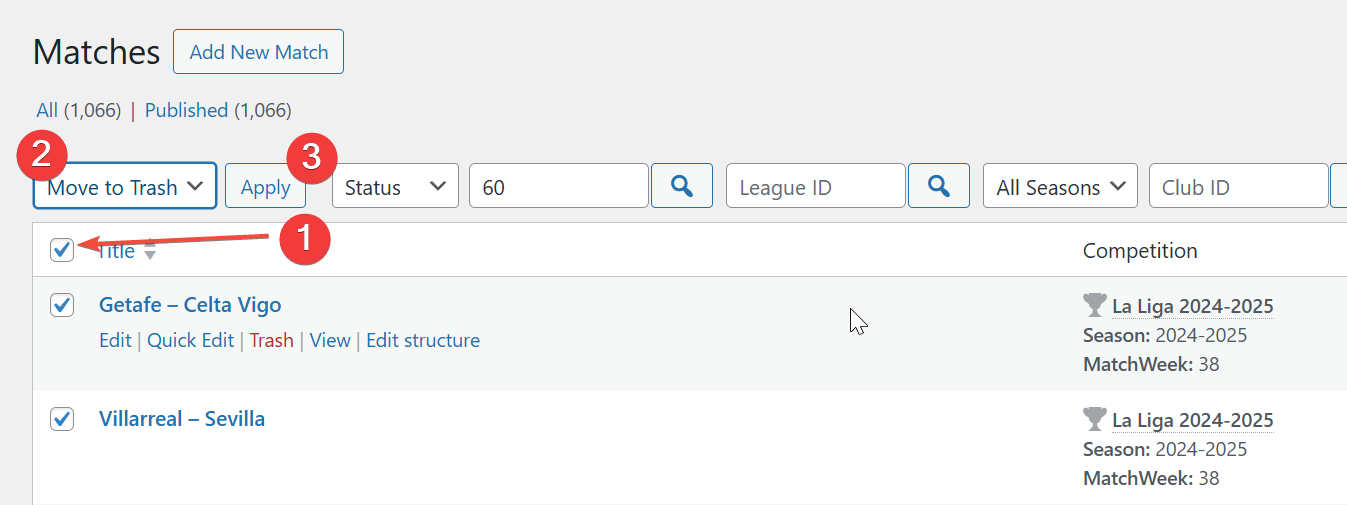
- Check the checkbox in the header row to select all visible matches
- From the Bulk actions dropdown, select “Move to Trash”
- Click Apply
Step 4: Permanently Delete from Trash
Items moved to Trash are not yet permanently deleted. A trashed game already drops out of every match list, but standings and player stats still count it until you delete it permanently. To remove them completely:
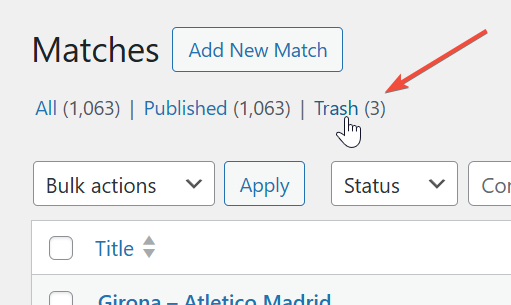
- Click the Trash link above the matches table
- Click Empty Trash to permanently delete all trashed items

Important
Once you click “Empty Trash”, items are permanently deleted and cannot be recovered. Back up your database before bulk deletions.
Step 5: Repeat for Additional Matches
If you have more than 100 matches to delete, repeat steps 3-4 until all unwanted matches are removed.
Bulk Delete Other Entities
The same process works for all Football Leagues entities:
| Entity | Location |
|---|---|
| Players | Football Leagues → Players |
| Clubs | Football Leagues → Clubs |
| Staff | Football Leagues → Staff |
| Referees | Football Leagues → Referees |
| Stadiums | Football Leagues → Stadiums |
Recovering Deleted Items
Made a mistake? Items in Trash can be restored before you empty it:
- Click the Trash link
- Hover over the item you want to recover
- Click Restore
Note
After bulk deletions, clear the plugin cache at Settings & Tools → Toolbox → Clear Cache to ensure standings and statistics update correctly.
Troubleshooting
“Move to Trash” option not appearing?
- Make sure at least one item is selected
- Verify you have admin or editor permissions
Matches still showing after deletion?
- Clear the plugin cache: Settings & Tools → Toolbox → Clear Cache
- Refresh the page (Ctrl+F5)
Accidentally deleted something important?
- Check Trash immediately – items remain there until emptied
- If Trash was already emptied, restore from your database backup