

If you want to move your Football Leagues plugin license from one website to another, you’ll need to deactivate it on the old site first. This ensures that your license key can be reused on the new site without issues.
There are two ways to do this, depending on whether you still have access to your old website or not.
Method 1: When You Still Have Access to the Old Website
- Log in to your old WordPress dashboard.
- From the left-hand menu, navigate to Football Leagues > Account.
- Look for the Deactivate License link and click it.
- Confirm your choice when prompted.
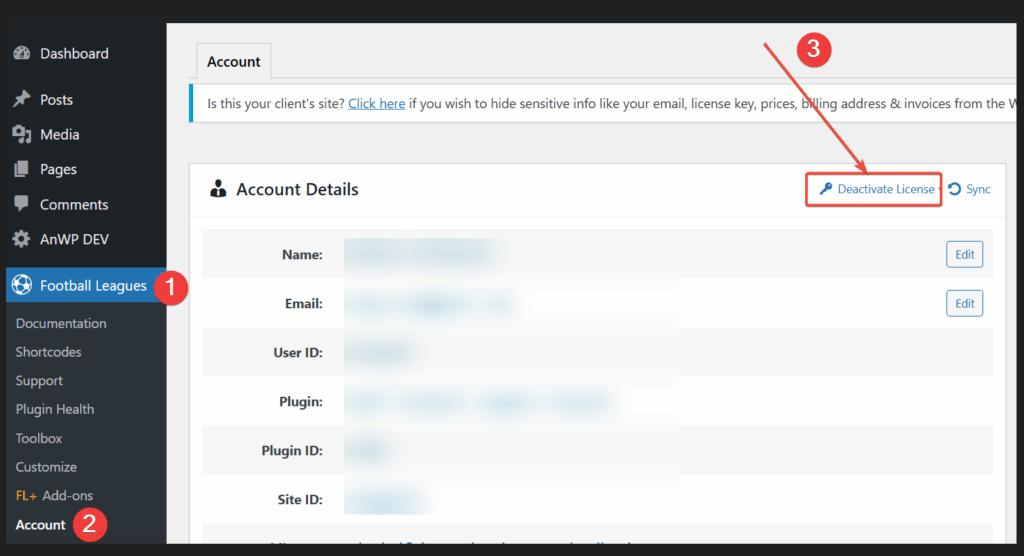
Once the license has been deactivated, it becomes “free” and can now be activated on your new website.
Method 2: When You No Longer Have Access to the Old Website
If your old site is no longer available (for example, it was deleted, broken, or you cannot log in), you can still manage your license through your Freemius Buyer Account:
- Go to https://users.freemius.com/login and log in with the same email address you used to purchase the plugin.
- Once logged in, navigate to the Websites section.
- Find the old website in the list and select it.
- On the right-hand sidebar, locate the License box.
- Click the Deactivate button to release the license from that site.
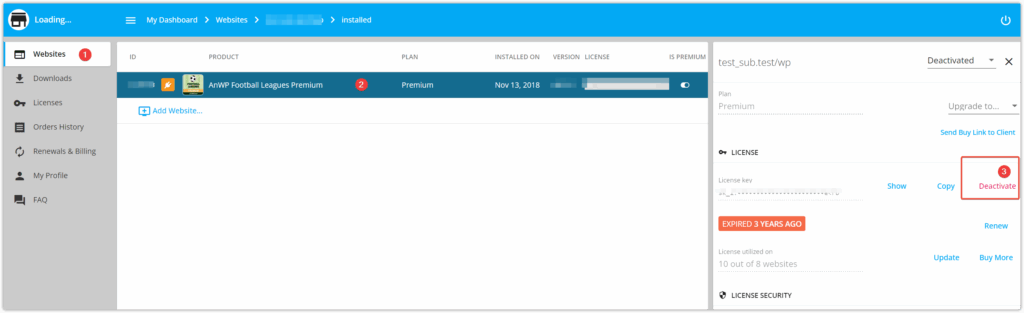
After this step, the license key will be available and ready to activate on your new website.
✅ Important Notes
- A license key can only be active on the number of websites allowed by your purchase plan.
- If you don’t deactivate your old site, you may see license activation errors when trying to use the key on a new one.
- Deactivating a license does not cancel your subscription—it only removes the connection to a particular website.