

Calendar Slider Shortcode
Display a date-based horizontal calendar with matches. Users can navigate through dates and see matches for each day, grouped by competition. Perfect for a “What’s On” style display or main navigation for match schedules.
Premium Feature
This shortcode requires the Football Leagues Premium plugin.
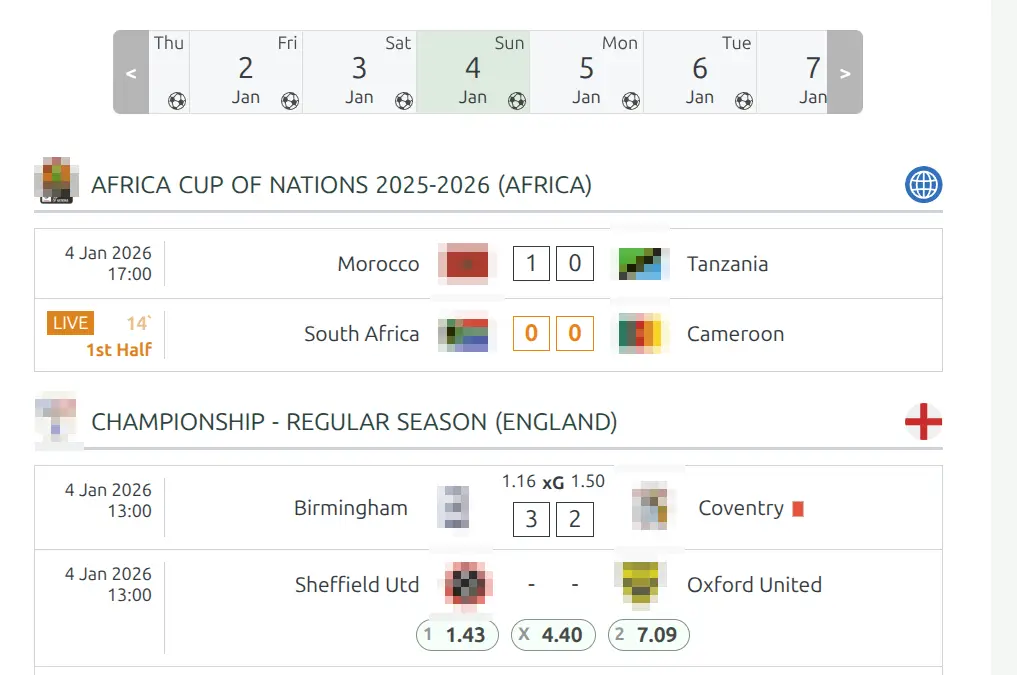
Basic Usage
[anwpfl-calendar-slider competition_id="12"]This displays a calendar slider for competition 12, starting at today’s date.
All Parameters
Query Parameters
| Parameter | Default | Description |
|---|---|---|
competition_id |
(empty) | Competition ID(s), comma-separated |
filter_by_clubs |
(empty) | Club ID(s) to filter matches |
group_by_competition |
1 | Group matches by competition. Use 0 to disable |
Competition Order
When grouping by competition, use the Competition Order setting on each Competition’s edit page (admin panel) to control the display order. Lower numbers appear first.
Display Parameters
| Parameter | Default | Description |
|---|---|---|
competition_title |
(title) | Title format: empty for Competition title, stage (title + stage), league (league name) |
competition_country |
(none) | Show country: country, flag, or country-flag |
competition_link |
1 | Make competition title clickable. Use 0 to disable |
no_data_text |
“No games on this date” | Text when no matches for selected date |
Calendar Options
| Parameter | Default | Description |
|---|---|---|
calendar_size |
default | Calendar size: empty for default, small for compact |
show_day_of_week |
1 | Show day name (Mon, Tue…). Use 0 to hide |
day_leading_zero |
1 | Show leading zero for day (01 vs 1). Use 0 to disable |
month_text |
short | Month format: short (Jan) or full (January) |
centered |
0 | Center active day in slider. Use 1 to enable |
day_width |
(auto) | Custom width for day items in pixels |
Examples
Example 1: Multi-Competition Calendar
When to use: Main schedule page showing all leagues.
[anwpfl-calendar-slider competition_id="12,25,30" group_by_competition="1"]Result: Calendar showing matches from multiple competitions, grouped by league.
Example 2: Club-Specific Calendar
When to use: Club page showing all their upcoming matches.
[anwpfl-calendar-slider filter_by_clubs="8"]Result: Calendar showing only matches involving club 8.
Example 3: With Country Flags
When to use: International site with multiple countries.
[anwpfl-calendar-slider competition_id="12,25" competition_country="flag" competition_title="league"]Result: League names with country flags for easy identification.
Example 4: Compact Sidebar Widget
When to use: Smaller calendar for sidebars.
[anwpfl-calendar-slider competition_id="12" calendar_size="small" show_day_of_week="0"]Result: Compact calendar without day names.
Example 5: Centered Active Day
When to use: Better UX when browsing past and future dates equally.
[anwpfl-calendar-slider competition_id="12" centered="1"]Result: Selected date appears in the center of the slider.
Tip
The calendar automatically highlights today and starts with the current date visible. Dates with matches are indicated, making it easy for users to find match days.
Troubleshooting
No dates showing matches?
- Verify matches exist within the date range
- Check competition_id or filter_by_clubs is correct
- Ensure matches are published
Grouping not working?
- Ensure
group_by_competition="1"is set - Multiple competitions needed for visible grouping
Related
[anwpfl-calendar]– Static monthly calendar view[anwpfl-matches]– Standard match list (Core)[anwpfl-matchweeks-slides]– Matchweek-based navigation