

Super League Greece doesn’t finish the way it starts. In 2024-25, 14 clubs played a 26-round regular season, then the league split in three: the top 4 went into the Championship Play-offs, 5th to 8th into the Europe Play-offs, and the bottom 6 into the Relegation Play-outs. Each group started from the record its clubs had built over the regular season.
api-football.com publishes all of it as one league with a long list of rounds. Your site has to hold it as one competition with four stages – and because the play-off rounds only appear at the provider after the regular season ends, you add those stages to a season you imported months ago. This page walks through that, step by step, on the real 2024-25 season.
The same recipe fits any league that splits after a regular season – Scotland, Denmark, Austria, Cyprus. It doesn’t depend on the number of groups either. The 2023-24 Greek season split into just two (a 6-club play-off round and an 8-club play-out round), and the steps were identical.
🎯 What you’ll build
One competition, Super League 1 2024-2025, with four round-robin stages. The API round names are the ones api-football.com uses for league 197, season 2024:
| Stage title | Clubs | API rounds | Games |
|---|---|---|---|
| Regular Season | 14 | Regular Season - 1 to Regular Season - 26 | 182 |
| Championship Play-offs | 4 (1st-4th) | Championship Round - 1 to Championship Round - 6 | 12 |
| Europe Play-offs | 4 (5th-8th) | Conference League Play-off Group - 1 to - 6 | 12 |
| Relegation Play-outs | 6 (9th-14th) | Relegation Round - 1 to Relegation Round - 10 | 30 |
Plus one standing table per play-off stage, each starting from the regular season’s numbers.
Before you start, you need:
- The regular season already linked to api-football.com, its games imported and its standing table in place. If that’s not done yet, start with API Import for a Round-Robin League.
- The play-off fixtures published at the provider. In 2024-25 the regular season ended on 9 March and the first play-off games were on 29 March – somewhere in that gap the new rounds show up.
1. Check the regular season is in place
Open Super League 1 2024-2025 under Competitions. The General panel should show League Super League 1 and Season 2024-2025, and the first stage tab should be the regular season: Competition Type Round Robin, Round-Robin Format Double, one group holding all 14 clubs.
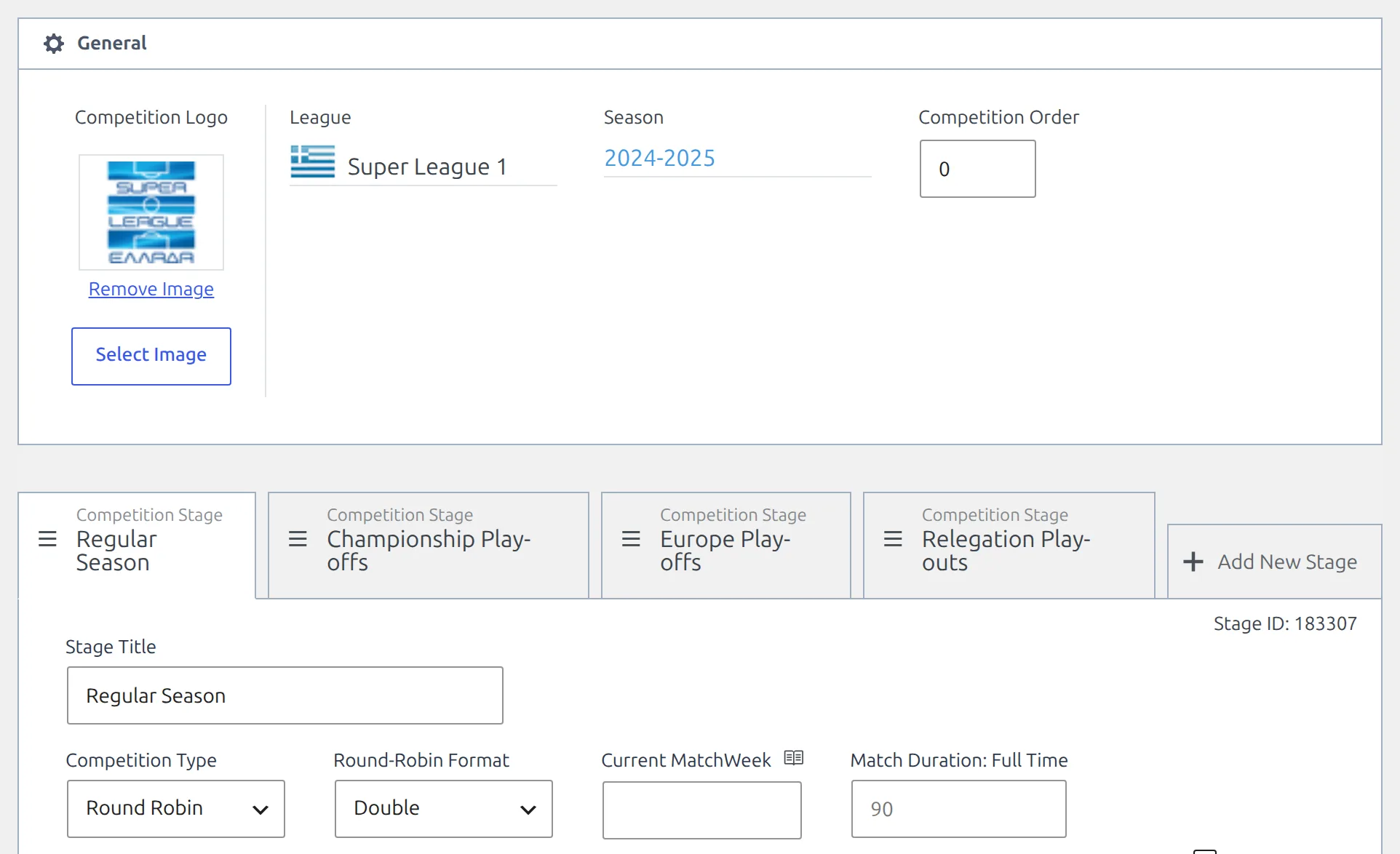
This is the competition every new stage will belong to. Don’t create a second competition for the play-offs – a player’s goals would then be split across two competition rows instead of adding up in one.
2. Add the play-off stages
Still in the competition editor, click Add New Stage at the right end of the tab strip. A new tab appears and the panel below switches to it. Fill it in:
- Stage Title –
Championship Play-offs. The tab label follows as you type. - Competition Type – Round Robin. A new stage already starts that way.
- Round-Robin Format – Double, also the default. Each club plays the other three home and away.
- Friendly – leave it unticked, so the games count towards player statistics.
Leave the stage’s group empty. The importer puts the right four clubs into it in step 5.
Click Add New Stage twice more for Europe Play-offs and Relegation Play-outs, then click Save.
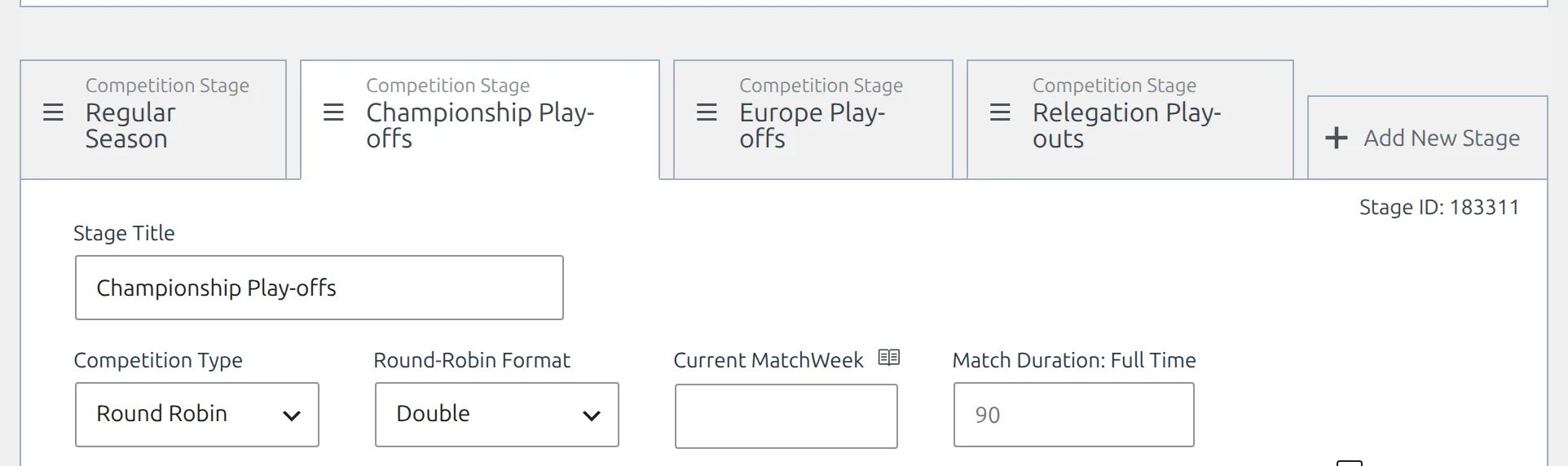
There are no Multistage, Main Stage ID or Stage Order fields to fill in any more. A tab added here becomes a secondary stage of this competition when you save, and its order is its position in the tab strip – drag a tab by its grab handle to move it. So keep the tabs in the order the stages are played.
Save before you go to the importer
A new tab shows Stage ID: temp-... until the competition is saved, and the importer only sees saved stages. If a stage is missing in the next step, it was never saved.
3. Open the competition structure
Go to FL API Import > API Leagues. Set Filter by Country to Greece and Filter by Season to 2024 to find the row: Super League 1, Greece, 2024.
The row has three buttons at the right. Click the last one, the branching-arrow button whose tooltip reads edit Structure (groups and teams), and choose Add teams to groups/ties from the menu that opens.
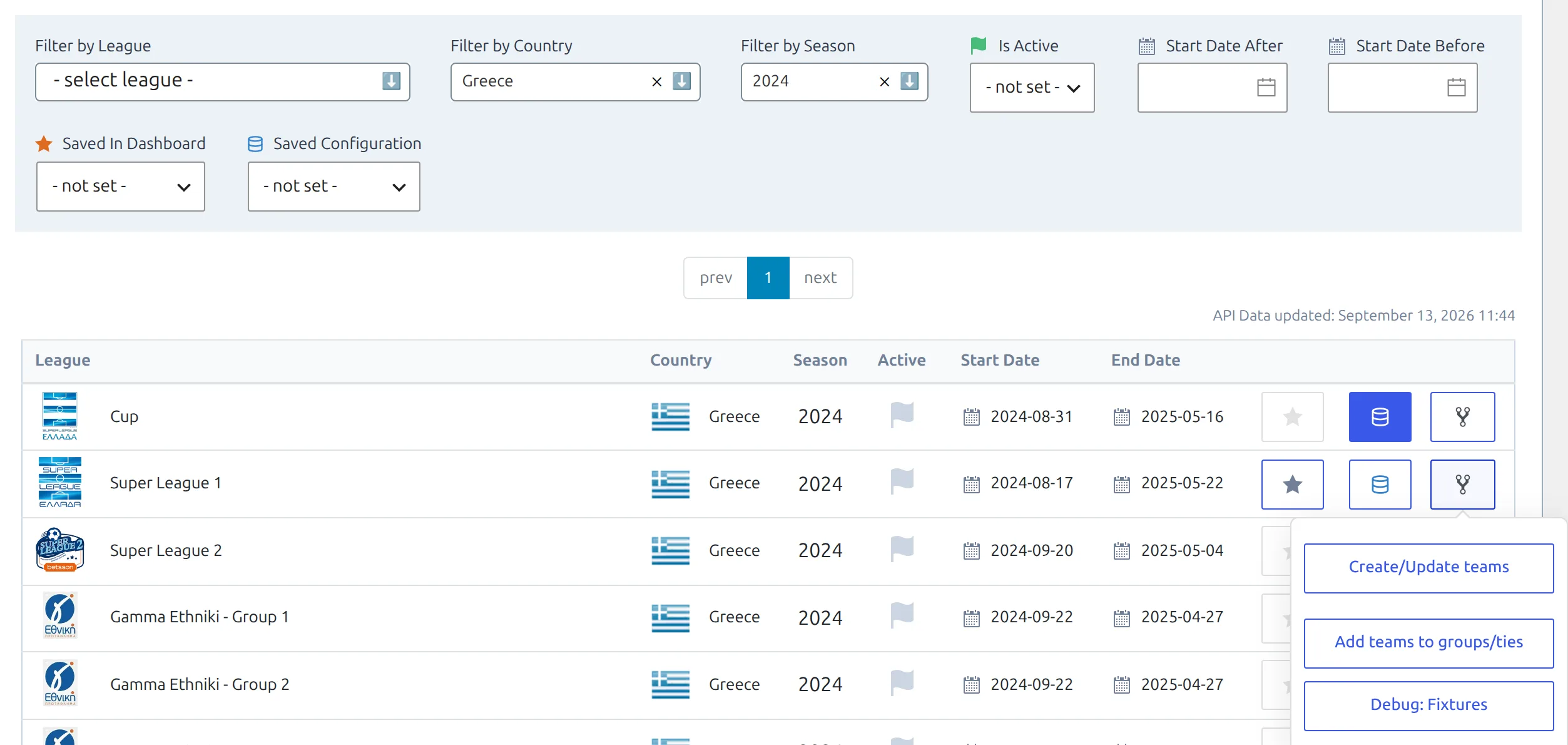
That opens the Edit Competition Structure modal – the same two-step modal described in API Import for a Multistage Competition. The stage list is read when the modal opens, so if you saved new stages while it was open, close it and open it again.
4. Put the new rounds into the new stages
Step 1 has one row per stage, in tab order. The Regular Season row already holds its 26 rounds from the original import – leave it alone. The three new rows are empty.
Click into each new row’s API Rounds field and pick its rounds:
- Championship Play-offs –
Championship Round - 1toChampionship Round - 6 - Europe Play-offs –
Conference League Play-off Group - 1toConference League Play-off Group - 6 - Relegation Play-outs –
Relegation Round - 1toRelegation Round - 10
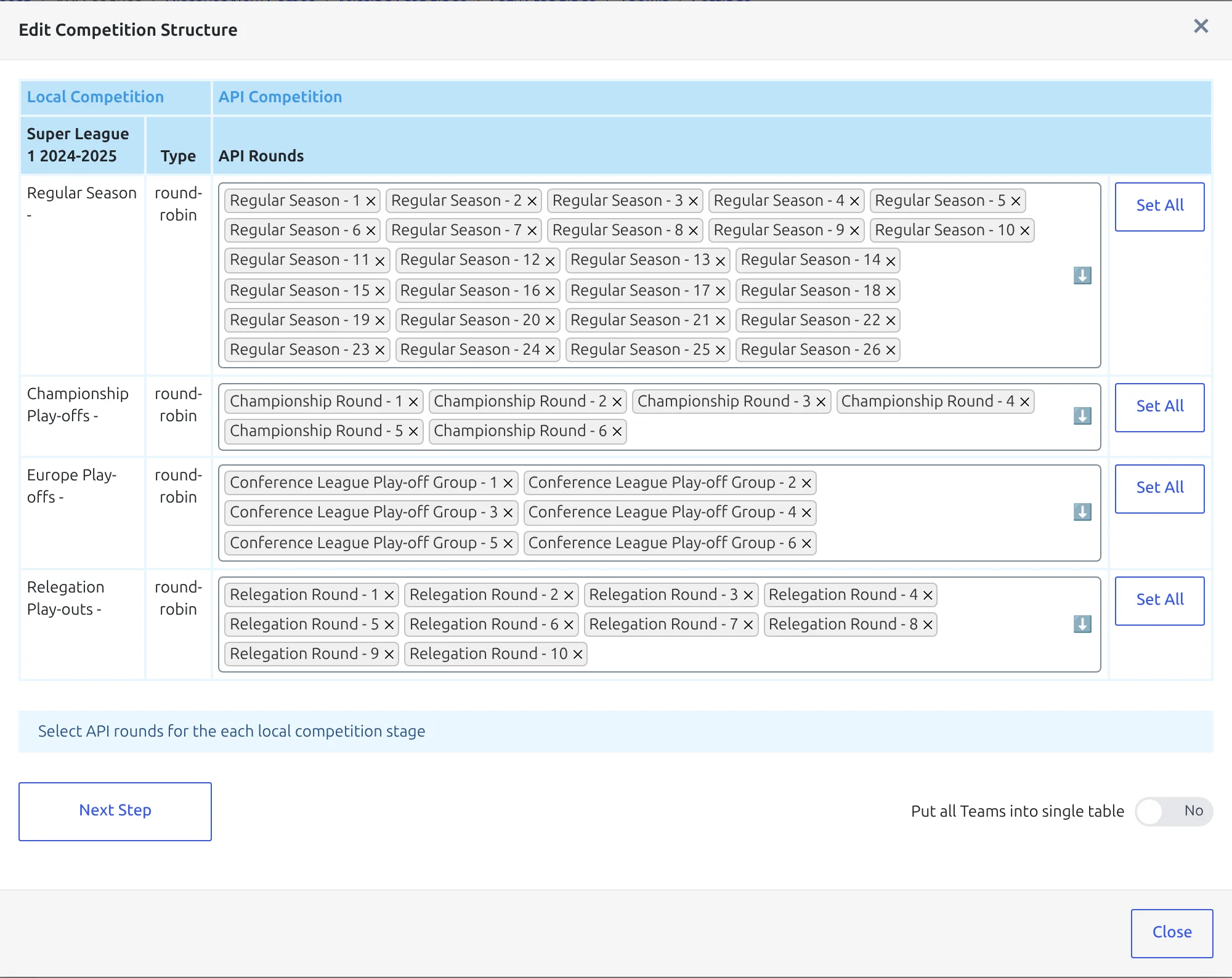
A round you’ve placed on one row drops out of the list on every other row, so the dropdowns get shorter as you go. Names and counts change from season to season – 2023-24 had no Europe group at all – so read what the dropdown offers rather than copying the list above.
Don’t press Set All on the new rows
Set All adds every round that isn’t placed yet. On the Championship Play-offs row that means the Europe and Relegation rounds too, and their games would land in the wrong stage. Pick the rounds by hand.
Leave Put all Teams into single table on No. Every club in a Greek play-off group plays every other one, so each stage comes out as a single group anyway. Click Next Step.
5. Check the groups and update the structure
Step 2 shows what the plugin found for each row: the rounds you picked, then the group it worked out from who plays whom, with a Create / Ignore toggle beside it.
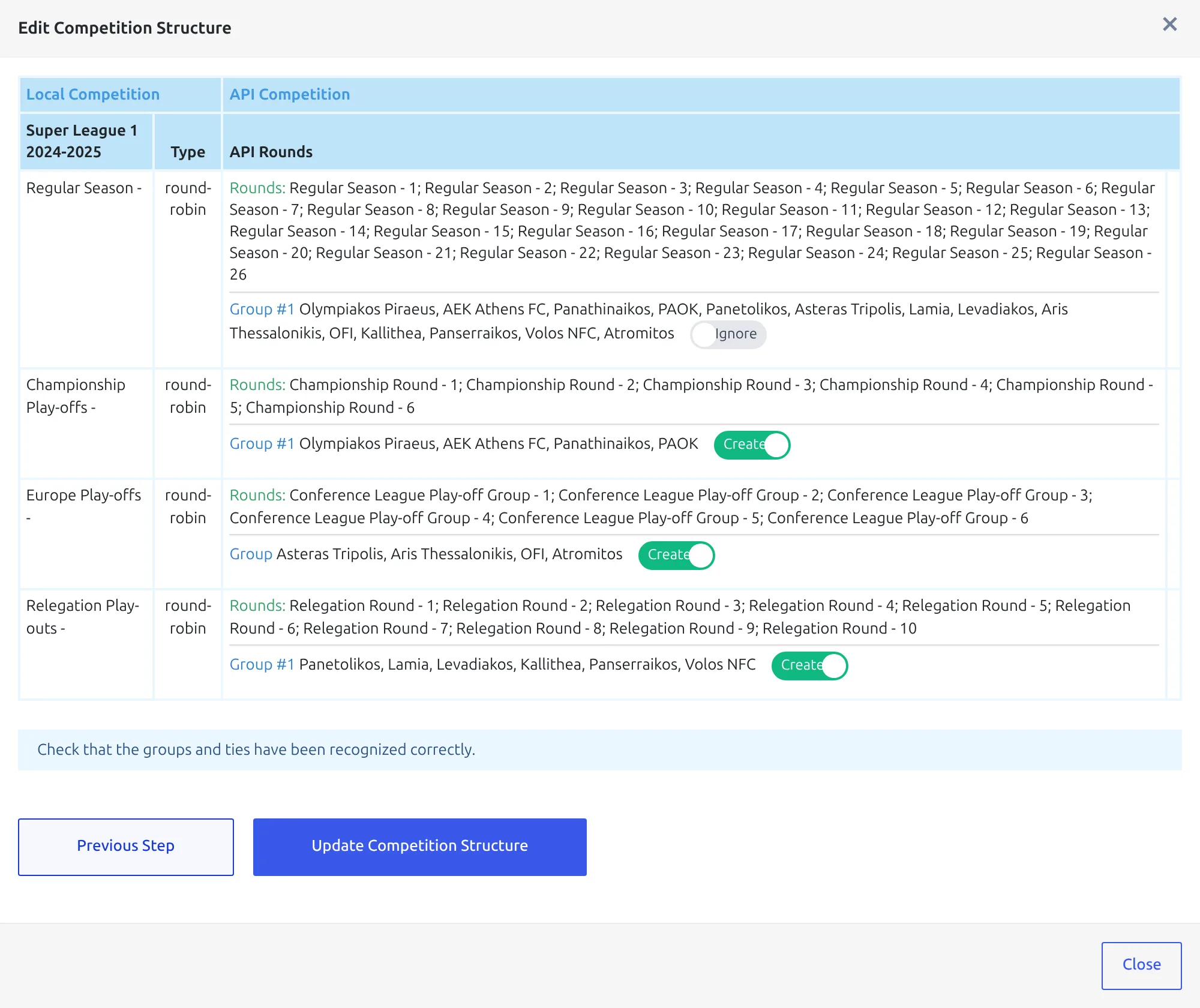
Check it reads like this before going on:
- Regular Season – one group of 14 clubs, set to Ignore. A group that already has clubs always starts on Ignore, which is why re-opening this modal mid-season doesn’t disturb the regular season.
- Each new stage – one group with the right clubs (4, 4 and 6), set to Create, because its group is still empty.
The group label is usually Group #1. Where the provider’s own standings name the same set of clubs, that name is used instead, so one row may read just Group. That’s fine either way.
Click Update Competition Structure. The clubs go into each stage’s group and the round mapping is saved for every later import.
6. Create the games
Back on the same API Leagues row, click the middle button – the blue database icon, edit Import Configuration. In Import Competition Configuration, check the two linked names under Linked Competitions, then press the play button on Create Games in the Create & Setup group.
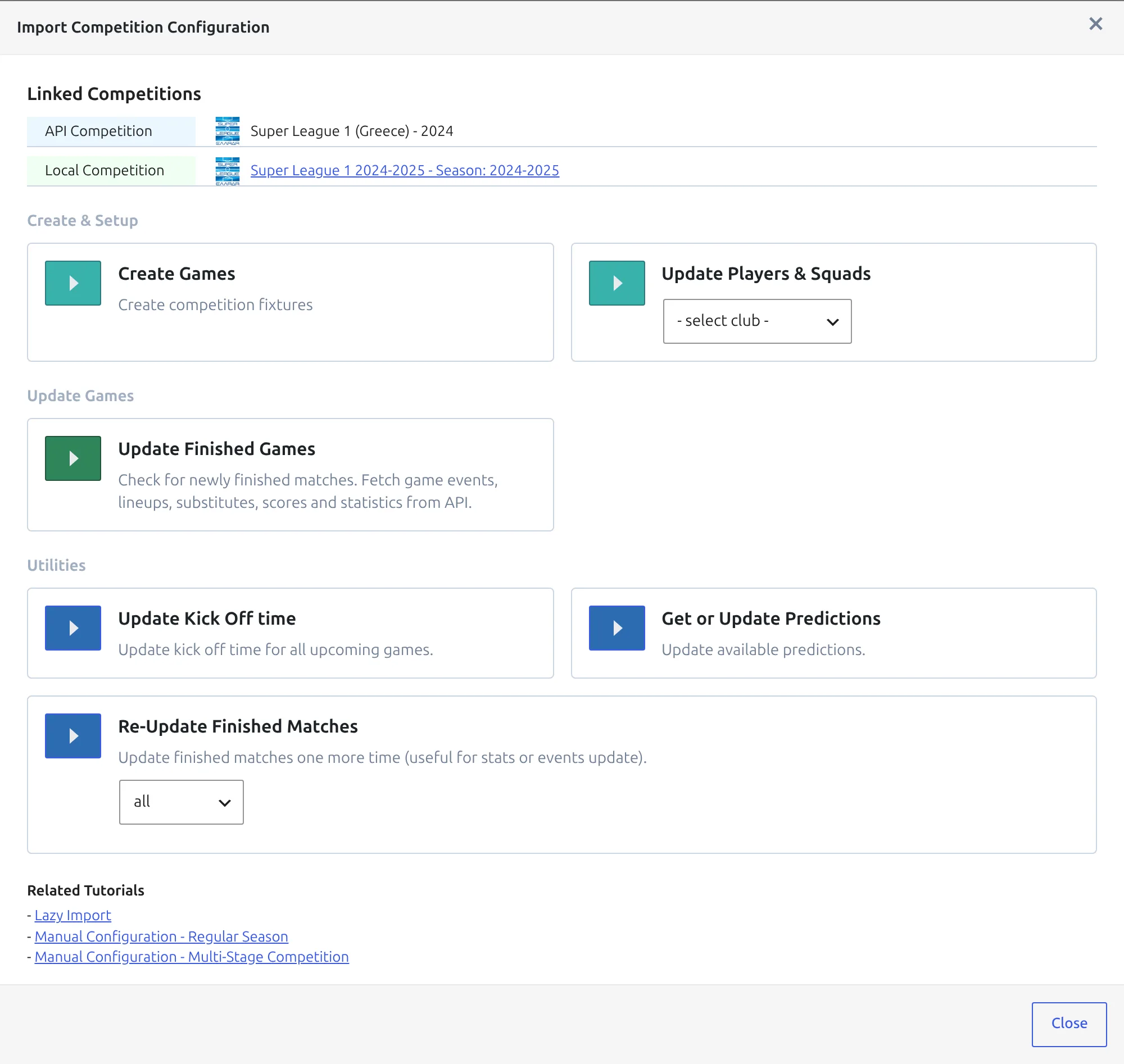
Only fixtures that aren’t on your site yet are created – here that’s the 54 play-off games (12 + 12 + 30). The 182 regular-season games aren’t touched. Each game goes into the stage that owns its round, and its matchweek comes from the number at the end of the round name, so Championship Round - 3 becomes matchweek 3 of the Championship Play-offs.
Leave the modal open until the progress message finishes. If the new stages bring clubs you don’t have squads for yet, pick All Clubs in the Update Players & Squads card next to it, then press its play button.
7. Add a standing table to each new stage
Standing tables belong to stages, so each play-off group needs its own. Go to Competitions > Standing Tables > Add New Standing Table.
In Select Competition Group, open Competition and pick Super League 1 2024-2025 – Championship Play-offs – each stage is listed as its own option. Then pick its only Group, which lists the four clubs so you can confirm it’s the right one, and click Save & Continue.
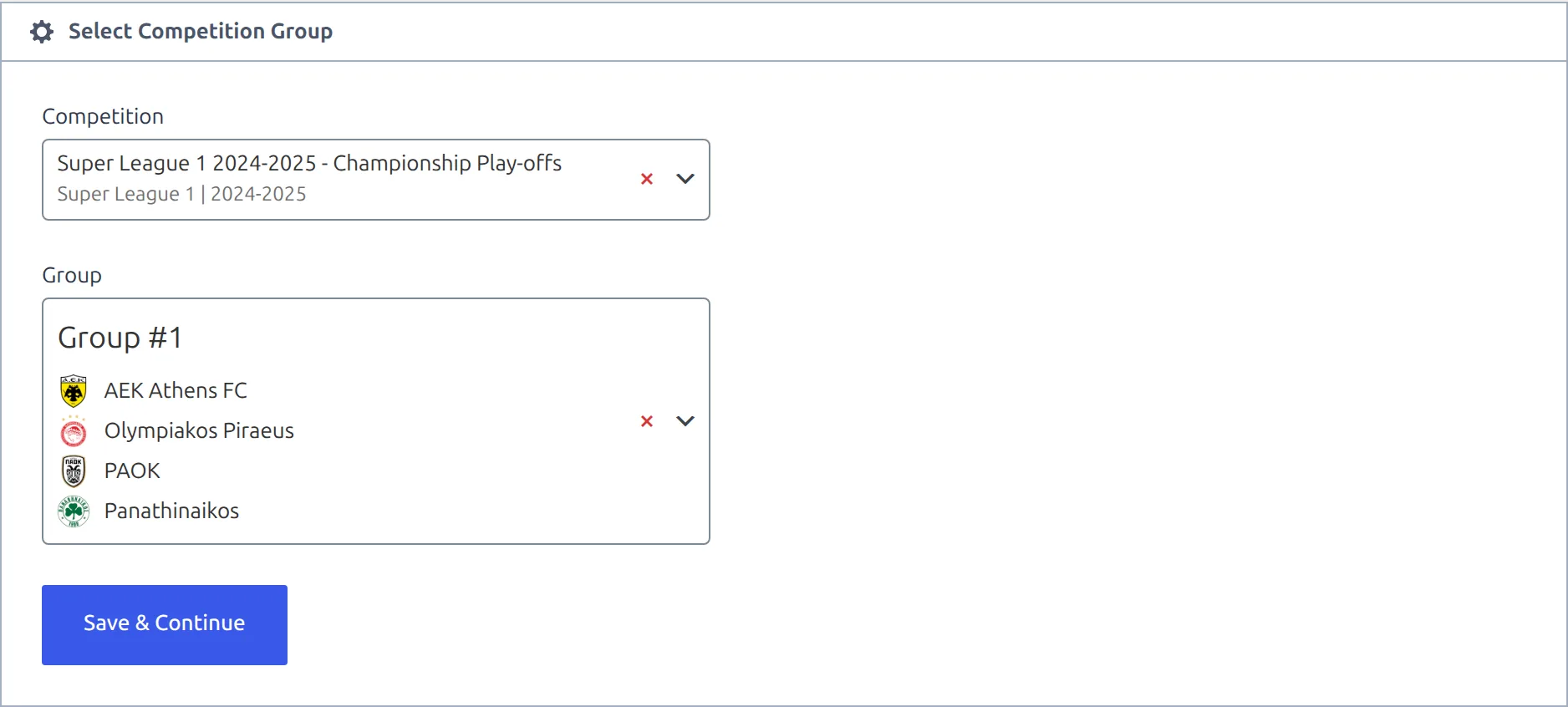
A group drops off that list once it has a published table, so the dropdown doubles as a to-do list for the remaining stages. Give the table a title, or leave it empty and one is built from the competition and group names. Set the ranking rules the way the league breaks ties – see Standing Rules.
8. Carry the regular season into the table
Left alone, the new table is built from the play-off games only and every club starts on zero. To start each club from its regular-season record, scroll past the Standing Table and Display Options blocks to Initial Standing Table Data.
- Under Initial Table, switch the toggle to Enable. An empty grid appears with one row per club in the group.
- Click Load initial data from another Standing table.
- In the modal, pick the regular season’s table – Super League 1 2024-2025 – Group #1 – and click Load Data.
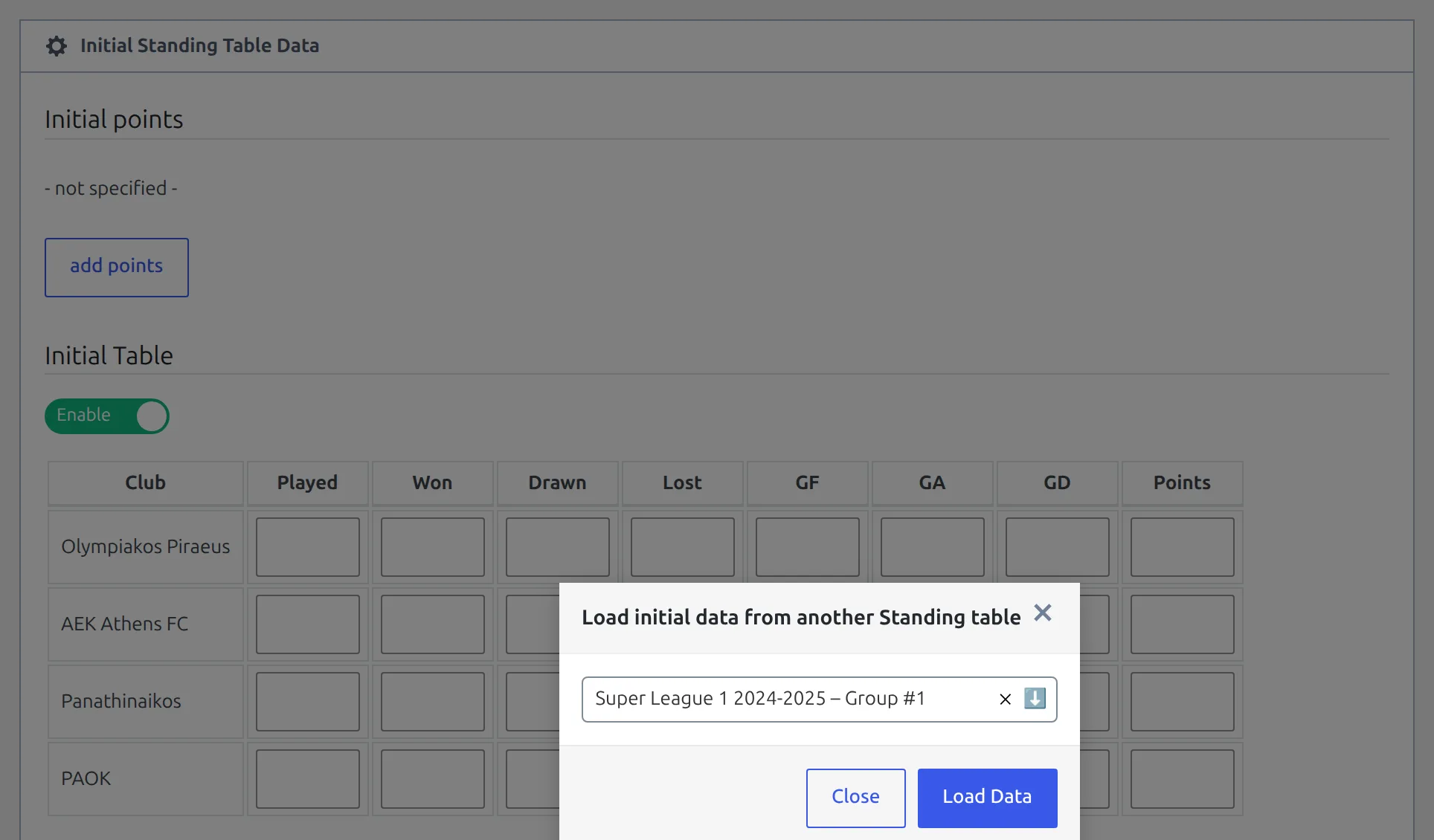
The grid fills with each club’s Played, Won, Drawn, Lost, GF, GA, GD and Points, copied from the regular-season table as it was last calculated:
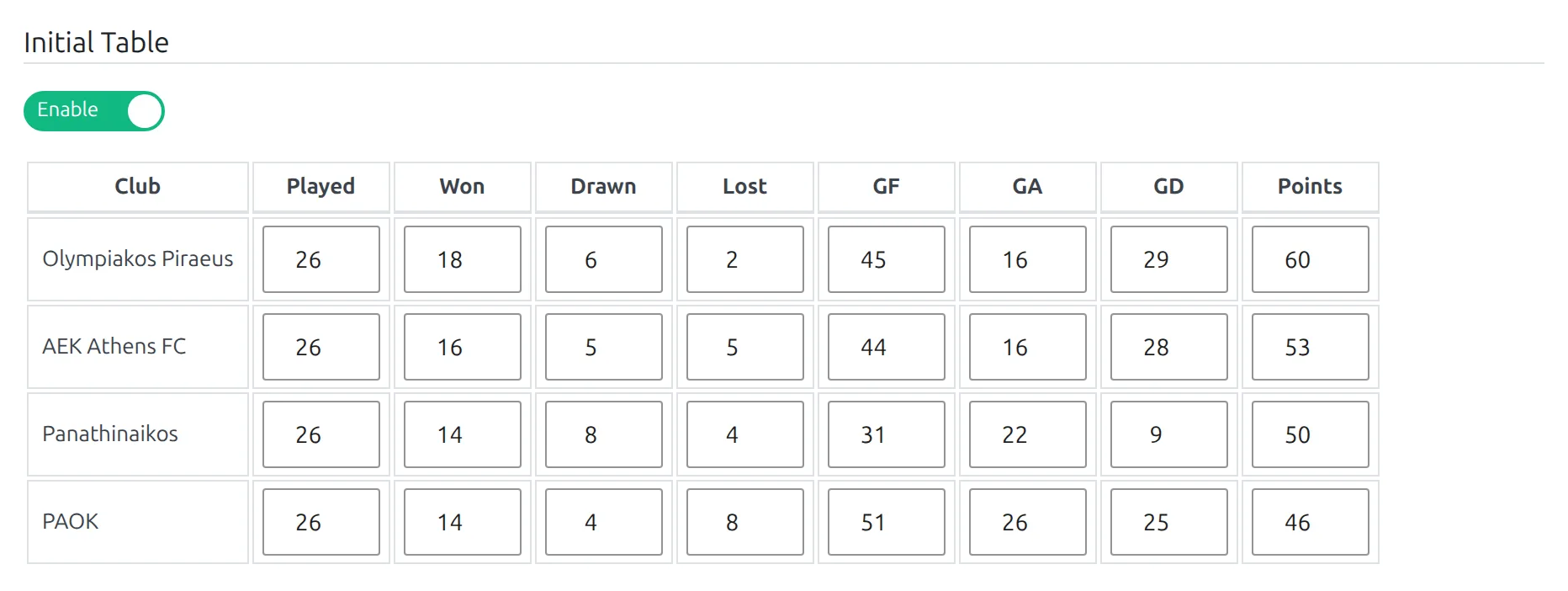
Only clubs in this group are filled. Form, position and the regular-season table’s ranking rules, colours and notes aren’t copied. Loading doesn’t save anything, either – click Publish (or Update) to store the numbers and rebuild the table.
From then on the table adds the play-off games on top of those numbers every time it’s recalculated. Loading again replaces the grid rather than adding to it, so re-loading after a late correction to a regular-season result is safe. It also overwrites anything you typed into the grid yourself, so redo those edits after a re-load.
Leagues that don’t carry everything over
The grid is editable after loading. Austria’s Bundesliga, for one, halves the points at the split – load the data, then type the halved figure into each Points cell before you save. And if you’d rather Played showed only the play-off games, clear the Played, Won, Drawn and Lost cells and keep the rest.
9. Repeat for the other two stages
Add a table for Europe Play-offs and one for Relegation Play-outs the same way, loading each from the same regular-season table. Aris Thessalonikis enters the Europe Play-offs on 42 points; Panetolikos leads the Relegation Play-outs from 33.
🏆 Check the result
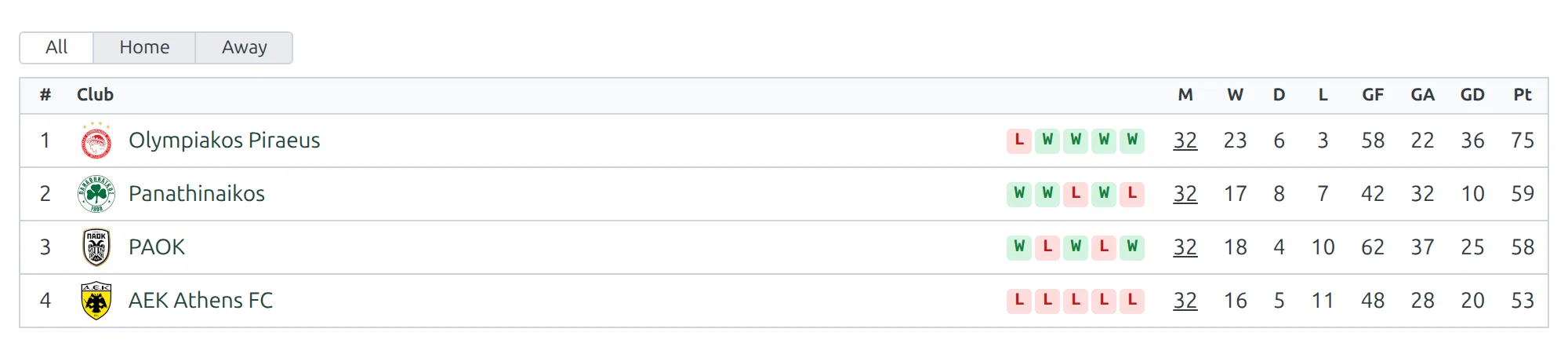
Open the Championship Play-offs table once some play-off games are finished. Here’s the difference the carried-over record makes after all six rounds of 2024-25:
| Club | Regular season | Play-off games only | Table with carry-over |
|---|---|---|---|
| Olympiakos Piraeus | 60 pts | 15 pts (1st) | P32, 75 pts (1st) |
| Panathinaikos | 50 pts | 9 pts (3rd) | P32, 59 pts (2nd) |
| PAOK | 46 pts | 12 pts (2nd) | P32, 58 pts (3rd) |
| AEK Athens FC | 53 pts | 0 pts (4th) | P32, 53 pts (4th) |
Without the initial data, PAOK would sit above Panathinaikos. With it, every club is on 32 played and Panathinaikos finish a point clear of PAOK in second.
A few more places to confirm the setup:
- Competitions list – the Super League 1 2024-2025 row’s Stages column reads MULTIPLE and lists all four stages in order, and its Standings column now shows four tables.
- Competitions > Matches – a play-off game names the competition and then its stage, for example Stage: Championship Play-offs.
- The competition page – each stage is its own section, and a stage’s table shows up there once it’s published. To place one table somewhere else, use [anwpfl-standing] with its ID, or put all three play-off tables on one page with [anwpfl-standings].
🆘 Troubleshooting
The play-off rounds aren’t in the dropdown
Step 1 lists what the provider publishes for that season, up to 10 minutes behind it. If there’s no Championship Round - 1 yet, the fixtures haven’t reached api-football.com. Come back once the play-off schedule is announced – nothing you’ve set up is lost in the meantime.
A new stage isn’t in the structure modal
It wasn’t saved. Go back to the competition, check the tab shows a numeric Stage ID rather than temp-..., click Save, then close and reopen the modal.
Create Games finished but no play-off games appeared
A game is only created when both its clubs are in the stage’s group. If Create Games finishes but creates nothing, a new stage’s group was left on Ignore in step 5, so the group is still empty. Reopen the structure modal, set that group to Create, click Update Competition Structure, then run Create Games again.
Games landed in the wrong play-off stage
A round was put on the wrong row, usually through Set All. Reopen the structure modal and fix the mapping. The games already created stay where they are, so move those through each game’s Match Setup.
The play-off table starts from zero
Either the Initial Table toggle is off, or the data was loaded and the table was never saved – loading only fills the grid. Enable it, load from the regular-season table again and click Update.
A club’s points are counted twice
Initial points and the Initial Table add up. If the regular-season table had a points deduction entered under Initial points, the loaded Points already include it – don’t enter it again on the play-off table. Watch for this when you create the play-off table with Clone from the Standing Tables list: a cloned table brings the source table’s Initial points with it, so remove them before loading.
Played shows 32, not 6
That’s the regular season’s 26 games plus the 6 play-off games, because the loaded data includes Played. For a table that counts only play-off games but keeps the points, clear the Played, Won, Drawn and Lost cells in the initial grid and save.
The competition has two stages, not three
That’s the season’s shape, not a problem. Build as many stages as the league really has – 2023-24 had a Play-off round and a Play-out round – and map each one’s rounds. Every other step is the same.
📚 What’s next
- API Import Use Cases – the other real competitions set up end to end.
- API Import for a Multistage Competition – the structure modal in full, for a cup with group and knockout stages.
- Competition: Multistage – the stage tabs, what belongs to a stage, and how stages show on the site.
- Import Dashboard – make sure the league is on the Dashboard and ticked in the update actions you schedule, so the play-off scores keep updating.