

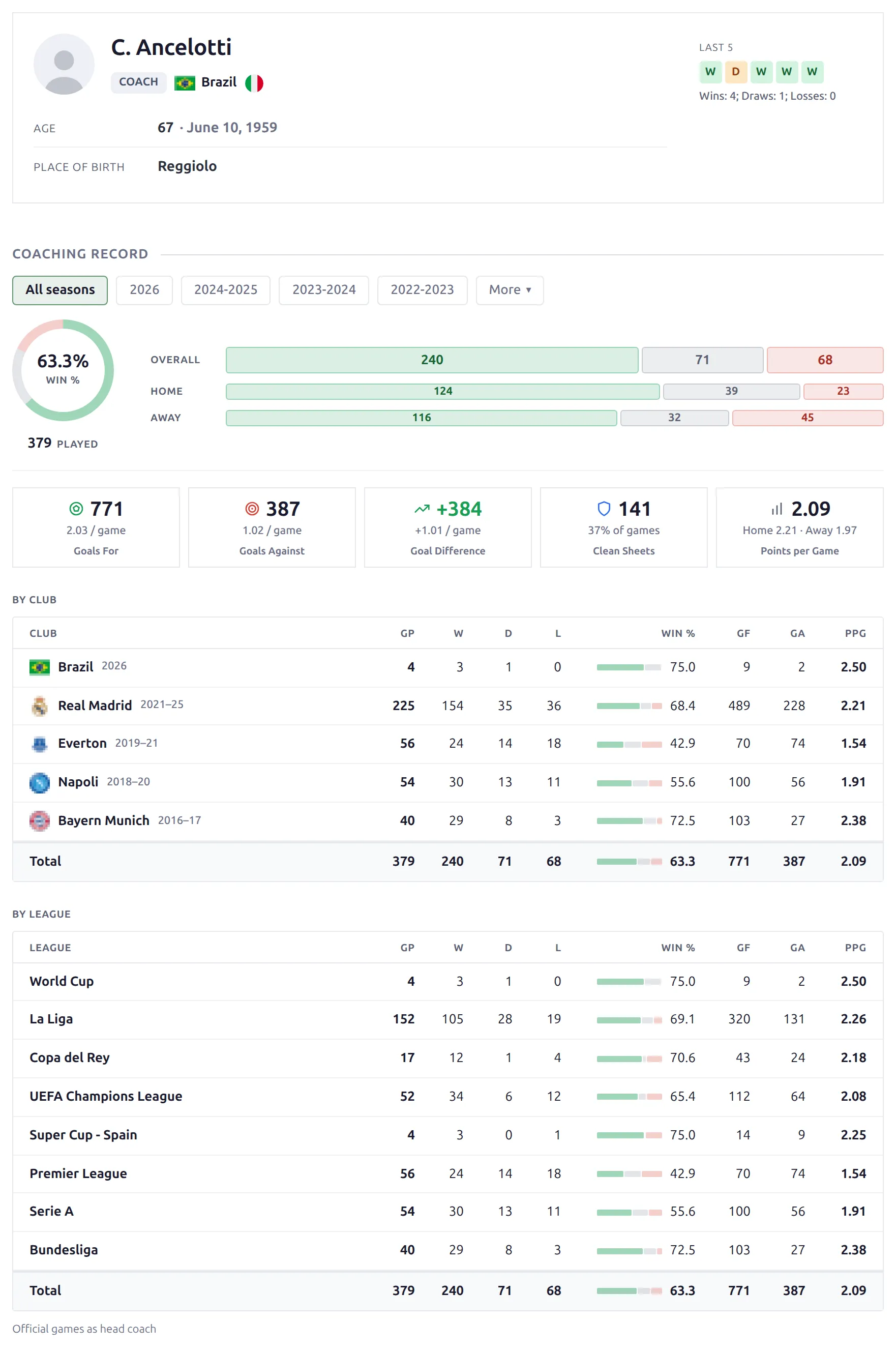
Layout Builder v2 gives your staff pages a new design, and for coaches it adds what the old page never had: their games and their record. Every game already stores its head coach for each side, so a coach’s page now shows the full coaching record, split by club and by league, the game log, a career built from the games, the players used, a career chart and records and streaks. Physios, scouts and other staff get a clean profile page with their bio and career.
🚀 Turn it on
The new staff layout is off until you activate it. Staff pages keep their current look until you do.
- In wp-admin, open Layout Builder → Layouts (v2).
- Find the Staff layout card.
- Switch its toggle on. The label next to it changes from Inactive to Active.
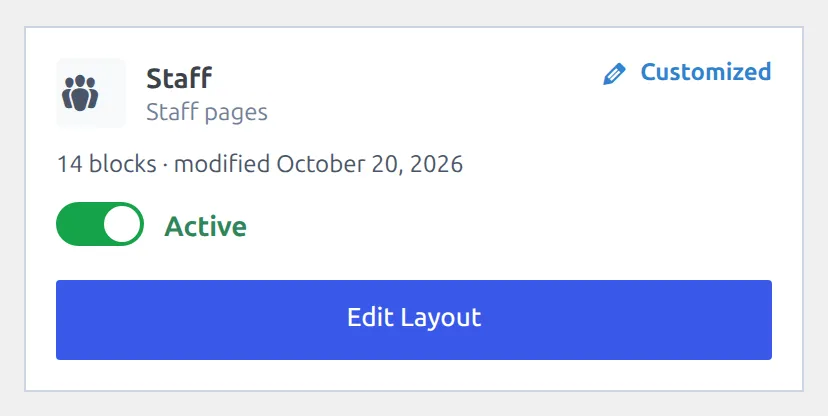
That’s it. Every staff page now renders the new design, and an active v2 Staff layout wins over any v1 Staff layout you have. To go back, switch the toggle off – your v1 layout, or the plugin’s default staff page, takes over again.
What’s on the page
The default staff layout ships with these blocks, in this order. You can reorder, hide, or regroup any of them in the builder.
| Block | Shows |
|---|---|
| Staff Header | Photo, name, job title, current club, nationality, age and date of birth, place of birth, date of death and your custom fields. For a coach, a last-5 results strip (turn it off or change the number of games in the block settings). |
| Section navigation | Jump links to the blocks below. |
| Coaching Record | Games, wins, draws and losses with a win % donut, then goals for and against, goal difference, clean sheets and points per game, plus a Cards tile for a coach who has been shown cards. Below that, a By club and a By league table with the same numbers per row. Season pills, starting on All. |
| Next Game | The next fixture of the club the coach runs now. |
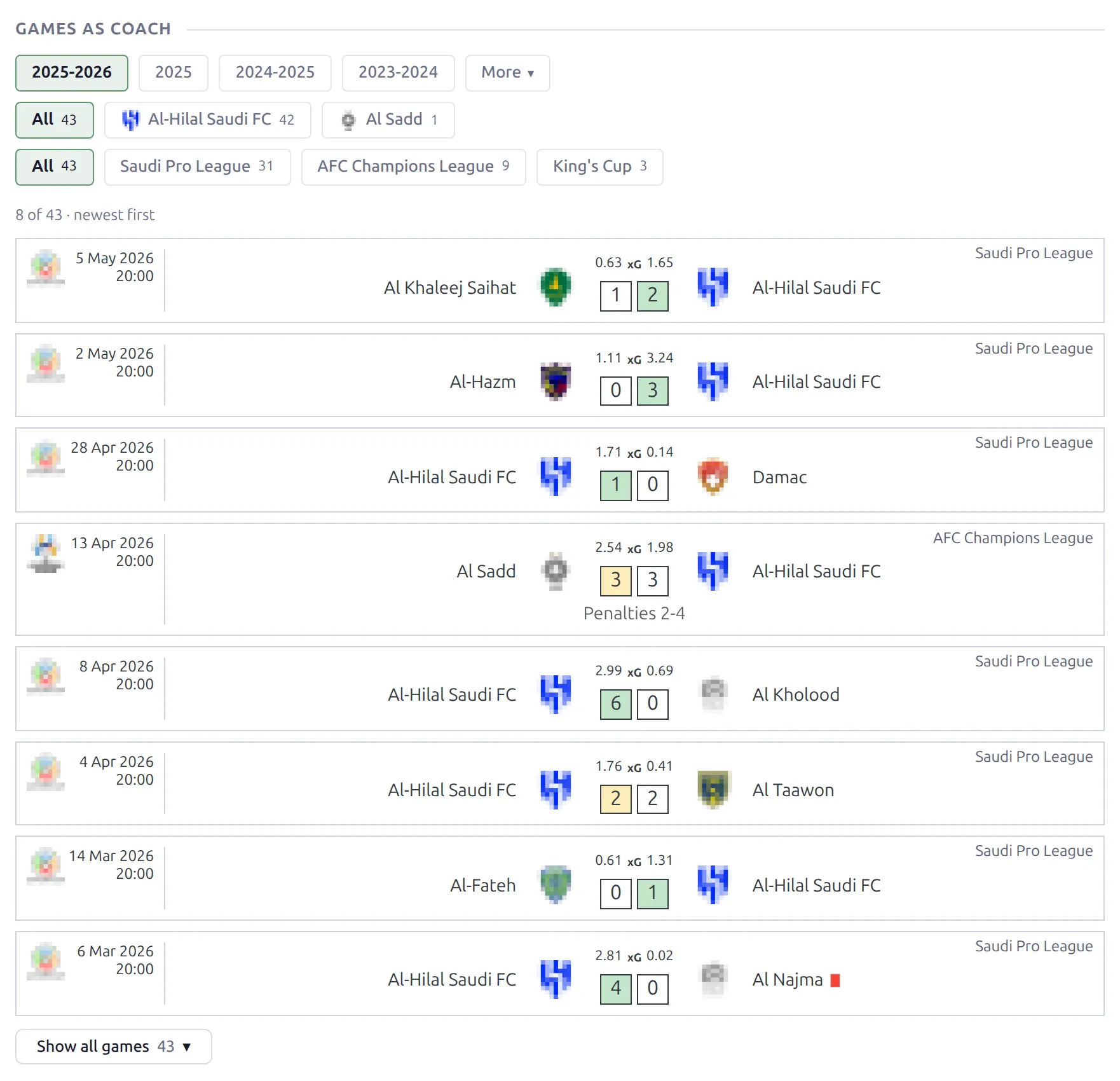
| Games as Coach | The coach’s games as match cards, newest first – 8 at first, with a button that shows the rest. Season, Club and League pills. |
| Players Used | The players with the most appearances, goals, assists and minutes under this coach – pick which stats in the block settings. Club pills. |
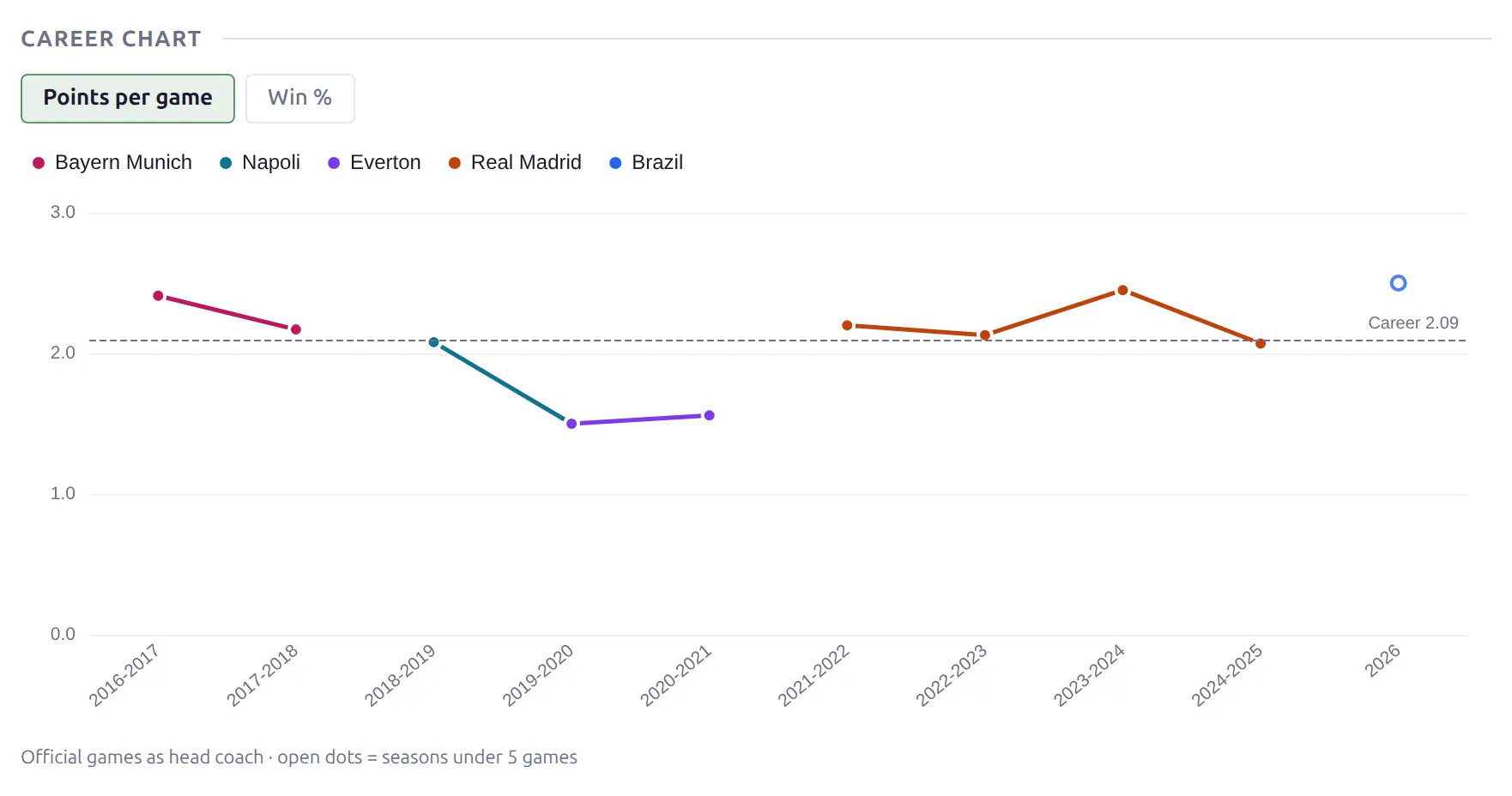
| Career Chart | Points per game or win % per season, one line per club. |
| Records & Streaks | Biggest win, heaviest defeat, longest unbeaten and winning runs, penalty shootouts won and lost, the longest runs at each club and milestone games (the first game, then every 100th). |
| Playing Style | The team’s per-game averages for and against: possession, shots, shots on target, corners, fouls, offsides and cards. Season and Club pills. |
| Match & Goals Breakdown | Home and away goals, over/under lines, clean sheets, both teams scored and win margins. Season, Club and League pills. |
| Formations | The coach’s most-used formations, with games, wins, draws, losses and win % for each. Season and Club pills. |
| Career | A timeline of the coach’s clubs. See Career: history and games below. |
| Bio | The staff member’s description text. |
| Bottom Content | The Bottom Content you enter on the staff edit screen. |
Head coach games only
A game stores one coach per side – the head coach. So the record blocks (Coaching Record, Games as Coach, Players Used, Career Chart, Records & Streaks, Playing Style, Breakdown, Formations and the games part of Career) count the games where this person was the head coach. Assistant coaches have no games of their own. The record counts finished official games, the same games as a club’s Season Record on the team page, and a game decided on penalties counts as a draw.
Blocks hide when there’s nothing to show
Every block below the header hides itself without data, so one layout works for every kind of staff member. A physio or a scout with no coach games gets the header, Career, Bio and Bottom Content – no empty record boxes. A coach with a short spell gets a short page. Some blocks need more than games:
| Block | Shows only when |
|---|---|
| Next Game | The coach has a current club and that club has an upcoming fixture. |
| Players Used | The coach’s games have lineups. |
| Career Chart | The coach has at least 3 seasons with 5 or more games – fewer points make a trend that says nothing. |
| Playing Style | The games have team statistics (possession, shots and so on). API import fills them; on a manual site, enter them in the game editor. |
| Formations | The games have a formation. API import brings it; on a manual site it is read from the lineup when you enter a full starting XI in the game editor. |
| Bio, Bottom Content | The text is filled in on the staff edit screen. |
So Playing Style and Formations are at their best on sites that import games from the API. On a site where you enter games by hand they only appear when you add that data yourself.
Season, club and league pills
Most record blocks carry their own pills. Click one and just that block updates in place, with no page reload. Club pills narrow a block to one of the coach’s clubs, and League pills to one league – every season of it in one row, with all the stages of a competition counted together. A Club or League row only appears when the chosen season has more than one to pick from. Coaching Record starts on all seasons; Games as Coach opens on the latest one.
Career Chart and Records & Streaks always cover the whole career. They split by club on their own: the chart draws one line per club, and the longest runs are counted per club, since a run can’t carry over from one club to the next.
Career: history and games
The Career block has a Source setting with three choices:
| Source | Shows |
|---|---|
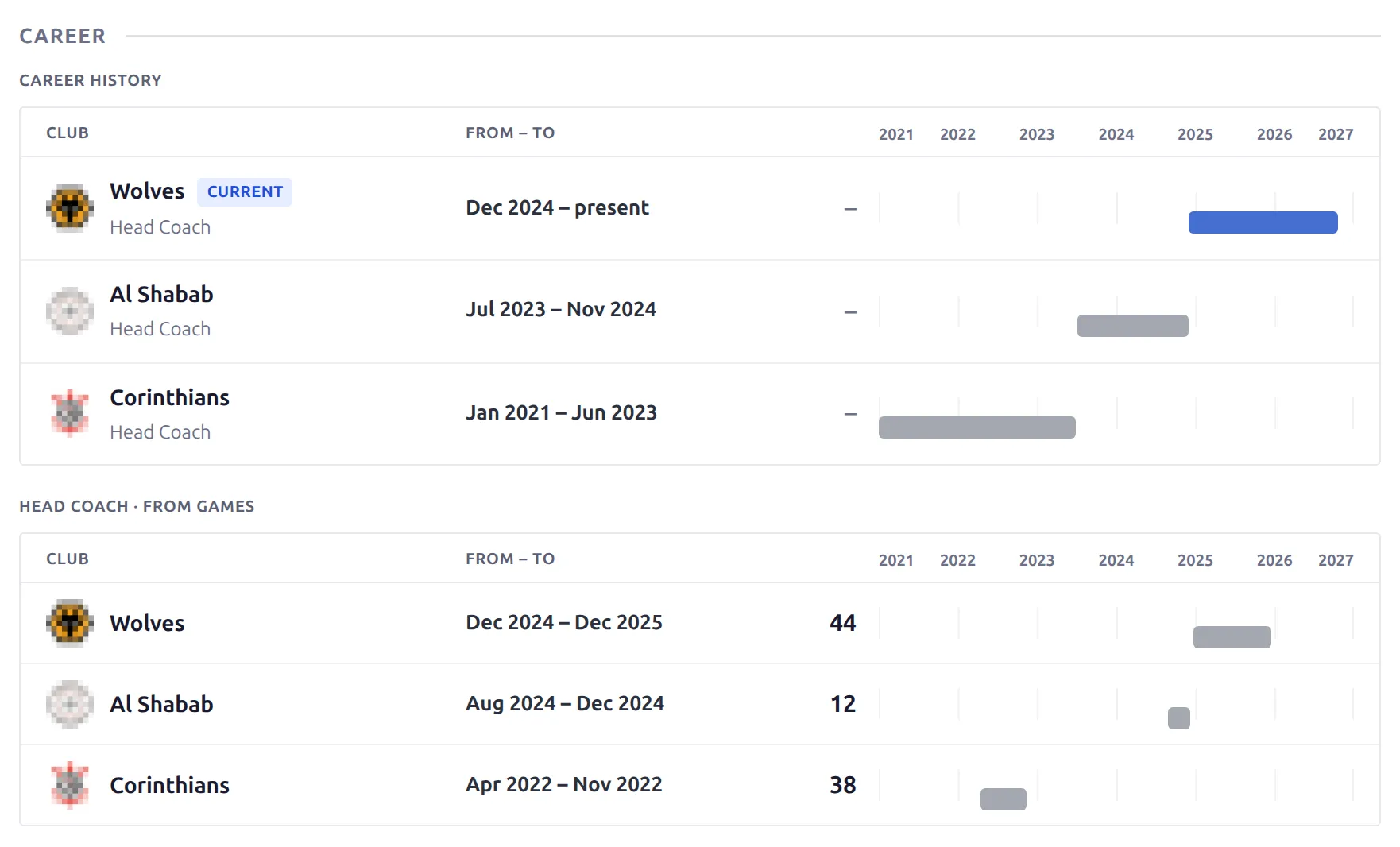
| Career history + from games (default) | Two sections on one timeline: the career history you entered on the staff edit screen, then the clubs built from the coach’s games. |
| Career history | Only the history you entered. |
| From games | Only the clubs from the games – each with its dates and the number of games. |
When the career history is empty, the block shows the clubs from the games, so a coach imported from the API gets a career with no typing. The club the coach runs now is marked as current – judged from the games, not from the Current Club field, which often goes stale on imported staff.
Current club in the header
The Staff Header block has a Current Club setting:
- Follow plugin settings (default) – uses Settings & Tools → Settings → Display → Player & Staff → Staff – Current Team, the same setting the old staff page reads.
- Show (by value) – the Current Club entered on the staff edit screen.
- Show (by last game) – the club of the coach’s most recent game.
- Hide – no club in the header.
Coming from a v1 Staff layout
The v2 layout covers everything the v1 staff blocks did – header, description, career history and bottom content – and adds the record blocks on top. Two things don’t carry over:
- Theme code on the old staff template hooks. If you added content to staff pages with the
anwpfl/tmpl-staff/action hooks, that content doesn’t appear on a v2 page – the old template doesn’t load there. Move it into a Text, HTML or Shortcode block in the v2 layout. - Shortcode blocks and custom classes from your v1 layout. Rebuild them in the v2 builder – it has its own Shortcode, Text and HTML blocks.
Customize the layout
Open the Staff layout in Layouts (v2) to change it. You can drag blocks into rows, reorder them, hide ones you don’t need, and set per-block spacing and colors. The record blocks can sit in the layout for everyone – they hide on staff they don’t apply to. Save, and your staff pages update right away.
🆘 Troubleshooting
A coach page shows no record
The record blocks only count games where this staff member is set as the home or away coach. Open one of the coach’s games in the editor and check the coach field. Games imported from the API set it for you. Also check that the games are finished and official – friendlies don’t count.
The record doesn’t match the club’s page
Both count the same games, so look at who coached them. A coach who took over mid-season has only their own games in the record, while the club’s Season Record counts the whole season.
📚 Related
The other page types have their own Layout Builder v2 guides: Team Pages, Player Pages, Competition Pages and Game Pages. For v1 layouts and how the two versions fit together, see Layout Builder.