

The Toolkit collects one-off maintenance jobs for a site that imports from the API: lighter logos, duplicate players, leftover photos and games that came in without lineups. None of them run on a schedule – you start each one by hand.
🚀 Where to find it
FL API Import > Toolkit. The tools are grouped into Logo Optimization, Data Cleanup and Game Data. Each card says what the tool changes: Caution means it edits your data, Destructive means it permanently deletes files.
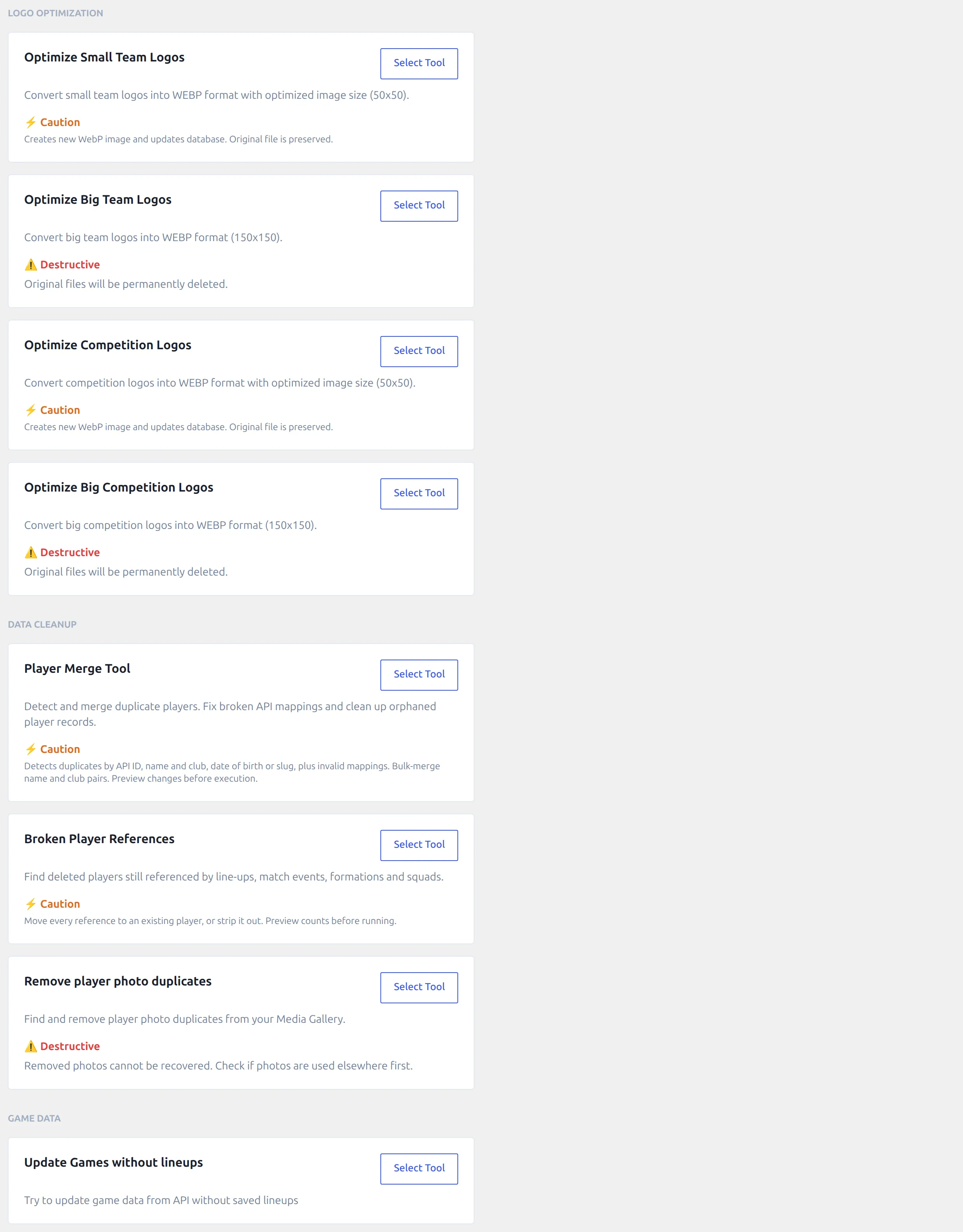
Click Select Tool to open a tool and << Go Back to return to the list. Only one tool runs at a time. Most tools show a count first and start when you press the play button (a small arrow), with a progress bar while they work.
Back up first
Every tool here changes or deletes data, and none of them has an undo. Take a backup of the database and the uploads folder before you run one.
Logo Optimization
Imported logos often come in as one large PNG used for both the small and the big logo. These four tools make a light WebP version of each. They need the Imagick PHP extension on your server – without it they stop with Imagick is not available, and your host can switch it on.
| Tool | What it does | Original file |
|---|---|---|
| Optimize Small Team Logos | For each club that uses the same image as its small and big logo, makes a 50×50 WebP and sets it as the small logo. | Kept – it’s still the big logo |
| Optimize Big Team Logos | For each club that already has its own small WebP logo, converts the big logo to a 150×150 WebP. | Permanently deleted |
| Optimize Competition Logos | The same as the small team tool, for competitions. | Kept |
| Optimize Big Competition Logos | The same as the big team tool, for competitions. | Permanently deleted |
Run the small tool before the big one. The big tools only pick up clubs and competitions whose small logo is already a separate file, so on a fresh import they find nothing until the small tool has run.
Each tool shows how many logos it may optimize, then reports how many it optimized and how many it skipped. A logo is skipped when its image is smaller than the target size – the tools never enlarge an image – or when the file can’t be read.
💡 Tip: switch off image optimization plugins such as Imagify, ShortPixel or Smush while the big tools run. They can process the new files mid-run and get in the way.
Data Cleanup
Player Merge Tool
Finds players the API imported twice – most often under a new API ID with a shorter name – and merges each pair into one player. Detection methods, the birth-date check and bulk merge are all covered on its own page: Player Merge Tool.
Broken Player References
Finds players you deleted who are still named in lineups, game events, formations or squads, and moves those references to an existing player or removes them. It works on any site, imported or not. See Broken Player References.
Remove player photo duplicates
Re-importing players with a fresh photo can leave the old copies in your Media Library. This tool looks for images identical to a player’s photo at the provider and deletes the ones that aren’t in use. It runs in two steps:
- Step 1 – Create hash. For every API player that doesn’t have one yet, the plugin downloads the player’s photo from the provider and stores a fingerprint of the image. The count shows how many players still need one. On a large site this takes a while – it’s one download per player.
- Step 2 – Remove Duplicates. The plugin checks every PNG and JPEG in your Media Library. An image whose fingerprint matches a player’s provider photo is deleted, unless a player, coach or referee still uses it as their photo.
Step 2 only checks player, coach and referee photos. If you placed a player photo in a post or page by hand, it can still be removed, so take a backup before you run it.
Game Data
Update Games without lineups
Providers sometimes publish lineups hours after the final whistle, after your import already ran. This tool finds your finished games with no lineup for one or both clubs, asks the provider for them again in batches of 20, and updates every game the provider now has a starting XI for. The whole game is updated from the provider, the same as a normal game update.
The count at the top is rounded up to whole batches of 20, so it can be a little higher than the real number of games. When it finishes, Updated Games shows how many got their lineups. Games the provider still has no lineups for stay as they are – run it again in a few days. Each batch is one API request.
🆘 Troubleshooting
“Imagick is not available”
The logo tools and the photo tool need the Imagick PHP extension. Ask your host to enable it, then run the tool again.
A big logo tool finds 0 logos
Run the matching small tool first. The big tools only work on clubs and competitions that already have a separate small WebP logo.
Update Games without lineups finished with 0 updated
The provider doesn’t have lineups for those games yet – common for lower leagues, where it may never get them. Nothing on your site was changed.
📚 Related
- Player Merge Tool – merge duplicate players
- Broken Player References – repair references to deleted players
- Import Dashboard – scheduled updates, including Re-check LineUps & Formations