

Most leagues ban a player after a set number of yellow cards. A Card Suspension record tells the plugin what that number is for one competition. Once it exists you can list the players who are one booking away from a ban, and optionally have the plugin add suspended players to the next fixture for you.
🚀 Creating a record
Go to Competitions > Card Suspensions and click Add New. Pick the competition from the dropdown and click Save & Continue. The rules editor appears on the next screen, and the record takes the competition’s name as its title.
You need one record per competition, and only main competitions appear in the dropdown. A multistage competition gets a single record on the main competition, and it covers every stage under it – a yellow picked up in the group stage still counts toward a ban in the play-offs.

Yellow card rules
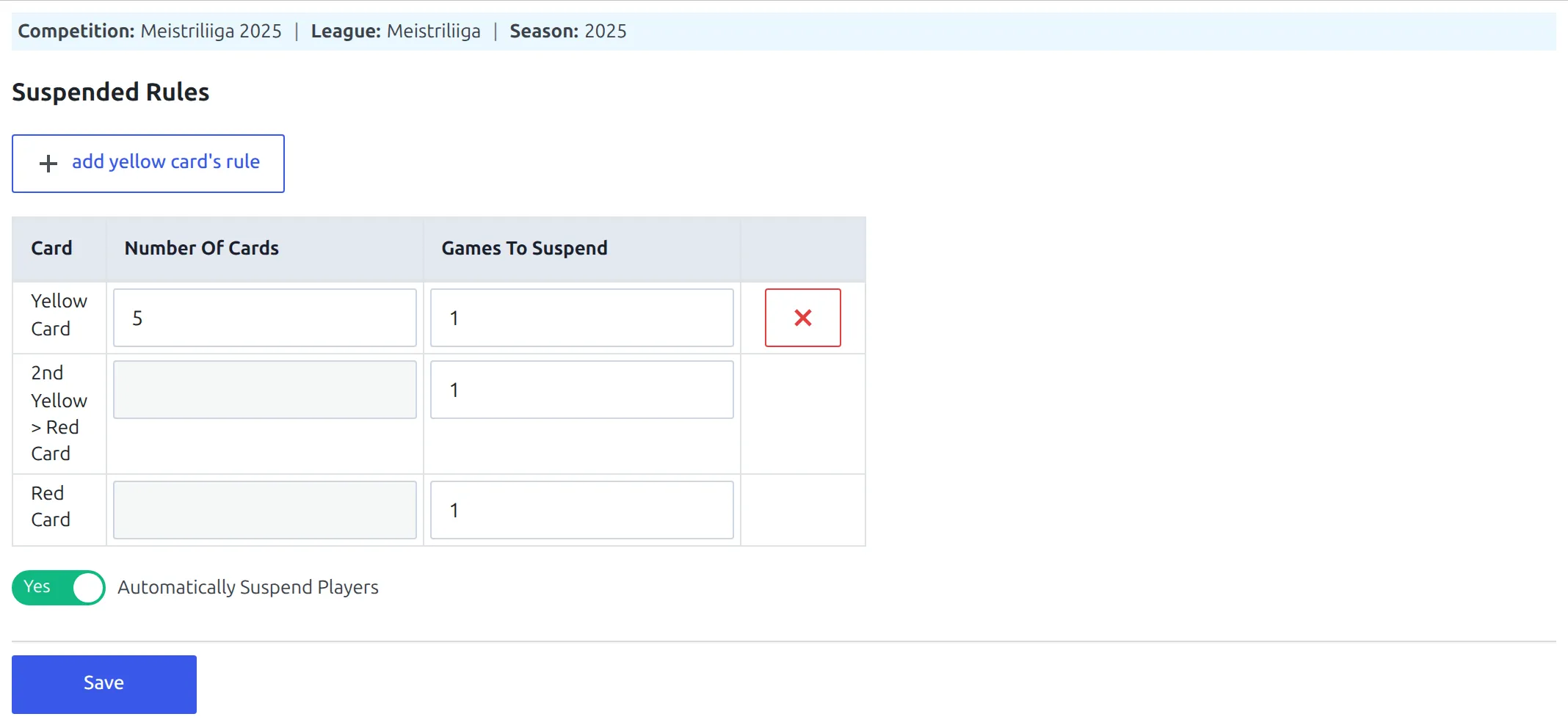
Click add yellow card’s rule to get a row, then fill in two numbers:
| Column | What to put there |
|---|---|
| Number of Cards | The yellow-card total that triggers a ban. Most leagues use 5, then 10, then 15. |
| Games to suspend | Has to be filled in – a rule with this left empty or set to 0 is ignored completely. See the note below about what the number itself does. |
Add one row per threshold. A league that bans at 5, 10 and 15 yellows needs three rows. Number of Cards has to be 2 or more; a rule set to 1 is skipped, so you can’t use this to ban a player after a single booking.
Every automatic ban is one game long
Whatever you type into Games to suspend, the plugin adds the player to exactly one game – the team’s next fixture. The number is only checked for being non-zero. If your competition hands out two- and three-game bans, add the extra games by hand in each game’s Missing Players tab.
⚠️ How yellow cards are counted
This is the part that surprises people, so it’s worth being precise about it.
If a player is sent off for two yellows, that game contributes nothing to the suspension count. Not the second yellow, and not the first one either. The whole game drops out, because the player has already been punished for it with a red card and a ban.
The player’s own profile page counts differently. By default it counts every yellow the player received, including the first of the two that got them sent off. So the two numbers disagree, on purpose, and the gap between them is exactly the number of times that player has been sent off for two yellows.
| A season for one player | Yellows shown on the profile | Yellows counted toward a ban |
|---|---|---|
| 14 games with one booking | 14 | 14 |
| 2 games that ended in a second yellow | +2 | +0 |
| Total | 16 | 14 |
With a 5-yellow rule, that player is two bookings from a ban, not one – even though their profile shows 16. Neither of the plugin’s card-counting settings changes this; the suspension count always works this way.
Two more things the count does:
- Only official games count. A game marked as a friendly never adds to the total, however many cards it produced.
- Only finished games count. Cards on a game that hasn’t been marked Finished are invisible to the counter.
Showing who’s at risk
Once a record has at least one yellow-card rule, the [anwpfl-suspension-risk] shortcode lists the players sitting one booking below a threshold. With a 5-card rule that’s everyone on 4.
[anwpfl-suspension-risk competition_id="123"]Point it at a single game instead and it shows only the two clubs playing, which is what you want in a match preview:
[anwpfl-suspension-risk game_id="4512" header="One booking from a ban"]The list is exact rather than cumulative: with rules at 5 and 10, a player on 4 or on 9 appears, and a player on 6 doesn’t. Players whose squad status is “left” are left out. Full attribute list: Suspension Risk shortcode.
Automatic suspensions
Switch on Automatically Suspend Players and two more rows appear in the table, for 2nd Yellow > Red Card and Red Card. Save the record and the plugin starts adding suspended players to upcoming games by itself.
Here’s what actually happens when you save a finished game in the game editor. For each player who was booked or sent off, the plugin checks:
- A yellow card counts only if it takes the player exactly to one of your thresholds.
- A second yellow always counts. So does a straight red. Neither is optional – there’s no way to turn reds off and keep yellow accumulation.
- The plugin finds that club’s next fixture in the same competition, starting from the day after this game, and adds the player to it as a missing player.
A green notice at the top of the screen lists everything it saved, as player / team / game, so you can see at a glance who got banned and where. If a player already appears in the next game’s missing list for any reason, they’re left alone rather than added twice.
Only manual saves trigger it
Automatic suspensions run when someone opens a finished game in the WordPress game editor and clicks Update. Games brought in by API import don’t trigger them, and neither does front-end game editing. That’s why the toggle is greyed out on any competition linked to API-Football, with a note pointing you at the import’s UPDATE INJURIES task instead.
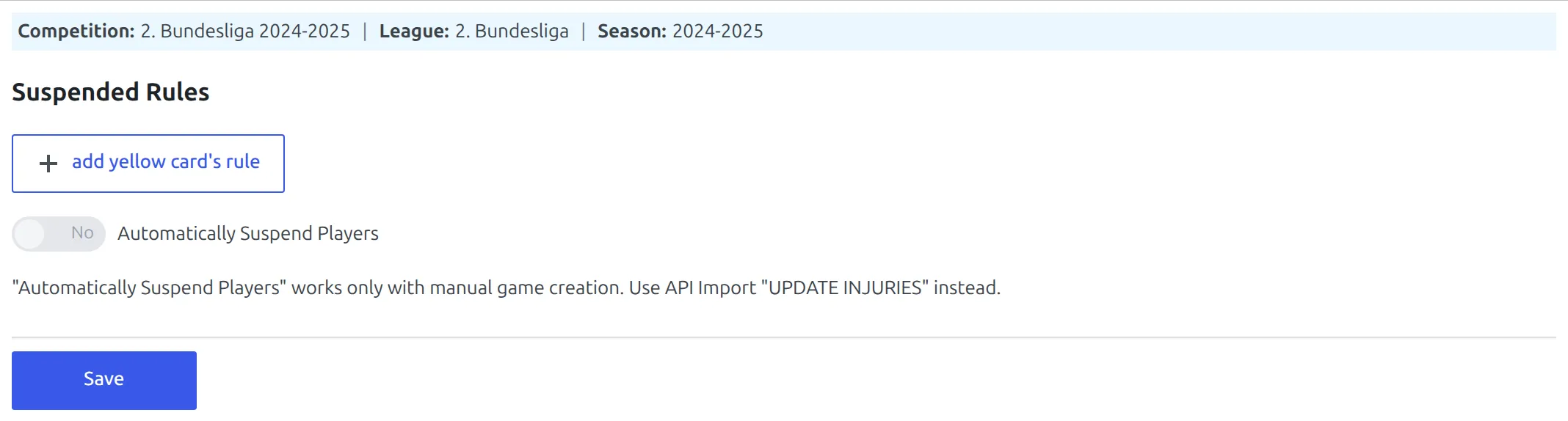
The Games to suspend boxes on the two red-card rows behave the same way as the yellow one – the number is stored but not used, and the ban is one game. Their Number of Cards boxes are disabled, because a sending-off is always a sending-off.
Where a ban shows up
Suspensions are stored as missing players on the game the player will sit out. Visitors see them in the Missing Players block on that game’s page, labelled Suspended followed by the reason – Yellow card suspension or Red card suspension.
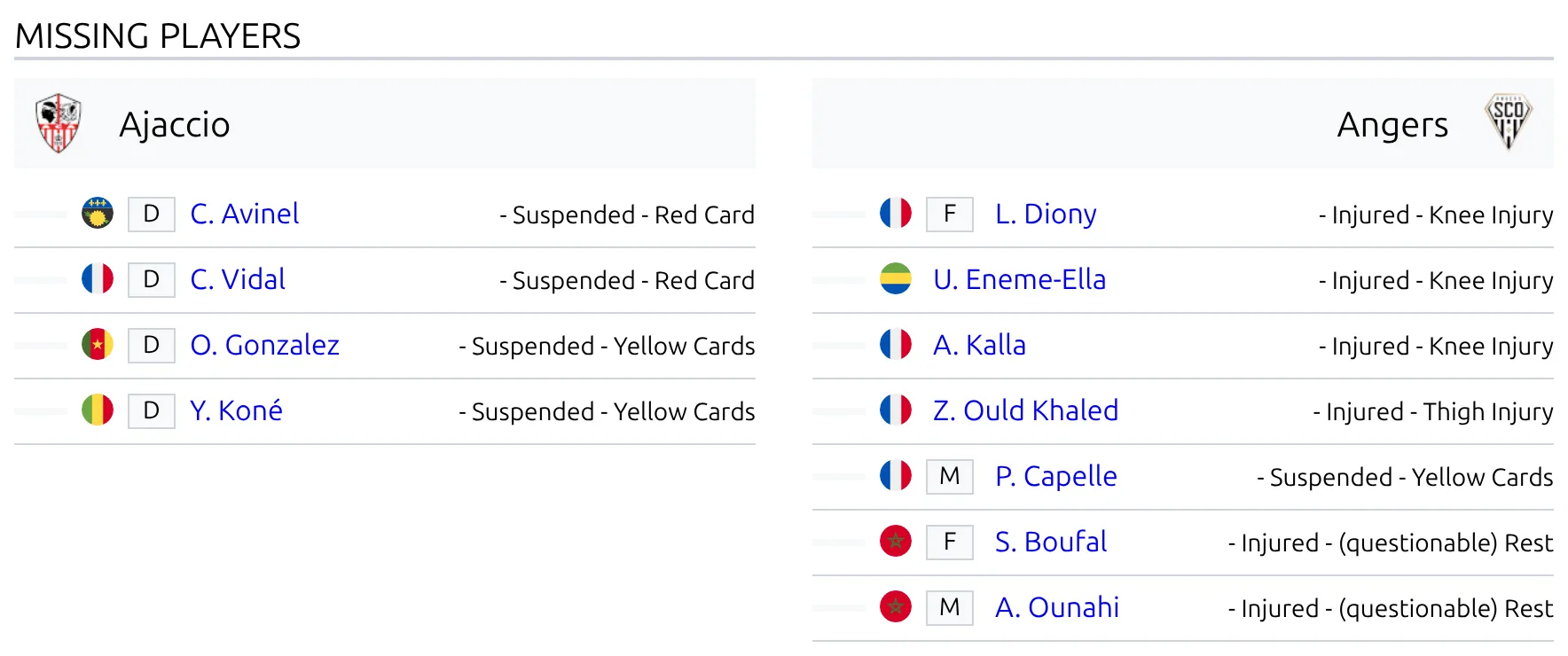
You can also pull them together across a competition with [anwpfl-missing-players].
Both reason labels are editable on the Translations menu, under Text Strings, where they’re listed as suspension :: comment. Reword them or put them in your own language.
Clearing or changing a ban
An automatic suspension is an ordinary missing-player entry, so you edit it where you’d edit any other one.
- Open the game the player is banned from.
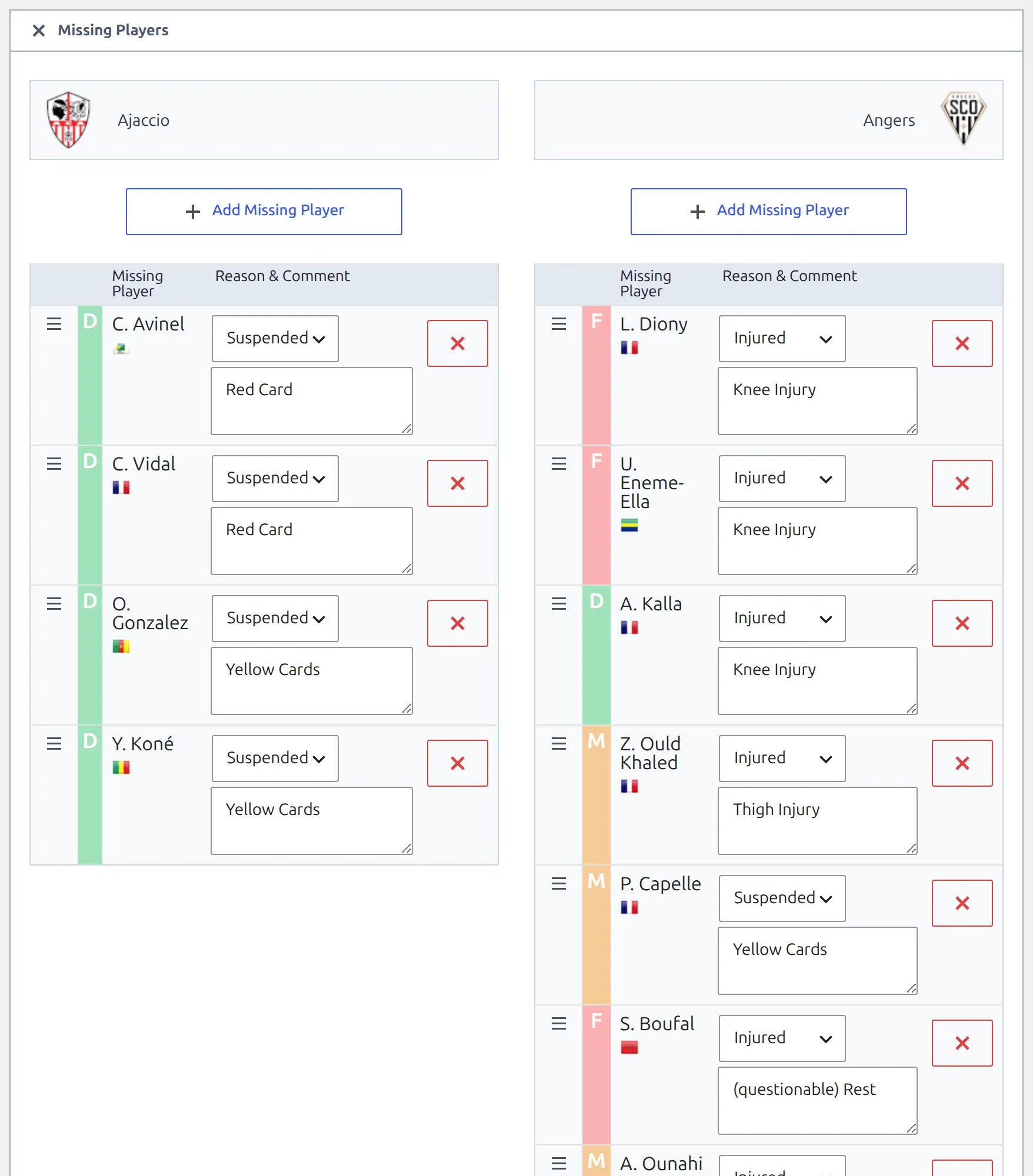
- Go to the Missing Players tab.
- Delete the row to lift the ban, or edit its comment to say something more specific.
- Click Update.
The same tab is where you add a ban by hand, which is how you handle anything the plugin can’t work out for itself – a longer ban from a disciplinary panel, a suspension carried over from another competition, or a player who’s simply injured.
Saving a game rewrites its whole missing list
Whatever is in the Missing Players tab when you click Update becomes the complete list for that game. That’s what makes deleting a row work, and it’s also why you shouldn’t clear the tab out and expect the automatic entries to come back – they won’t, unless the game that caused them is saved again.
🆘 Troubleshooting
The risk list is empty
Work through these in order:
- Is there a Card Suspension record for this competition? A record you created but abandoned at the Select Competition step exists in the list yet holds no rules.
- Does it have at least one yellow-card rule with Number of Cards of 2 or more and Games to suspend filled in? A rule missing either is thrown away.
- Are you pointing at the main competition? On a multistage competition the record lives on the main one, and that’s the ID the shortcode wants.
- Is anyone actually one card short? With a 5-card rule, a squad whose highest total is 3 produces an empty list, and the shortcode renders nothing at all rather than an empty box.
A player’s count looks too low
Count their sendings-off for two yellows and add that many. See How yellow cards are counted above – this is expected behaviour, not a data problem. Friendlies and unfinished games are the other two reasons a total comes out lower than you expected.
Nobody was suspended when I saved the game
The game has to be marked Finished and have card events on it – a scoreline alone isn’t enough. Automatically Suspend Players has to be on and saved. And the club needs a next fixture to be banned from: if this was the last game of the season, or the following game isn’t in the fixture list yet, there’s nowhere to record the ban and nothing happens.
The ban landed on the wrong game
The plugin picks the club’s earliest unplayed fixture in that competition from the day after the game being saved. If the club’s schedule has a fixture on the same day as the game you just saved, that one is skipped. Kick-off dates that are missing or wrong will send a ban somewhere unexpected, so check the fixture dates first.
📚 Related
- Suspension Risk shortcode – every attribute for the at-risk list
- Missing Players shortcode – suspensions and injuries across a competition
- Cards shortcode – card rankings, which count differently again
- Multistage Competitions – why one record covers every stage