

AnWP Club Kit comes with 7 designs. They all install the same things: 6 pages, a main menu, a header and footer, 8 or 9 news posts, Football Leagues settings and a player page layout. What changes is the look, the fonts and how the home page is laid out.
Pick the one that feels closest to your club. The colors are the easy part: every design takes them from the Kadence palette, so you can put any of them in your club’s colors (see Change Colors). And you can switch designs later with Replace.
🎯 At a glance
| Design | Look | Fonts | Home page opens with |
|---|---|---|---|
| Yellow Wedge | Light and quick. Yellow wedges and slants on white, black bands. | Sofia Sans Extra Condensed + Figtree | A match report headline on a yellow wedge |
| Red Scoreline | Bold and loud. Red and black bands, giant numbers. | Anton + Hanken Grotesk | Your last result as a giant score |
| Grounded Power | Community club. Emerald and cool ink on white. | Lexend Exa + Inter | A matchday panel with your last result |
| Broadcast Prime Time | Prime-time TV graphics. Tangerine and electric blue on warm dark ink. | Big Shoulders Display + Manrope, Teko for numbers | A scoreboard with your last result |
| Broadcast Prime Time Dark (Away Kit) | Broadcast Prime Time on a dark page. | Big Shoulders Display + Manrope, Teko for numbers | A scoreboard with your last result |
| Heritage Broadsheet | Classic newspaper. Oxblood, cream and gold. | Barlow Condensed + IBM Plex Sans | A lead story with a big photo |
| Heritage Supplement | Sunday supplement. Bottle green, cream and gold. | Barlow Condensed + IBM Plex Sans | Four lead stories in a magazine grid |
The first font sets the headings and the second one the text. All of them are Google Fonts, set in the Kadence Customizer, so you can change them in Appearance > Customize > Colors & Fonts > Typography.
What every design has
- Pages: Home, News, Squad, Fixtures, a league table page and Match Centre. The Heritage and Broadcast designs call the table page “Standings”, the others “Table”. Red Scoreline and Yellow Wedge leave Match Centre out of the menu. Add it in Appearance > Menus if you want it there.
- A demo club of its own in the same fictional league: Ashbourne Rovers, Ervin Town, Castlebridge City, Harwick Athletic (both Broadcast designs), Northfield United or Kingsmere FC. Its squad has player photos, and its name is in the header, the footer and the news.
- A sticky header with the club’s name, the main menu and a tickets button.
- A footer with the club’s details and link lists. Red Scoreline and Yellow Wedge have a newsletter link where the others have social icons.
- The same player page, built with the Layout Builder, with the player’s bio right under the header.
- Opponents without their own pages: other clubs, their players and their staff show up as plain names in tables and lineups, so the site stays about your club.
Yellow Wedge
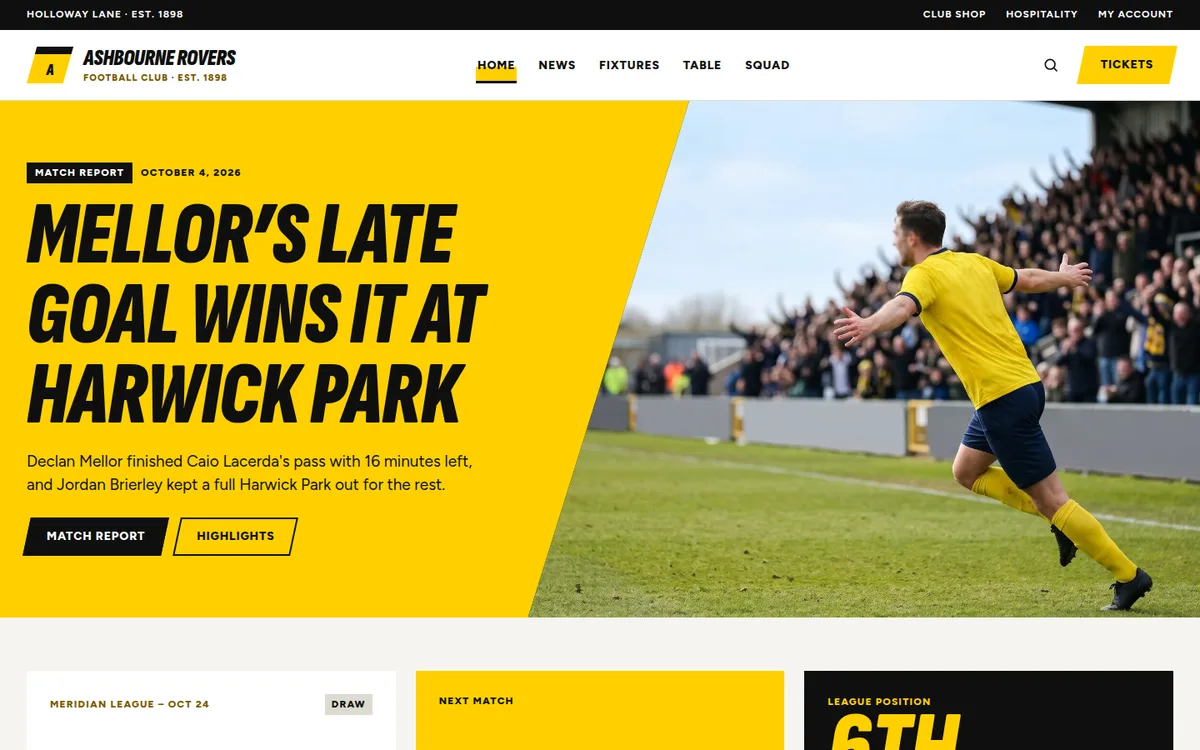
Light and quick. Yellow comes in as angled planes: a wedge behind the headline, a slanted table panel, skewed buttons. It’s never used for text, so everything stays readable on white. Headings are heavy italic capitals. Demo club: Ashbourne Rovers.
Home page, top to bottom:
- A match report headline on a yellow wedge, with its photo beside it.
- Matchday: your last result, the next game with a countdown, and your league position with your points and the gap to the next place.
- Latest: a lead story and the next 3 posts.
- Fixtures & table on a dark band: the upcoming games next to the top 8 on a slanted yellow panel.
- Team sheet: the squad as a list by position, with skewed number tabs.
- Join for 2027: a membership band with two buttons.
- Club partners: 6 logos.
Around the pages: a black strip above the header with the ground’s name, the year the club was founded and 3 links (club shop, hospitality, my account).
Red Scoreline
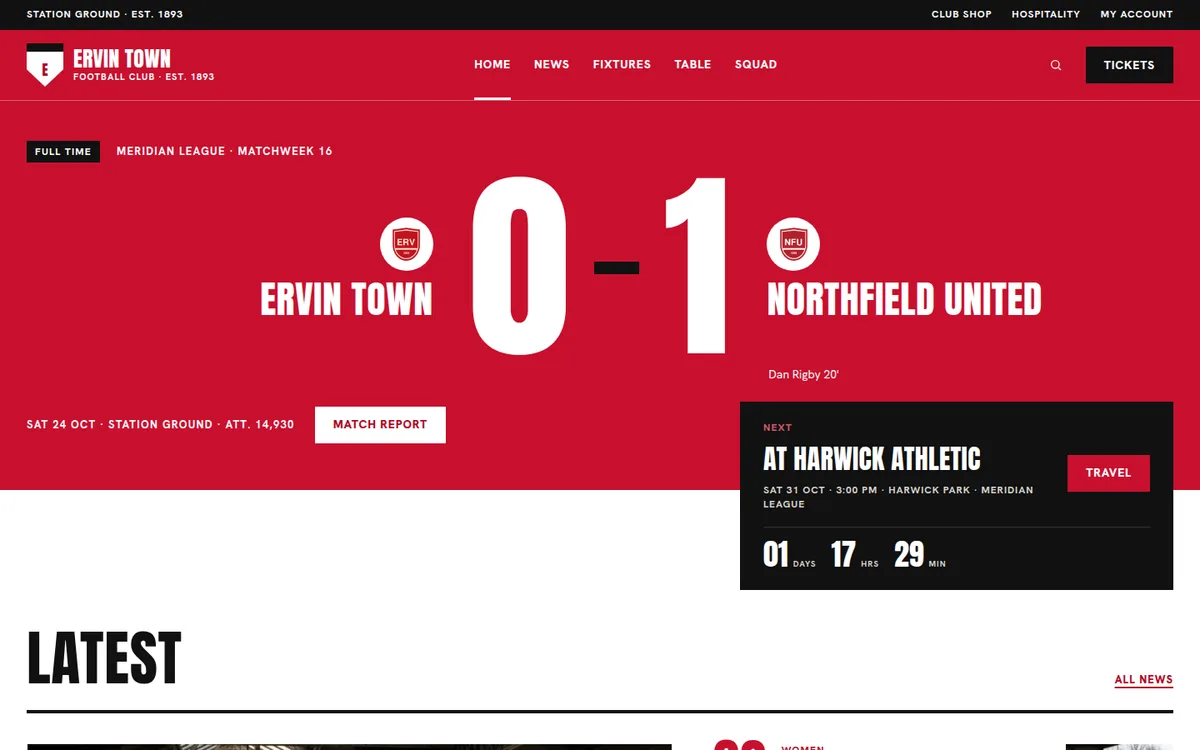
Bold and loud. Red fills whole sections, the last result is the hero and giant numbers do the decorating. Red and black bands take turns down the home page. Demo club: Ervin Town.
Home page, top to bottom:
- Your last result as a giant score on a red band, with the goalscorers and a link to the match report. A black card with the next game hangs over the news below it.
- Latest: a lead story next to the 5 newest posts, numbered 02-06.
- Fixtures & table on a black band: the upcoming games next to the top 8.
- First team on a red band: player cards with big shirt numbers.
- Season tickets: a band with a big “26/27” and a button.
- Club partners: 6 logos.
Around the pages: a black strip above the header with the ground’s name, the year the club was founded and 3 links (club shop, hospitality, my account).
Grounded Power
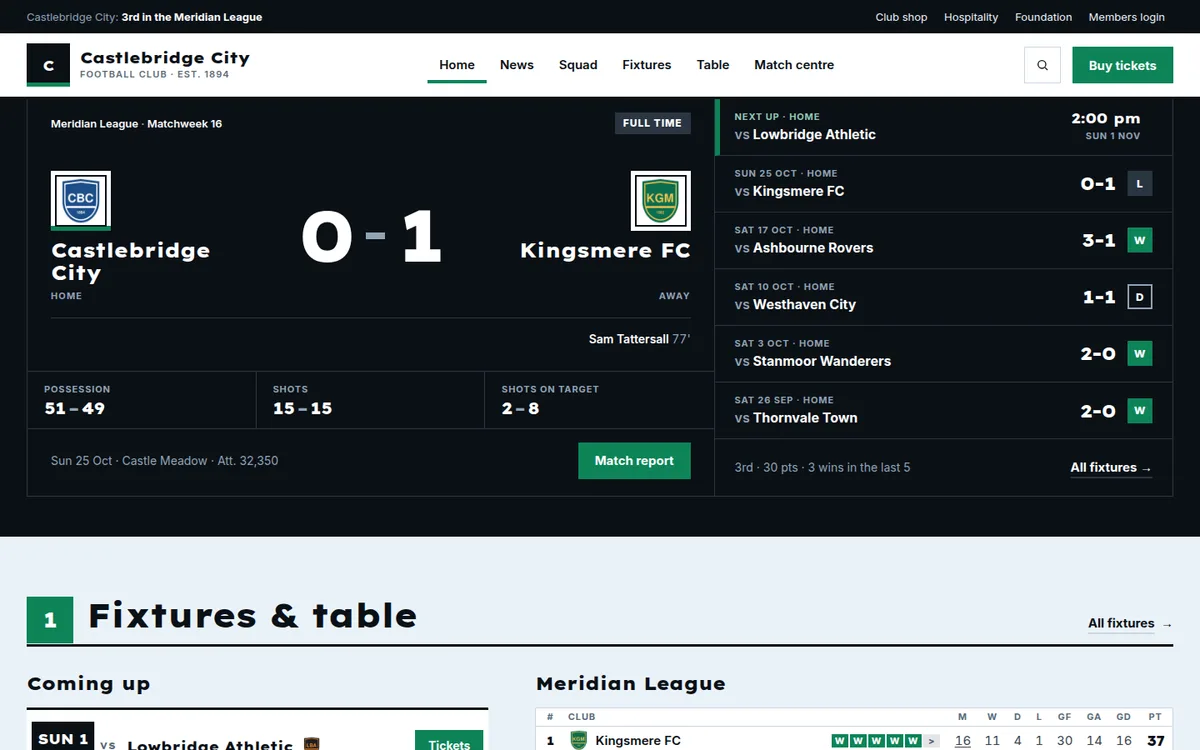
A club that’s part of its town. Wide display type, square corners, and every section opens on a solid rule with a numbered emerald square. The home page gives the women’s team, the Under-21s, the academy and the club’s foundation their own space. Demo club: Castlebridge City.
Home page, top to bottom:
- Matchday panel: your last result, the next game, the last 5 results and key match stats.
- 1 Fixtures & table: the next 4 games next to the top 8 of the table.
- 2 Latest news: a lead story and the next 4 posts.
- 3 Four squads, one club: panels for the first team, the women, the Under-21s and the academy.
- The foundation: a text band with 4 numbers and a button.
- 4 The squad.
- 5 Club partners in 3 tiers: 2 principal, 4 official and 6 community partners.
Around the pages: a dark utility bar above the header with your club’s league position and 4 links (club shop, hospitality, foundation, members login).
Broadcast Prime Time
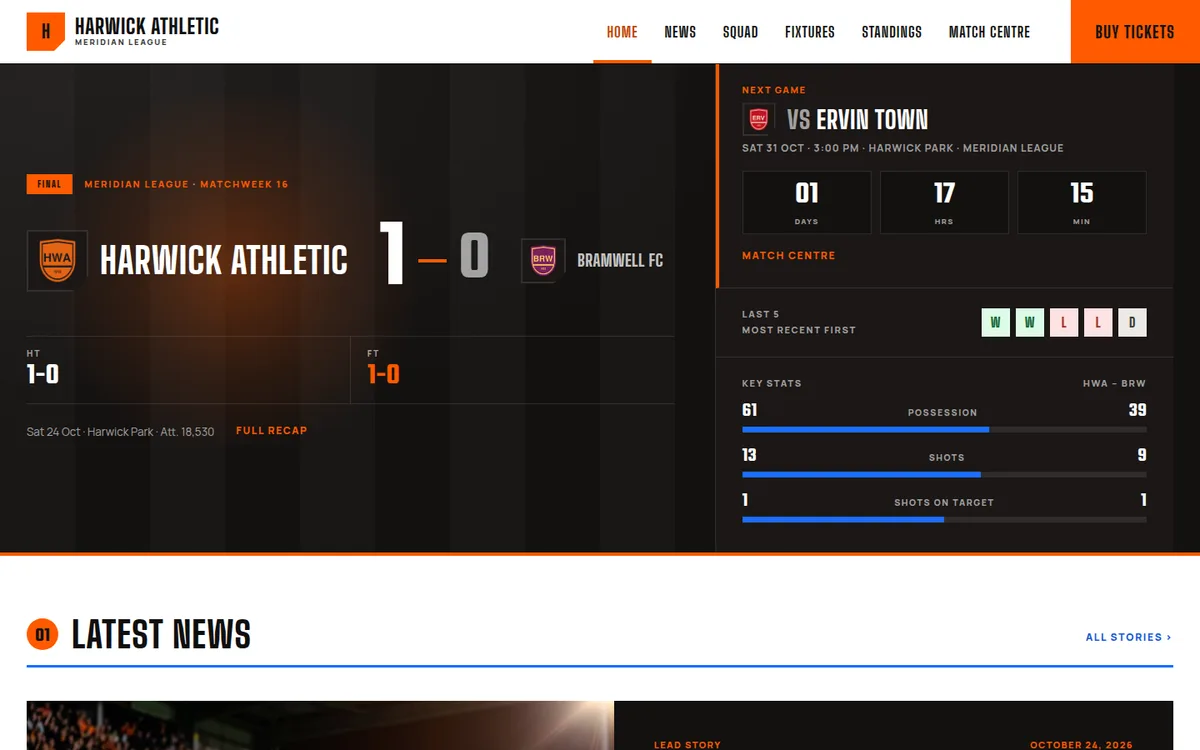
Matchday on TV. A scoreboard opens the home page and every section has a big number on a blue rule. Demo club: Harwick Athletic.
Home page, top to bottom:
- Scoreboard: your last result, the next game, the last 5 results and key match stats.
- 01 Latest news: a lead story and the newest posts.
- 02 Table & fixtures: the full league table next to the upcoming games.
- 03 The squad, on a dark band.
- 04 Top scorers: the league’s and your club’s, side by side.
- Partners: 6 logos.
Around the pages: just the header and the footer. There’s no strip above the header and no fixture bar, because the scoreboard already shows the next game. The header has no search icon.
Away Kit: Broadcast Prime Time Dark
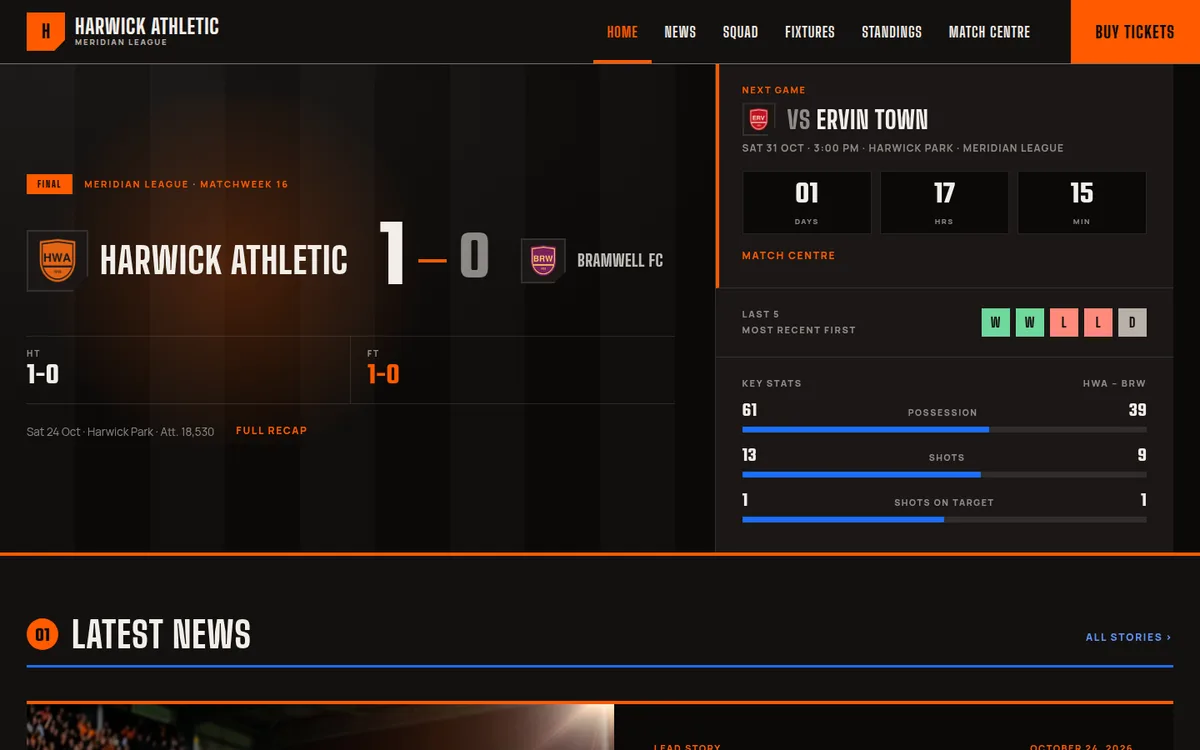
The same design on a dark page: same club, pages, news and home sections, with light text on warm dark ink. The player pages use the dark scheme of the Layout Builder. It has its own card in the gallery, and you install it like any other design.
Heritage Broadsheet
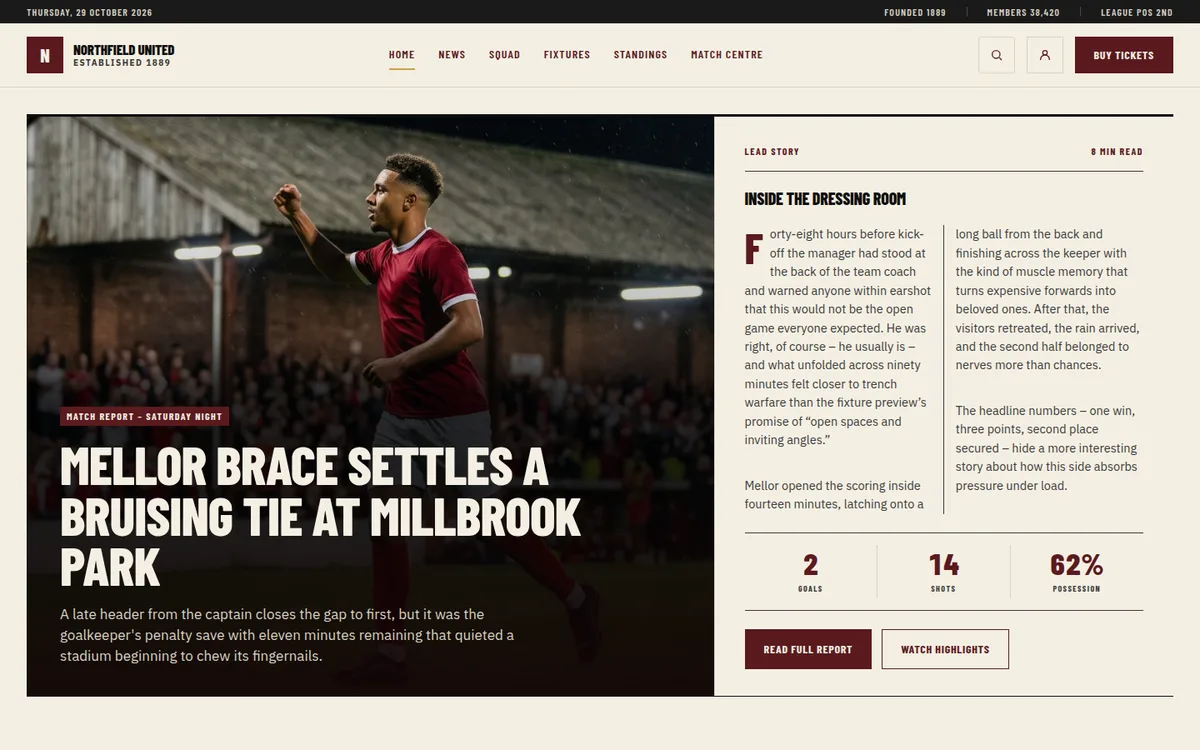
A newspaper front page for a club with a long history. Tall condensed headlines, thin rules between sections and cream paper. Demo club: Northfield United.
Home page, top to bottom:
- Lead story: a big photo with the headline, the start of the report in two columns and three match numbers.
- Recent results, then the next fixture.
- Latest from the club: the newest news posts.
- The Long Read: a feature article with three shorter reads beside it.
- The squad.
- Fixtures next to the top 8 of the league table.
- The latest match report.
- Club partners: 6 logos.
Around the pages: a dark strip above the header with today’s date, the year the club was founded, its members and its league position. A next fixture bar sits above the footer on every page.
Heritage Supplement
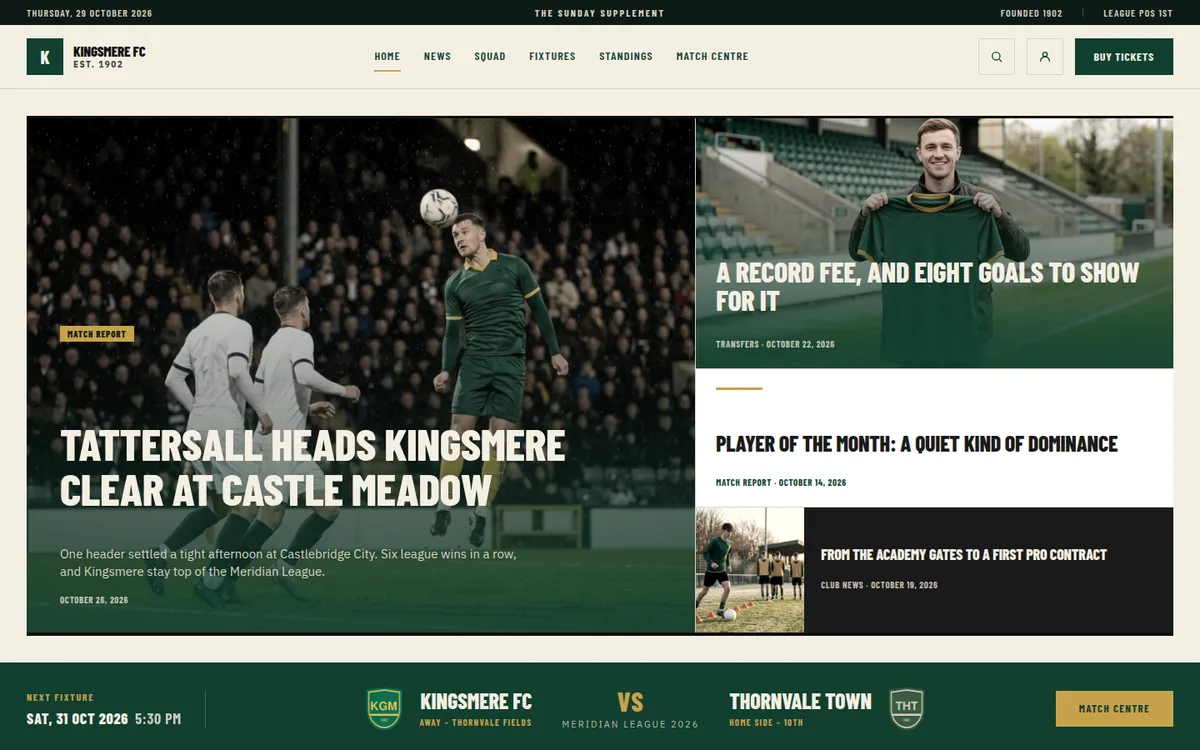
The Sunday magazine sister of Heritage Broadsheet. Same fonts and cream paper, in bottle green, with more room for stories and numbered section bars. Demo club: Kingsmere FC.
Home page, top to bottom:
- Four lead stories: one big, three smaller.
- The next fixture on a full-width green band.
- 01 Recent Results.
- 02 Long Reads & Features: a feature article with three shorter reads beside it.
- 03 Standings & Fixtures: the top 8 of the table next to the upcoming games.
- 04 Squad.
- 05 Match Centre: the latest match report.
- Official partners: 6 logos on a dark band.
Around the pages: a dark strip above the header with today’s date, “The Sunday Supplement”, the year the club was founded and its league position. A next fixture bar sits above the footer.
🚀 Next steps
- Install a design: requirements and your first install.
- Make It Your Club: swap the demo club, news, header and partners for your own.
- Change Colors: put the design in your club’s colors.
- Replace, Remove and Backups: switch to another design.