

Every AnWP Club Kit design takes its colors from the Kadence palette. Change the palette and the design follows: header, buttons, links, news, match blocks and standings. For the few colors the palette doesn’t reach, there’s Additional CSS, and it’s yours: the design never touches it.
🎯 Change the palette
- Go to Football Leagues > Site Designs > My Site and click Customize colors and fonts (or open Appearance > Customize).
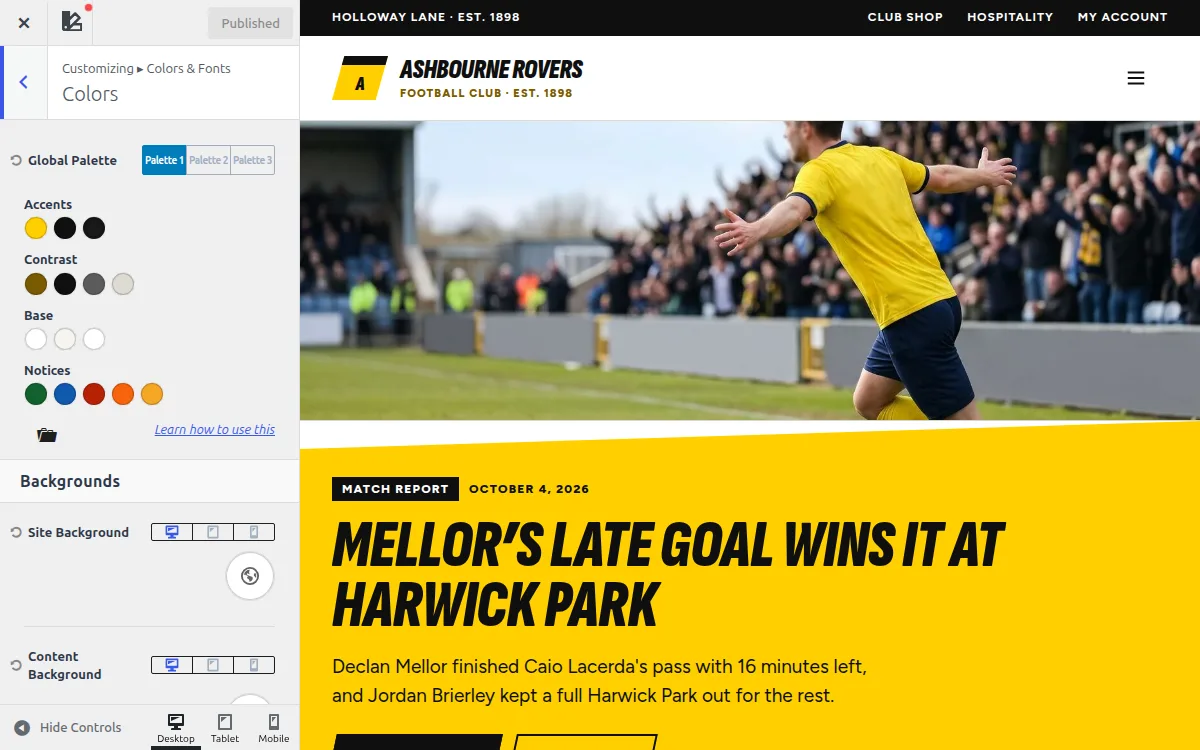
- Open Colors & Fonts > Colors.
- In Global Palette, stay on the Palette 1 tab: the design’s colors are there. Click a color and pick a new one. The preview updates as you go.
- Click Publish.
What each palette color does
The palette shows its colors in groups: Accents, Contrast, Base and Notices. Hover a swatch to see its number (the tooltip text describes Kadence’s defaults, so color 3 says “Strongest text”). The designs use colors 1-10 as below and leave the Notices alone.
Colors 1 and 3 are the club colors. Swapping just those two is usually all it takes to put a design in your club’s colors (Grounded Power, Red Scoreline and Yellow Wedge work a little differently, see below the table). The table also lists each design’s original values, so you can go back.
| Swatch | Used for | Heritage Broadsheet | Heritage Supplement | Broadcast Prime Time | Grounded Power | Red Scoreline | Yellow Wedge |
|---|---|---|---|---|---|---|---|
| 1 (Accents, 1st) | Main club color: buttons, badges, your club’s row in the standings | #5A1A1F Oxblood | #123F2F Bottle Green | #FF5A00 Tangerine | #0D8457 Emerald | #C8102E Club Red | #FFD000 Club Yellow |
| 2 (Accents, 2nd) | Dark panels, covers and black bands | #1A1A1A | #1A1A1A | #141110 | #0B1016 | #111111 | #0F0F0F |
| 10 (Accents, 3rd) | Deepest dark shade: dark strips, link hover in the Heritage designs, row hover on the black bands in Red Scoreline and Yellow Wedge | #1A0E0E | #0E1A15 | #0B0908 | #151D26 | #1C1C1C | #1A1A1A |
| 3 (Contrast, 1st) | Second club color: labels, rules, data bars. A darker shade of color 1 for links and small text in Grounded Power, Red Scoreline and Yellow Wedge | #C8A24A Gold | #C8A24A Gold | #1B6DFF Blue | #0B7A53 Emerald text | #B0081F Deep Red | #7A5A00 Ochre |
| 4 (Contrast, 2nd) | Headings | #0F0F0F | #0F0F0F | #0F0F0F | #0B1016 | #111111 | #0F0F0F |
| 5 (Contrast, 3rd) | Body text (small gray text in Red Scoreline and Yellow Wedge) | #3A3A3A | #3A3A3A | #3A3A3A | #3A4450 | #5C5C5C | #5C5C5C |
| 6 (Contrast, 4th) | Borders | #D8D2C4 | #D8D2C4 | #E8E4E0 | #C9D6E2 | #DCD7CF | #DDDAD1 |
| 7 (Base, 1st) | Page background | #F4EFE3 Cream | #F4EFE3 Cream | #FFFFFF | #FFFFFF | #FFFFFF | #FFFFFF |
| 8 (Base, 2nd) | Cards (Heritage) / alternate bands (Broadcast, Grounded Power) / quiet surfaces (Red Scoreline, Yellow Wedge) | #FFFFFF | #FFFFFF | #F7F5F2 | #EAF2F8 Ice | #E9E6E1 Stone | #F6F5F0 Paper |
| 9 (Base, 3rd) | Block editor background | #F4EFE3 | #F4EFE3 | #F7F5F2 | #FFFFFF | #FFFFFF | #FFFFFF |
Grounded Power, Red Scoreline and Yellow Wedge have one club color. Their color 3 is a darker shade of color 1, used for links and small colored text, so change the two together: your club color in 1, a darker shade of it in 3. In Grounded Power, color 10 is the lighter ink of the raised panels on the dark matchday panel, and color 2 the darker one.
Yellow Wedge is made for a light club color. Color 1 only ever fills shapes (the wedges, buttons, the table panel), always with black text on top, so a yellow or a sky blue works there. Keep color 3 dark enough to read on white.
The Away Kit, Broadcast Prime Time Dark, uses the same club colors as Broadcast Prime Time (1 #FF5A00, 3 #1B6DFF), but the rest of its palette is dark and some colors do different jobs: 2 #0B0908 dark bands, 4 #F2EEE9 headings, 5 #B8B0A8 body text, 6 #3F3733 borders, 7 #F2EEE9 text on dark, 8 #1B1716 alternate bands, 9 #141110 page background, 10 #0B0908 footer.
Keep text readable
Color 1 fills the buttons and badges, with text on top, and in the Heritage designs it’s the link color too. In Grounded Power, Red Scoreline and Yellow Wedge the links use color 3, so keep that one dark enough to read on white. A pale yellow or light sky blue there makes text hard to read. If your club color is light, pick Yellow Wedge, or put a darker shade of it in color 1 and the light one in color 3.
Colors the palette doesn’t change
A few colors are fixed on purpose, so results read the same in any club color. Here’s where to change them.
| What | Designs | Where to change it |
|---|---|---|
| Player page cards: background, border, row dividers, text on active tabs | All | Settings & Tools > Settings > Appearance > Layout Builder |
| Link color in page and news text | Broadcast Prime Time | Appearance > Customize > Colors & Fonts > Colors > Links Color |
| Tint of your club’s row in the standings | Heritage Broadsheet, Heritage Supplement | Additional CSS (example below) |
| Win / draw / loss colors in results, form and player records | Broadcast Prime Time | Additional CSS |
| Shades of the dark panels | Broadcast Prime Time | Additional CSS |
| Grays: rules and raised cells on the dark panels, small muted text, dark button hover | Grounded Power | Additional CSS |
| Body text | Red Scoreline | Appearance > Customize > Colors & Fonts > Typography > Base Font |
| Grays: rules and small muted text on the black bands, and the header button hover in Red Scoreline | Red Scoreline, Yellow Wedge | Additional CSS |
In Grounded Power, Red Scoreline and Yellow Wedge, results follow the palette: a win is color 1 and a loss is color 2. In Grounded Power your club’s standings row is a light tint of color 1 too.
Everything else: Additional CSS
Add your own CSS in Appearance > Customize > Additional CSS. It loads after the design’s CSS, so your rule wins over a design rule with the same selector.
The design’s color variables are the easiest thing to target. For example, to recolor your club’s standings row in the Heritage designs:
:root {
	--hfl-highlight-row: #DDE4F0;
	--hfl-highlight-points: #C9D5EA;
}
And the win / draw / loss colors plus the dark panels in Broadcast Prime Time:
:root {
	--bp-win-fill: #DCFCE7;
	--bp-win-ink: #166534;
	--bp-draw-fill: #ECE9E5;
	--bp-draw-ink: #3A3A3A;
	--bp-loss-fill: #FEE2E2;
	--bp-loss-ink: #A52F26;
	--bp-ink-1: #1B1716;
	--bp-ink-2: #241E1C;
}
And the grays in Grounded Power:
:root {
	--gp-steel: #2A3542;
	--gp-ink-hover: #26303B;
	--gp-muted: #5B6B7A;
	--gp-muted-on-ink: #8FA3B5;
}
And the grays on the black bands in Red Scoreline and Yellow Wedge:
:root {
	--rs-rule-on-ink: #333333;
	--rs-muted-on-ink: #D6D3CE;
	--rs-ink-hover: #333333;
	--yw-rule-on-ink: #333333;
	--yw-muted-on-ink: #D6D3CE;
}
These are the shipped values. Change the ones you need and delete the rest. The design’s variable and class names keep their names in AnWP Club Kit updates, so rules like these keep working.
What survives updates, Replace and Remove
| When you… | Your palette | Your Additional CSS |
|---|---|---|
| Update AnWP Club Kit | Kept | Kept |
| Replace the design | Replaced by the new design’s palette | Kept |
| Remove the design | Back to your pre-install palette (if Restore settings from the backup is ticked) | Kept |
| Restore a backup (Backups tab) | From the backup | From the backup |
An update also refreshes the design’s own CSS with any fixes, while your settings stay as you left them.
Restoring a backup replaces your Additional CSS
A backup holds your Additional CSS as it was when the backup was taken. Restoring it puts that version back. A backup of your current settings is taken first, so you can undo the restore, but copy any CSS you added since then before you restore.
Palette changes are part of your settings, so a Replace brings the new design’s palette. Note your colors before you replace, then set them again in the new design.
🆘 Troubleshooting
Part of the page kept its old color
Check the fixed colors above. Player page cards come from the Layout Builder settings, not the palette.
My Additional CSS rule does nothing
Your selector is probably weaker than the design’s. Additional CSS only wins when the selectors are equally specific, so copy the design’s selector from your browser’s inspector. If you use a caching plugin, clear its cache too.