

Every club, player, game, competition, season and league you create gets a number. Shortcodes, blocks and PHP snippets use that number to say which one you mean. This page covers where to read it, and – more useful in practice – which kind of number each attribute is asking for, because that’s where most “my shortcode shows nothing” reports come from.
🚀 Most of the time you don’t need the ID
Start here before you go hunting. The Shortcode Builder, the block editor and the Layout Builder all pick entities by name and write the number for you. Of the 140 ID fields across the shortcode forms, 137 have a picker: 133 open the FL Selector modal and 4 are plain name dropdowns. Only three are a bare text box.
- Shortcode Builder – Football Leagues > Shortcodes. Pick a shortcode, click the magnifier next to any ID field, search by name, click the plus. The ID lands in the field and in the generated shortcode.
- Gutenberg blocks – the FL blocks open the same modal from the block sidebar.
- Layout Builder – you never type an entity ID inside a layout. Blocks inherit the entity from whatever page is being rendered. The only IDs a layout uses are its scope (“apply this layout to these clubs / competitions / games”), and those are picked through the same modal.
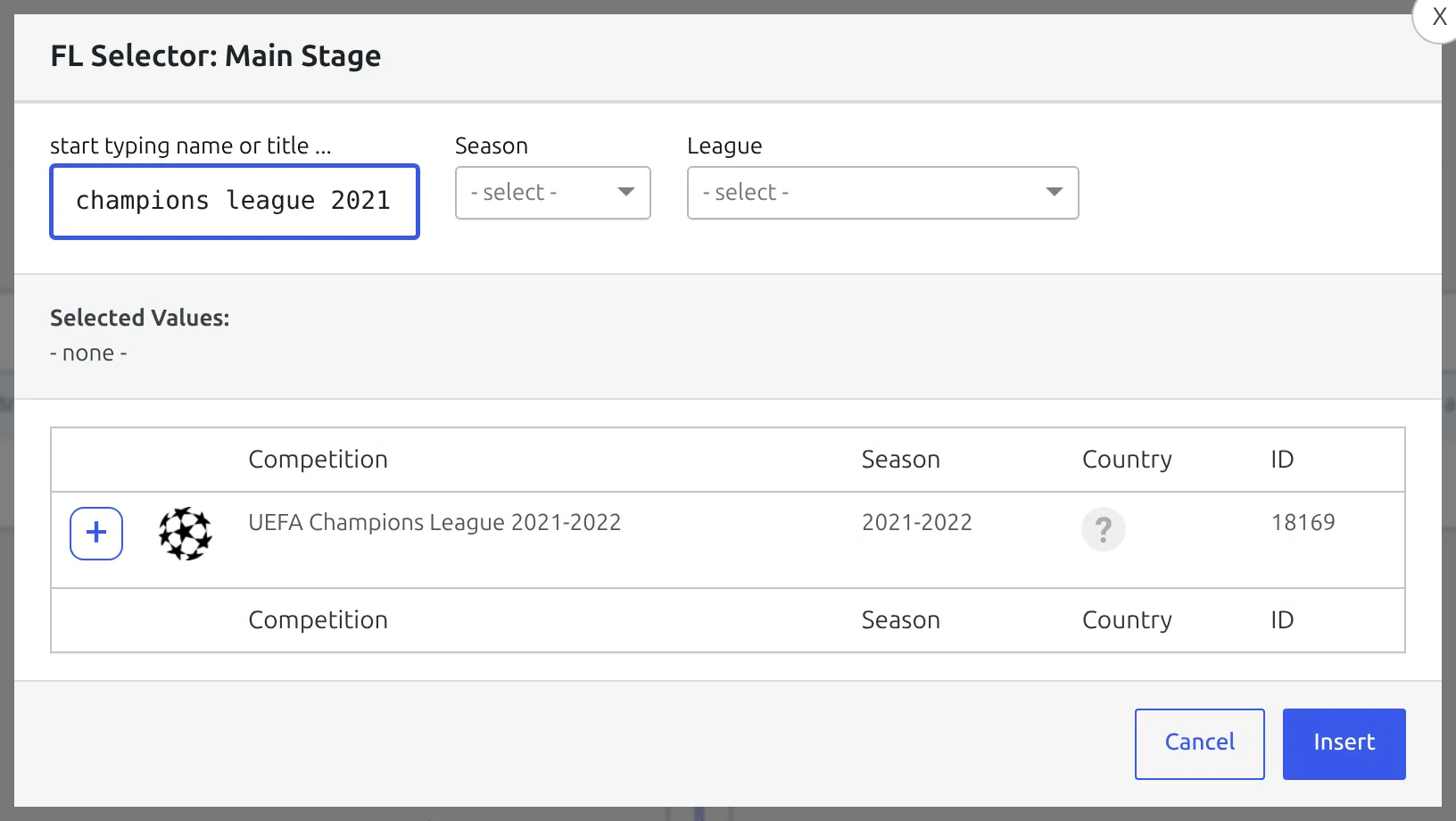
The modal is also a lookup tool in its own right. Every one of its eleven contexts – player, staff, referee, club, match, competition, main stage, stage, season, league, stadium – returns a table with an ID column, and it has search plus season, league, club, country and date filters. If you just want to read a number, opening any shortcode’s picker is usually faster than finding the right list screen.
So you genuinely need a raw ID when you’re typing a shortcode by hand, pasting one from the forum, filling in group_id or partial, writing PHP, or debugging. Not often otherwise.
🎯 Which ID does the attribute actually want?
This is the part that costs people the most time. Several attributes are named in a way that suggests one entity and want another, and the failure is completely quiet.
A misspelled attribute is thrown away without a word
Every FL shortcode drops any attribute it doesn’t declare. There’s no warning, no error and nothing in the log – the attribute simply isn’t there when the template runs, so the shortcode renders zero bytes. If a shortcode you typed by hand shows nothing, check the attribute name before you doubt the ID. [anwpfl-match id="123"] renders nothing; the attribute is match_id.
| Shortcode | Attribute | What it wants |
|---|---|---|
[anwpfl-match] | match_id | A game ID. Plain id is not an attribute here and is discarded. |
[anwpfl-competition-header] | id | A competition ID. There’s no competition_id attribute on this one. |
[anwpfl-standing] (free) | id | A Standing Table ID, not a competition ID. |
[anwpfl-standing-advanced] (PRO) | id | A Standing Table ID. |
[anwpfl-standings] (PRO, plural) | competition_id | A competition stage ID. The form labels it “Competition Stage ID”. |
[anwpfl-standings] | main_stage_id | One or more main-stage IDs, comma-separated. |
[anwpfl-bracket] (PRO) | competition_id | The knockout stage ID. Give it a round-robin stage or a parent competition and it renders nothing. |
[anwpfl-bracket-advanced] (PRO) | competition_id | A stage ID, same rule. |
[anwpfl-results-matrix] (PRO) | standing_id | A Standing Table ID. The older competition_id + group_id pair still works but is deprecated, and group_id defaults to 1, which is a literal group number rather than “the first group”. |
[anwpfl-suspension-risk] (PRO) | game_id | A game ID. The builder currently writes include_ids for this field, which the shortcode doesn’t declare – edit it to game_id by hand. |
[anwpfl-tag-posts] (PRO) | id | A club, game, competition, player, staff or referee ID – the entity whose tags drive the post query. Not a tag ID. |
[anwpfl-matches] | outcome_id | A club ID. Wins and losses are shown from that club’s point of view, and only in the slim layout. |
[anwpfl-standing], -advanced, -standings | partial | "1-5" is a place range. A bare number like "45" is a club ID, and shows that club’s row with two above and two below. |
[anwpfl-matches], [anwpfl-matches-section] | group_id | A group number inside one stage, not a post ID. It’s only meaningful together with a competition or stage ID. |
[anwpfl-clubs], [anwpfl-competition-list], [anwpfl-matches] | include_ids, exclude_ids | IDs of the entity that shortcode lists – clubs, competitions and games respectively. The type is different on each one. |
Two attributes that quietly cancel each other
On [anwpfl-matches], season_id is ignored whenever competition_id is set. A competition already belongs to a season, so the season filter is skipped rather than combined. If you’re getting games from the wrong season, this is usually why. Use stage_id instead of competition_id if you need both filters to apply, or drop the competition and filter by season and league.
Also on [anwpfl-matches]: competition_id pulls in every stage of that competition, because show_secondary is on by default. stage_id never does – it matches that one stage and nothing else.
Posts and terms are numbered separately
Almost everything in Football Leagues is a WordPress post and has a post ID. Seasons and Leagues are the exception – they’re taxonomy terms and have term IDs, which are counted in a different table. Term 80 and post 80 are unrelated. That’s the only reason this distinction matters, but it matters often enough that it used to have its own help article.
| Entity | Kind of ID | Where the list lives |
|---|---|---|
| Club | Post ID | Clubs & People > Clubs |
| Player | Post ID | Clubs & People > Players |
| Staff | Post ID | Clubs & People > Staff |
| Referee | Post ID | Clubs & People > Referees |
| Stadium | Post ID | Clubs & People > Stadiums |
| Transfer (PRO) | Post ID | Clubs & People > Transfers |
| Competition, and every stage of one | Post ID | Competitions > Competitions |
| Game | Post ID | Competitions > Matches |
| Standing Table | Post ID | Competitions > Standing Tables |
| Suspension (PRO) | Post ID | Competitions > Suspensions |
| League | Term ID | Competitions > Leagues |
| Season | Term ID | Competitions > Seasons |
| Layout (PRO) | Post ID | Layout Builder > All Layouts |
Reading the ID out of the address bar
Open the entity for editing and look at the browser’s address bar. Posts and terms use different query arguments, so you’re looking for a different word depending on what you opened.
Any club, player, game, competition, stage, standing, stadium, referee, staff member, layout or transfer – the number comes after post=:
/wp-admin/post.php?post=1234&action=editA season or a league – the number comes after tag_ID=:
/wp-admin/term.php?taxonomy=anwp_season&tag_ID=80&post_type=anwp_competitionNote the capital letters in tag_ID – it catches people out when they type the URL rather than copy it. Older links in the shape edit-tags.php?action=edit&taxonomy=…&tag_ID=… still work and use the same argument name, so a URL pasted from an old forum post isn’t wrong.
Where the admin shows you an ID
The ID column on list screens
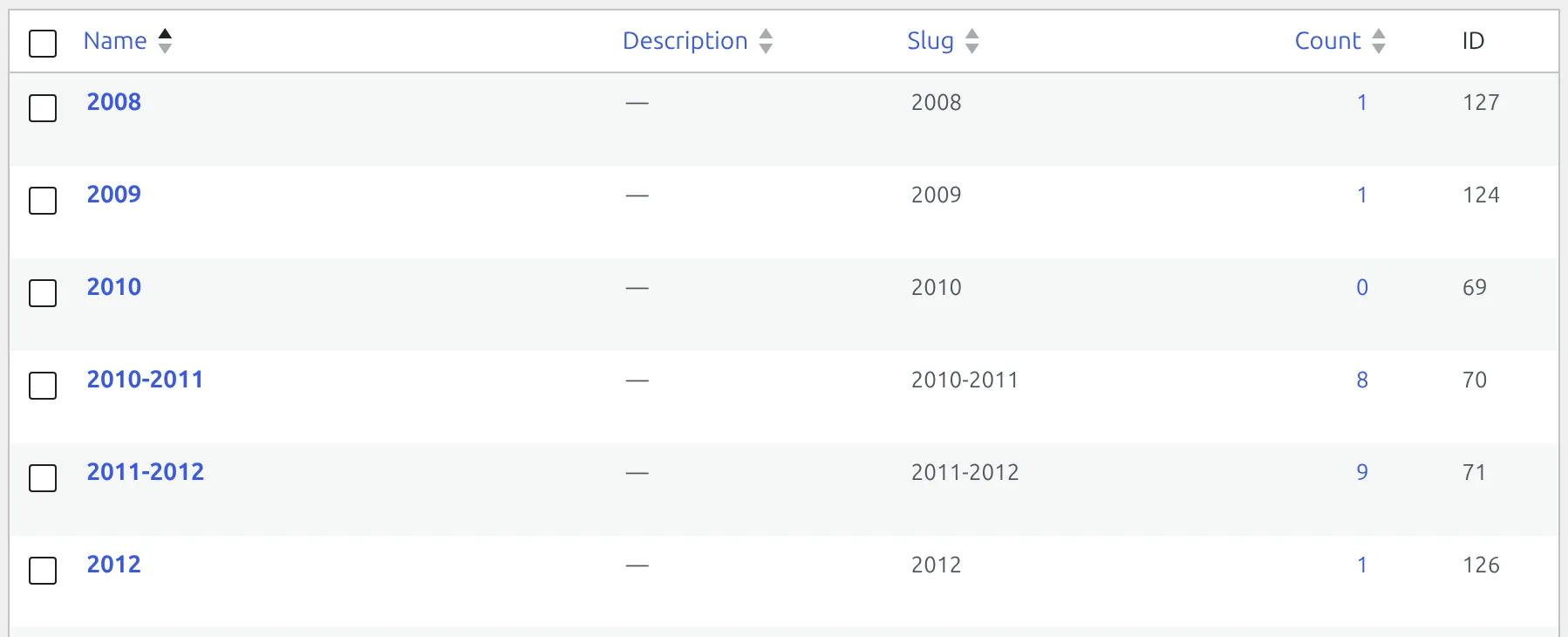
Clubs, Players, Matches, Competitions, Standing Tables, Stadiums, Referees, Staff, Leagues and Seasons all have an ID column, and it’s the last column on the row. On the eight post types you can click the column heading to sort by ID; on Leagues and Seasons you can’t, because term columns aren’t sortable.
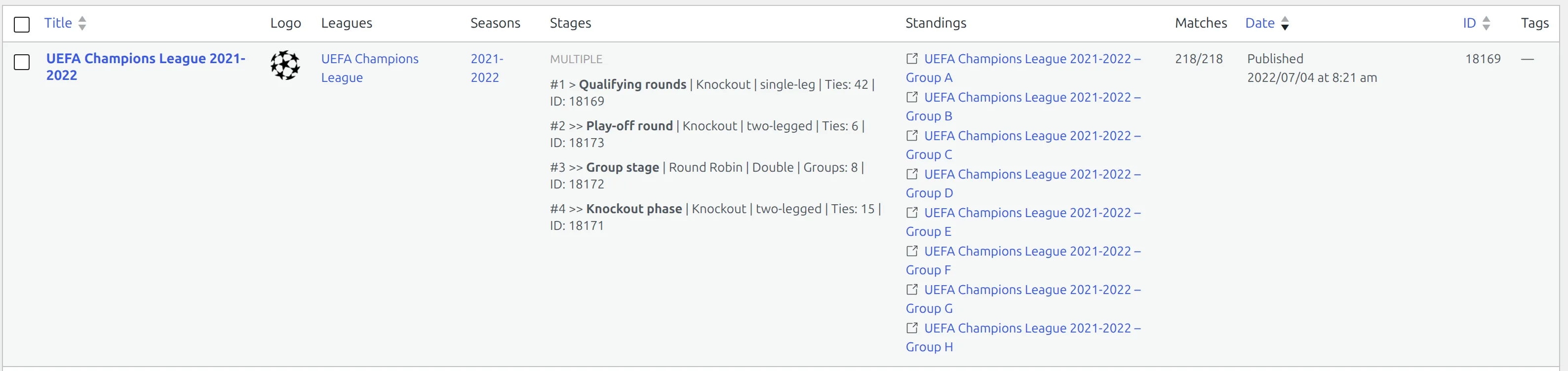
Two PRO screens have no ID column at all: Layout Builder > All Layouts and Clubs & People > Transfers. Open the item and read the address bar instead. On the layouts list, don’t mistake the “IDs:” line inside the Layout Info cell for the layout’s own number – those are the clubs, competitions or games the layout is scoped to.
The Competitions list prints the whole stage tree
The Stages column on Competitions > Competitions is the quickest way to see a multistage competition’s structure. A single-stage competition prints one line ending in ID: 89. A main stage prints itself with a single > and then one indented >> line per secondary stage, each ending in its own ID.
Every stage is also its own row in that list, so you can find a secondary stage by searching for it directly. But only the main stage’s row prints the full tree – a secondary stage’s row shows just itself.
A game’s editor prints five IDs in one line
Open any game from Competitions > Matches and look at the green bar above the editor. It reads the competition, league, season, round and group in one strip, each with its number.

The pair in brackets after the competition title is main stage ID - stage ID. On a single-stage competition both numbers are the same. On a multistage one the first is the parent and the second is the stage this game actually belongs to, which makes this the fastest way in the whole plugin to read a secondary stage’s ID.
One screen answers most ID questions
If you need a competition’s league and season term IDs, open any game in that competition rather than visiting the Leagues and Seasons lists. Both numbers are already on the bar. The one ID not in this strip is the game’s own – read that from the ID column or the address bar.
Stage, group and round IDs inside a competition
Open a competition and look at the Tournament box. The active stage panel prints Stage ID in its top-right corner, every group or tie card prints Group ID in its footer, and every round block ends with Round ID.
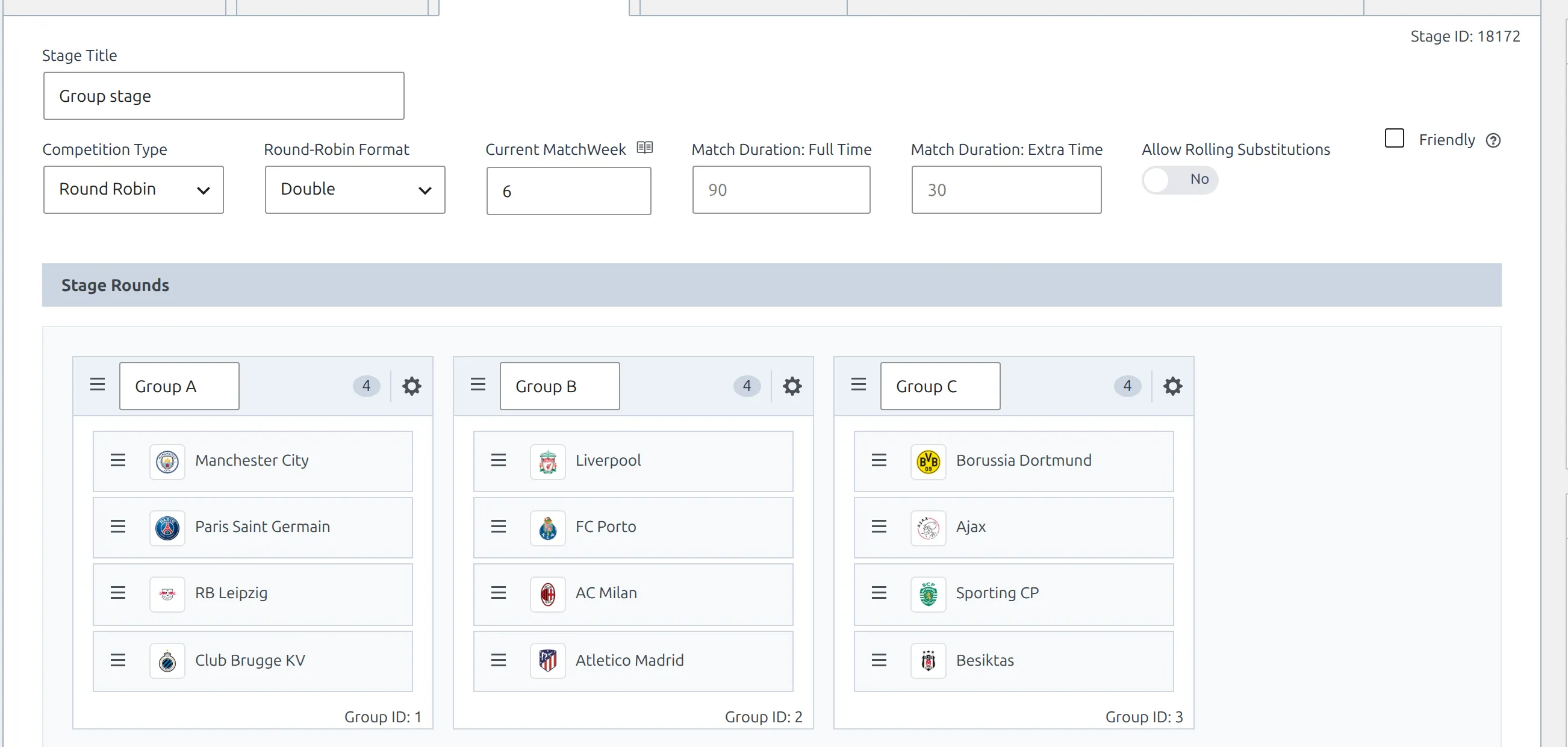
Stage ID is a post ID. Group ID and Round ID are not – they’re numbers inside that one stage, so group 1 exists in every stage of every competition. That’s why group_id on its own never identifies anything; it always travels with a competition or stage ID.
Multistage: the main stage and its stages
In a multistage competition, each stage is a separate entity with its own ID. One of them is the main stage and the others hang off it. A real example:
| ID | Competition | Stage | Role | Type |
|---|---|---|---|---|
| 89 | Ligue 1 2022-2023 | Regular Season | Main stage | Round-robin |
| 91 | Ligue 1 2022-2023 | Relegation Round | Stage of 89 | Knockout |
So [anwpfl-bracket competition_id="89"] renders nothing – 89 is the round-robin regular season and there’s no bracket to draw. [anwpfl-bracket competition_id="91"] is the one that works. The attribute is called competition_id, but it wants the knockout stage.
Why the picker sometimes can’t find your stage
“Group stage” isn’t in the list
The FL Selector runs in two different modes for competitions, and the modal’s own heading tells you which. FL Selector: Main Stage lists single-stage competitions and main stages only – secondary stages are deliberately hidden. FL Selector: Stage lists every stage. If a stage seems to be missing, you almost certainly have the Main Stage picker open. It’s not missing; it’s on the field below.
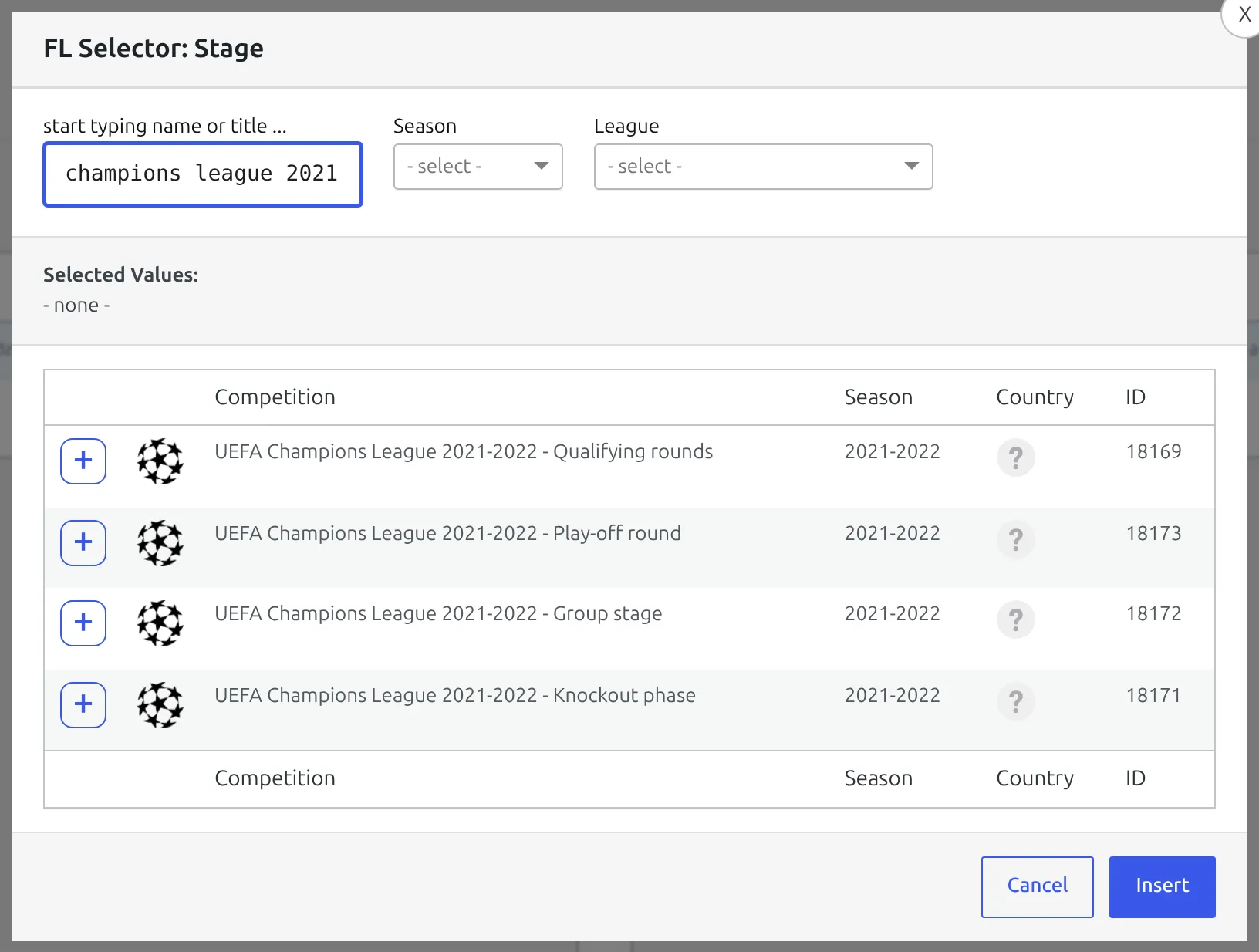
On [anwpfl-matches] the two fields sit right next to each other: Competition ID opens the Main Stage picker and pulls in every stage; Competition Stage ID opens the Stage picker and matches exactly one. [anwpfl-standings] has the same pair the other way round – its competition_id is the Stage picker and its main_stage_id is the Main Stage one.
Most shortcodes use the Main Stage picker – the statistics family, players, cards, calendar, charts, scoreboard, head-to-head, transfers and the competition header all take the parent competition and roll its stages together. Only four fields use the Stage picker: both brackets, stage_id on [anwpfl-matches], and competition_id on [anwpfl-standings]. Each of those can only draw one stage at a time.
Standing Table IDs
A standing table is its own entity with its own ID, separate from the competition it belongs to. [anwpfl-standing], [anwpfl-standing-advanced] and [anwpfl-results-matrix] all want that ID and nothing else. Three ways to get it:
- Competitions > Standing Tables, read the ID column.
- The Standings column on the Competitions list links each table straight to its editor – the number is then in the address bar.
- Don’t look it up at all. The Shortcode Builder offers these tables as a dropdown of names, one of the four ID fields that isn’t a modal.
🆘 Troubleshooting
There’s no ID column on my list screen
Open Screen Options at the top right of the list and tick the ID column – WordPress remembers column visibility per user, so it can be off for you and on for someone else. The exceptions are Layout Builder and Transfers, which never had one.
My shortcode renders nothing at all
In order of how often it turns out to be the cause:
- The attribute name isn’t one the shortcode declares, so it was discarded. Check it against the table above, or rebuild the shortcode in Football Leagues > Shortcodes and compare.
- It’s the right name but the wrong kind of ID – a competition ID where a stage or a standing table was wanted.
- The entity exists but has no data to show yet.
The fastest check is to build the same shortcode in the Shortcode Builder and diff it against yours. The builder can’t produce a wrong attribute name.
partial=”45″ shows the whole table
partial with a bare number wants a club ID, and that club has to be in this table. If it isn’t – wrong club, wrong season, wrong competition – the slice can’t be resolved and the full table is shown instead of an error. Check the number against Clubs & People > Clubs, and check that the club appears in the standing you’re rendering.
I need hundreds of IDs at once
No list screen solves that well. Use Settings & Tools > Data Import > CSV Export instead – the Players, Clubs, Stadiums, Staff and Referees exports each carry an ID column, so you get every number in one spreadsheet. If a database update is still pending, the Clubs export is held back until it finishes.
📚 Related
- Shortcode Builder – build any shortcode without typing an ID
- Multistage competitions – how stages relate to each other
- Bracket shortcode – the one that needs a knockout stage ID
- Standing shortcode and Standings shortcode – the singular and plural pair that want different IDs
- CSV Export – IDs in bulk