

Providers publish fixtures in waves. A cup adds its next round after each draw, a league adds postponed games back with a new date, a tournament publishes its knockout stage once the groups end. Discover New Games checks your imported competitions for fixtures the API has now but your site doesn’t, and creates them.
🚀 Where to find it
FL API Import > Discover New Games. The tab lists every competition saved to the Import Dashboard – the ones with an orange star on the API Leagues tab. Nothing else shows up here.
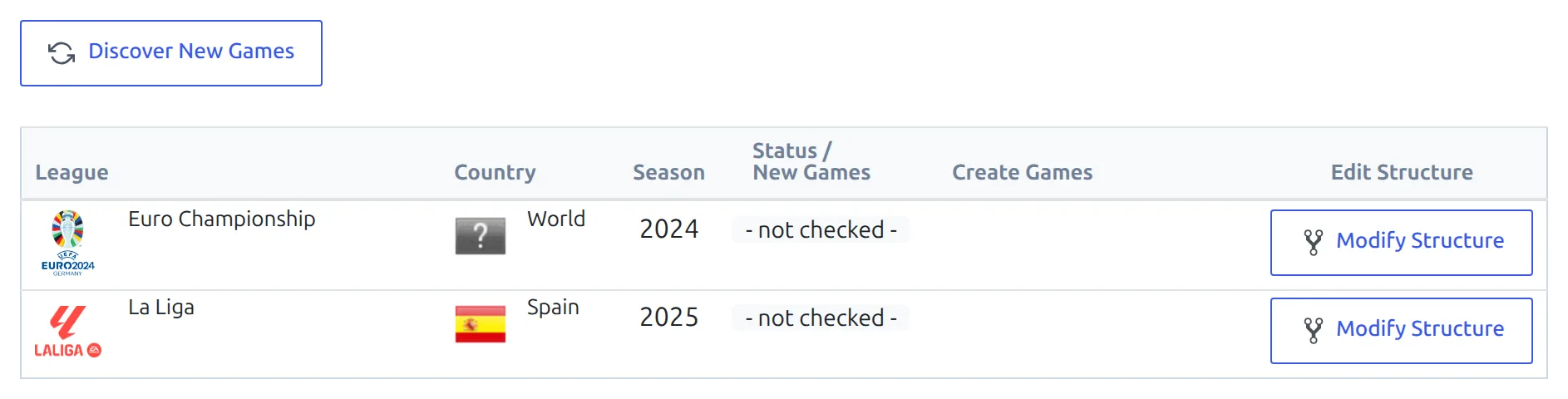
Each row is one competition and season. Until you run a check, the Status / New Games column reads – not checked –.
Find the new games
Click Discover New Games. The plugin works through the list one competition at a time and compares the provider’s fixture list for that season with the games already imported. A spinner moves down the rows as it goes.
When a competition is done, its row shows the number of fixtures that aren’t on your site. Competitions with nothing new drop off the list, so after a full check you’re left with the ones that need work.

The count covers every fixture of the season the provider lists and your site doesn’t know, in any round. It includes rounds you haven’t mapped yet and rounds you chose not to import, so it isn’t always the number Create Games will add.
Create the games
What you do next depends on where the new fixtures belong.
New games in a round you already have
This is the usual case for a league: a postponed game, or the rest of a season the provider published late. Click Create Games on the row. A progress line counts the games up, then the plugin checks the competition again. If everything was created, the row disappears.
A new round or stage
After a cup draw, the new round isn’t mapped to anything on your site yet, so there’s nowhere to put the games. Don’t click Create Games first. Add the stage or round to your competition, then click Modify Structure on the row. In the Edit Competition Structure modal, map the provider’s new round to your stage, check the groups and ties it found, and click Update Competition Structure. Then create the games.
The full steps, with screenshots of the modal, are in Add New Games to a Multistage Competition. For the whole job on a real tournament, see Euro 2024 Knockout Stage.
Safe to repeat
Create Games only adds fixtures your site doesn’t have. Games you already imported aren’t touched, so you can run it after every draw or every week.
The other buttons
| Button | What it does |
|---|---|
| Logs | Lists what happened on this tab since you opened it: each competition checked, games created, and any errors from the provider. The list clears when you leave the page. |
| Get Your API Status | Shows your API-Football account, the plan with its end date, and today’s requests against your daily limit. It’s only there for a direct API-Football key – it’s hidden when you connect through RapidAPI. |
🆘 Troubleshooting
A competition isn’t in the list
The tab only shows competitions saved to the Import Dashboard. Click the star on the league’s row in API Leagues so it turns orange, then reload this tab. Competitions added with Lazy Import are never listed. The table also shows ten rows at a time – after a check, the ones with nothing new drop off and make room for the rest.
The count stays the same after Create Games
The leftover fixtures belong to a round that isn’t mapped, so Create Games skipped them, and pressing it again answers No Games to Create. Map the round with Modify Structure if you want those games. If every round is mapped and games are still missing, see the troubleshooting in Add New Games to a Multistage Competition.
The provider has the games, but the count is 0
With Cache some requests on in FL API Import > Settings, fixture lists are kept for up to 10 minutes. Wait and run the check again.
📚 Related
- Import Dashboard – save competitions here and schedule their updates
- Add New Games to a Multistage Competition – mapping a new round, step by step
- API Import for a Round-Robin League – the first import of a league season