

Display multiple matches with powerful filtering options. Use this shortcode to show fixtures, results, or a combination of both, filtered by competition, club, date range, and more.
Basic Usage
[anwpfl-matches competition_id="123"]This displays all matches from competition ID 123. Add parameters to filter, sort, and customize the display.
Quick Examples
[anwpfl-matches competition_id="12" type="fixture" limit="10"]Next 10 upcoming fixtures from competition 12.
[anwpfl-matches filter_by_clubs="5" type="result" limit="5" sort_by_date="desc"]Last 5 results for club ID 5, newest first.
All Parameters
Query Parameters
| Parameter | Default | Description |
|---|---|---|
competition_id |
(empty) | Competition ID(s). Comma-separated for multiple. Supports %competition_id% from URL |
stage_id |
(empty) | Competition Stage ID(s), comma-separated. Targets a specific stage, including secondary stages like groups or knockout rounds |
season_id |
(empty) | Filter by Season ID |
league_id |
(empty) | Filter by League ID |
group_id |
(empty) | Filter by Group ID (for group stage competitions) |
type |
(all) | Match status: result (finished), fixture (upcoming), or empty for all |
limit |
0 | Maximum matches to show. Use 0 for unlimited |
show_secondary |
1 | Include secondary stages (multistage competitions). Use 0 to disable |
Note
By default, show_secondary="1" includes all stages of multistage competitions. The Competition Selector only shows main stages. To get matches for a specific stage (knockout or playoff), enter the stage ID manually in competition_id and set show_secondary="0".
Filter Parameters
| Parameter | Default | Description |
|---|---|---|
filter_by_clubs |
(empty) | Show matches involving these Club IDs (comma-separated) |
home_club |
(empty) | Filter by specific home club ID |
away_club |
(empty) | Filter by specific away club ID |
stadium_id |
(empty) | Filter by Stadium ID |
filter_by_matchweeks |
(empty) | Show specific matchweeks/rounds (comma-separated) |
include_ids |
(empty) | Show only these Match IDs (comma-separated) |
exclude_ids |
(empty) | Hide these Match IDs (comma-separated) |
Date Filter Parameters
| Parameter | Default | Description |
|---|---|---|
date_from |
(empty) | Start date in YYYY-MM-DD format (e.g., 2024-01-15) |
date_to |
(empty) | End date in YYYY-MM-DD format |
days_offset |
(empty) | First day to show, counted from today. 0 = today, -7 = 7 days ago, 1 = tomorrow. This day is included |
days_offset_to |
(empty) | First day to leave out, counted from today. 1 = stop at the end of today, 8 = stop after day +7. This day is not included |
These two turn into a rolling date window that moves with the calendar, so a page built once keeps showing the right games. Use them instead of date_from / date_to whenever the range is relative to “now”.
How the window is counted
The window is half-open. days_offset is the first day included and days_offset_to is the first day left out, so the last day you actually see is today + days_offset_to − 1.
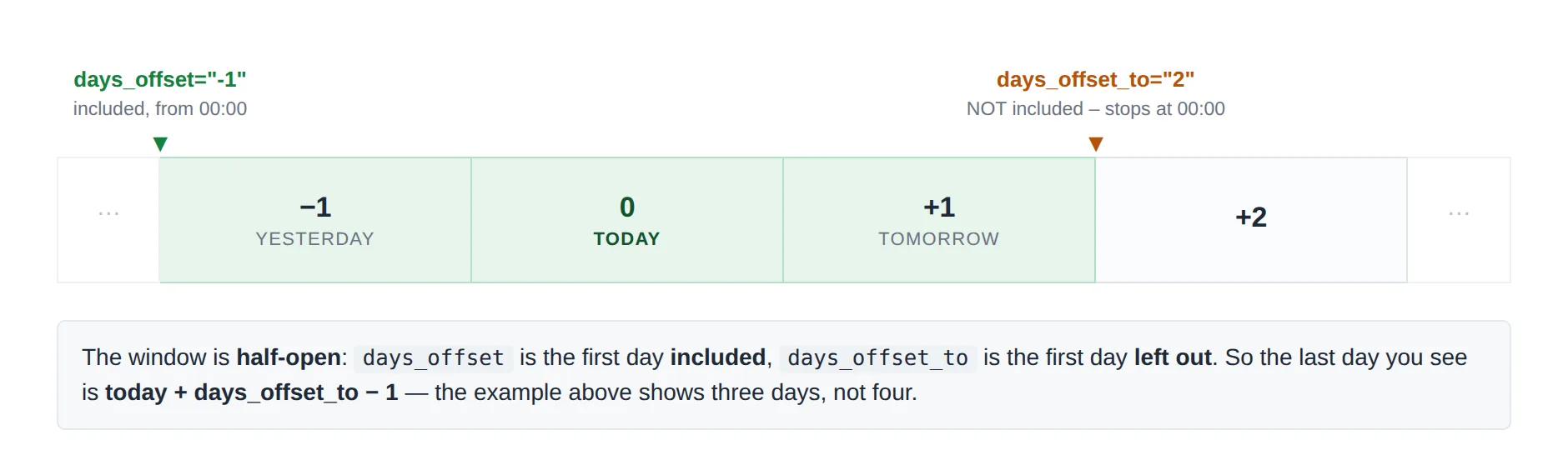
The end day is excluded – this is the usual mistake
To show today only you need days_offset="0" days_offset_to="1", not days_offset_to="0". And days_offset="-1" days_offset_to="1" is not “today” – it is yesterday and today. Both bounds are measured from midnight, so a game kicking off at 20:00 on day +1 still belongs to day +1.
Ready-made windows
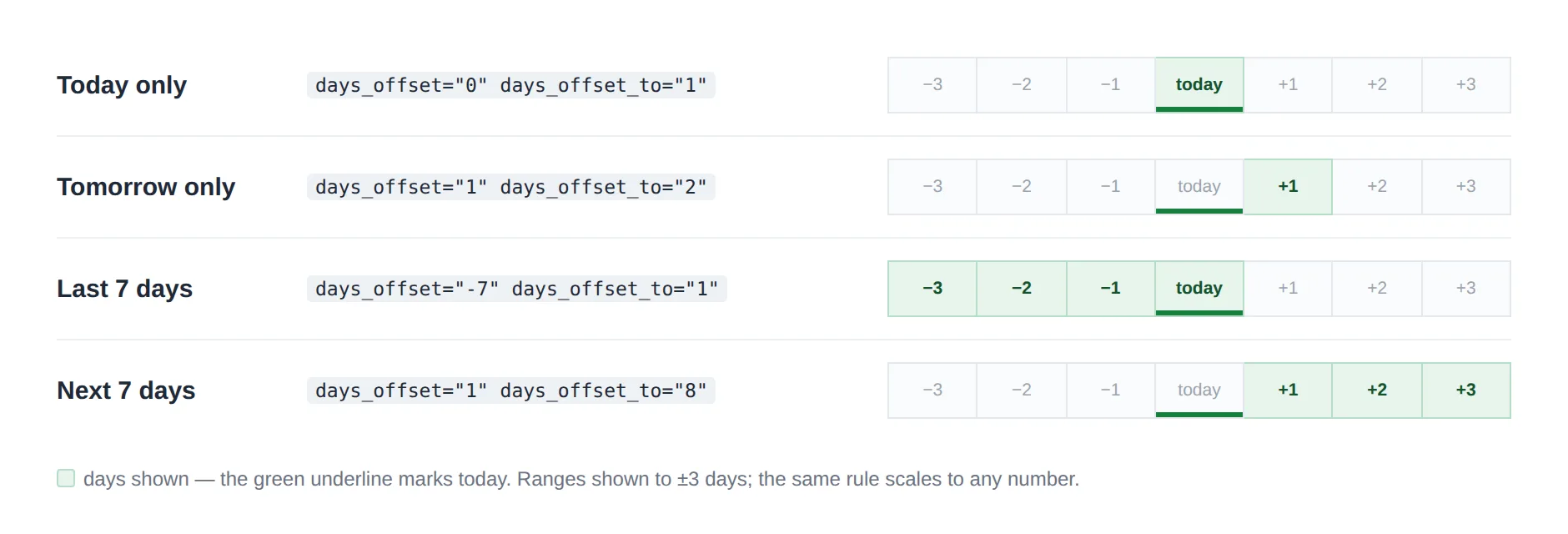
Leave one of them out to get an open-ended window: days_offset="0" on its own means “today and everything after it”, and days_offset_to="0" on its own means “everything before today”.
Tip
Pair a rolling window with type="fixture" or type="result" to build “Next games” and “Latest results” blocks that never need editing. Note that cache is ignored whenever days_offset or days_offset_to is set, so the window can never go stale.
Sorting & Grouping Parameters
| Parameter | Default | Description |
|---|---|---|
sort_by_date |
(none) | Sort by date: asc (oldest first) or desc (newest first) |
sort_by_matchweek |
(none) | Sort by matchweek: asc or desc |
group_by |
(none) | Group matches: day, month, matchweek, stage, competition |
group_by_header_style |
default | Group header style: default or secondary |
Display Parameters
| Parameter | Default | Description |
|---|---|---|
layout |
slim | Display layout: slim (default), modern, simple. With the PRO add-on active you also get plain |
show_club_logos |
1 | Show club logos. Use 0 to hide |
show_match_datetime |
1 | Show match date and time. Use 0 to hide |
competition_logo |
1 | Show competition logo. Use 0 to hide |
club_links |
1 | Make club names clickable. Use 0 to disable |
league_name |
(site setting) | Show the league name on each match row. 1 to show, 0 to hide, empty follows the site setting |
outcome_id |
(empty) | Club ID to show win/draw/loss icons for (slim layout only) |
no_data_text |
“Nothing found” | Custom message when no matches found |
show_load_more |
0 | Show “Load More” button. Use 1 to enable |
Performance Parameters
| Parameter | Default | Description |
|---|---|---|
cache |
(off) | Cache the rendered output for this many seconds (e.g. 3600 = 1 hour). Best for static match lists shown on every page, like a footer or sidebar, so they skip repeated database queries. Ignored when days_offset or days_offset_to is set |
Layout Comparison
| Layout | Best For | Features |
|---|---|---|
slim |
Default, most uses | Clean horizontal layout, score centered, logos on sides |
modern |
Featured matches | Card-style design, larger logos, more visual impact |
simple |
Lists, sidebars | Text-focused, minimal design, compact |
plain (PRO) |
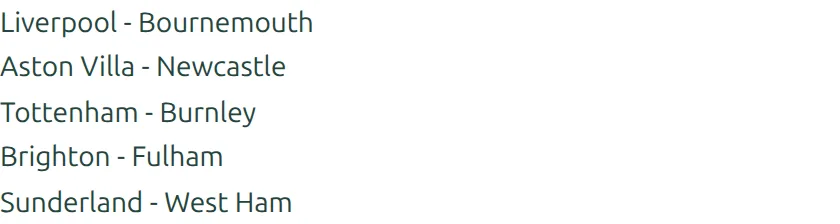
Link lists, footers, related-content blocks | One text link per game reading “Home club – Away club”. No date, no logos, no score |
The plain layout needs the PRO add-on
The free plugin registers slim, modern and simple. PRO adds plain to the same layout attribute, so it also shows up in the shortcode builder’s Layout dropdown once PRO is active. Without PRO the value is ignored and you get the default slim layout.
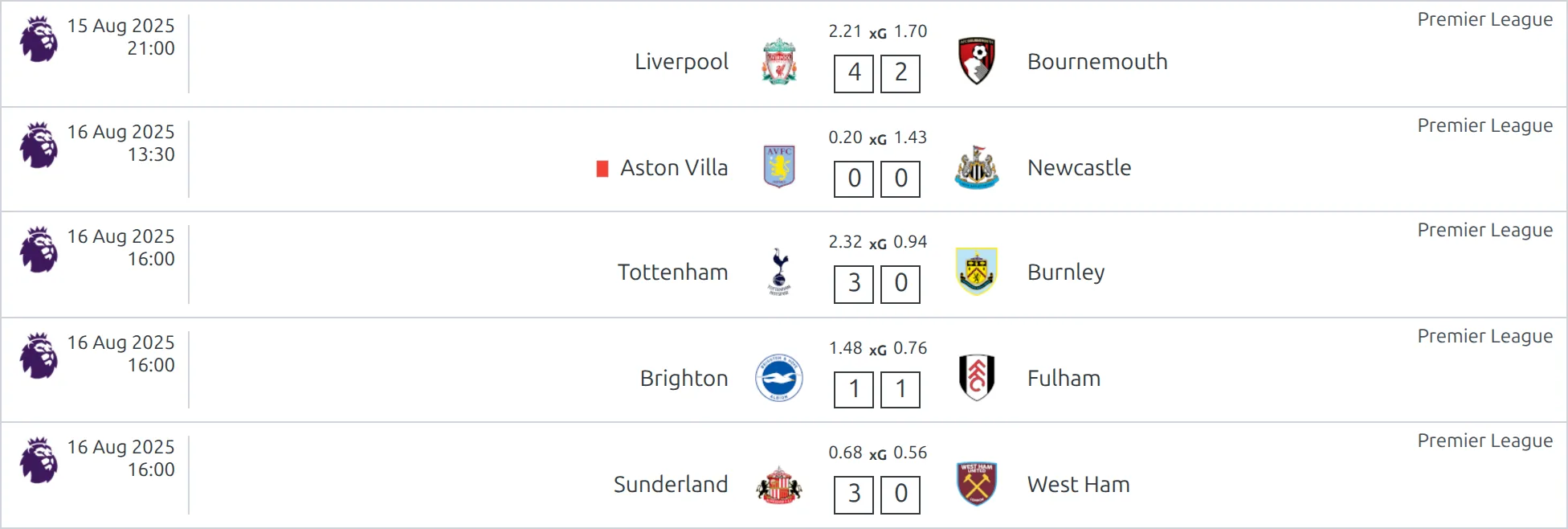
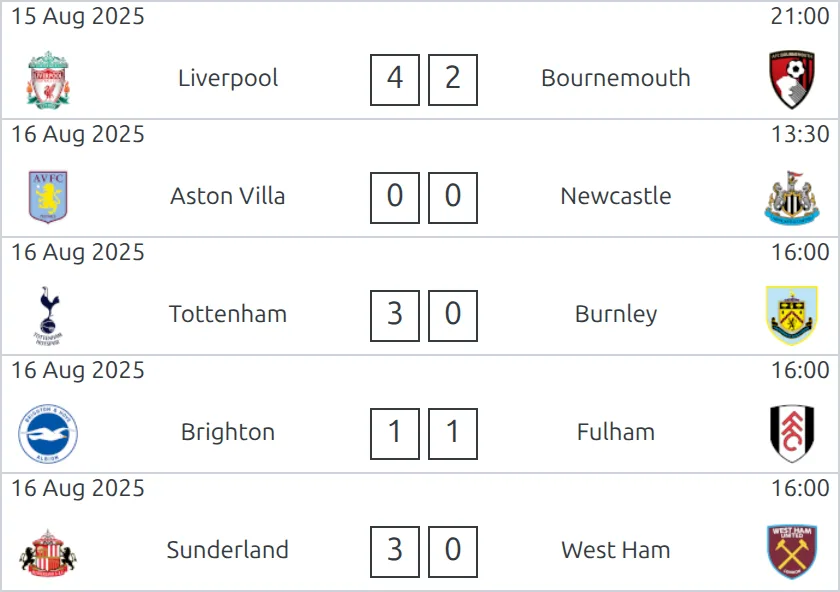
The same five games, rendered by each layout. slim is shown at full content width; modern, simple and plain are shown in a narrow column, which is where you would normally use them:
slim (default)
modern
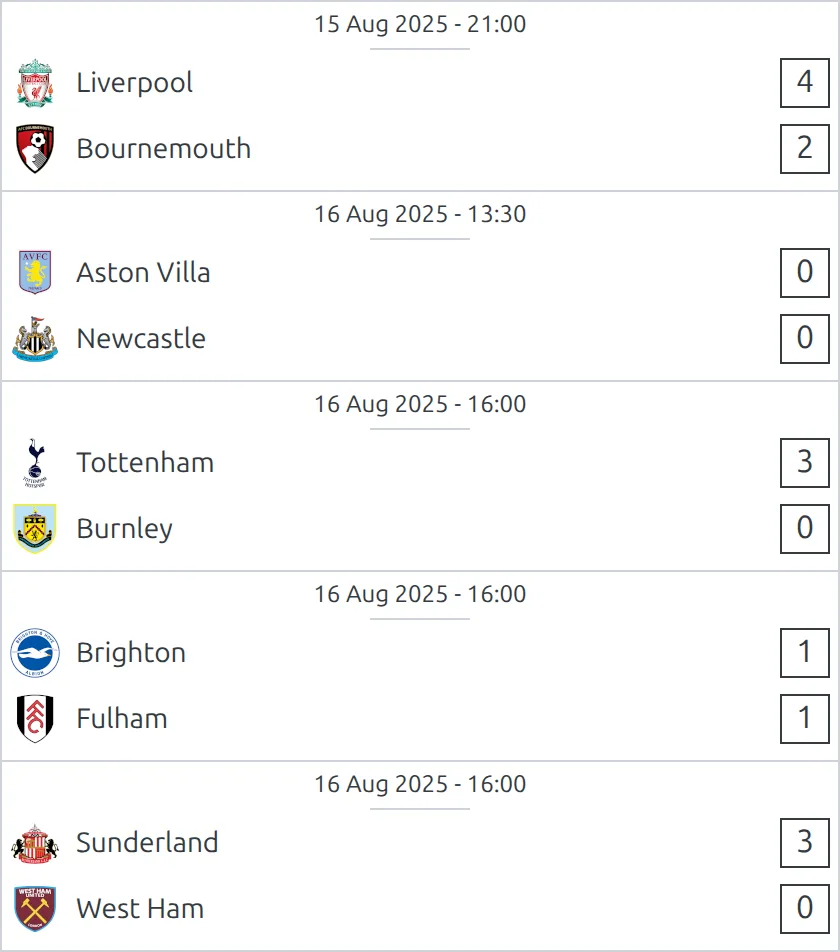
simple
plain (PRO)
Examples
Example 1: Competition Fixtures Page
When to use: Dedicated page showing all upcoming matches for a competition.
[anwpfl-matches competition_id="12" type="fixture" sort_by_date="asc" group_by="matchweek"]Result: All upcoming fixtures grouped by matchweek, sorted chronologically.
Example 2: Recent Results
When to use: Homepage widget showing latest results across all competitions.
[anwpfl-matches type="result" limit="10" sort_by_date="desc" group_by="day"]Result: Last 10 results from all competitions, newest first, grouped by day.
Example 3: Club Page – All Matches
When to use: On a club’s page showing their complete fixture list.
[anwpfl-matches filter_by_clubs="8" season_id="5" sort_by_date="asc" outcome_id="8"]Result: All matches for club 8 in season 5, with W/D/L indicators.
Example 4: This Week’s Matches
When to use: Dynamic widget showing matches around the current date.
[anwpfl-matches days_offset="-3" days_offset_to="7" sort_by_date="asc" group_by="day"]Result: Matches from 3 days ago through day +6, grouped by day. Day +7 is the first day left out – use days_offset_to="8" if you want a full week ahead.
Example 5: Home Matches at Stadium
When to use: Stadium page showing all matches played there.
[anwpfl-matches stadium_id="15" type="fixture" sort_by_date="asc"]Result: All upcoming fixtures at stadium 15.
Example 6: Dynamic URL-Based Filtering
When to use: Competition template where the competition changes based on URL.
[anwpfl-matches competition_id="%competition_id%" group_by="matchweek"]URL: yoursite.com/fixtures/?competition_id=12
Result: Reads competition ID from URL, allowing one page to serve multiple competitions.
Common Use Cases
Complete League Page Setup
[anwpfl-competition-header id="12" season_selector="1"]

<h2>Recent Results</h2>
[anwpfl-matches competition_id="12" type="result" limit="10" sort_by_date="desc"]

<h2>Upcoming Fixtures</h2>
[anwpfl-matches competition_id="12" type="fixture" limit="10" sort_by_date="asc"]
Head-to-Head Setup
[anwpfl-matches home_club="5" away_club="8" type="result" limit="10" sort_by_date="desc"]Shows matches where club 5 was home and club 8 was away.
Troubleshooting
“Nothing found” message?
- Remove filters one by one to identify which is too restrictive
- Check that competition/season/club IDs exist and are correct
- Verify matches exist with the specified type (result vs fixture)
- Check date filters aren’t excluding all matches
Wrong matches appearing?
- Check if
show_secondary="0"is needed to exclude secondary stage matches - Verify the competition ID is correct (not the league ID)
- Clear the plugin cache: FL Settings & Tools > Toolbox > Clear Cache
Sorting not working?
- Use lowercase values:
ascordesc - Only use one sort parameter at a time (
sort_by_dateORsort_by_matchweek)
Performance Note
Using limit="0" with no filters can load thousands of matches. Always use appropriate filters or limits to ensure good page performance. If the same list appears on every page (footer, sidebar), add cache="3600" so the matches are fetched once and reused for an hour instead of queried on every page load.
Related
[anwpfl-match]– Display a single match with full details[anwpfl-match-next]– Display club’s next upcoming match[anwpfl-match-last]– Display club’s most recent result- Premium:
[anwpfl-matches-scoreboard]– Horizontal scrolling scoreboard - Premium:
[anwpfl-matches-section]– Matches with date tabs