

Premium users have access to dedicated email support directly from the WordPress admin panel. The Support page automatically collects system information to help resolve issues faster.
🚀 Accessing the Support Page
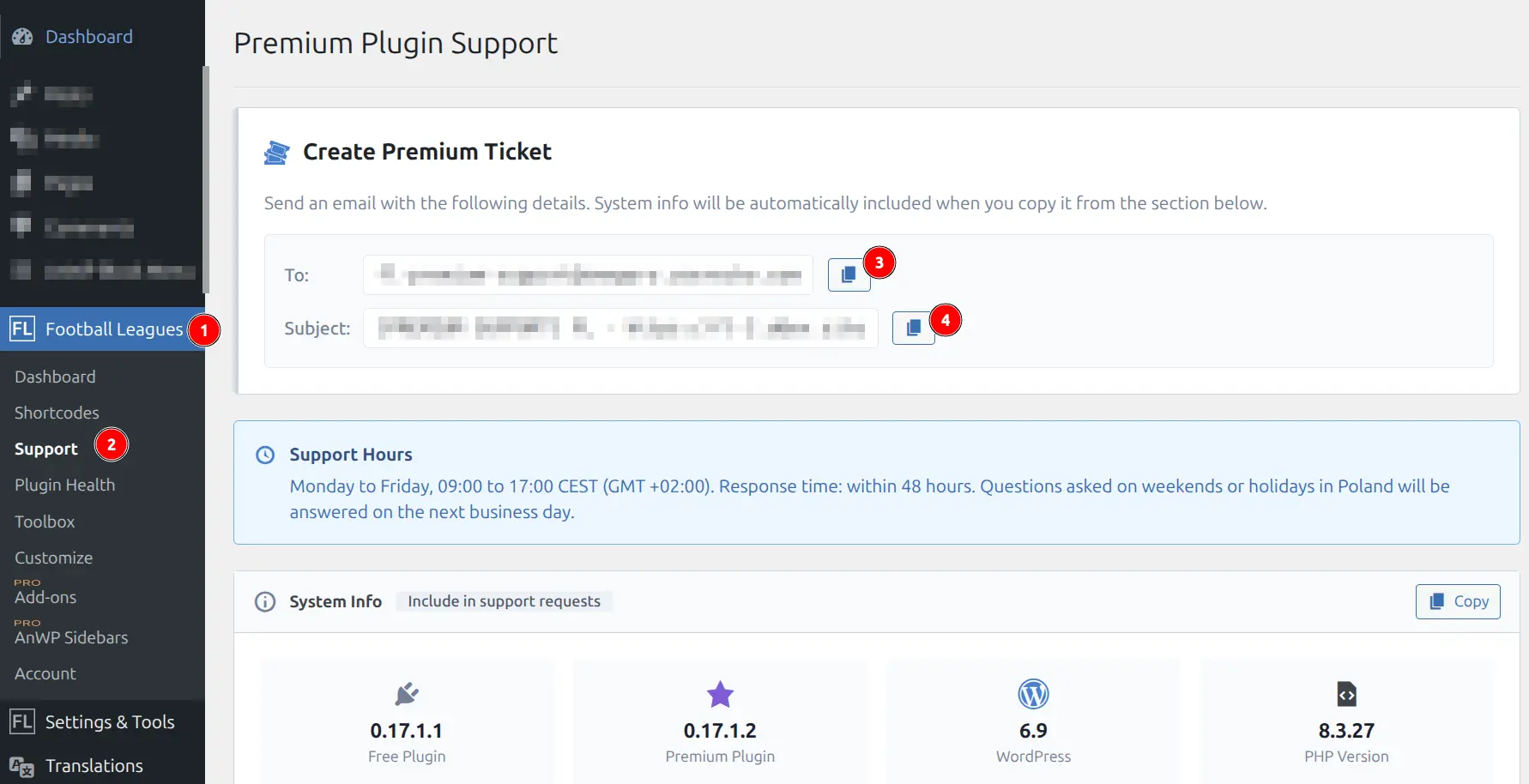
Navigate to Football Leagues → Support in your WordPress admin. This page displays:
- Contact email address (pre-formatted for quick copying)
- System information collector
- Quick links to documentation
📧 Creating a Support Ticket
Follow these steps to submit a support request:
Step 1: Copy the Email Address
Click the Copy button next to the support email address. The email and subject line are pre-formatted for tracking.
Step 2: Collect System Information
Click the Copy System Info button to collect diagnostic information. This data helps us identify issues quickly:
- Plugin versions (Core and Premium)
- WordPress and PHP versions
- Site timezone settings
- Database table status
- Active plugins list
- Multisite configuration (if applicable)
Step 3: Compose Your Email
In your email, include:
- System information – Paste the copied data
- URL with the problem – The specific page where you’re experiencing issues
- Steps to reproduce – Clear instructions explaining how to recreate the problem
- Screenshots – Visual documentation of the issue (recommended)
Tip
Include annotated screenshots showing the exact location of the issue. This significantly speeds up the resolution process.
⏰ Support Hours & Response Time
| Business Hours | Monday – Friday, 09:00 – 17:00 (CEST/GMT+2) |
| Response Time | Within 48 hours on business days |
| Language | English |
📋 Request Categories
Bug Reports (Priority)
If something isn’t working as expected:
- Include system information (required)
- Provide the URL where the bug occurs
- List exact steps to reproduce the issue
- Attach screenshots showing the problem
CSS/Theme Conflicts
For display issues or visual glitches:
- Provide the URL of the affected page
- Include screenshots showing the problem
- Note your theme name and version
- Mention any page builders in use (Elementor, etc.)
Feature Requests
Suggestions for new features or improvements are welcome but handled at lower priority. Describe your use case clearly so we can understand the need.
✅ What’s Covered
- Bug fixes and troubleshooting
- Configuration help and usage questions
- Documentation clarification
- Basic setup guidance
❌ What’s Not Covered
- Custom development or code modifications
- Theme customizations
- Server configuration issues
- Third-party plugin conflicts (beyond basic diagnosis)
- Custom CSS styling
💡 Tips for Faster Resolution
- Check documentation first – Your answer might already be available
- One issue per ticket – Helps us track and resolve each problem
- Be specific – Include URLs, screenshots, and exact steps
- Test with default theme – Helps rule out theme conflicts
- Disable other plugins temporarily – Helps identify plugin conflicts
Note
Please use only the dedicated support email. Support requests sent via other channels (social media, contact forms) may not be tracked properly.