

Football Leagues Premium 0.18.0 ships a public REST API with 26 endpoints. Use it to build mobile apps, power external frontends, or sync match data from another system. This page documents every endpoint available in 0.18.0.
🚀 Quick start
- Go to Settings & Tools > API and enable one or both namespaces.
- For the authenticated namespace, create a WordPress Application Password: Users > Profile > Application Passwords.
- Test with the curl example below.
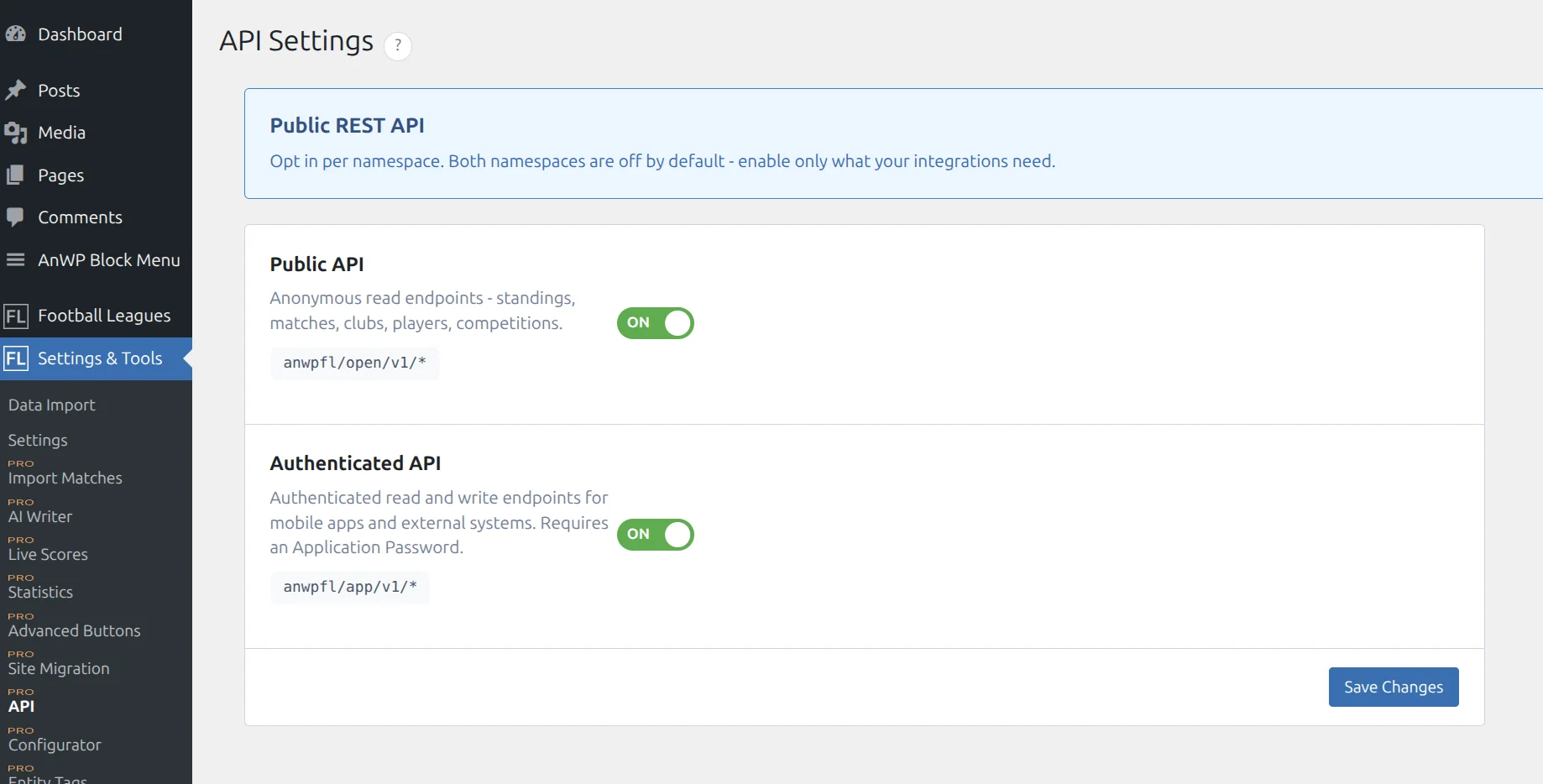
Two namespaces
| Namespace | Base URL | Auth | Methods | Toggle |
|---|---|---|---|---|
| Public | /wp-json/anwpfl/open/v1/* | None | GET (reads) | Public API |
| Authenticated | /wp-json/anwpfl/app/v1/* | Application Password | GET + POST + DELETE | Authenticated API |
Each namespace is toggled independently. When a toggle is off, every endpoint under that namespace returns 404 rest_no_route – the routes are not registered at all.
Note
The plugin-internal namespace /wp-json/anwpfl/v1/* is NOT part of the public contract. It powers the plugin’s own admin and frontend code and can change between releases without notice. Don’t use it from external integrations.
🔐 Authentication
The Authenticated API uses WordPress Application Passwords. Each password is independently revocable from the user profile page without affecting the account. Application Passwords require HTTPS – WordPress rejects them over plain HTTP.
Create an Application Password
- Open Users > Profile (or Users > All Users > [user] > Edit).
- Scroll to Application Passwords.
- Enter a name (for example: “Mobile app”) and click Add New Application Password.
- Copy the generated password. It looks like
abcd efgh ijkl mnop qrst uvwx. WordPress shows it only once.
Test it with curl
curl -u "username:abcd efgh ijkl mnop qrst uvwx" \
  https://example.com/wp-json/anwpfl/app/v1/auth/verify
A valid response returns HTTP 200 with a JSON body describing the current user’s capabilities. Wrong password or missing header returns 401.
Request and response conventions
Pagination
List endpoints accept per_page (default 20, maximum 100 – larger values are capped silently) and offset (default 0). Responses are plain JSON arrays, not envelopes.
Request bodies
POST and DELETE endpoints accept JSON only. Always send Content-Type: application/json.
Error format
Errors use the standard WordPress REST error shape:
{
  "code": "match_not_found",
  "message": "Match not found.",
  "data": { "status": 404 }
}| Status | Meaning |
|---|---|
| 200 | OK |
| 201 | Created (new match event) |
| 204 | No Content (event deleted) |
| 400 | Validation failed – check the code and message. |
| 401 | Not authenticated. Missing or bad credentials. |
| 403 | Authenticated but not allowed (captain scoping, wrong club). |
| 404 | Entity not found OR namespace toggled off. |
Tip
A 404 on a path you expect to work usually means the namespace toggle is off. Check Settings & Tools > API first.
📖 Public API (/open/v1/)
Anonymous read endpoints. Gated by the Public API toggle. Responses are cached at the origin (short TTLs, automatically invalidated on saves).
GET /standings/{id}
Returns a standings table with club, rank, points, goals for/against, and recent form.
GET /wp-json/anwpfl/open/v1/standings/12

{
  "id": 12,
  "competition": { "id": 88, "title": "Premier League 2025/26" },
  "season": { "id": 42, "title": "2025/26" },
  "table": [
    {
      "rank": 1,
      "club": { "id": 301, "title": "Arsenal", "logo": "...", "abbr": "ARS" },
      "played": 10, "won": 8, "drawn": 1, "lost": 1,
      "goals_for": 24, "goals_against": 7, "goal_diff": 17, "points": 25,
      "form": "wwwdw"
    }
  ]
}
GET /matches
Cross-competition match list. Returns compact match objects with nested home/away club (id, title, logo, abbr). Does not include events, lineups, or stats – use the detail endpoint for those.
| Query param | Type | Description |
|---|---|---|
competition_id | int | Filter by competition. |
club_id | int | Filter to matches where the club is home or away. |
season_id | int | Filter by season. |
date_from | YYYY-MM-DD | Kickoff on or after. |
date_to | YYYY-MM-DD | Kickoff on or before. |
per_page, offset | int | Pagination. Max 100. |
GET /matches/{id}
Full match detail: goals per period (half, full, extra, penalty), referee, coaches, events (goal, card, substitute, missed_penalty, penalty_shootout), lineups (home/away starters and subs), and team stats. Assistants and fourth official are added in v0.18.1.
{
  "id": 501, "kickoff": "2025-11-08 17:30:00", "match_week": 11,
  "finished": 1, "home_goals": 2, "away_goals": 1,
  "home_goals_half": 1, "away_goals_half": 1,
  "home_club": { "id": 301, "title": "Arsenal", "logo": "...", "abbr": "ARS" },
  "away_club": { "id": 302, "title": "Chelsea", "logo": "...", "abbr": "CHE" },
  "referee": 401,
  "assistant_1": 402, "assistant_2": 403, "referee_fourth": 404,   // v0.18.1
  "coach_home": 9001, "coach_away": 9002,
  "events": [
    { "type": "goal", "club": "301", "minute": "23", "player": "7001" }
  ],
  "lineups": {
    "home": { "starters": [7001, 7002, ...], "subs": [7011, ...] },
    "away": { "starters": [...], "subs": [...] }
  },
  "team_stats": {
    "home": { "possession": "55", "shots": "12" },
    "away": { "possession": "45", "shots": "8" }
  }
}
GET /matches/{id}/live-state
Anonymous live polling endpoint. Returns an 11-field allowlist suitable for short-interval polling (10-15 seconds). Sends Cache-Control: public, max-age=10.
{
  "match_id": 501,
  "live_status": "_2_nd_half",
  "current_time": "67", "max_time": "90",
  "home_score": "2", "away_score": "1",
  "finished": 0, "home_goals": 2, "away_goals": 1,
  "events": [ ... ],
  "lineups": {
    "home_starters": [7001, 7002], "away_starters": [7101, 7102],
    "home_subs": [7011], "away_subs": [7111]
  }
}
GET /competitions/{id}/matches
Matches filtered to one competition. Same response shape as /matches. Accepts match_week, status (finished or upcoming), date_from, date_to, per_page, offset.
GET /competitions
Competition list. Secondary stages (Group A, Round of 16, etc.) are excluded by default – the list stays at the “main competition” level. Accepts season_id, league_id, type, per_page, offset.
[
  {
    "id": 88, "title": "Premier League 2025/26", "slug": "premier-league-2025-26",
    "type": "league", "logo": "...",
    "league_id": 5, "league_text": "England",
    "season_ids": "42", "season_text": "2025/26",
    "multistage": ""
  }
]
GET /competitions/{id}
Competition detail. Adds title_full, multistage_main, stage_title, stage_order, competition_order, tmpl_layout, decoded groups (for group-stage competitions), and rounds (for knockout brackets) on top of the list fields.
GET /clubs
Club list (alphabetical by title). Clubs with empty titles are filtered out. Accepts nationality (ISO country code), is_national_team (0 or 1), per_page, offset.
[
  {
    "id": 301, "title": "Arsenal", "slug": "arsenal",
    "abbr": "ARS", "nationality": "ENG",
    "logo": "https://example.com/wp-content/uploads/arsenal.png",
    "main_color": "#EF0107"
  }
]
GET /clubs/{id}
Club detail. Adds city, is_national_team, stadium_id, logo_big, description, and details (decoded JSON array) on top of the list fields.
GET /clubs/{id}/squad
Active squad, or historical squad for a specific season. Accepts season_id (optional – omit for active roster).
{
  "club_id": 301, "season_id": 42,
  "players": [
    {
      "id": 7001, "name": "John Smith", "short_name": "J. Smith",
      "position": "FW", "number": "10",
      "nationality": "ENG",
      "photo": "https://example.com/wp-content/uploads/7001.jpg"
    }
  ]
}
GET /players/{id}
Player profile. Zero dates (0000-00-00) are normalized to empty strings. Career stats and match history are not in 0.18.0.
{
  "id": 7001, "name": "John Smith", "short_name": "J. Smith", "full_name": "John Albert Smith",
  "position": "FW", "team_id": 301, "national_team": 0,
  "nationality": "ENG", "nationalities": ["ENG"],
  "place_of_birth": "London", "country_of_birth": "ENG",
  "date_of_birth": "1998-05-12", "date_of_death": "",
  "height": "183", "weight": "78",
  "photo": "https://...", "photo_sm": "https://..."
}
GET /seasons · GET /leagues
Taxonomy term lists. Same shape for both: [ { "id": 42, "name": "2025/26", "slug": "2025-26", "count": 12 } ].
✍️ Authenticated API (/app/v1/)
Reads scoped to the current user, plus writes for match management. Gated by the Authenticated API toggle. Every request requires an Application Password.
Permission model
Write endpoints use the plugin’s existing per-match permission system. The answer to “can this user edit this match?” depends on user role and plugin meta:
| Role | Can write |
|---|---|
Administrator (manage_options) | Any match. |
| Competition supervisor | Any match in their assigned competitions. |
| Per-match editor | Only the matches they’re explicitly assigned to. |
| Club captain | Only their own club’s side in matches their club plays in. Captain writes to lineups, team-stats, and player-stats are automatically scoped to their club – attempts to write the other side return 403. |
| Any other logged-in user | Nothing – 403 on write endpoints. |
Match status, score, and events endpoints require strict edit permission – captains are excluded from those. Captains can use lineups, team-stats, player-stats, and the full save endpoint, but only for their club’s side.
GET /auth/verify
Confirms the credentials are valid and returns the current user’s capabilities. Use this as the first call after login to discover what the user can do.
{
  "user_id": 1, "display_name": "Admin", "role": "administrator",
  "capabilities": {
    "manage_all_matches": true,
    "managed_competitions": [],
    "managed_clubs": []
  },
  "plugin_version": "0.18.0",
  "site_name": "My League",
  "api_version": "1.0"
}
For admins, manage_all_matches is true and the managed arrays are empty (access to everything is implied). For supervisors/captains, manage_all_matches is false and the arrays list the specific entity IDs they manage.
GET /my/matches
Matches the current user can edit, filtered by date. Admins see all matches; supervisors see matches in their competitions; captains see matches their club plays in; per-match editors see their assigned matches.
| Query param | Values | Default |
|---|---|---|
date | today, upcoming, past_week | today |
per_page | 1-100 | 20 |
offset | int | 0 |
GET /my/competitions
Competitions the current user can manage. Admins get all active competitions. Others get only competitions where they’re listed as a supervisor.
[
  { "id": 88, "title": "Premier League 2025/26", "type": "league", "season_ids": "42", "league_id": 5 }
]
GET /matches/{id}/squad
Both clubs’ rosters for lineup selection. Returns home_club and away_club each with club_id, club_title, and players (array of {id, name, number, position}). Empty squads return players: [], never null.
GET /matches/{id}/live-state
Authenticated version of the public live-state endpoint. Returns the same shape as /open/v1/matches/{id}/live-state but for authorized editors (admin, supervisor, per-match editor, or the home/away club captain). Use this when the caller is also going to write updates – a single token handles both.
POST /matches/{id}/status
Set the live match clock status. Recalculates current_time and max_time based on the match’s configured duration. The optional offset shifts current_time within the current phase – for example {"status":"_1_st_half","offset":5} sets the clock to the 6th minute.
POST /wp-json/anwpfl/app/v1/matches/501/status
Content-Type: application/json

{ "status": "_2_nd_half", "offset": 2 }
Valid status values: _1_st_half, half_time, _2_nd_half, full_time, extra_time, penalty. Anything else returns 400 invalid_status.
POST /matches/{id}/score
Update the live scoreboard. Both fields are required. Updates live meta only – the match’s home_goals / away_goals columns are updated when the match is finalized.
POST /wp-json/anwpfl/app/v1/matches/501/score
Content-Type: application/json

{ "home_score": 2, "away_score": 1 }
POST /matches/{id}/events
Add a match event. The server assigns a UUID and returns the created event with status 201. The event is appended to match_events – existing events are preserved.
| Field | Required for | Notes |
|---|---|---|
type | all | goal, card, substitute, missed_penalty, penalty_shootout |
club | all | Must match home or away club ID. |
minute | all | 1-150. penalty_shootout allows 0. |
player | all | Player ID. |
card | card only | y, yr, or r |
playerOut | substitute only | Player coming off. player is the one coming on. |
scored | penalty_shootout only | 1 = scored, 0 = missed |
POST /wp-json/anwpfl/app/v1/matches/501/events
Content-Type: application/json

{ "type": "goal", "club": 301, "minute": 23, "player": 7001 }

// Response 201:
{ "id": "b8f3c9a2-...", "type": "goal", "club": "301", "minute": "23", "player": "7001" }
DELETE /matches/{id}/events/{event_id}
Remove a single event by its UUID. Returns 204 No Content on success, 404 if the event is not found.
POST /matches/{id}/lineups
Save starters, subs, captains, coaches, and custom shirt numbers for one or both clubs. Uses INSERT ON DUPLICATE KEY UPDATE – sending only home data leaves away data untouched. coach_home and coach_away accept a staff post ID.
POST /wp-json/anwpfl/app/v1/matches/501/lineups
Content-Type: application/json

{
  "home_starters": [7001, 7002, 7003, ...],
  "home_subs":     [7011, 7012],
  "away_starters": [7101, 7102, ...],
  "away_subs":     [7111],
  "captain_home":  "7001",
  "captain_away":  "7101",
  "coach_home":    "9001",
  "coach_away":    "9002",
  "custom_numbers": { "7001": "10", "7101": "7" }
}

// Response 200:
{ "match_id": 501, "saved": true }
Captain scoping: if the authenticated user is a club captain, the server rejects fields for the other side with 403. An empty payload returns 400 no_data.
POST /matches/{id}/team-stats
Save team-level match statistics. Keys are free-form (whatever your league tracks). Values are stored verbatim as strings.
POST /wp-json/anwpfl/app/v1/matches/501/team-stats
Content-Type: application/json

{
  "home": { "possession": "55", "shots": "12", "corners": "6" },
  "away": { "possession": "45", "shots": "8",  "corners": "3" }
}
POST /matches/{id}/player-stats
Save per-player stats (goals, assists, ratings, minutes played, etc.) for one or both sides. Only persists if the plugin’s “Allow player stats from frontend” option is enabled (FL+ Configurator > Match Live).
{
  "home_players": [ { "id": 7001, "goals": "1", "rating": "7.5" } ],
  "away_players": [ { "id": 7101, "goals": "0", "rating": "6.8" } ]
}
POST /matches/{id}/save
Available in v0.18.1. This endpoint will accept match officials (referee, assistants, fourth official) – see below.
Full match save. Follows the same save chain as the plugin’s frontend editor: updates core match fields, lineups, events, team stats, and player stats in one call; recalculates standings; closes live tracking if the match is marked finished.
Use this when you need a single atomic save at the end of a match. For in-progress updates, prefer the targeted endpoints above.
Match officials (available in v0.18.1). Send referee (main official), assistant_1, assistant_2, and referee_fourth as referee post IDs. Each is optional – omit a field to leave it unchanged, or send an empty string to clear it. These fields will also be returned by GET /matches/{id}.
{
  "finished": 1, "home_goals": 2, "away_goals": 1,
  "referee": 401, "assistant_1": 402, "assistant_2": 403, "referee_fourth": 404   // v0.18.1
}
What’s coming in 0.18.1+
- API Keys – per-integration credentials with revocation, instead of Application Passwords tied to a WordPress user.
- Rate limiting – per-key request throttles.
- Usage stats & audit log – see who’s calling what.
- Webhooks – push notifications for match events, score changes, match finished, standings updated.
- Expanded endpoints – create/update clubs and players, head-to-head, transfers, advanced stats.
🆘 Troubleshooting
Every request returns 404 rest_no_route
The namespace toggle is off. Open Settings & Tools > API and enable the toggle for the namespace you’re calling. Both toggles are off by default on a fresh 0.18.0 install.
Authentication keeps failing with 401
- WordPress rejects Application Passwords over plain HTTP. The site must be served over HTTPS.
- Check that the password is exactly what WordPress showed you (including the spaces). The header format is
Authorization: Basic base64(username:password-with-spaces)– curl’s-uflag handles this for you. - Application Passwords can be disabled by a security plugin. Look for “Application Passwords” in your security plugin’s settings.
POST returns 403 forbidden
The user is authenticated but doesn’t have edit permission for the match. Check the user’s role in the plugin – regular WordPress editors and authors have no edit permission on matches by default.
POST event returns 400 invalid_club
The club field in the event body must be the home or away club ID of this specific match. You can’t attach an event to an unrelated club.