

Display a single standing table with advanced filtering options including home/away filtering, matchweek range selection, and club exclusions. Extends the core standing shortcode with premium features.
Premium Feature
This shortcode requires the Football Leagues Premium plugin.
Basic Usage
[anwpfl-standing-advanced id="45"]This displays standing table 45 with access to all advanced features.
All Parameters
Selection Parameters
| Parameter | Default | Description |
|---|---|---|
id * |
(required) | Standing Table ID to display |
title |
(auto) | Custom title (overrides automatic) |
Filter Parameters
| Parameter | Default | Description |
|---|---|---|
exclude_ids |
(empty) | Club IDs to exclude (comma-separated) |
matchweeks |
(empty) | Filter by matchweeks: “5” (single) or “1-5” (range) |
filtered_data |
(all) | Data filter: home or away only |
Display Parameters
| Parameter | Default | Description |
|---|---|---|
layout |
default | Display layout: default or mini |
partial |
(empty) | Show partial: “1-5” (positions) or club ID (center on team) |
show_notes |
1 | Show notes below table. Use 0 to hide |
show_home_away |
(default) | Home/Away selector: yes, no, or empty for default |
club_links |
(from settings) | Link team names to their club pages. 1 yes, 0 no, empty follows the global Settings > Display > Standing setting |
bottom_link |
(none) | Show link to: competition or standing |
link_text |
(auto) | Custom text for bottom link |
cache |
(empty) | Cache the rendered output for this many seconds (3600 = 1 hour). Overrides the global setting for this shortcode only. Recalculating a table clears it right away – club renames and label changes wait for the time to run out |
* Required parameter
What the Output Looks Like
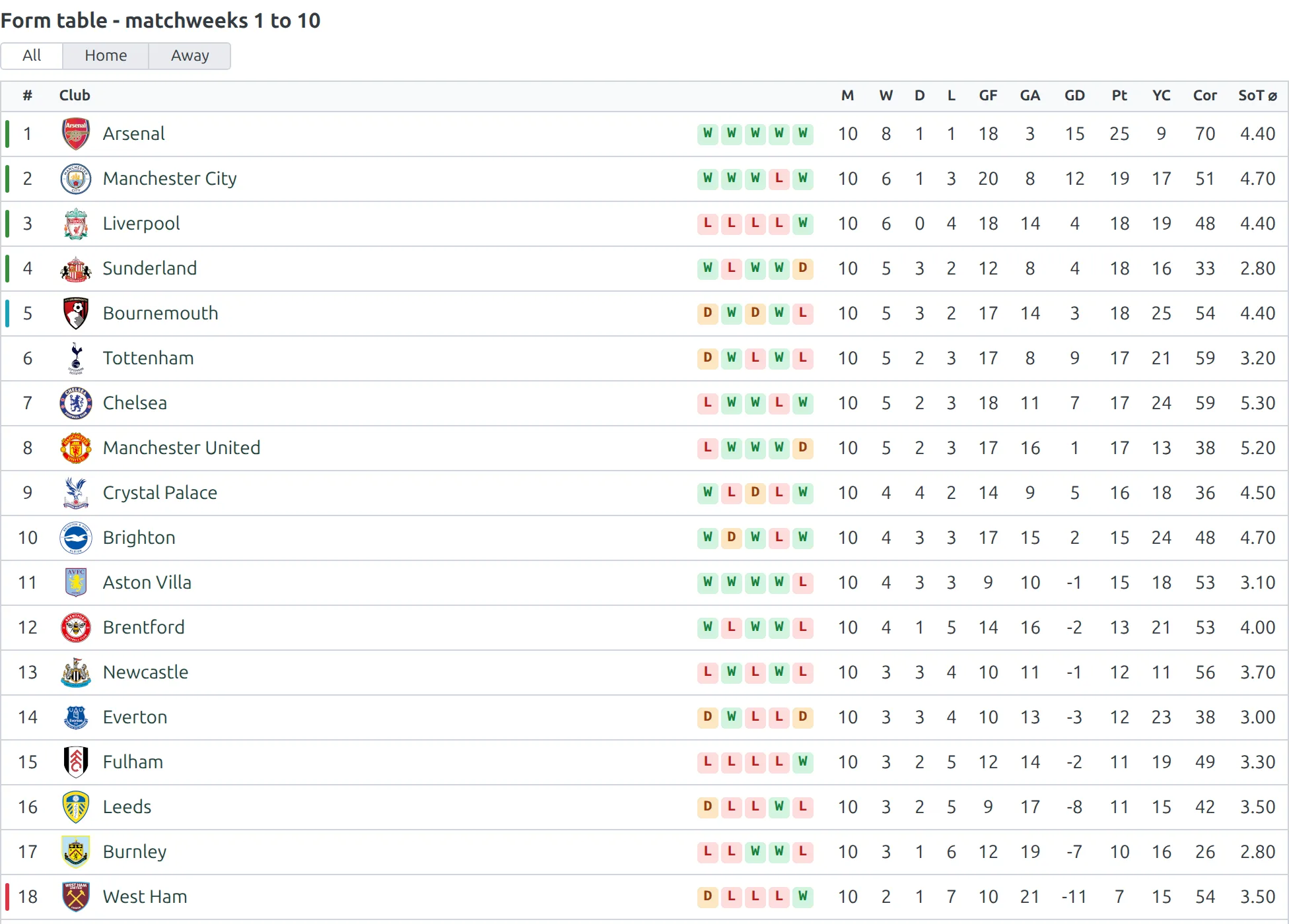
The table is recalculated from the filtered games only, so the positions, points and form strip all belong to the window you asked for – not the full-season table with rows hidden:
matchweeks=”1-10″
Examples
Example 1: Home Form Table
When to use: Show which teams are strongest at home.
[anwpfl-standing-advanced id="45" filtered_data="home" title="Home Form Table"]Result: Standings based only on home matches.
Example 2: Away Form Table
When to use: Show which teams perform best on the road.
[anwpfl-standing-advanced id="45" filtered_data="away" title="Away Form Table"]Result: Standings based only on away matches.
Example 3: First Half of Season
When to use: Compare first half vs second half of season.
[anwpfl-standing-advanced id="45" matchweeks="1-17" title="First Half Standings"]Result: Standings from matchweeks 1-17 only.
Example 4: Recent Form
When to use: Show standings from last 5 matchweeks.
[anwpfl-standing-advanced id="45" matchweeks="30-34" title="Last 5 Matches Form"]Result: Form table for recent matches only.
Example 5: Exclude Relegated Teams
When to use: Focus on teams still in contention.
[anwpfl-standing-advanced id="45" exclude_ids="101,102,103"]Result: Standing without the specified clubs.
Example 6: With Home/Away Toggle
When to use: Let users switch between all/home/away views.
[anwpfl-standing-advanced id="45" show_home_away="yes"]Result: Table with dropdown to filter by home/away.
Tip
Combine filtered_data with matchweeks for powerful analysis, such as “Home form in second half of season” using filtered_data="home" matchweeks="18-34".
Troubleshooting
Filtered data empty?
- Check that matches have the correct matchweek numbers assigned
- Verify home/away venues are set correctly on matches
Matchweek filter not working?
- Format should be “5” (single) or “1-5” (range)
- Ensure matchweek numbers are assigned to matches
Related
[anwpfl-standing]– Basic standing table (Core)[anwpfl-standings]– Multiple standings display[anwpfl-matches]– Match list with filtering