

Since 2024-25 the UEFA Champions League has no group stage. Its league phase runs 36 clubs through one table over eight matchdays, and every club plays eight different opponents. api-football.com publishes it as eight rounds – League Stage - 1 to League Stage - 8 – with no groups at all.
This walkthrough imports the UEFA Champions League 2024-2025 league phase into a single 36-club standing table, with the real qualification zones underneath. The same recipe fits the Europa League and Conference League league phases, and every season from 2025-26 on.
It’s one of the API Import Use Cases. Steps that are already explained on the configuration pages link there instead of being repeated.
Before you start
You need the API import connected, and the season built as a multistage competition. For 2024-25 that is five stages:
| Stage order | Stage title | Type | Rounds |
|---|---|---|---|
| 1 (main stage) | Qualifying rounds | Knockout | First qualifying round, Second qualifying round, Third qualifying round |
| 2 | Play-off round | Knockout | One round |
| 3 | League phase | Round Robin | One round |
| 4 | Knockout round play-offs | Knockout | One round |
| 5 | Knockout round | Knockout | Round of 16, Quarter-finals, Semi-finals, Final |
The league phase is one round-robin stage with one round. Don’t add eight rounds for the eight matchdays – the matchdays come from the provider’s round names, as you’ll see in step 5.

Building the stages is covered in Multistage Competitions, and linking a cup to the provider in API Import for a Multistage Competition.
This page follows the real timeline. The qualifying rounds start in July, so the competition is usually linked by then. The league phase draw happens at the end of August, and that’s when you come back to map it. If you’re linking the competition for the first time, the database button on the league row, Manual Configuration, your competition and Next Step open the same structure modal – carry on from step 2.
🚀 1. Open the structure for the 2024 season
- Go to FL API Import > API Leagues.
- In Filter by League pick UEFA Champions League (World). The provider files the 2024-25 season under 2024.
- On that row, click the branching-arrow button (its tooltip reads edit Structure (groups and teams)) and choose Add teams to groups/ties.
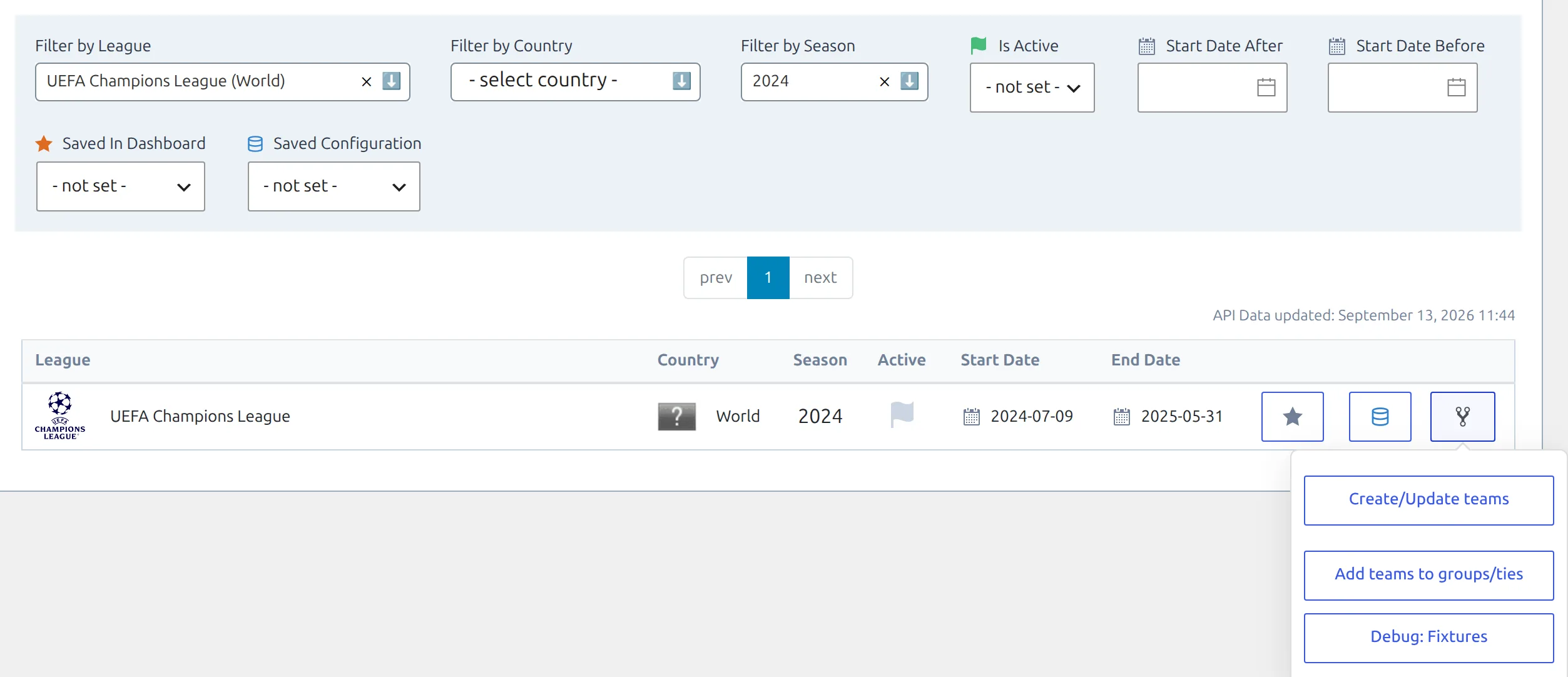
Add teams to groups/ties only appears once the row is linked to a competition on your site. The Modify Structure button on the Discover New Games tab opens a copy of the same modal, with the same switch, if you’d rather start from there.
2. Put all eight rounds into the League phase
Step 1 of Edit Competition Structure lists every round of every stage. Rounds you mapped earlier are already filled in. On the League phase – row, open the API Rounds dropdown and pick League Stage - 1 through League Stage - 8.
The finished 2024-25 mapping looks like this. At the end of August only the rows down to the League phase have rounds to pick – the knockout rounds reach the provider after the league phase ends.
| Row in step 1 | API rounds |
|---|---|
| Qualifying rounds – First qualifying round | 1st Qualifying Round |
| Qualifying rounds – Second qualifying round | 2nd Qualifying Round |
| Qualifying rounds – Third qualifying round | 3rd Qualifying Round |
| Play-off round – | Play-offs |
| League phase – | League Stage - 1 to League Stage - 8, all eight on this one row |
| Knockout round play-offs – | Knockout Round Play-offs |
| Knockout round – Round of 16 | Round of 16 |
| Knockout round – Quarter-finals | Quarter-finals |
| Knockout round – Semi-finals | Semi-finals |
| Knockout round – Final | Final |
A round you pick on one row drops out of every other row’s dropdown, so you can’t map the same round twice by accident. Be careful with Set All, though: it adds every round that isn’t mapped anywhere yet. That’s harmless in August, when League Stage - 1 to 8 are the only unmapped rounds. On a season that has already finished, it drags the knockout rounds into the League phase too.
3. Switch on single table, then Next Step
Before you click Next Step, set Put all Teams into single table to Yes. The switch sits on the right, level with the button.
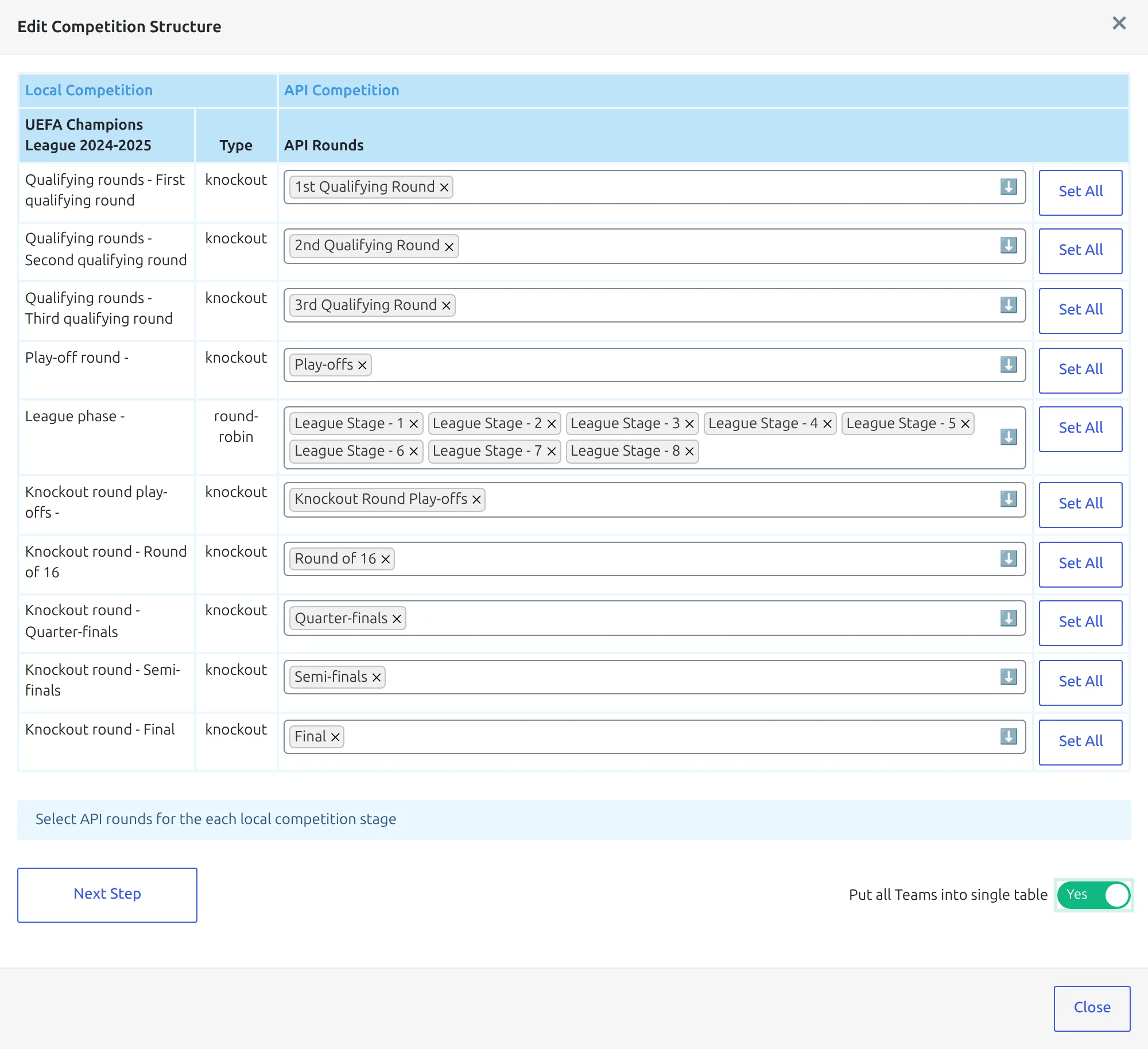
The switch only changes round-robin rows. The qualifying, play-off and knockout rows in the same modal still get their ties worked out as usual, so there’s no need to map the league phase on its own.
The switch goes back to No on step 2
As soon as step 2 loads, Put all Teams into single table resets to No. If you click Previous Step to fix a mapping, set it to Yes again before the next Next Step – otherwise step 2 comes back as dozens of groups.
4. Check step 2 shows one group of 36
Step 2 reports what the plugin found. The League phase – row should read Rounds: League Stage - 1 to League Stage - 8, then exactly one entry, Group #1, naming all 36 clubs – Real Madrid, Arsenal, Sturm Graz, Slovan Bratislava and the rest, in the order the provider lists them.
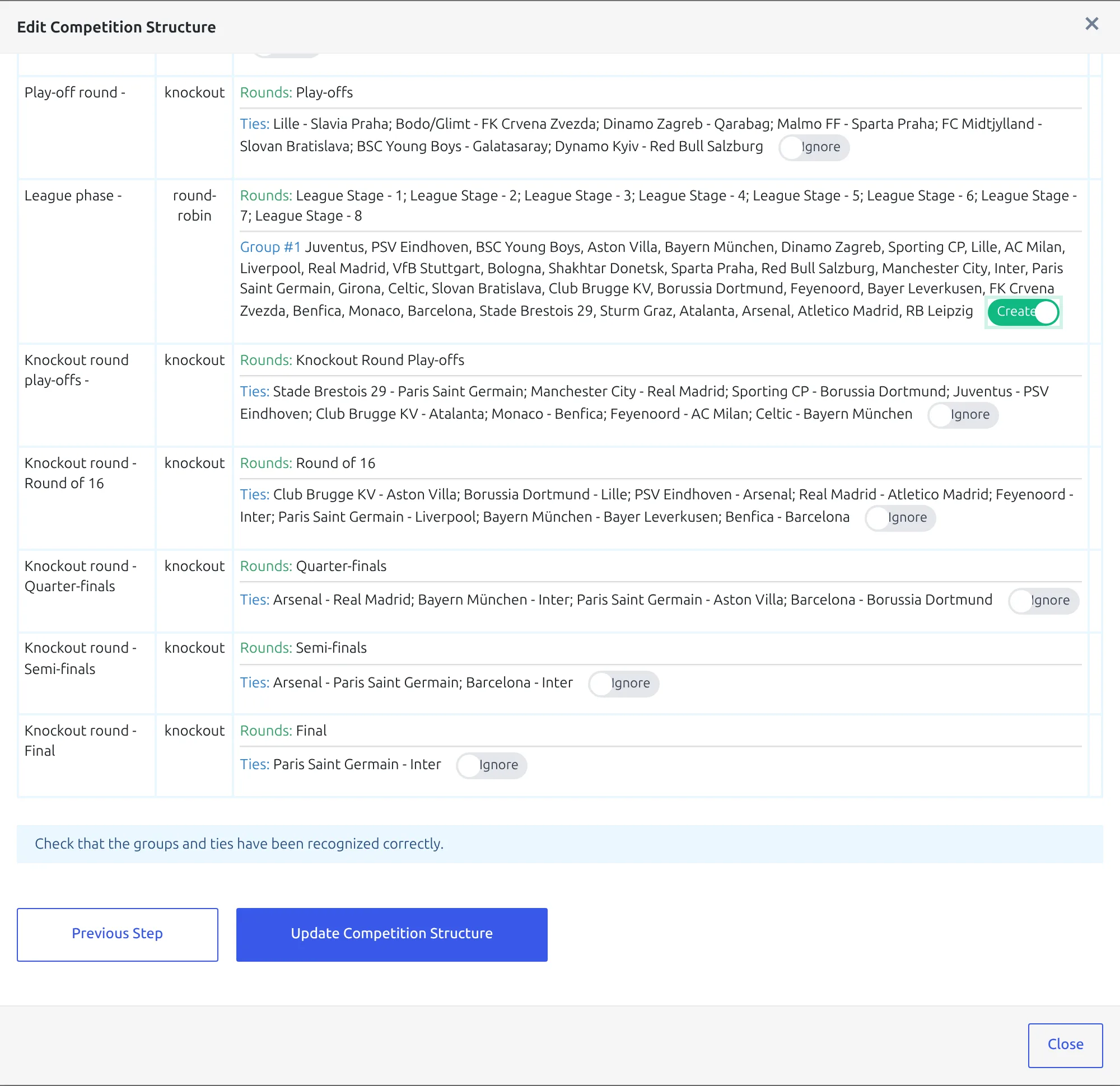
Group #1 is the plugin’s own name – the provider has no group name for the league phase to borrow. Leave its toggle on Create and click Update Competition Structure. Clubs that aren’t on your site yet are imported first, then the 36 clubs go into the League phase group and the round mapping is saved for later imports. With that many new clubs it takes a few minutes, so leave the tab open.
5. Create the games
Back on the API Leagues row, click the database button. In Import Competition Configuration, check the two Linked Competitions lines read UEFA Champions League (World) – 2024 and UEFA Champions League 2024-2025 – Season: 2024-2025, then run Create Games from the Create & Setup group.
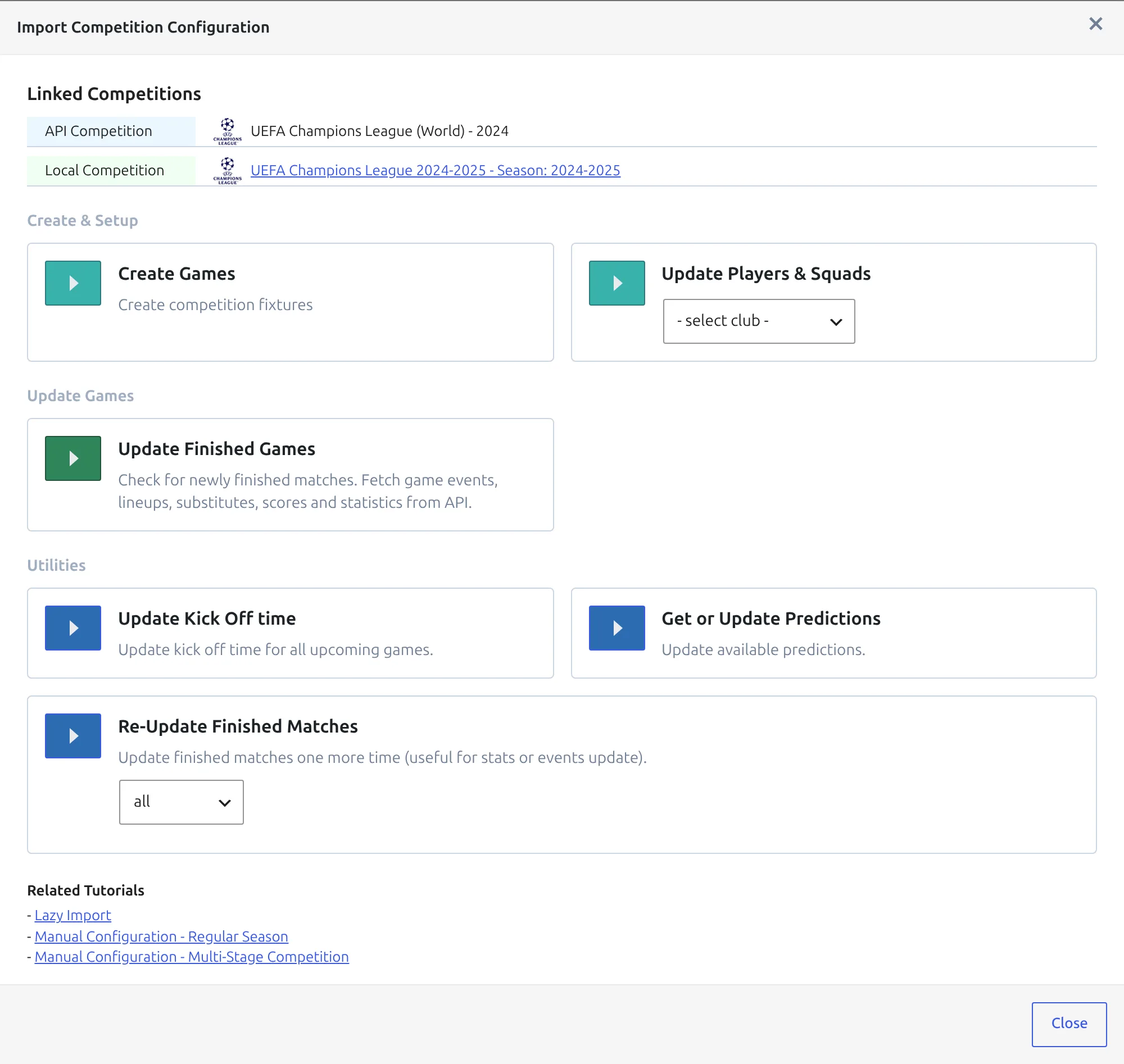
The league phase alone is 144 games – 36 clubs, eight games each. Create Games only adds fixtures you haven’t imported yet, so the qualifying games from July stay as they are. Each league-phase game gets its matchweek from the number at the end of its round name: League Stage - 3 becomes matchweek 3.
Then run Update Players & Squads with All Clubs selected. If matchdays have already been played, run Update Finished Games as well.
Why step 2 needs the switch
The provider sends fixtures, not groups, so for a round-robin stage the plugin works the groups out itself. For every club it collects that club plus every opponent it met in the mapped rounds, then merges the lists that come out identical.
- In a normal league everyone meets everyone, so every list is the whole league and you get one group.
- In the old Champions League group stage, the four clubs of a group only met each other. Their four lists matched and merged, giving you Group A to Group H.
- In the league phase each club meets eight different opponents. No two lists match, so nothing merges – you get one overlapping group of nine clubs per club, 36 of them.
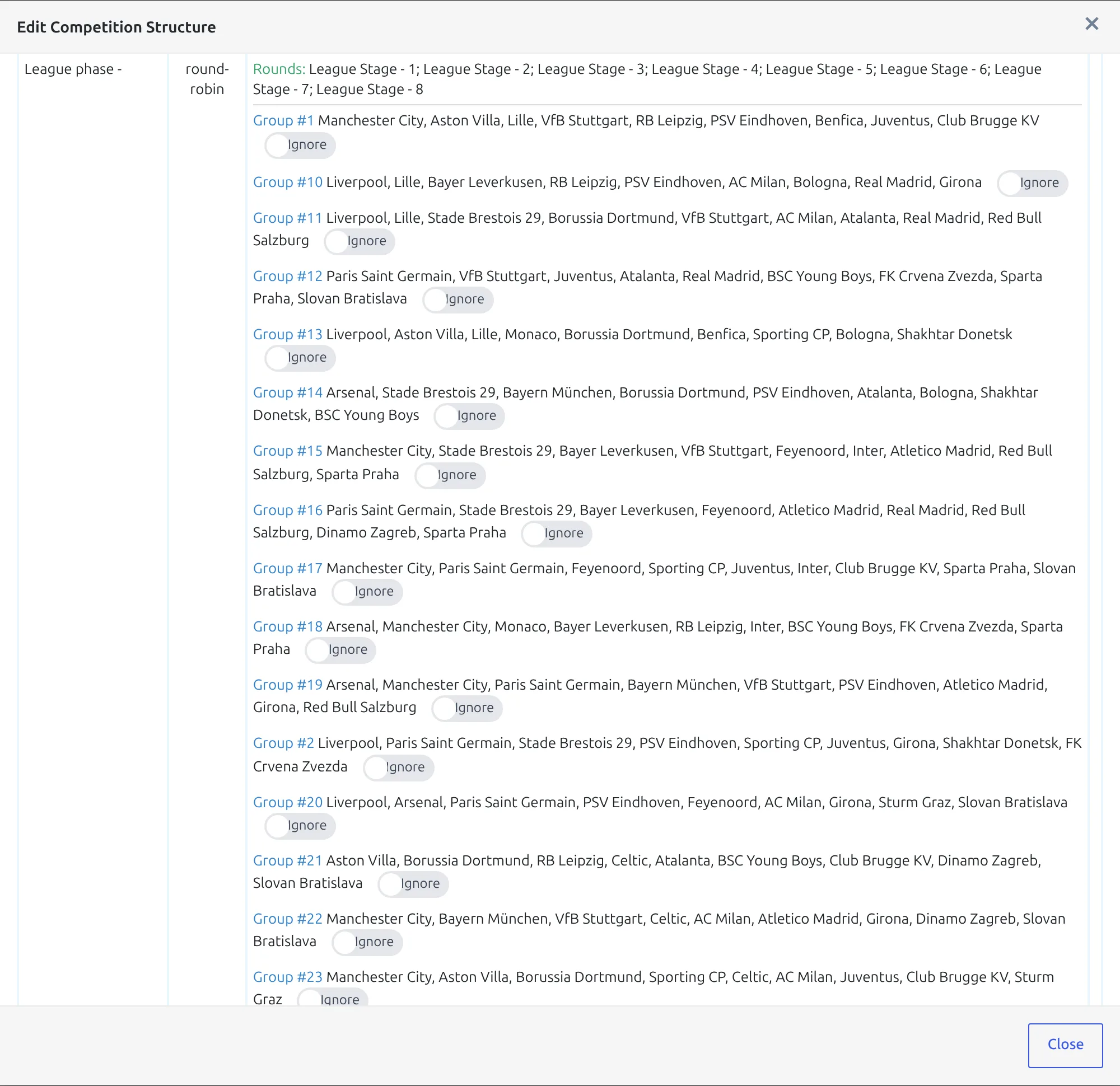
That breaks more than the table. A game is only created when both clubs sit in the same group, and with 36 overlapping groups the games scatter across those groups – no standing table shows the whole league phase. Put all Teams into single table skips the guessing and puts every club from the mapped rounds into one group.
The same switch solves a league split into conferences – see API Import for a Competition with Conferences and the Argentina Liga Profesional walkthrough.
🏆 6. One standing table with the real zones
The import doesn’t create the table. You add one standing table for the League phase group, and give it UEFA’s ranking rules, row colours and notes.
Create the table
- Go to Competitions > Standing Tables and click Add New Standing Table.
- Leave the title empty. On save it’s filled in for you as UEFA Champions League 2024-2025 – Group #1.
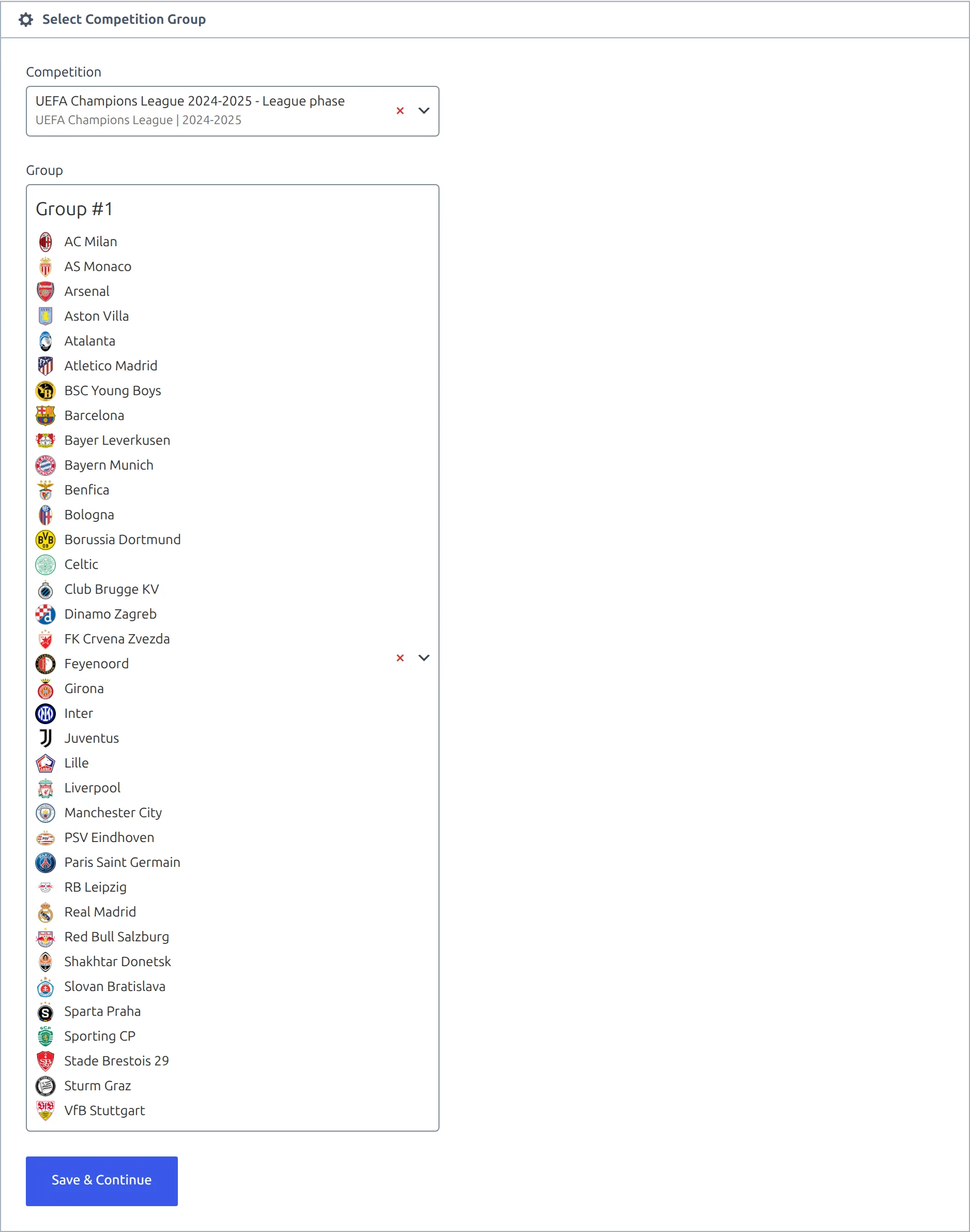
- In Select Competition Group, set Competition to UEFA Champions League 2024-2025 – League phase.
- Set Group to Group #1. The dropdown lists its 36 clubs, which is a last check that step 4 worked.
- Click Save & Continue.
Ranking rules
In the Ranking Rules block, Points is always rule 1. Below it, add these five in this order:
- Goals Difference
- Goals Scored
- Away Goals Scored
- Wins
- Away Wins
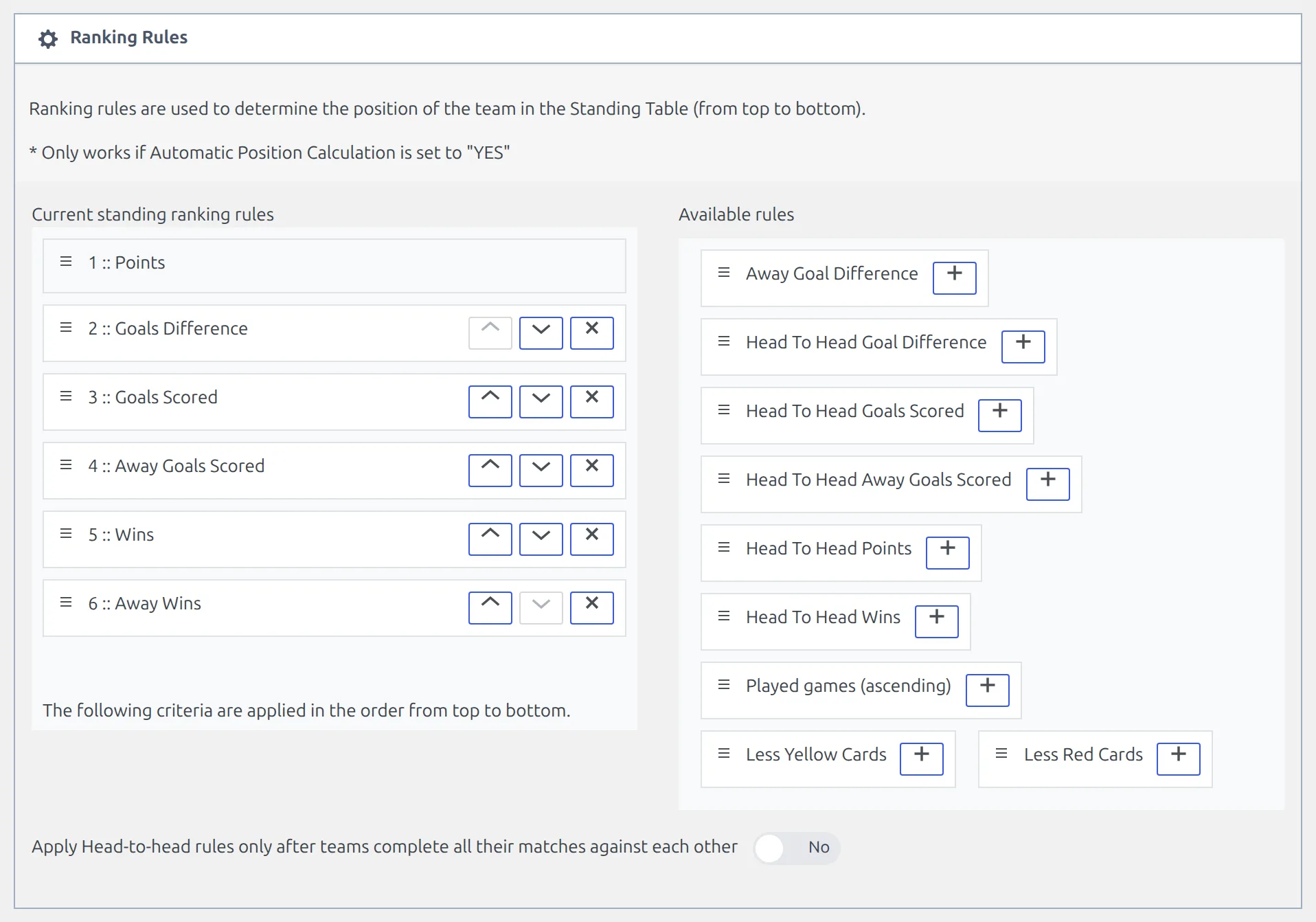
Those are UEFA’s first five league-phase tiebreakers after points. Leave the head-to-head rules out – with every club playing different opponents, most tied clubs never met. UEFA’s later tiebreakers (the opponents’ combined results, disciplinary points, club coefficient) have no exact match – Less Yellow Cards and Less Red Cards only come close – and a tie that survives five of them is rare. The rules only apply while Automatic Position Calculation, at the top of the editor, is on Enable. Standing Rules explains every rule.
Row colours and notes
In 2024-25 places 1 to 8 went straight to the round of 16, places 9 to 24 into the knockout phase play-offs (9 to 16 seeded, 17 to 24 unseeded), and 25 to 36 were out. That’s three colours:
| Places | Colour | Meaning |
|---|---|---|
| 1 to 8 | success | Round of 16 |
| 9 to 16 | info | Knockout phase play-offs, seeded |
| 17 to 24 | primary | Knockout phase play-offs, unseeded |
| 25 to 36 | none | Eliminated |
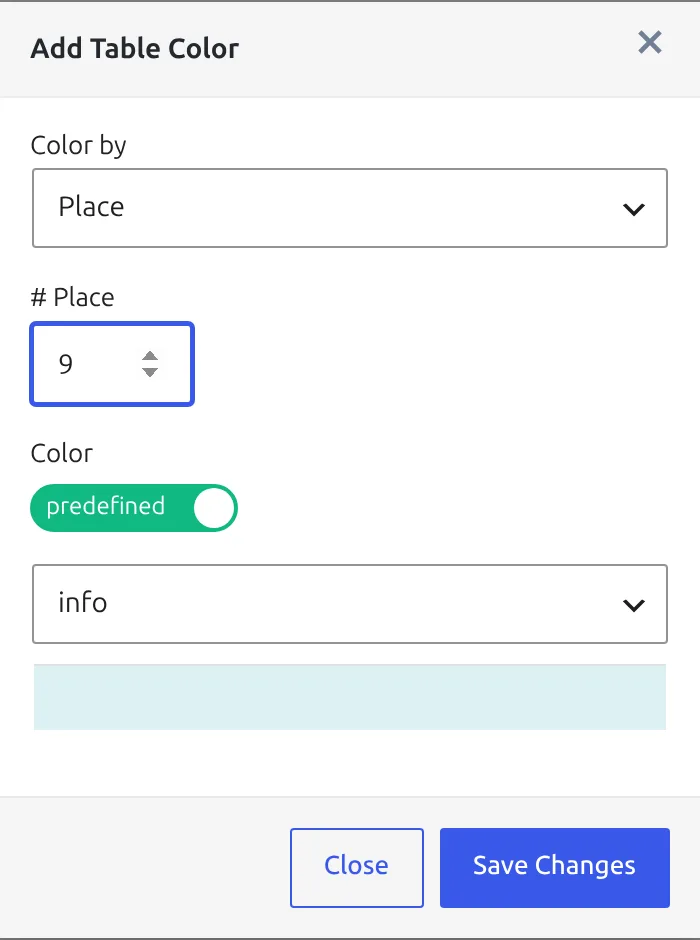
In Standing Table Colors, click add color. Set Color by to Place, type the place number, keep the colour on predefined, pick the colour and click Save Changes. A colour covers one place, so this is 24 entries – the tip at the end of this page saves you doing it again next season.
Then type the key into Notes (below table), one line per zone. Each %colour% placeholder turns into a swatch of that colour:
%success% - Advance to round of 16 (seeded)
%info% - Advance to knockout phase play-offs (seeded)
%primary% - Advance to knockout phase play-offs (unseeded)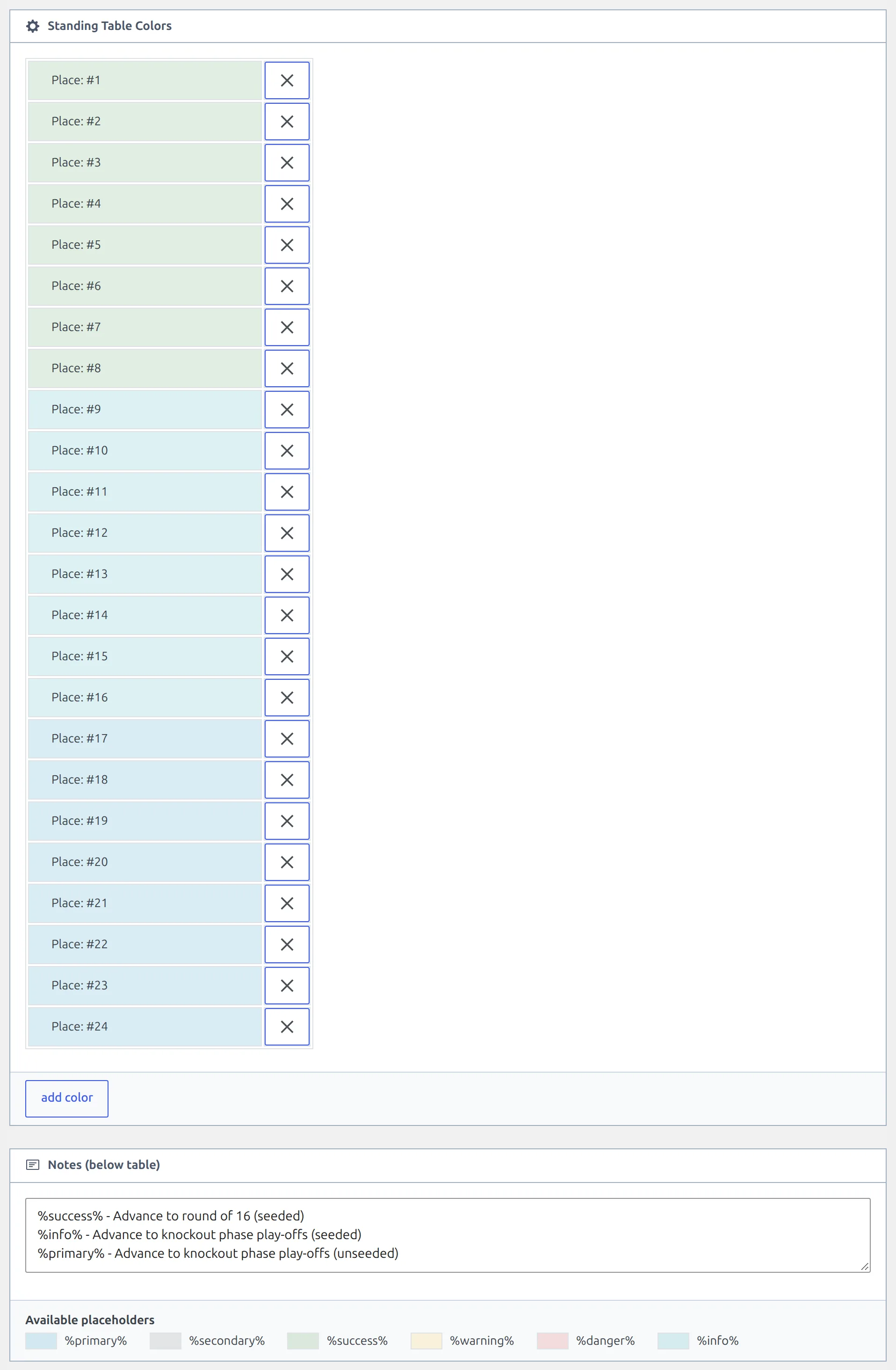
Leave Points at 3 for a win, 1 for a draw and 0 for a loss, then click Publish – or Update, if the table is already published.
7. Check the result
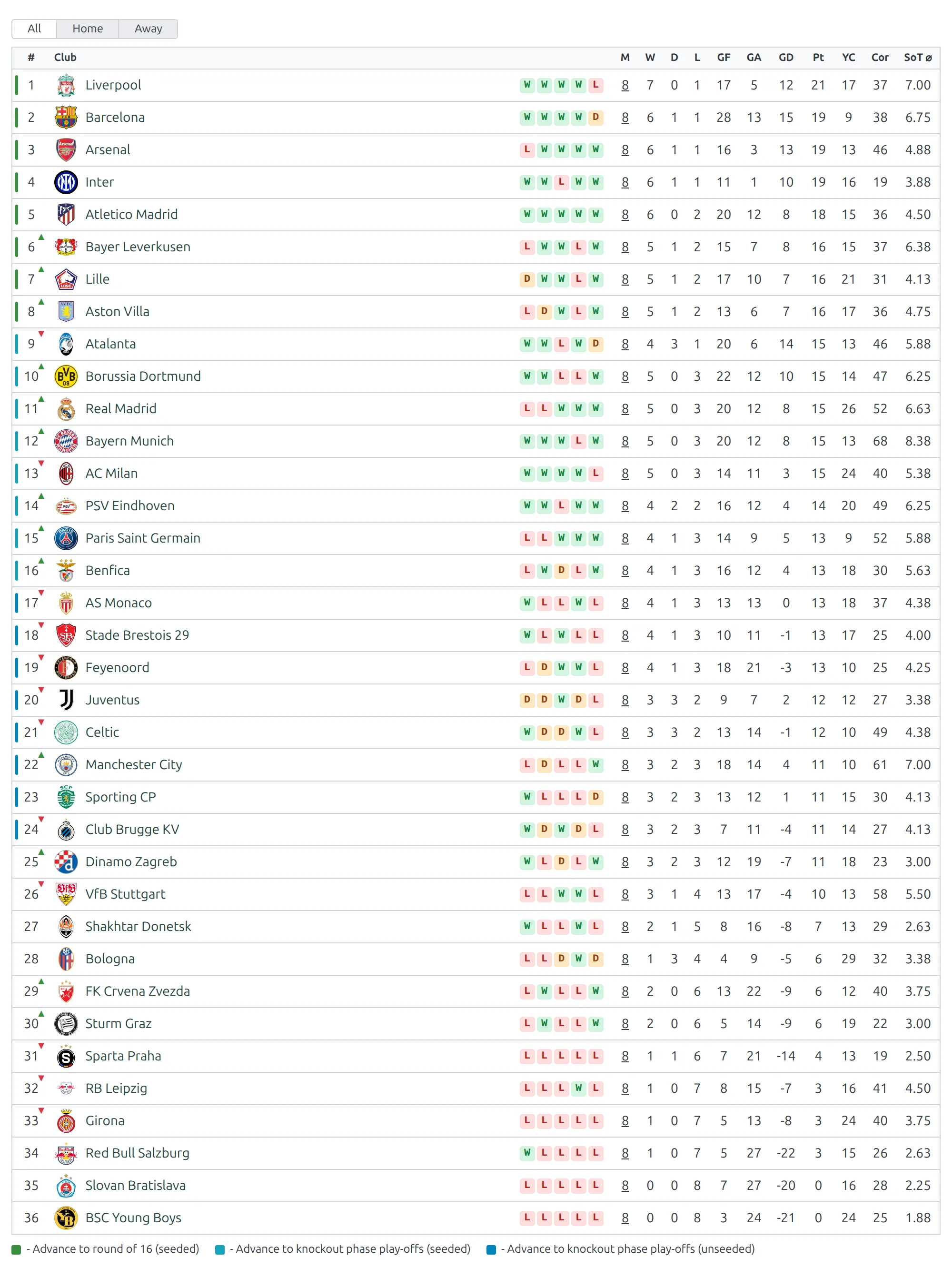
Open the table with View Standing Table, or place it anywhere with its ID – [anwpfl-standing id="123"]. Once the eight matchdays are in, you should see what the screenshot at the top of this page shows:
- 36 rows, every club on 8 played.
- A colour on places 1 to 24 and none below.
- The three note lines under the table, each with its swatch.
A zone colour shows as a bar on the edge of the position cell, and sites that update to 0.18.5 switch to it too. The older look tints the whole cell. To switch between the two, go to Settings & Tools > Settings, open the Standing tab and set Zone Color Style to Edge bar (default) or Filled cell. The Standing shortcode page covers partial, layout="mini" and the other display options – partial="1-8", for example, gives you just the round of 16 places.
Europa League, Conference League and later seasons
The Europa League and the Conference League have the same league-phase shape, so the steps don’t change. Only the number of rounds does:
| Competition | League phase rounds | Games |
|---|---|---|
| UEFA Champions League | League Stage - 1 to League Stage - 8 | 144 |
| UEFA Europa League | League Stage - 1 to League Stage - 8 | 144 |
| UEFA Conference League | League Stage - 1 to League Stage - 6 | 108 |
Round names outside the league phase shift from season to season, so read the dropdown rather than copying the mapping table above. From 2025-26 the provider lists the knockout phase play-offs as Round of 32, and the Conference League’s play-off round as Playoff round.
Clone last season’s table
The 2025-26 league phase uses the same zones. On the Standing Tables list, hover the 2024-25 table and click Clone: the ranking rules, all 24 colours and the notes come across. Pick the new season’s League phase and its group, click Save & Continue, then Publish.
🆘 Troubleshooting
The league phase came out as dozens of groups
Put all Teams into single table was off when you clicked Next Step – either you never set it, or it reset when you stepped back. Click Previous Step, set it to Yes and click Next Step again. Your competition isn’t changed until you click Update Competition Structure, so a wrong step 2 costs nothing.
Group #1 is set to Ignore
The League phase group already holds clubs, usually from an earlier attempt, and step 2 won’t overwrite a filled group unless you ask. Switch the toggle to Create. If that earlier attempt ran without the switch and wrote many groups, delete the extra groups in the competition editor first. The update fills the stage’s groups in order, so one new group only replaces the first and the others keep their clubs.
Create Games added fewer than 144 league-phase games
A game is only created when both of its clubs are in the same group, and the finish message only counts the games that were. A club missing from Group #1 – its import failed, say – silently takes its eight games with it. Open the League phase in the competition editor and count the group: it should hold 36 clubs. Fix the group, then run Create Games again. Games already imported aren’t duplicated.
Create Games says “No Games to Create”
Every fixture in the mapped rounds is already on your site. Nothing is wrong. To pull in rounds the provider has added since – the knockout draws in January and February – see Add New Games to a Multistage Competition.
Two clubs on the same points are in the wrong order
Check the Ranking Rules order against the list above, and that Automatic Position Calculation is on Enable. With it on Disable, positions are whatever you set by hand and the rules are ignored.
📚 What’s next
- Add New Games to a Multistage Competition – the knockout phase play-offs and round of 16, once they’re drawn.
- Import Dashboard – save the league with the star button so scores and line-ups keep updating through the eight matchdays.
- Standing Rules – every ranking rule, and when the table re-sorts.
- Standing Columns – pick and order the columns in the table.
- API Import Use Cases – the other real competitions, set up end to end.