

AnWP Club Kit turns a Football Leagues site into a finished club website in one step. A design isn’t just a skin: it sets up the Kadence theme, adds pages, a menu, news posts, a header and footer, and applies a matching set of Football Leagues settings and a player page layout.
This page covers the requirements and your first install. To compare the 7 designs first, see The Designs. To switch or take a design off your site, see Replace, Remove and Backups.
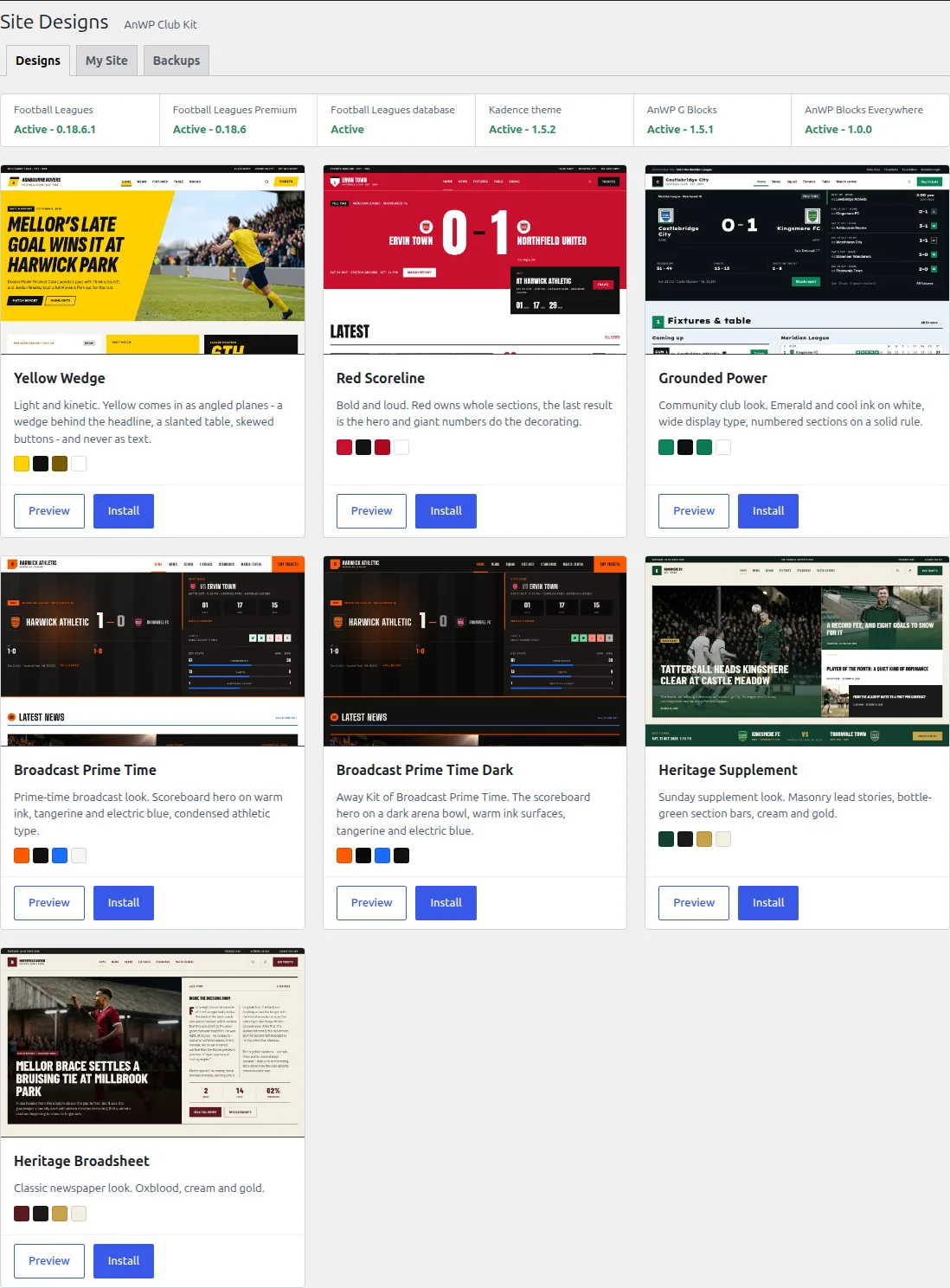
What a design adds
| Part | What you get |
|---|---|
| Theme style | Kadence colors, fonts, widths and widgets, plus the design’s own CSS. |
| Pages and menu | Home, News, Squad, Fixtures, a league table page and Match Centre, with the main menu and your home page set. |
| News posts | Sample news with photos, categories and tags, so the pages look finished from the start. |
| Header and footer | The site header and footer. Some designs add a strip above the header or a next fixture bar. |
| Football Leagues settings | Display and appearance settings for a club site, and a player page layout from the Layout Builder. |
| Demo football data | A fictional league with 12 clubs, their players and a season of games, plus club logos and player photos. |
The demo club, league and players are invented. Replace them with your own club once the design is in place.
The demo games are dated to your install day: the latest results are from the past week and the upcoming fixtures run about 6 weeks ahead. The dates don’t move after that. So if you keep the demo data longer than 6 weeks, the next match, countdown and fixture sections go empty. Add your own games before then.
Requirements
| Needed | Version | Notes |
|---|---|---|
| Football Leagues | 0.18.6 or newer | Comes inside the Football Leagues Premium download. |
| Football Leagues Premium | 0.18.6 or newer | With an active license. |
| Kadence theme | Any current version | Site Designs can install and activate it for you. |
| WordPress / PHP | 6.5+ / 7.4+ |
AnWP G Blocks and Blocks Everywhere come bundled with AnWP Club Kit, so you don’t need to install them. So does a hook finder: Find a hook on your site on the Blocks Everywhere screen. If you already run the standalone G Blocks or Blocks Everywhere plugin, that copy is used instead. Keep a standalone G Blocks on 1.5.1 or newer, or Install stays disabled.
🚀 Install a design
- Upload the AnWP Club Kit ZIP in Plugins > Add New > Upload Plugin and activate it.
- Site Designs opens by itself the first time. Later you’ll find it at Football Leagues > Site Designs, and the Football Leagues Dashboard shows a “Pick a site design” card until a design is installed.
- On the Designs tab, check the requirements strip. Anything missing has a button next to it (for example Install and activate for Kadence). While something is missing, the card tells you why Install is disabled.
- Click Install on a design. The summary lists everything the design adds.
- Click Install design and keep the tab open until the report appears.
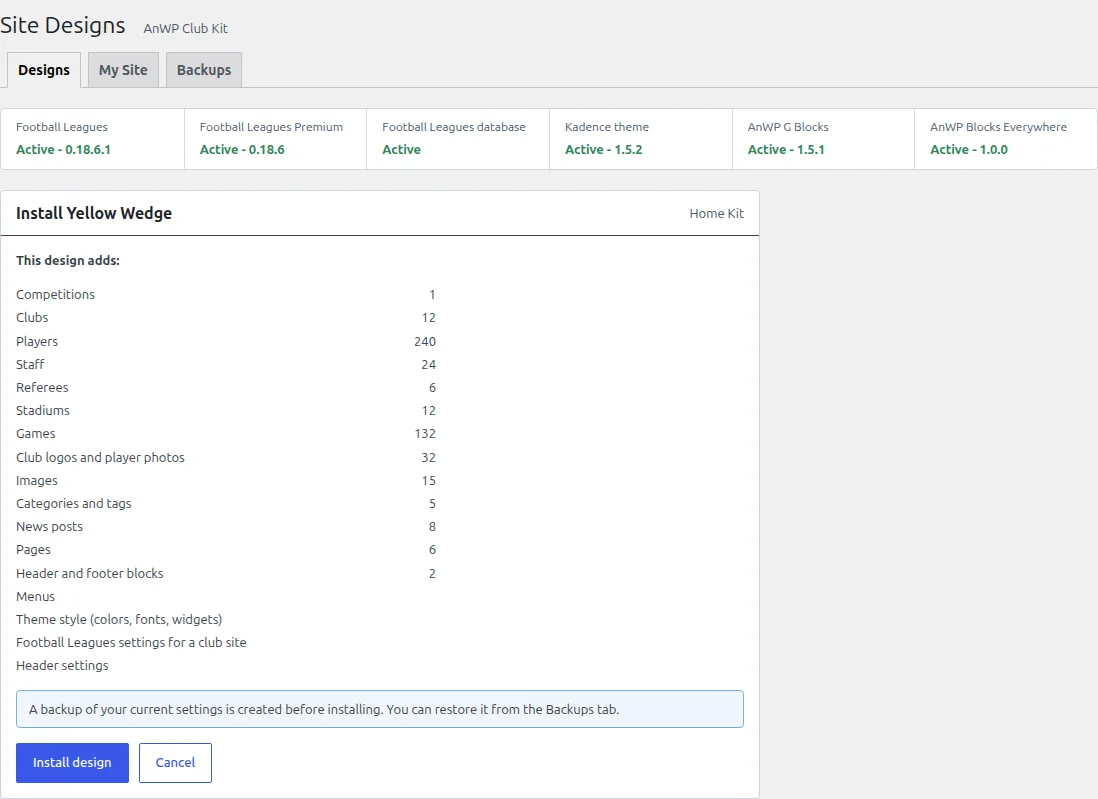
A backup comes first
Before anything changes, AnWP Club Kit saves a backup of your current settings. You’ll find it on the Backups tab, and removing the design later puts those settings back.
If your site already has football data
When your site already has clubs, players or games, the install summary shows “This site already has football data”. The design adds its own clubs, players and games next to yours. Nothing of yours is changed or deleted: seasons and leagues with the same slug are shared, and stat columns you already have are reused. Tick Add the design’s football data next to mine to continue.
Progress and report
The install runs in steps, starting with the settings backup. Each step shows what it created, skipped or couldn’t create, and why. If the tab is closed or reloaded mid-way, the run pauses: open Site Designs again and click Continue, or Abort to stop there. Everything created so far stays tracked, so it can still be removed.
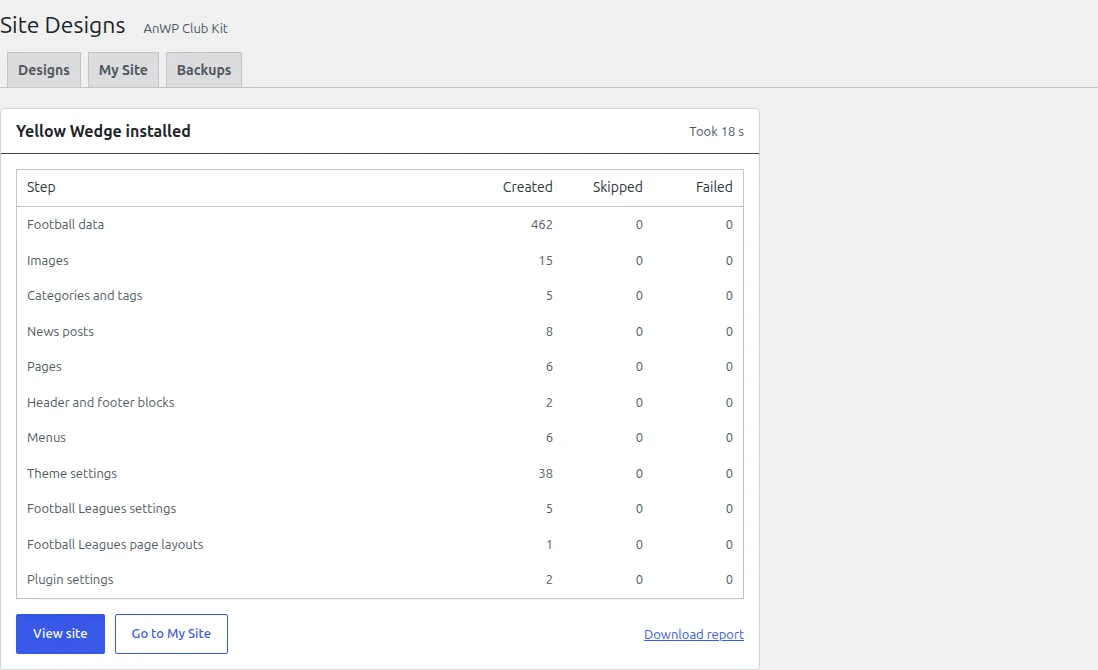
When it’s done, click View site. Download report saves the full report, which helps if you contact support.
🎯 Make it your club
The short version is below. Make It Your Club walks through every step: football data, site club, header, footer, news, partners and menu.
- Colors and fonts: My Site > Customize colors and fonts opens the Kadence Customizer. See Change Colors.
- Your club: add your own club and set it as the site club. The demo club is deleted when you replace or remove the design, so don’t build your real club on it.
- Other clubs, players and staff: the design hides every club, every player outside the demo club’s squad and every staff member not tied to it, so the site stays about one club. They still show in standings, stats and lineups. See Hidden Clubs and Players.
- Player pages: the design turns on a player layout. Change it in the Player Layout Builder.
- Active season: the design doesn’t set one. Set it again in Football Leagues settings once your own season is in.
- Futsal or mini-football: the demo league plays 90-minute games. Set your competition’s match duration (40 for futsal, 50 or 60 for mini-football) before you add fixtures. See Rolling Substitutions.
🆘 Troubleshooting
Install is disabled
The card says why. Usually it’s a missing requirement (Kadence not active, a Football Leagues version below the minimum, or no active Premium license). If it says another design is installed, replace it from My Site. Designs never stack.
The report lists failed items
Each failed item shows its reason. If the design wasn’t installed completely, remove it from My Site and install it again: everything it created is tracked, so nothing is left behind.
Still stuck?
Contact support and attach the file from Download report. It lists every step and item, so we can see what happened without asking you to run the install again.