

A knockout stage is one where clubs are paired off and the winner of each pair goes through. National cups, play-offs, the last 16 of a continental tournament, a two-legged relegation decider – anything decided by elimination rather than by points.
Structurally it’s the same editor as a round-robin competition, with one setting flipped. What changes is that the stage gains rounds, each group holds exactly two clubs and is called a tie (or match-up), and there is no standing table.
🚀 Create the competition
Open Competitions → Add New Competition.
- Give it a title and fill in the General panel. League and Season are required – the editor shows an orange “Fill in the required fields” notice until both are set.
- Set Competition Type to Knockout. The Round-Robin Format select disappears and a Knockout Format select takes its place.
- Name the first round. A knockout stage puts a title box on every round block – “Preliminary round”, “Quarter-finals”, “Final”. Round #1 already exists.
- Fill the ties. Each round starts with one empty tie card. Click the cog on it to add the two clubs, then use Add New Group/Match-up for the rest of the round.
- Add the next round with the Add New Round button at the bottom, and repeat.
- Click Save.
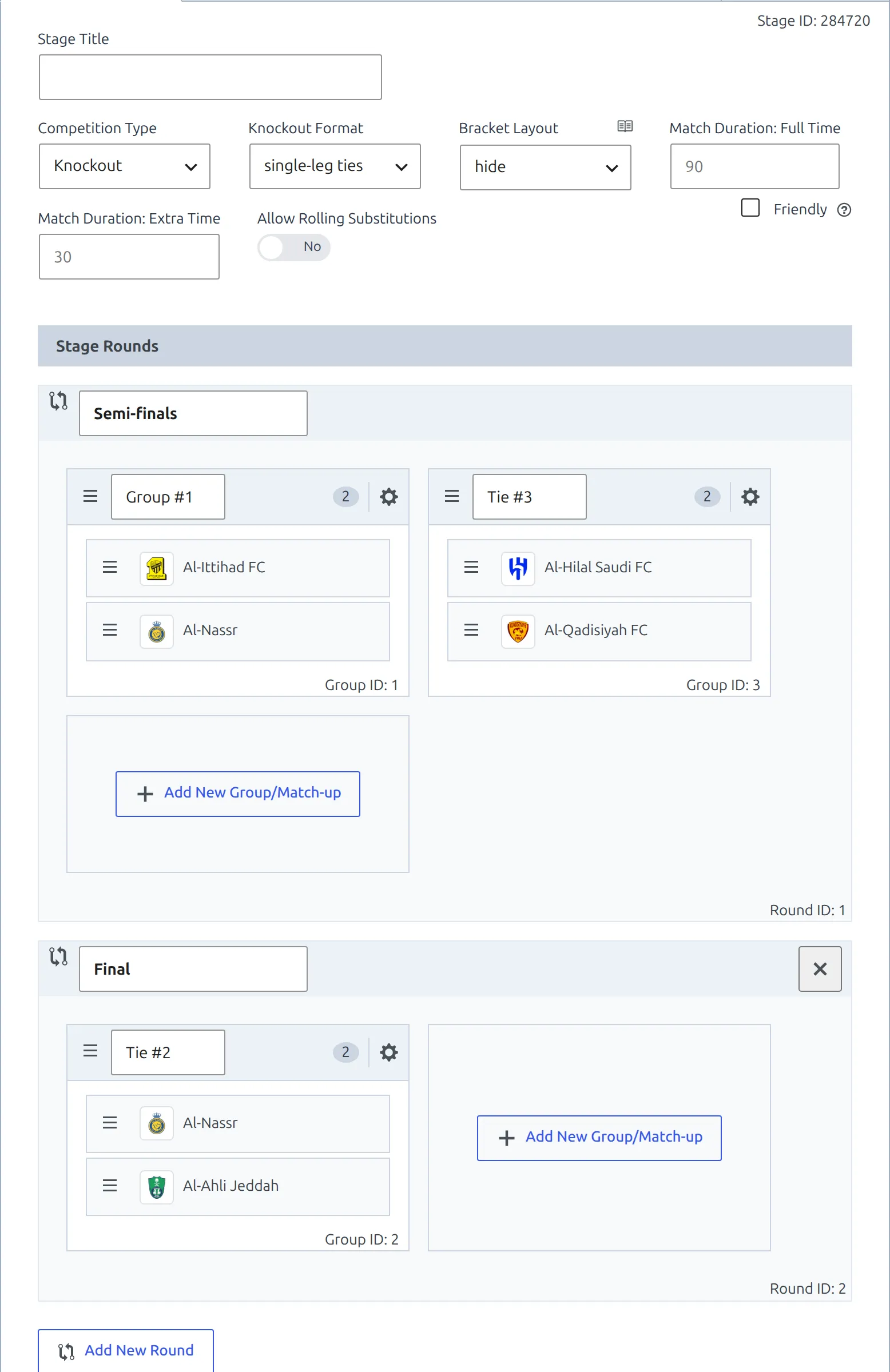
The Friendly checkbox works the same as everywhere else: it marks the stage as unofficial and player statistics are not calculated for its matches.
Knockout Format
| Format | Use it for |
|---|---|
| two-legged ties | Home and away over two matches. The default for a new competition. |
| single-leg ties | One match decides the tie. Domestic cups, a World Cup knockout phase, a one-off final. |
The format is a label, not a rule
Choosing two-legged ties doesn’t create the second match, and choosing single-leg ties doesn’t stop you adding one. Two things read the setting: the Stages column in the Competitions list, and the automatic bracket, which prints each leg’s score. Everything else works off the matches you actually add. Mixing the two inside one competition is normal – a cup whose earlier rounds are two-legged and whose final is a single match still gets one setting for the whole stage. Pick the one that describes most of it.
Rounds and ties
A round is one horizontal block in the stage panel. It has a title and holds the ties played at that point in the cup. Add New Round appends a new block, pre-named Round #2, Round #3 and so on, already carrying one empty tie – rename it to whatever the round is really called.
Rounds are stored in the order you create them, which for a cup is also the order they’re played. Round #1 has no delete button; every later round has an × in its header.
A tie is one card inside a round – the same card a round-robin stage calls a group, capped at two clubs. Click the cog to open it. Clubs already in the tie are on the left with a red × each; the searchable club list with its country filter is on the right. Once two clubs are in, the picker is replaced by a notice:
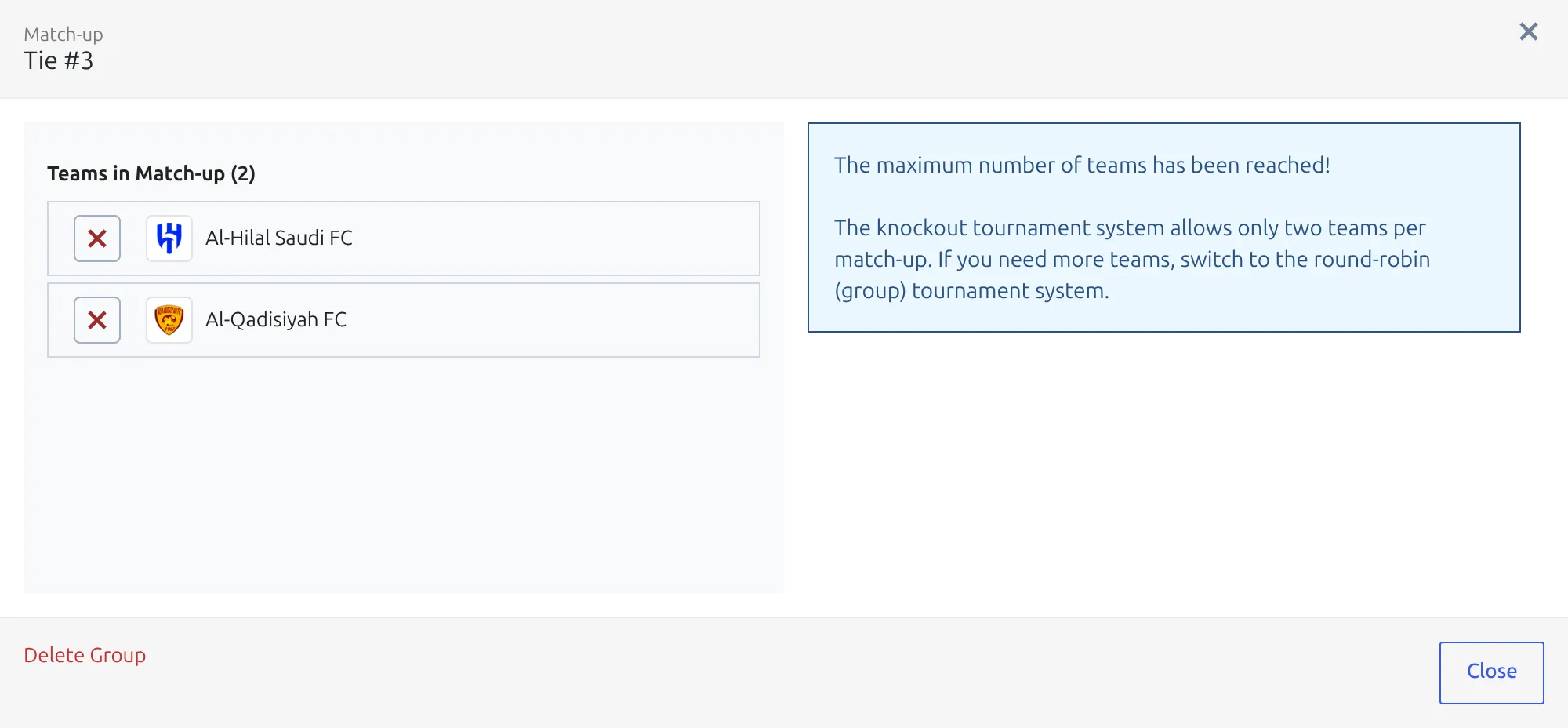
A group of three or more is a mini-league, not a tie, so it belongs in a round-robin stage. In a cup that has both – a group phase feeding a knockout phase – you want two stages in one competition. That’s round-robin plus knockout, wired together as a multistage competition.
Ties don’t need names. An untitled one is stored as #2, #3 and so on, and the competition page never prints tie names anyway – only round titles. Name them if it helps you find things in the editor, otherwise leave them.
Add matches
Go to Competitions → Matches → Add New Match. On a knockout competition, Match Setup grows an extra control – a Round selector between Season and Home Club, listing every round with its internal ID.
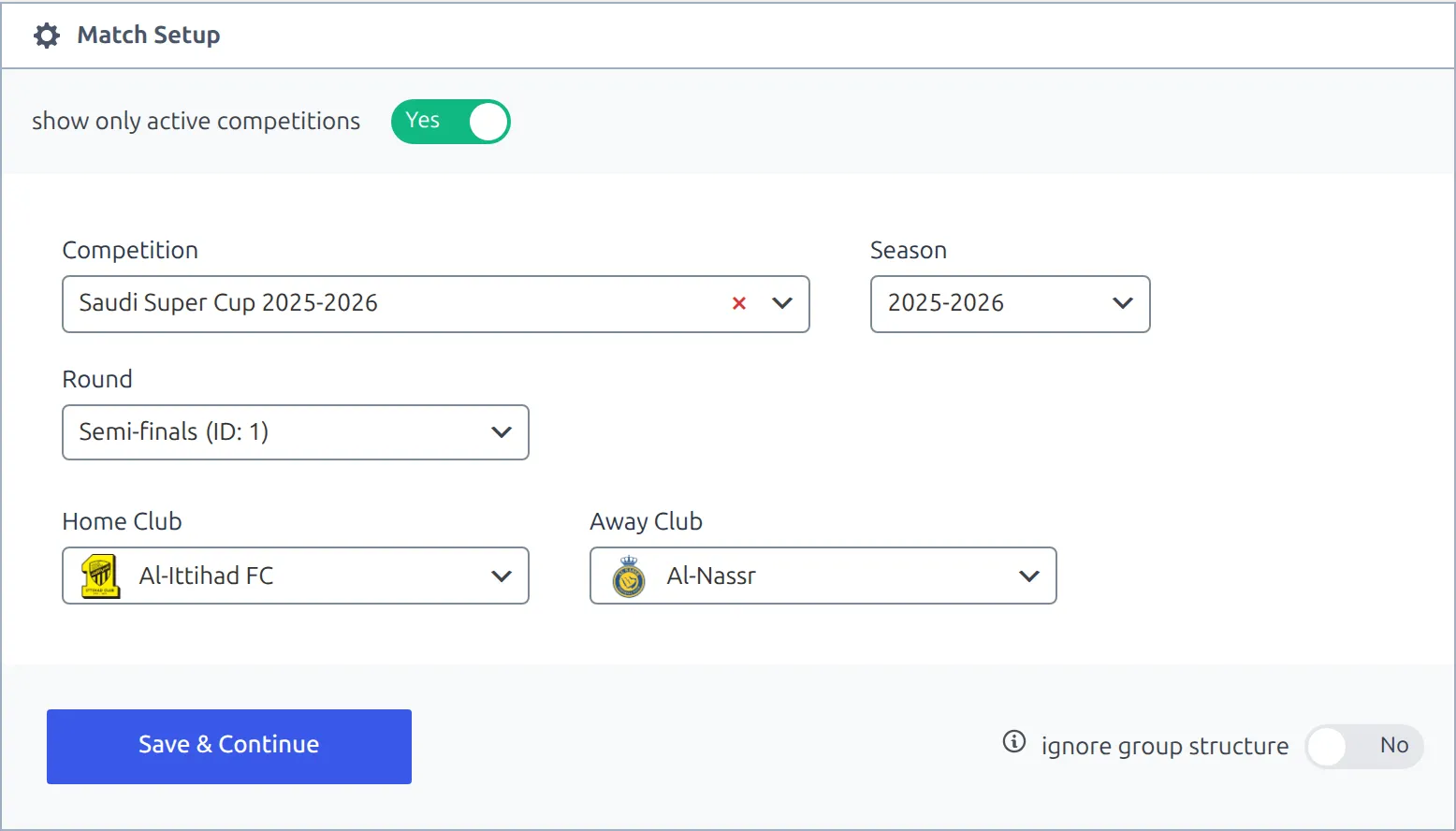
The selectors narrow each other down. Pick a round and Home Club offers only clubs assigned to a tie in that round. Pick the home club and Away Club offers only the club it’s actually drawn against. Save the match and the tie is worked out from the two clubs – you never choose it by hand.
Two-legged ties are two matches in the same tie, with the clubs swapped. Add the first leg, then add a second match with the same round and the same pair the other way round. Both land in the same tie because the pairing is what identifies it.
Knockout matches have no Match Week field
In a round-robin competition the match editor carries a Match Week box. In a knockout one it isn’t there, because the round is the match week – the plugin stores the round you picked on the setup screen in the same field. That’s why changing a knockout match’s round means going back through Match Setup rather than editing the match’s General panel.
For a full cup draw, the Data Import Tool takes a spreadsheet paste, and PRO adds the Import Matches tool and the API import.
Extra time and penalties
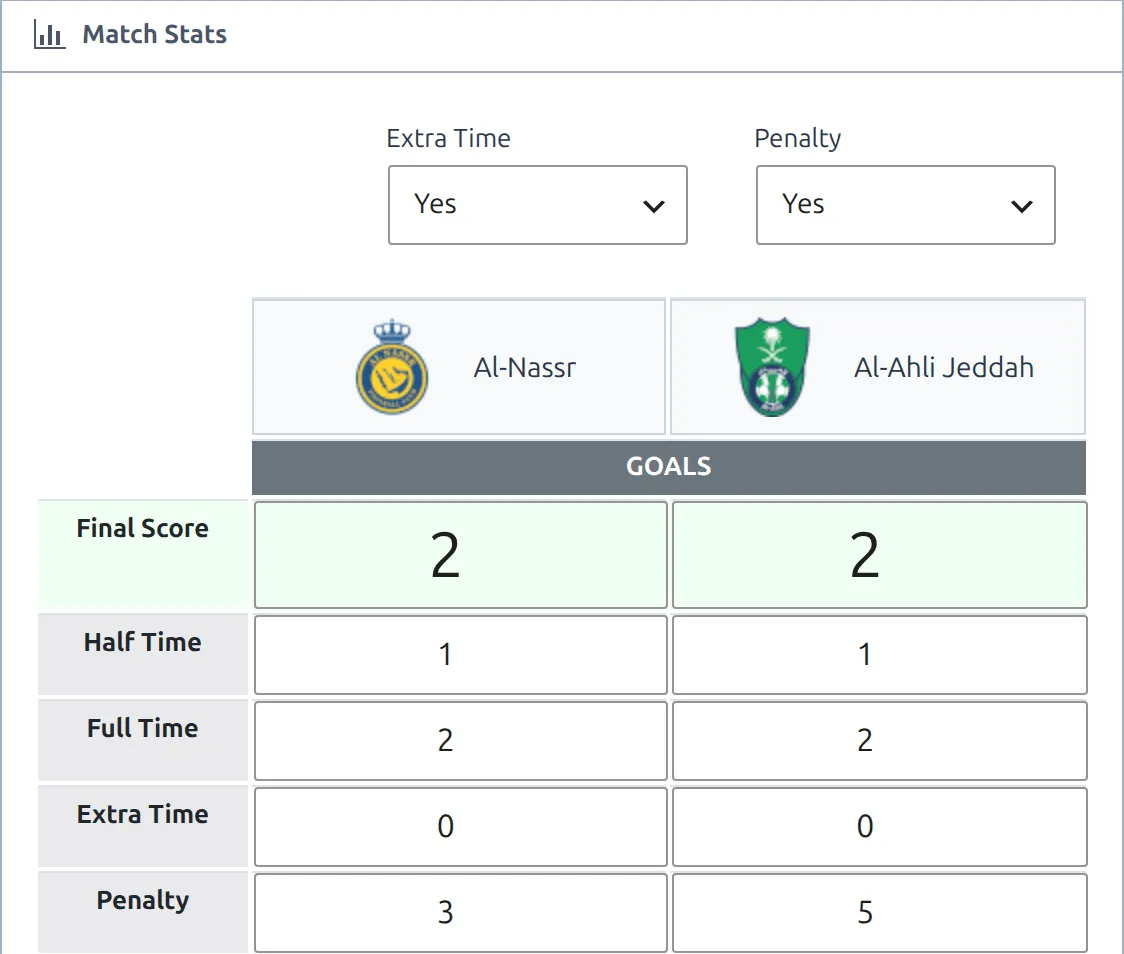
Set the match status to Result and two selects appear at the top right of the Match Stats panel: Extra Time and Penalty. Each is a plain Yes/No, and each adds rows to the score table.
- Extra Time = Yes adds a Full Time row and an Extra Time row. Full Time is the score at the end of normal time; Extra Time is the goals scored in the extra period.
- Penalty = Yes adds a Penalty row for the shootout.
- Final Score stays what it always is – the result the match ended on, shootout excluded.
With PRO the stage panel also carries Match Duration: Full Time and Match Duration: Extra Time, which fall back to 90 and 30. They’re copied onto each match as it’s created, and the live match clock reads them – during extra time it counts up to Full Time + Extra Time rather than stopping at 90. A cup playing shorter halves, or 2×10 of extra time, is worth setting here so the clock is right; a match that already has its own duration keeps it.
One more field is worth knowing about, over in the General panel: Aggregate Text. It’s free text printed next to the score on match cards, and the editor’s own hint says what it’s for – Agg: 2-2; Team A won on penalties (5-3). Use it on a second leg to say how the tie was settled. Nothing is calculated from it; it’s a caption you write.
Show it on the site
The competition page lists the ties round by round, using the round titles you typed. Round titles are only printed when the stage has more than one round, so a one-round competition just shows its matches.
Cups usually read better newest-first. Appearance → Customize → Football Leagues → Competition → Rounds order switches the whole site between Ascending (1…30) and Descending (30…1), so the final can sit at the top instead of the bottom.
Bracket Layout (PRO)
With the premium version a knockout stage also gets a Bracket Layout select, right next to Knockout Format. It decides what the competition page draws at the top of the stage, above its match list.
| Option | What you get |
|---|---|
| hide | No bracket. The default, and the right answer for a stage that’s only one or two rounds deep. |
| automatic | A bracket built from the stage structure. One column per round, ties sorted so each pair lines up with the one it feeds, each leg’s score listed and the two legs totalled. |
| manual | Same bracket, but you order the ties yourself by dragging the cards, and each tie gets an options modal for placeholder team names and a date/time caption. |
| advanced | A separate, self-contained bracket you draw on its own Bracket tab in the editor. It resolves matches by ID and advances winners for you. |
The first three are documented with the [anwpfl-bracket] shortcode; advanced has its own page, Advanced Bracket. Either can also be dropped on any page with its shortcode rather than left on the competition page.
Check your work
The Stages column in the Competitions list prints the structure the plugin read back, and it says Ties for a knockout stage where a round-robin one says Groups. That word is the quickest confirmation you set the type you meant to.

The Standings column stays empty, and that’s correct – it only ever lists tables for round-robin stages.
🆘 Troubleshooting
“The maximum number of teams has been reached”
The tie already holds two clubs. Remove one with the red × on the left before adding another, or – if you genuinely need three or more clubs together – use a round-robin stage instead.
There’s no Round selector on Match Setup
It only appears once the chosen competition is a knockout one and has at least one round saved. If you flipped the type but haven’t saved the competition yet, save it first.
The Home Club dropdown is empty
The selected round has no clubs in its ties. Open the competition, click the cog on each tie in that round and add the two clubs. An empty tie card contributes nothing to the dropdown.
A match vanished from the competition page after I edited the structure
Deleting a round or a tie removes it from the competition, but it doesn’t touch the matches that pointed at it. Those matches still exist and still open from Competitions → Matches – they just have nowhere to be drawn, because the page walks the rounds and ties and prints the matches that belong to each. Re-create the tie, or open each orphaned match through Match Setup and re-pick its round and clubs.
I can’t create a standing table for my cup
Standing tables exist only for round-robin stages, so a knockout competition never appears on the Add New Standing Table screen. If your cup has a group phase that does need a table, that phase has to be a round-robin stage – see multistage competitions.
The bracket is empty or the ties are in the wrong order
The automatic bracket is built from the stage structure, so it needs both clubs filled in on each tie and it sorts each round against the clubs in the round before it. A round whose ties are still empty breaks the chain. Switch to manual if you’d rather drag the ties into place yourself, or to advanced for a bracket that advances winners on its own.
📚 What’s next
- Competition: Round-Robin – groups, points and the standing table.
- Competition: Multistage – a group phase and a knockout phase in one competition.
- Advanced Bracket – a bracket that advances winners and losers for you.
- [anwpfl-matches] and [anwpfl-competition-header] – put the fixtures and the competition title block on a page.