

Display a compact player card with photo, name, and optional custom statistics. Perfect for featuring individual players in articles, sidebars, or team pages.
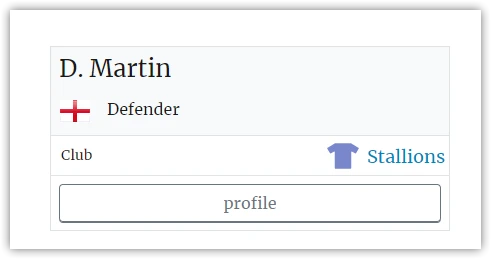
Basic Usage
[anwpfl-player player_id="45"]This displays a card for player ID 45 with their photo, name, and a link to their full profile.
All Parameters
| Parameter | Default | Description |
|---|---|---|
player_id * |
(required) | Player ID to display |
show_club |
0 | Show player’s current club. Use 1 to display |
profile_link |
1 | Show link to full profile. Use 0 to hide |
profile_link_text |
“profile” | Custom text for the profile link |
options_text |
(empty) | Custom stats to display (see format below) |
* Required parameter
Custom Stats Format
The options_text parameter lets you display custom statistics on the card:
- Separate each stat with a pipe
| - Use colon
:between label and value - Example:
Goals: 15 | Assists: 8 | Apps: 32
Examples
Example 1: Basic Player Card
When to use: Simple player feature in an article.
[anwpfl-player player_id="45"]Result: Player photo, name, and profile link.
Example 2: With Club Name
When to use: When context about the player’s team is needed.
[anwpfl-player player_id="45" show_club="1"]Result: Card includes the player’s current club name.
Example 3: With Custom Statistics
When to use: Featuring a player with their season stats.
[anwpfl-player player_id="45" options_text="Goals: 12 | Assists: 5 | Apps: 28"]Result: Card displays custom stats below the player info.
Example 4: Without Profile Link
When to use: When you don’t want users to navigate away.
[anwpfl-player player_id="45" profile_link="0"]Result: Card without the clickable profile link.
Example 5: Custom Link Text
When to use: Different call-to-action text.
[anwpfl-player player_id="45" profile_link_text="View Full Stats"]Result: Link displays “View Full Stats” instead of “profile”.
Tip
The options_text parameter is great for highlighting specific achievements like “Player of the Month” or seasonal stats without needing database calculations.
Troubleshooting
Card shows no photo?
- Check that the player has a featured image set
- Verify the player ID is correct
Club not showing?
- Ensure
show_club="1"is set - Verify the player is assigned to a club for the current season
Related
[anwpfl-player-data]– Full player profile with all sections[anwpfl-players]– Top scorers/assists rankings[anwpfl-squad]– Full team roster display