

Stats Players Custom Shortcode
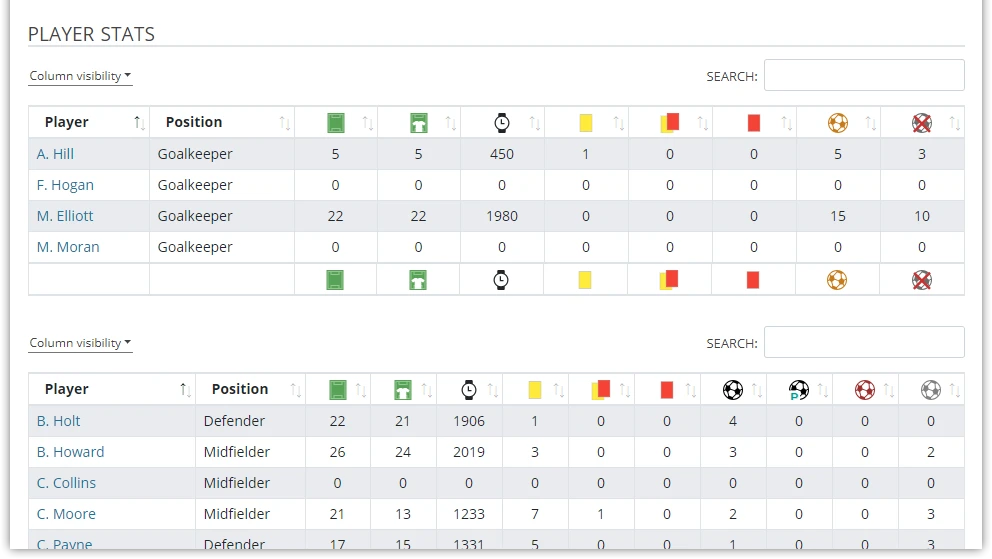
Display highly customizable player statistics with selectable columns, advanced sorting, filtering, and optional Tabulator layout for interactive data exploration. Supports custom stat columns defined in your plugin settings.
Premium Feature
This shortcode requires the Football Leagues Premium plugin.
Basic Usage
[anwpfl-stats-players-custom competition_id="12" columns="player_name,club,goals,assists"]This displays a custom stats table with only the specified columns.
All Parameters
Column Selection
| Parameter | Default | Description |
|---|---|---|
columns * |
(required) | Columns to display (comma-separated) |
Available Columns
| Column | Description |
|---|---|
ranking |
Ranking position number |
player_name |
Player name |
club |
Player’s club |
position |
Playing position |
appearance |
Games played |
started |
Games started |
minutes |
Minutes played |
cards_all |
All cards combined |
cards_y |
Yellow cards |
cards_r |
Red cards |
goals |
Goals scored |
goals_penalty |
Penalty goals |
goals_own |
Own goals |
assists |
Assists |
goals_conceded |
Goals conceded |
clean_sheets |
Clean sheets |
{custom_stat_id} |
Any custom stat defined in settings |
Query Parameters
| Parameter | Default | Description |
|---|---|---|
competition_id |
(empty) | Competition ID |
season_id |
(empty) | Season ID |
league_id |
(empty) | League ID |
club_id |
(empty) | Club ID |
multistage |
1 | Include secondary stages (multistage competitions). Use 0 to disable |
type |
(all) | Player type: p (players), g (goalkeepers) |
date_from |
(empty) | Start date filter (format: YYYY-MM-DD) |
date_to |
(empty) | End date filter (format: YYYY-MM-DD) |
days_offset |
(empty) | Dynamic start date. Use negative for past (e.g., -30 = 30 days ago) |
days_offset_to |
(empty) | Dynamic end date. Use 0 for today, positive for future days |
limit |
10 | Maximum players (0 = all) |
Note
By default, multistage="1" includes all stages of multistage competitions. The Competition Selector only shows main stages. To get statistics for a specific stage (knockout or playoff), enter the stage ID manually in competition_id and set multistage="0".
Sorting Parameters
| Parameter | Default | Description |
|---|---|---|
sort_column |
(empty) | Primary sort column |
sort_order |
DESC | Primary sort order: asc or desc |
sort_column_2 |
(empty) | Secondary sort column |
sort_order_2 |
DESC | Secondary sort order |
Filtering Parameters
| Parameter | Default | Description |
|---|---|---|
filter_column_1 |
(empty) | First filter column |
filter_column_1_value |
(empty) | Minimum value for filter 1 |
filter_column_2 |
(empty) | Second filter column |
filter_column_2_value |
(empty) | Minimum value for filter 2 |
Display Parameters
| Parameter | Default | Description |
|---|---|---|
layout |
(table) | Layout: empty for regular, tabulator for interactive |
links |
0 | Link player names. Use 1 to enable |
photos |
0 | Show player photos. Use 1 to enable |
club_column |
logo_abbr | Club display: title, logo, abbr, logo_title, logo_abbr |
header |
(empty) | Custom header text above table |
show_filter |
0 | Show Tabulator filters. Use 1 to enable |
hide_zeros |
1 | Hide zero values. Use 0 to show |
hide_empty_columns |
1 | Hide columns with no data. Use 0 to show |
paging |
0 | Enable pagination. Use 1 to enable |
rows |
10 | Records per page (when pagination enabled) |
Advanced Display (v0.16.18+)
| Parameter | Default | Description |
|---|---|---|
full_column_name |
full | Column header style: full or short |
column_font_size |
(default) | Table font size in pixels |
max_column_width |
(default) | Maximum column width in pixels |
frozen_columns |
(empty) | Columns to freeze during scroll (comma-separated) |
* Required parameter
Examples
Example 1: Goals Per 90 Minutes Leaders
When to use: Advanced efficiency metric.
[anwpfl-stats-players-custom competition_id="12" columns="ranking,player_name,club,goals,minutes" sort_column="goals" filter_column_1="minutes" filter_column_1_value="450" limit="20"]Result: Top 20 scorers with minimum 450 minutes played.
Example 2: Interactive Tabulator Table
When to use: Let users sort and filter data themselves.
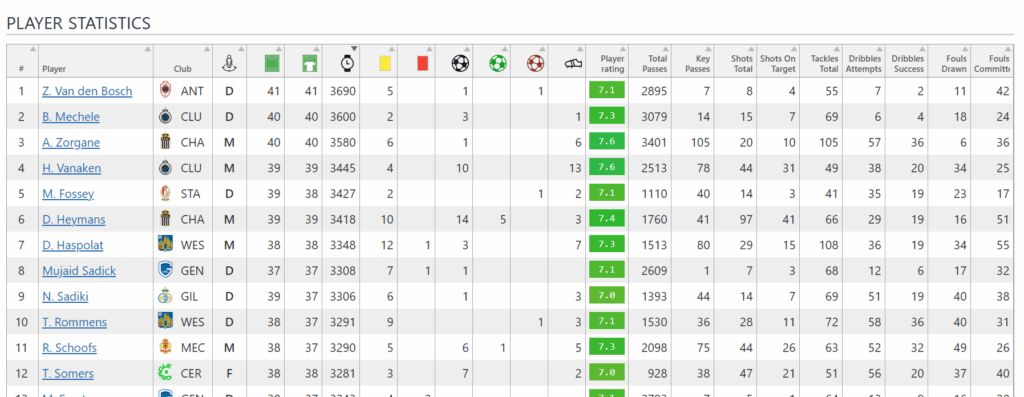
[anwpfl-stats-players-custom competition_id="12" columns="player_name,club,position,appearance,goals,assists,cards_y" layout="tabulator" show_filter="1" limit="0"]Result: Interactive table with client-side sorting and filtering.
Example 3: Midfielder Performance
When to use: Focus on specific position stats.
[anwpfl-stats-players-custom competition_id="12" columns="ranking,player_name,club,goals,assists,cards_y,minutes" sort_column="assists" sort_order="desc" sort_column_2="goals" photos="1" links="1"]Result: Sorted by assists, then goals, with player photos.
Example 4: Custom Stats Columns
When to use: Display custom-defined statistics.
[anwpfl-stats-players-custom competition_id="12" columns="player_name,club,shots,shots_on_target,key_passes,dribbles" layout="tabulator"]Result: Table with custom stat columns (if defined in settings).
Example 5: Club Page with Header
When to use: Club-specific stats with title.
[anwpfl-stats-players-custom competition_id="12" club_id="8" columns="ranking,player_name,position,appearance,goals,assists" header="2024/25 Season Statistics"]Result: Titled table showing only club 8’s players.
Example 6: Date Range Stats
When to use: Statistics for a specific time period.
[anwpfl-stats-players-custom competition_id="12" columns="ranking,player_name,club,goals,assists" date_from="2024-08-01" date_to="2024-12-31" sort_column="goals"]Result: Stats from matches played between August 1 and December 31, 2024.
Example 7: Frozen Columns with Pagination
When to use: Wide tables with many columns on mobile.
[anwpfl-stats-players-custom competition_id="12" columns="player_name,club,appearance,goals,assists,cards_y,cards_r,minutes" layout="tabulator" frozen_columns="player_name,club" paging="1" rows="20"]Result: Player name and club stay visible while scrolling horizontally.
Example 8: Rolling Monthly Form
When to use: Auto-updating monthly stats without editing shortcode.
[anwpfl-stats-players-custom competition_id="12" columns="ranking,player_name,club,goals,assists" days_offset="-30" days_offset_to="0" sort_column="goals" limit="20"]Result: Top 20 scorers from last 30 days, automatically updating daily.
Tip
The Tabulator layout provides client-side sorting (click column headers) and filtering capabilities. For large datasets, it offers a better user experience than the standard table layout.
Troubleshooting
Columns not appearing?
- Check column names are spelled correctly
- Verify custom stats are defined in plugin settings
- Use
hide_empty_columns="0"to show columns with no data
Tabulator not working?
- Ensure JavaScript is loading properly
- Check for conflicts with other plugins
Related
[anwpfl-stats-players]– Standard player statistics table[anwpfl-players]– Top scorers/assists (Core)[anwpfl-player-stats-panel]– Single player statistics