

API-Football sometimes moves a player to a new API ID – often with a shorter name, so “Joonas Kindel” comes back as “J. Kindel”. The import doesn’t know it’s the same person, so it creates a second player. From then on the player’s games, goals and cards are split between two records. The Player Merge Tool finds these duplicates and merges each pair into one player.
🚀 Where to find it
FL API Import > Toolkit, under Data Cleanup. Open Player Merge Tool.
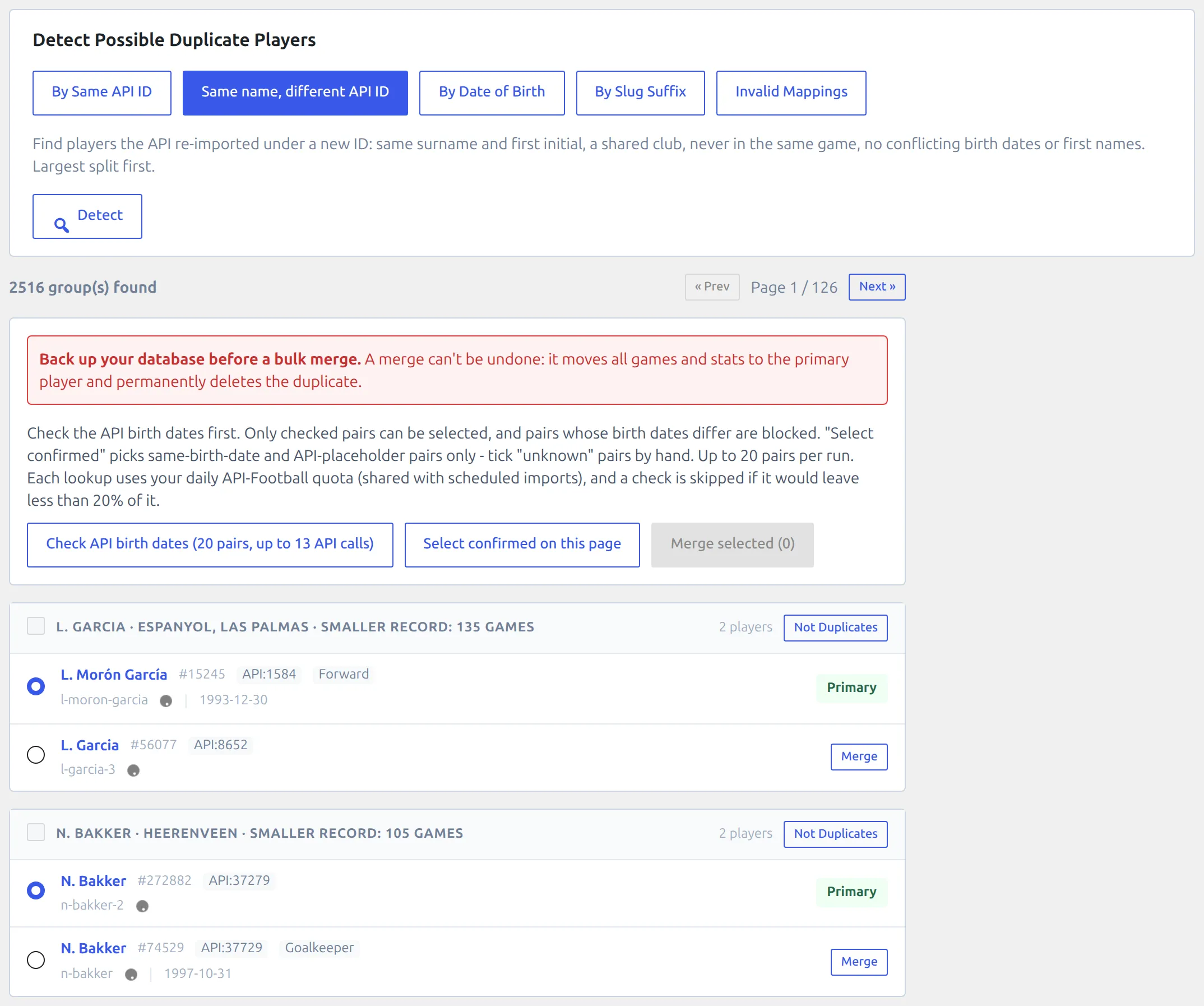
A merge can’t be undone
It moves every game and stat to the player you keep and permanently deletes the other one. Take a database backup before you merge, and always before a bulk merge.
Detection methods
Pick a method and press Detect. Each method looks for a different kind of duplicate:
| Method | Finds |
|---|---|
| By Same API ID | Two or more players mapped to the same API ID. |
| Same name, different API ID | Players the API re-imported under a new ID. This is the most common kind on sites that import every season. |
| By Date of Birth | Players with the same birth date and a similar name. |
| By Slug Suffix | Players whose URL ends in -2, -3 and so on – WordPress adds these when a second player gets the same name. |
| Invalid Mappings | Players with a broken API link. |
Results come in pages of 20. If a group isn’t a duplicate, press Not Duplicates and it won’t be listed again.
Same name, different API ID
This method pairs two players when all of these are true:
- Same surname and first initial. Accents don’t count, so “D. Lukacs” pairs with “Dániel Lukács”.
- They played for the same club.
- Their API IDs are different.
- They never played in the same game.
- Their birth dates don’t conflict, and neither do their full first names.
Each pair’s header shows the name, the shared clubs and how many games sit on the smaller record. The largest splits come first. The player with more games is preselected as the one to keep – switch the radio button if you’d rather keep the other.
But a matching name is only a hint. Two players with the same surname and initial can play for one club years apart. In our tests on a large site, 9 of the first 20 pairs were different people with different birth dates. That’s why the next step exists.
Checking birth dates through the API
Press Check API birth dates. It checks the pairs on the current page and tells you up front how many API calls it may use. A stored birth date is always used first – the API is only asked about a player who has none. Each pair gets a badge:
| Badge | Means | What to do |
|---|---|---|
| Same birth date | Both players have the same birth date. | Safe to merge. |
| API placeholder | One of the API IDs is an empty profile with no name or birth date. The API creates these when it moves a player to a new ID. | A strong sign of a duplicate. Safe to merge. |
| Birth date unknown | Neither your site nor the API has a birth date to compare. | Check the two players yourself before merging. |
| Birth dates differ | Two different people. | Don’t merge. Press Not Duplicates. |
Hover a badge to see both birth dates and where each one came from.
API quota
Each lookup uses your daily API-Football quota, the same one your scheduled imports and live scores use. Most pairs cost one call. The panel shows “API calls used today”, and the check refuses to run if it would leave less than 20% of your daily limit.
🎯 Merging in bulk
Bulk merge is available for the Same name, different API ID method.
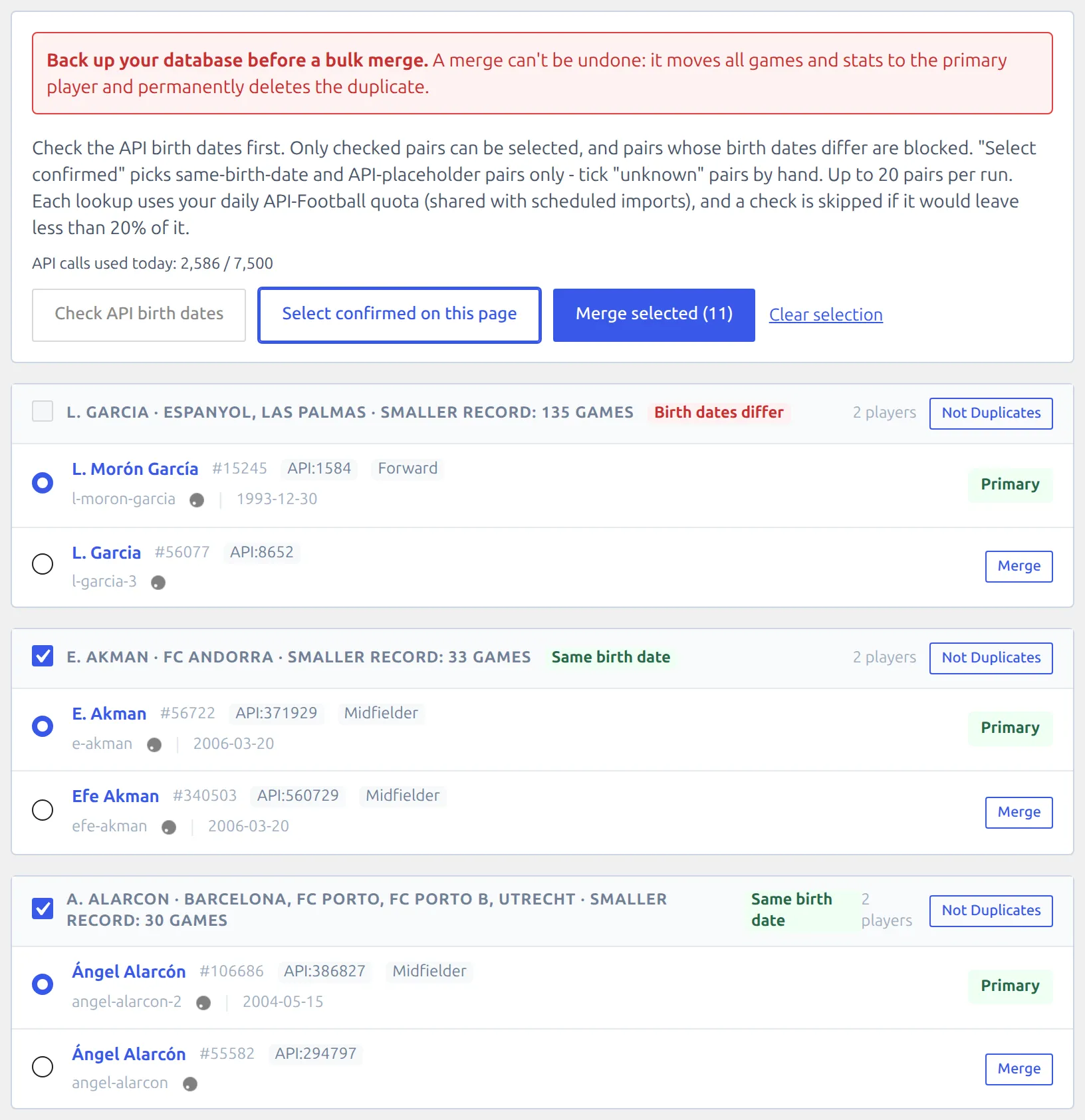
- Back up your database.
- Press Check API birth dates. A pair can only be selected after it has been checked, and pairs with Birth dates differ can’t be selected at all.
- Press Select confirmed on this page. It ticks the Same birth date and API placeholder pairs. Tick Birth date unknown pairs by hand, once you’ve checked them.
- Look over which player is kept in each pair.
- Press Merge selected. Up to 20 pairs per run.
The pairs are merged one at a time, with a progress line. If a merge fails, the run stops there – pairs merged before it stay merged. A pair is skipped when one of its players was already merged through another pair.
Merging one pair
Every method has a Merge button on each player row. It opens Preview Merge, which lists everything that will move. Press Execute Merge to run it.
To merge two players the detection didn’t find, use Manual Merge at the bottom of the tool: pick the Primary Player (keep) and the Duplicate Player (remove), then press Preview Merge.
What a merge does
- Moves the duplicate’s game stats, events, lineups, formations, transfers, squad places, manual stats and injuries to the player you keep.
- Permanently deletes the duplicate player.
- Remembers the duplicate’s API ID. Future imports that send that ID update the player you kept instead of creating the duplicate again.
You don’t need to re-import games after a merge – the games already point at the right player.
Keeping finished games correct
API-Football keeps correcting lineups and formations for a few days after a game. The Re-check LineUps & Formations action picks up those corrections. When the API swaps a player to a new ID in a game you already have, the game stays on your existing player record instead of moving to a new duplicate. See Import Dashboard to switch it on.
🆘 Troubleshooting
The birth date check won’t run
It would leave less than 20% of your daily API quota. Wait until the quota resets, or check fewer pages today.
I can’t tick a pair
The pair hasn’t been checked yet, its birth dates differ, or 20 pairs are already ticked. Hover the checkbox to see which. Run Check API birth dates first. If the API returned an error during the check, the pair stays unchecked and can be checked again.
I merged two different players
A merge can’t be reversed from the admin. Restore the database backup you took before the merge.
📚 Related
- Import Dashboard – scheduled actions, including the lineup re-check
- Broken Player References – repair lineups and events that point at deleted players