

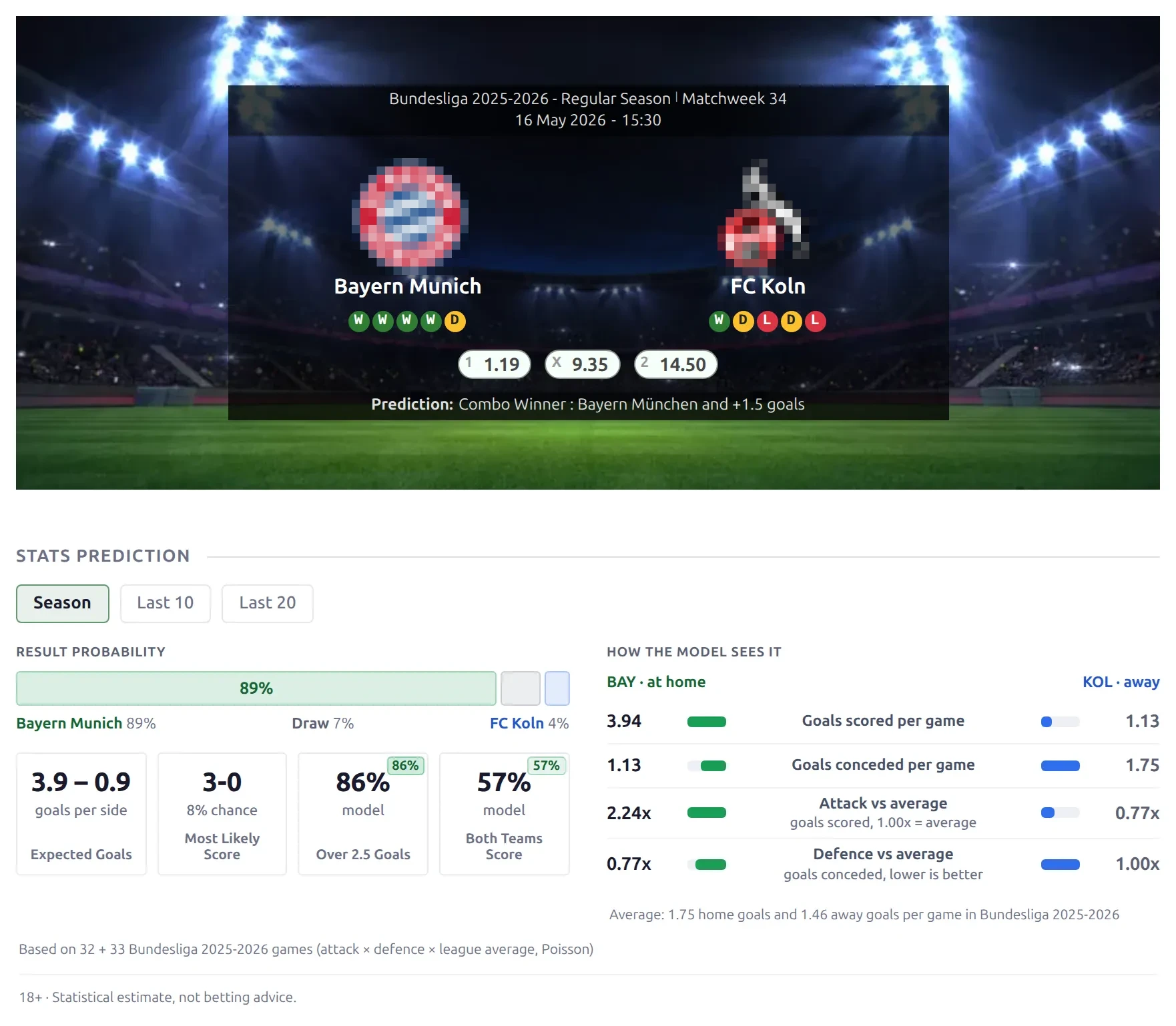
Layout Builder v2 gives every game page three layouts: Upcoming before kickoff, Live while the game is being played and Finished once the result is in. The page picks the right one by itself. The Upcoming layout is a full match preview – head to head, form, goals over/under, goal timing, likely scorers and a stats-based prediction – all worked out from the games already on your site.
🚀 Turn it on
Each of the three game layouts is its own card and is switched on separately. Until you do, your game pages render exactly as before – classic match page or your Layout Builder v1 Match and Match LIVE layouts.
- In wp-admin, open Layout Builder → Layouts (v2).
- Find the Game – Upcoming, Game – Live and Game – Finished cards.
- Switch on the ones you want. The label next to each toggle changes from Inactive to Active.

You don’t have to switch on all three. A state whose layout is inactive keeps the classic page – for example, activate Upcoming and Finished only and live games still render your classic live page. The builder reminds you with a “Not active: …” line above the layout.
Which layout a game gets
| Layout | Used when |
|---|---|
| Finished | The game has a result saved. |
| Live | The game page is in live mode: a live status or Live Events (Commentary) is set, the API live import lists the game, or a live source is enabled and kickoff is less than two hours away. Without a live status, Live Events or API data, a game stops counting as live 4 hours after kickoff. |
| Upcoming | Everything else – including postponed and cancelled games, and past games still waiting for a result. |
With live mode on, an open game page moves from Upcoming to Live to Finished by itself – visitors don’t need to reload.
What’s on each layout
The default layouts ship with these blocks, in this order. Reorder, remove or add blocks in the builder – each layout is edited on its own.
| Upcoming (22 blocks) | Live (12 blocks) | Finished (16 blocks) |
|---|---|---|
| Game Header, Stats Prediction, Matchweek Games, Missing Players, Lineups, Head to Head, Common Opponents, Form & Points per Game, Rest & Schedule, Team Comparison, Match Goals, Goals Scored & Conceded, Streaks, Match Totals, Goal Timing, Halves & Game State, Likely Scorers, Booking Risk, Standings, Summary, Latest Games, Bottom Content | Game Header, Timeline, Live Stats, Goal Timing, Momentum, Commentary, Lineups, Team Stats, Player Stats, Events Summary, Missing Players, Bottom Content | Game Header, Timeline, Events Summary, Lineups, Team Stats, xG & Finishing, Top Performers, Result in Context, Standings, Player Stats, Summary, Video, Gallery, Referees, Latest Games, Bottom Content |
Matchweek Games is a Global Shortcode block showing the rest of this matchweek (up to 20 games). The classic game sections – header, timeline, lineups, team and player stats, commentary, video, gallery – are the same ones your classic game page uses, with the same settings.
Preview statistics blocks
| Block | Shows |
|---|---|
| Stats Prediction | Win / draw / win chances, expected goals, the most likely score, over 2.5 and both-teams-to-score, from each club’s attack and defence (a Poisson model). Upcoming and Live only. |
| Head to Head | The record between the two clubs, the last meetings, and top scorers in those meetings. |
| Form & Points per Game | Last 5 / last 10 results and points per game, overall and at the venue. |
| Team Comparison | Played, win %, goals per game, scored, conceded, both teams scored, clean sheets, failed to score – and xG when your site records it. |
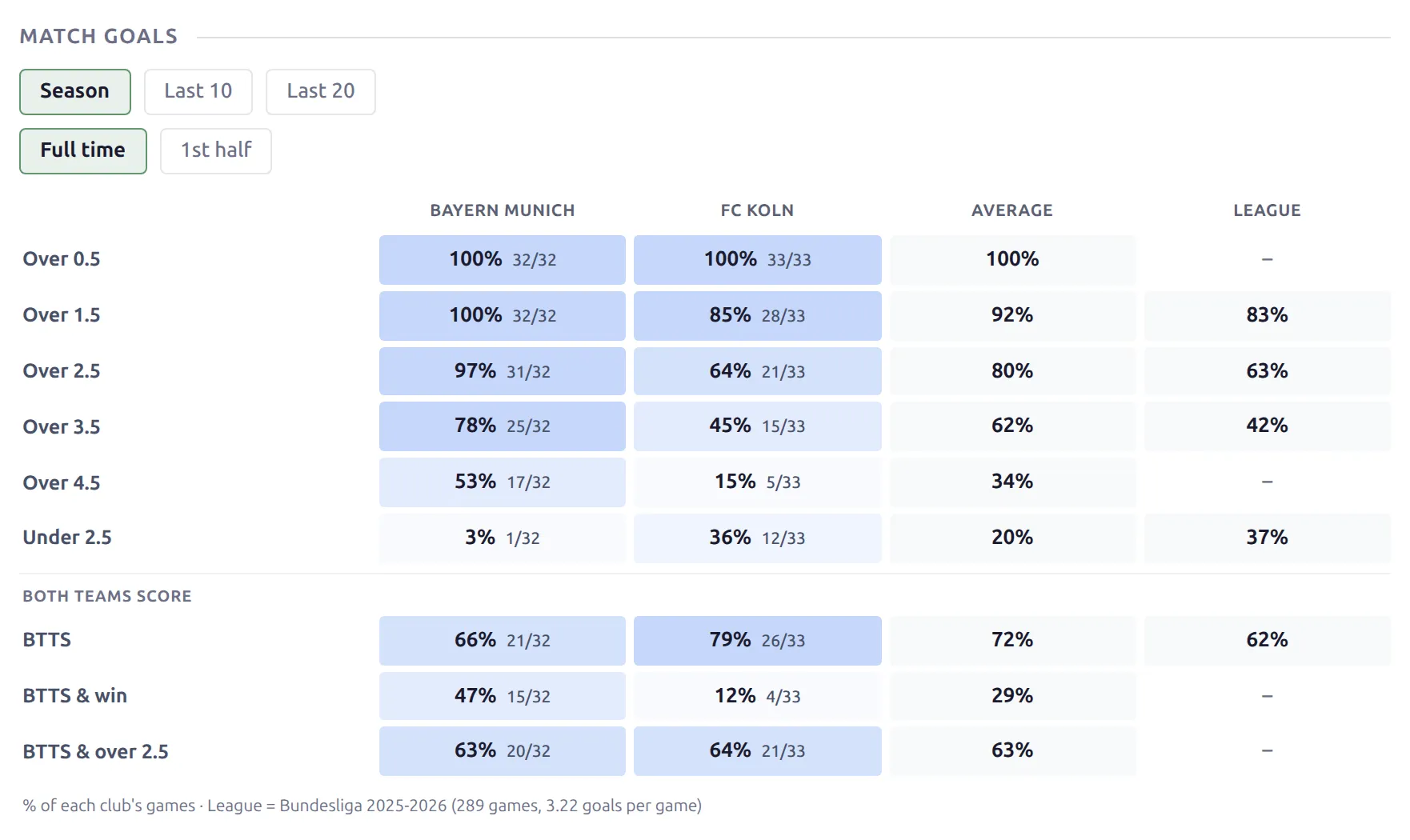
| Match Goals | Over 0.5 to 4.5 goals, under 2.5, both teams to score, with a league average column. A 1st half tab appears when half-time scores are recorded. |
| Goals Scored & Conceded | Who will score and who will concede – goals at the venue, scored over 0.5 / 1.5 / 2.5, failed to score, clean sheets. |
| Streaks | Current runs – wins, unbeaten, scoring, clean sheets, over 2.5 and more. |
| Match Totals | Corners, cards, shots, fouls, offsides and possession per game, with over lines. |
| Goal Timing | Goals scored and conceded in each 15-minute period, and who scores first. |
| Halves & Game State | Half-time record, leading at half time and winning, points won from losing positions. |
| Rest & Schedule | Days of rest, the last and next game, and games in the last 14 / 30 days. Upcoming only. |
| Common Opponents | How both clubs did against the same opponents. |
| Likely Scorers | Top scorers, assists and – with player ratings – in-form players, per 90 minutes and share of the club’s goals. Missing players are struck through. |
| Booking Risk | Players one booking from a ban, and cards per 90 minutes. |
| Standings | The game’s own table around both clubs, with both highlighted. On Finished it shows the table after the game. |
| Prediction (API) | The API-Football prediction charts. In the palette only when your API import stores predictions or odds. |
Live and Finished blocks
| Block | Shows |
|---|---|
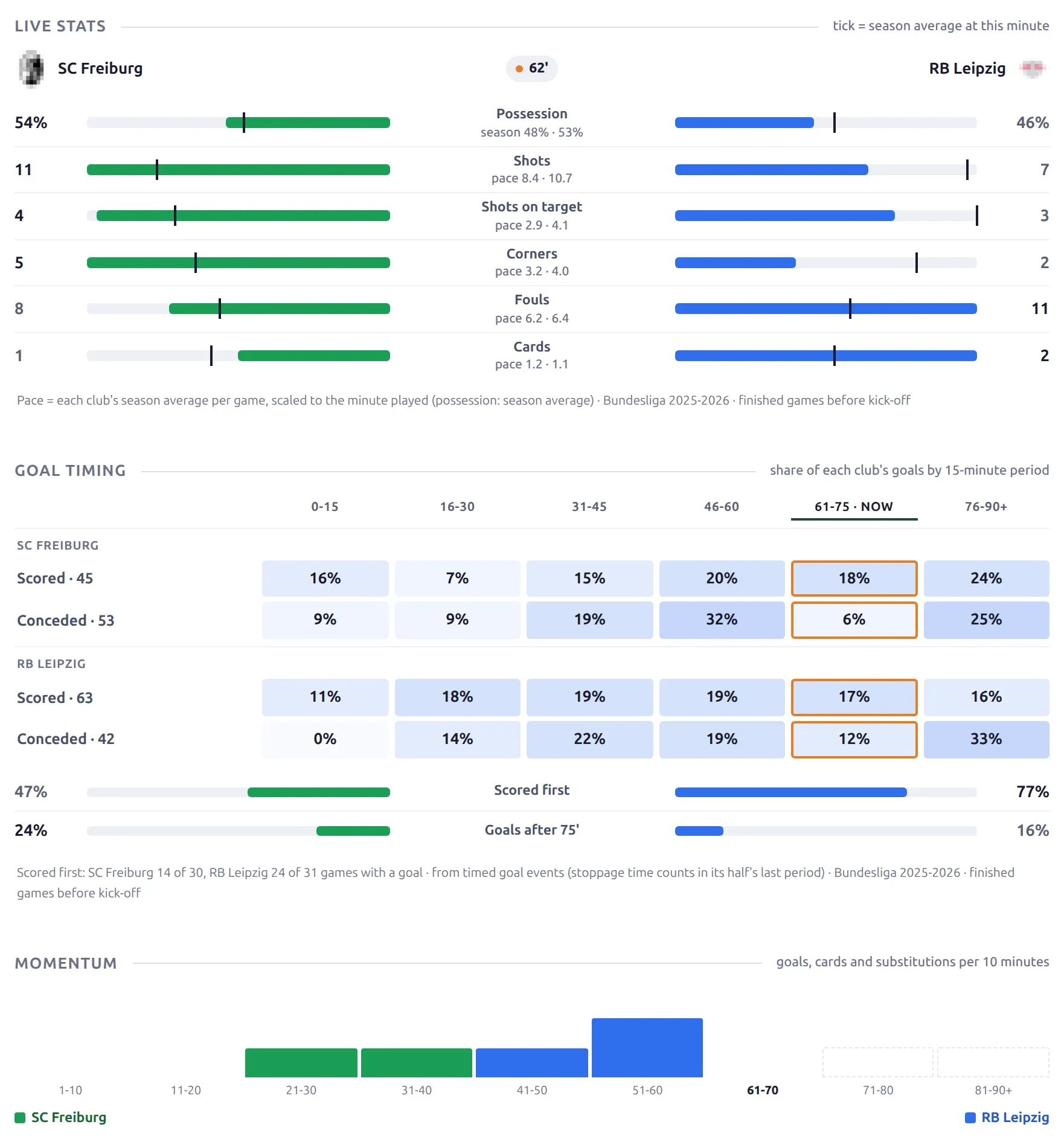
| Live Stats | Live team stats with a marker for each club’s usual pace at this minute. Live only. |
| Momentum | Goals, cards and substitutions in each 10-minute period. Live only. |
| Goal Timing | On a live game the current period is marked and moves with the clock. |
| Top Performers | The four best-rated players of the game. Finished only, needs a player rating field. |
| xG & Finishing | xG against goals, shot conversion and xG per shot. Without xG it becomes “Finishing”. Finished only. |
| Result in Context | Who was the pre-match favourite, pre-match form, how often this scoreline happens and which streaks the result extended or ended. Finished only. |
Live blocks refresh when new events or stats come in, not every minute, so a busy live page stays light.
🎯 Where the numbers come from
Every statistic is worked out from the finished games on your site. Three rules keep the numbers honest:
- Only games before kickoff count. Even on a Finished page, “form” and “head to head” are what they were before this game started – the game itself never leaks into its own preview numbers.
- Official games only. Friendlies are left out of every statistic, so the numbers match the team pages. The one exception is Rest & Schedule, which counts friendlies because they still tire a squad.
- Both clubs use the same games window. The two sides are always compared on the same basis.
Season, Last 10, Last 20
Statistics use one of three windows: Season (this game’s competition and season), Last 10 or Last 20 (each club’s latest finished games in any competition). Team Comparison, Match Goals, Goals Scored & Conceded, Match Totals and Stats Prediction show the three as pills, so visitors switch in place. The other statistics blocks follow the Default Window you set on the block in the builder.
Early in a season there aren’t enough games to go on. When either club has fewer than 5 season games, Season switches to each club’s last 10 games in all competitions, the Season pill is disabled and a note under the block says why. A friendly’s page does the same, since friendlies have no season statistics.
Neutral venues
The plugin has no neutral-venue setting, so on a cup final the club listed first gets its home numbers and the other club its away numbers. Keep that in mind when reading home / away splits on neutral-ground games.
Blocks hide on thin data
Every statistics block checks its data and hides – heading included – when there isn’t enough of it. A site that only records results gets the scores-based blocks (head to head, form, match goals, streaks) and nothing empty. A block needs, for example:
- Stats Prediction – at least 5 games for each club in the window.
- Goal Timing and Momentum – goal events with minutes.
- Halves & Game State – half-time scores for at least half the games.
- Match Totals – team match stats (corners, cards, shots) for most games. Stats with too little data are left out and named in a note.
- Top Performers and the In form tab of Likely Scorers – a player rating field.
Lineups before kickoff
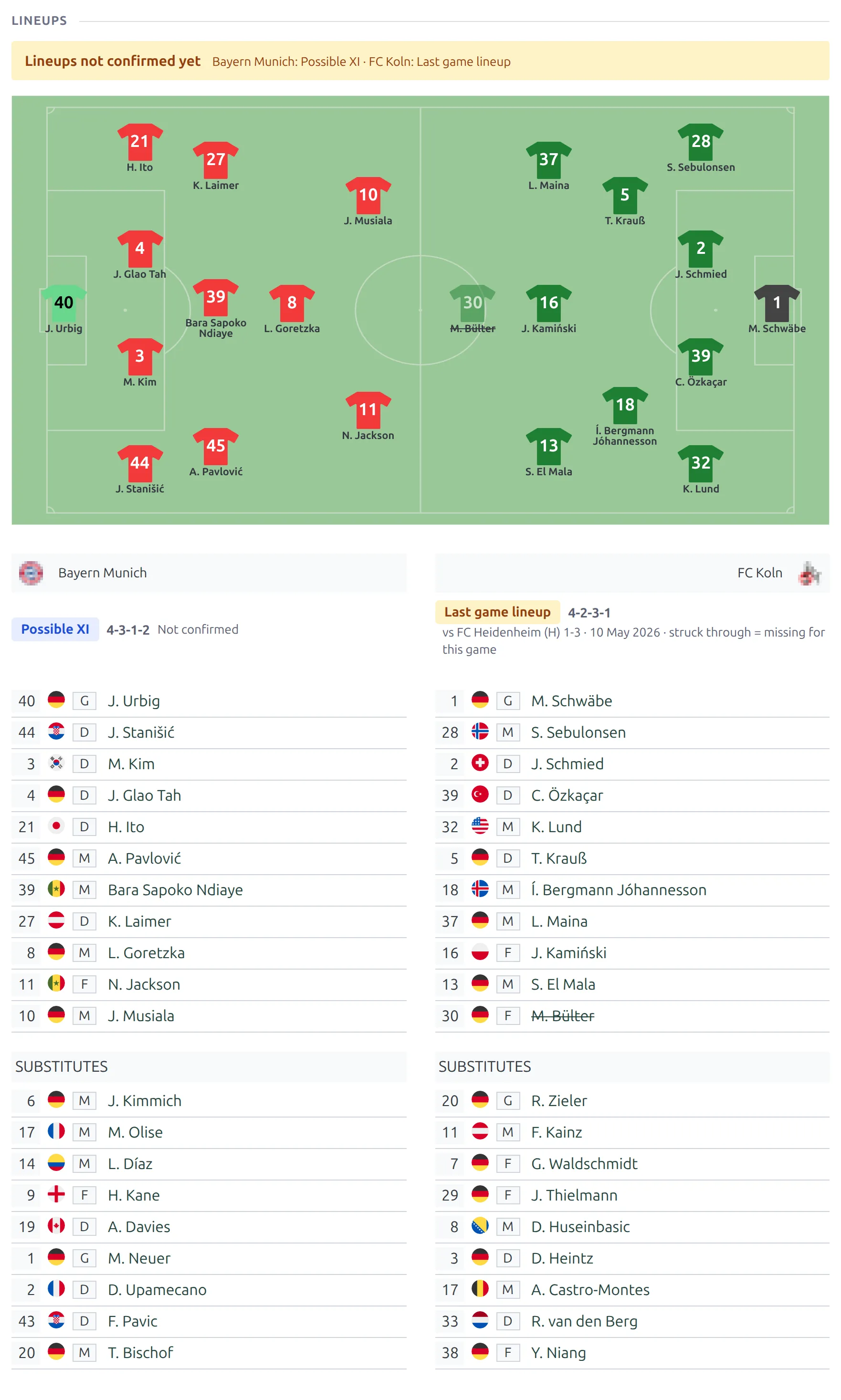
On the Upcoming layout the Lineups block labels each club’s side separately, so visitors know how far to trust it:
| Label | When |
|---|---|
| Confirmed | The official lineup is saved – entered by you or imported from the API. |
| Possible XI | You entered a lineup and ticked Possible XI – not confirmed for that club in the Players section of the game edit screen. |
| Last game lineup | No lineup yet – the club’s starting XI and formation from its previous finished game. |
When a side isn’t confirmed, a notice bar above the field says so – Lineups not confirmed yet, or Not all lineups confirmed yet when one club’s lineup is confirmed – and lists each club’s label. On Possible XI and Last game lineup, this game’s missing players are struck through. An imported API lineup always counts as confirmed and clears the Possible XI tick. Live and Finished pages show the lineup that was played, without a label.
Postponed and cancelled games
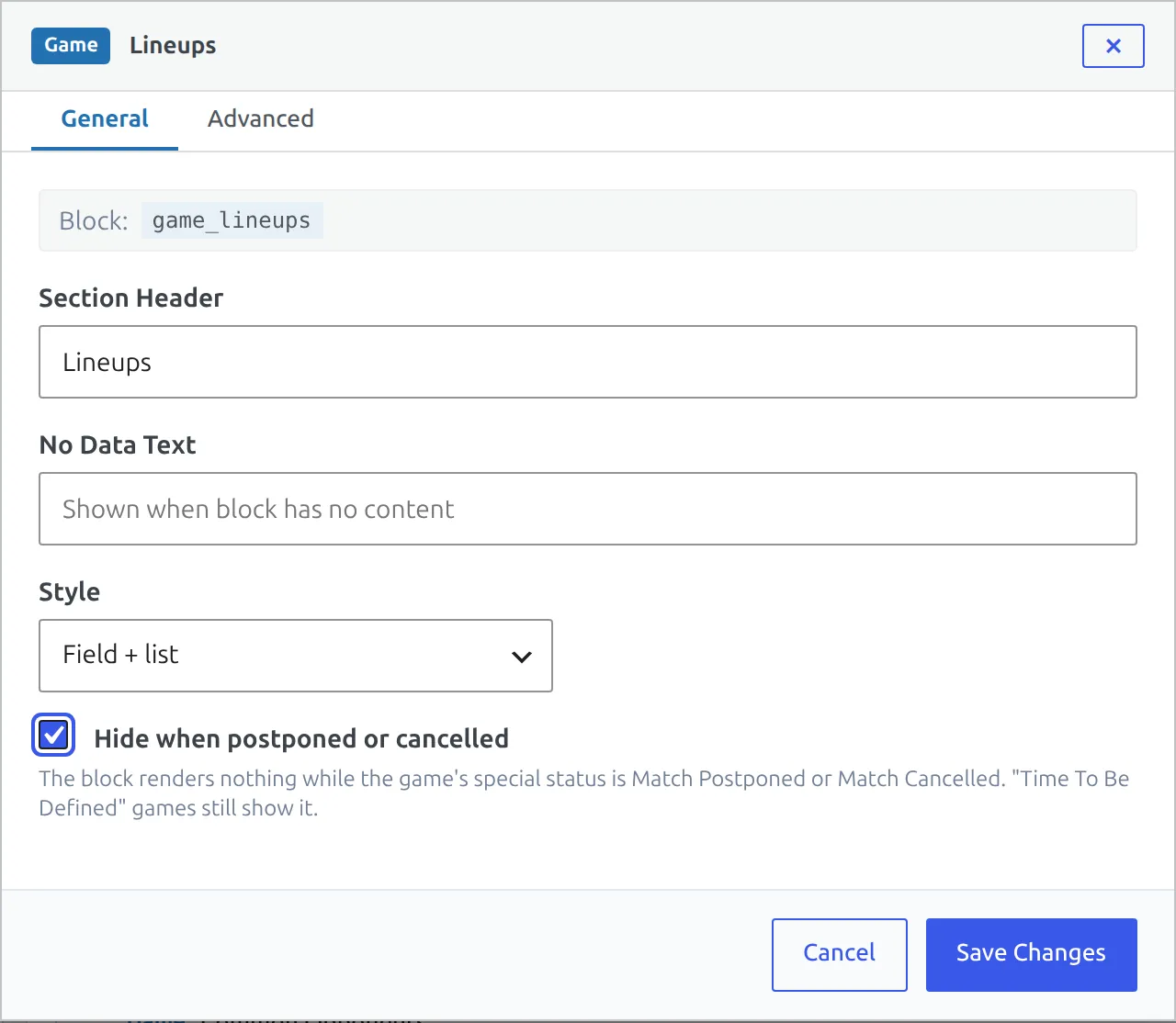
A postponed or cancelled game keeps the Upcoming layout, but much of a preview no longer makes sense – rest days, lineups and the prediction all assume the listed date. On the Upcoming layout, open a block’s settings and tick Hide when postponed or cancelled. The block (or a whole row) then disappears on games with the Postponed or Cancelled status. A game whose time is still to be decided (TBD) keeps it, because it usually goes ahead on the listed day.
Betting notice
Stats Prediction prints “18+ · Statistical estimate, not betting advice.” under its numbers. Switch it off at Settings & Tools > Settings > Features > Manual Odds > Betting notice, or change the wording in Translations > Text Strings. Every other label on the game page is in Text Strings too.
Dynamic variables
Use these in Text, HTML and Shortcode blocks and in each layout’s SEO title and description. The default SEO title is %home_club_title% vs %away_club_title% - %competition_title%.
| Variable | Value |
|---|---|
%match_id%, %competition_id%, %season_id%, %league_id%, %home_id%, %away_id% | Game, competition (main stage), season, league and club IDs – for shortcodes |
%home_club_title%, %away_club_title% | Club names |
%competition_title%, %season_title%, %league_title%, %matchweek% | Competition, season, league, matchweek |
%match_date%, %match_time%, %kickoff% | Game date and time |
%home_goals%, %away_goals% | Score |
%stadium_title%, %referee_name%, %referee_id% | Stadium and referee |
%prediction_text% | API prediction advice |
%h2h_total%, %h2h_home_wins%, %h2h_avg_goals%, %h2h_btts_pct% | Head to head: official meetings, home club wins, goals per game, both-teams-scored % (last 10) |
%last_meeting_result% | Last meeting, e.g. “Bayern 3-1 Koln” |
%home_form%, %away_form% | Last 5 results as W / D / L |
%home_ppg_home%, %away_ppg_away% | Points per game at the venue |
%home_streak%, %away_streak% | Current run, e.g. “3 wins” |
%home_avg_goals%, %away_avg_goals% | Goals per game |
The head-to-head values are empty when the clubs have never met. Wrap the sentence in [IF%h2h_total%] … [ENDIF%h2h_total%] and it’s dropped on a first meeting instead of reading “0 meetings”.
Moving from classic game layouts
Your Layout Builder v1 Match and Match LIVE layouts aren’t converted and aren’t touched. They keep rendering for every state whose v2 layout is inactive, so you can switch one state at a time. The v1 match blocks map to v2 like this:
| Layout Builder v1 | Layout Builder v2 |
|---|---|
| Match layout with Upcoming / Finished display options, and a separate Match LIVE layout | Game – Upcoming, Game – Live, Game – Finished |
| Header, Scoreboard | Game Header (Scoreboard or Classic header style) |
| Goals, Cards, Substitutes, Missed Penalties, Penalty Shootout | Events Summary (pick the sections) |
| LineUps, Formation | Lineups (Field + list, or List only) |
| Stats, Custom Player Stats | Team Stats, Player Stats |
| Head-to-head matches | Head to Head |
| Prediction | Prediction (API), or Stats Prediction from your own data |
| Latest Matches, Match Gallery | Latest Games, Gallery |
| Timeline, Commentary, Summary, Referees, Missing Players, Video, Home / Away Club Header, Bottom Content | Same names |
| Custom Code | Global Text, HTML or Shortcode |
| Odds | No separate block – the Game Header shows pre-match odds wherever your odds settings place them on the scoreboard |
Check three real games
After activating, open an upcoming league game, a first-ever meeting (or an early-season game) and a finished game. The same layouts should look right on all of them. If one doesn’t, switch that card back to Inactive while you adjust it – the classic page takes over again straight away.
🆘 Troubleshooting
The game page still looks like the old design
The layout for the game’s current state isn’t active – a live game needs Game – Live, a finished one Game – Finished. Or a page cache is serving old HTML: clear your caching plugin.
A statistics block is missing
It found too little data for this game and hid itself – see Blocks hide on thin data above. A block that’s palette-only on one state (Live Stats on Live, Top Performers on Finished) can’t be added to the others.
The Season pill is disabled
One of the clubs has fewer than 5 finished games in this competition and season, or the game is a friendly. The block uses the last 10 games instead and says so in its footer.
The Standings block doesn’t show
It shows the standing table of the game’s own competition and group. A knockout game has no table, so the block hides. An API table imported without a game date range can’t be matched to the game date and is skipped.
Numbers didn’t change after a result came in
Statistics are cached and refreshed whenever a game is finished – saved in the editor or imported by the API. If you corrected an old result by hand directly in the database, the cache catches up within a day.
📚 Related
- Team Pages with Layout Builder v2
- Player Pages with Layout Builder v2
- Competition Pages with Layout Builder v2
- Player match rating – needed for Top Performers and the In form tab
- Match statistics – the team stats Match Totals and xG & Finishing read
- LIVE on the Game Page – what puts a game in live mode
- Manual odds
- Layout Builder v1 or v2?