

Calendar Shortcode
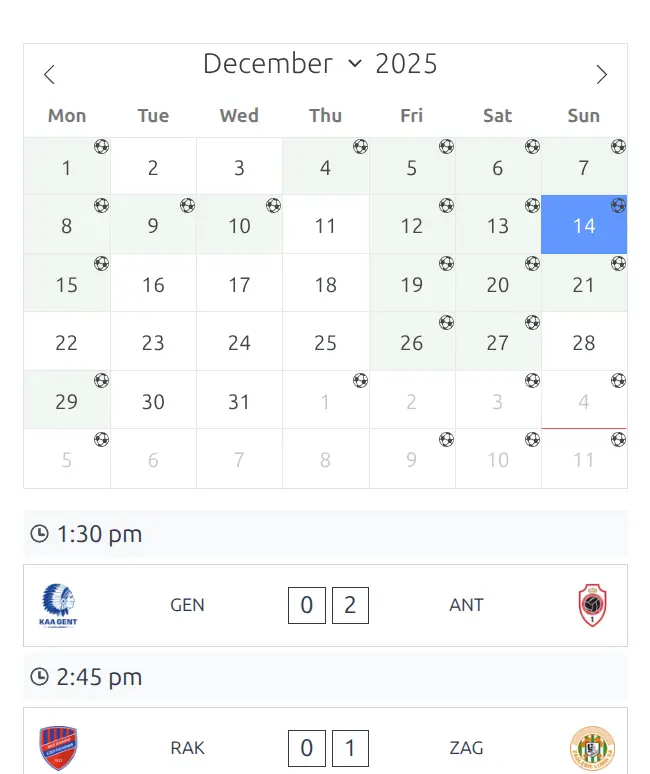
Display a monthly calendar view showing match days. The calendar highlights dates with matches and allows users to navigate through months to see the schedule. Perfect for overview pages showing when matches are played.
Premium Feature
This shortcode requires the Football Leagues Premium plugin.
Basic Usage
[anwpfl-calendar competition_id="12"]This displays a monthly calendar for competition 12.
All Parameters
| Parameter | Default | Description |
|---|---|---|
competition_id |
(empty) | Competition ID(s), comma-separated |
club_id |
(empty) | Club ID(s) to filter matches |
show_club_logos |
1 | Show club logos in match cards. Use 0 to hide |
show_club_name |
1 | Show club names in match cards. Use 0 to hide |
group_by_competition |
0 | Group matches by competition. Use 1 to enable |
group_by_time |
0 | Group matches by kickoff time. Use 1 to enable |
layout |
simple | Layout style: simple or modern |
Examples
Example 1: Competition Schedule Calendar
When to use: Main competition page showing match dates.
[anwpfl-calendar competition_id="12"]Result: Monthly calendar with match dates highlighted.
Example 2: Club Fixture Calendar
When to use: Club page showing their schedule across competitions.
[anwpfl-calendar club_id="8" group_by_competition="1"]Result: Calendar showing all matches for club 8, grouped by competition.
Example 3: Modern Layout
When to use: More visually appealing calendar display.
[anwpfl-calendar competition_id="12" layout="modern"]Result: Calendar with enhanced visual styling.
Example 4: Grouped by Kickoff Time
When to use: Days with multiple kickoff times.
[anwpfl-calendar competition_id="12" group_by_time="1"]Result: Matches grouped by time slots (15:00, 17:30, 20:00, etc.).
Example 5: Minimal Display
When to use: Compact calendar without logos.
[anwpfl-calendar competition_id="12" show_club_logos="0"]Result: Text-only match display for smaller spaces.
Tip
For a more interactive experience, consider using [anwpfl-calendar-slider] which provides a horizontal date navigation with match details. This static calendar is better for overview/print-friendly layouts.
Troubleshooting
Calendar appears empty?
- Verify competition_id or club_id is correct
- Check that matches exist in the current month
- Navigate to months with scheduled matches
Related
[anwpfl-calendar-slider]– Interactive date-based slider[anwpfl-matches]– Standard match list (Core)