

A slow Football Leagues page is almost always one of three things: standing tables being rebuilt on every load, live score requests hitting PHP instead of a cache, or the site having no object cache at all. This page covers each one, and how to find out which applies to you before changing anything.
🎯 Start here
| Symptom | Look at |
|---|---|
| High CPU during live games, even at low traffic | Live scores and the REST API |
| A page with many standing tables is slow | Standing tables |
| Every page is slow, logged in or out | Server-side caching |
| You don’t know which part is slow | Finding the slow block |
Standing tables
A standing table is one of the more expensive things the plugin renders, and pages that show several at once (a 13-group World Cup, a conference league, a team page with two tables) pay for it on every load. Three mechanisms cut that cost. Two are automatic; one is a setting you switch on.
The render cache
Go to Settings & Tools > Settings > Display > Standing and set Cache rendered tables (seconds). The finished HTML of every standing table is then reused for that many seconds instead of being rebuilt on each page load.
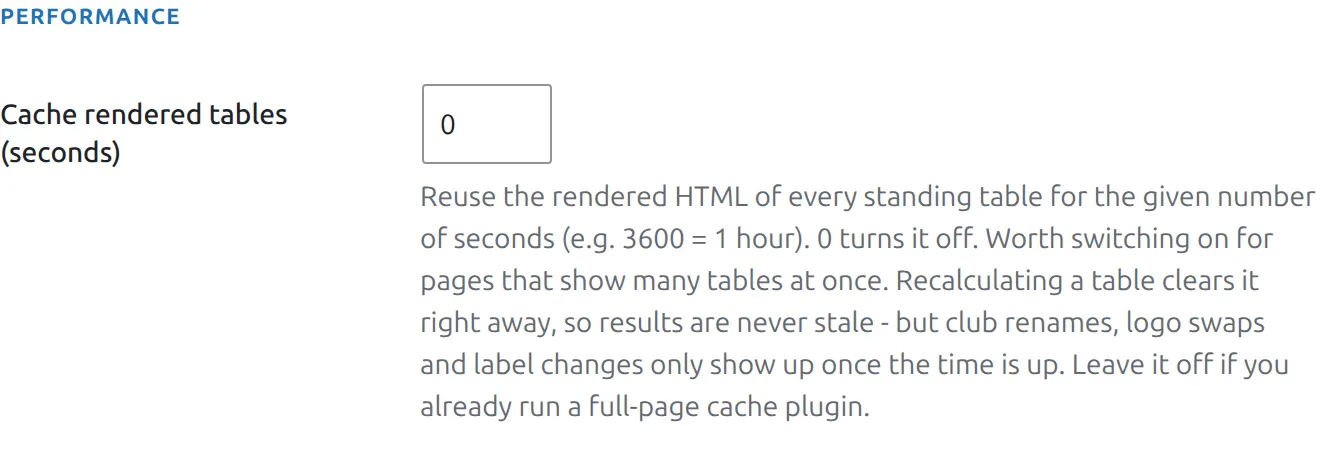
| Value | Effect |
|---|---|
0 (default) | Off – every table is built from scratch on every load |
3600 | Reuse the rendered table for one hour |
86400 | Reuse for a day – fine for a finished season |
Results are never stale, labels can be
This is the part worth understanding before you switch it on.
- Recalculating a standing clears its cache immediately. Save a match, run a recalculation, or use the Recalculate bulk action, and the new numbers show at once, whatever the cache time.
- Saving plugin settings clears it too. So a change to columns, zone colors or text strings takes effect right away.
- Everything else waits for the timer. Renaming a club, swapping a logo, or editing a translation outside the plugin settings won’t appear until the cached copy expires.
Already running a page cache?
Leave the render cache off. If WP Rocket, LiteSpeed or similar already serves your pages from a full-page cache, the table isn’t being rendered on those requests anyway. It earns its keep on sites with logged-in visitors, live pages, or a page cache that gets bypassed.
The standing shortcodes take a cache attribute, which overrides the global setting for that one place. Use it to cache a heavy archive table while leaving the current season uncached:
[anwpfl-standing id="42" cache="86400"]
[anwpfl-standing id="99" cache="0"]
What happens automatically (PRO)
Nothing to configure for either of these.
- Tab-at-a-time loading on competition pages. When a competition stage has several standing tables in tabs, only the table on the open tab is sent with the page. The rest arrive when a visitor opens their tab. On a ten-table stage that’s roughly 40 KB of standings instead of 326 KB.
- Full tables on demand. A team or player page set to show a partial table (“Top rows”, “Around this team”) used to ship a hidden second copy of the whole table in case the visitor pressed Show full table. Now the button fetches it. On a team page with two tables that’s 56 KB instead of 198 KB.
Live scores and the REST API
This is the most common cause of high CPU on an otherwise healthy site: a few hundred visitors during a live game, each browser polling the live score endpoint, every request reaching PHP. The fix is to cache those responses at the edge rather than to reduce the polling.
Add a Cloudflare Cache Rule for /wp-json/anwpfl/v1/*. Only the versioned v1 namespace is safe to cache – admin endpoints deliberately sit outside it. Full walkthrough: Cache a WordPress REST API endpoint with Cloudflare.
Keep the default cache key
Do not enable “Ignore Query String” (the legacy Caching Level) or a custom cache key that drops the query string. Several endpoints put their state there – filters on layout blocks, the time bucket on live score endpoints. Ignoring it makes Cloudflare serve one cached response for every variant: the wrong filter shown on a click, and live scores frozen until the edge cache expires.
Server-side caching
- Object cache – Redis or Memcached. The biggest single win on a data-heavy site, because it keeps repeated database reads out of PHP. If your host offers it, turn it on.
- Full page caching – Nginx FastCGI caching or an equivalent, for logged-out visitors. See caching in SpinupWP for one example of the setup.
- Bad bots – block them at Cloudflare. They generate real load on a site with thousands of player and match URLs.
Two habits also help: keep the plugin count modest, and prefer a lightweight SEO plugin over a resource-heavy one. If you need WooCommerce, consider running it as a separate WordPress instance.
Finding the slow block
Before optimizing anything, find out what’s actually costing the time. Turn on Block Performance Profiling under Settings > Advanced > Diagnostics with the Query Monitor plugin installed. Every template and layout block then reports its render time, memory use and query count to the Query Monitor panel.
Only administrators are measured, so visitors are never affected. Turn the standing render cache off while you measure, or you’ll be timing cache hits rather than real work.
🆘 Troubleshooting
I renamed a club and the table still shows the old name
Expected while the render cache is on – club renames are not one of the events that clear it. Wait for the cache time to pass, recalculate the standing, or clear the plugin cache under Settings & Tools > Toolbox > Clear Cache.
I am editing a table and want to see changes immediately
Set the cache to 0 while you work, then put it back. Saving the settings clears the cache in both directions, so the switch takes effect at once.
A standings tab opens empty or spins
The table for that tab is fetched over the REST API. If a security plugin, firewall or aggressive optimizer blocks REST requests from the front end, the fetch fails. See Page Optimizers.
Live scores are frozen or a filter shows the wrong data
Almost always a CDN cache key that drops the query string. See the warning above, and check the Cache Rule you added for /wp-json/anwpfl/v1/*.
📚 Related
- Page Optimizers – keeping plugin CSS and JS working through an optimizer
- Standing Columns – fewer columns is also less to render
- Standing Conferences