

Points come first in every league table. Ranking rules decide what happens next – which club goes above the other when two of them finish level on points. You build the order yourself, rule by rule, on each standing table. Seven rules ship with the free plugin and seven more come with PRO.
🎯 There is no default tiebreak order
This is the one thing worth reading twice. A new standing table starts with an empty rule list, and nothing fills it in for you. Points are the only thing separating clubs.
When two clubs are level on points and there’s no rule to separate them, the table falls back to the very last sort key, which is the club name, A to Z. So a table nobody has configured breaks ties alphabetically. Goal difference isn’t used. Goals scored isn’t used. Head-to-head isn’t used.
Check every table you already have
If two clubs on equal points look wrongly ordered and one of them just happens to start with an earlier letter, that’s this. Open the table, add at least Goals Difference and Goals Scored, and click Update. Alphabetical order is a fallback, not a bug – but it’s almost never what a league actually uses.
The club name stays the final tiebreak even after you’ve added rules. It only comes into play when every rule you set has also come out level, which is what you want – two clubs identical on every count still need a stable order, or the table would shuffle on every page load.
Where the rules live
Ranking rules are set per standing table, not per competition and not site-wide. Two groups of the same cup can use different rules, and usually should.
- Go to Competitions > Standing Tables and open the table.
- Scroll to the Ranking Rules block, near the bottom of the editor.
- Add rules from Available rules with the + button, or drag them across.
- Order them with the up and down arrows, or drag a rule by its handle.
- Remove one with the × button – it goes back to the available pool.
- Click Update. The table is rebuilt and re-sorted as you save.
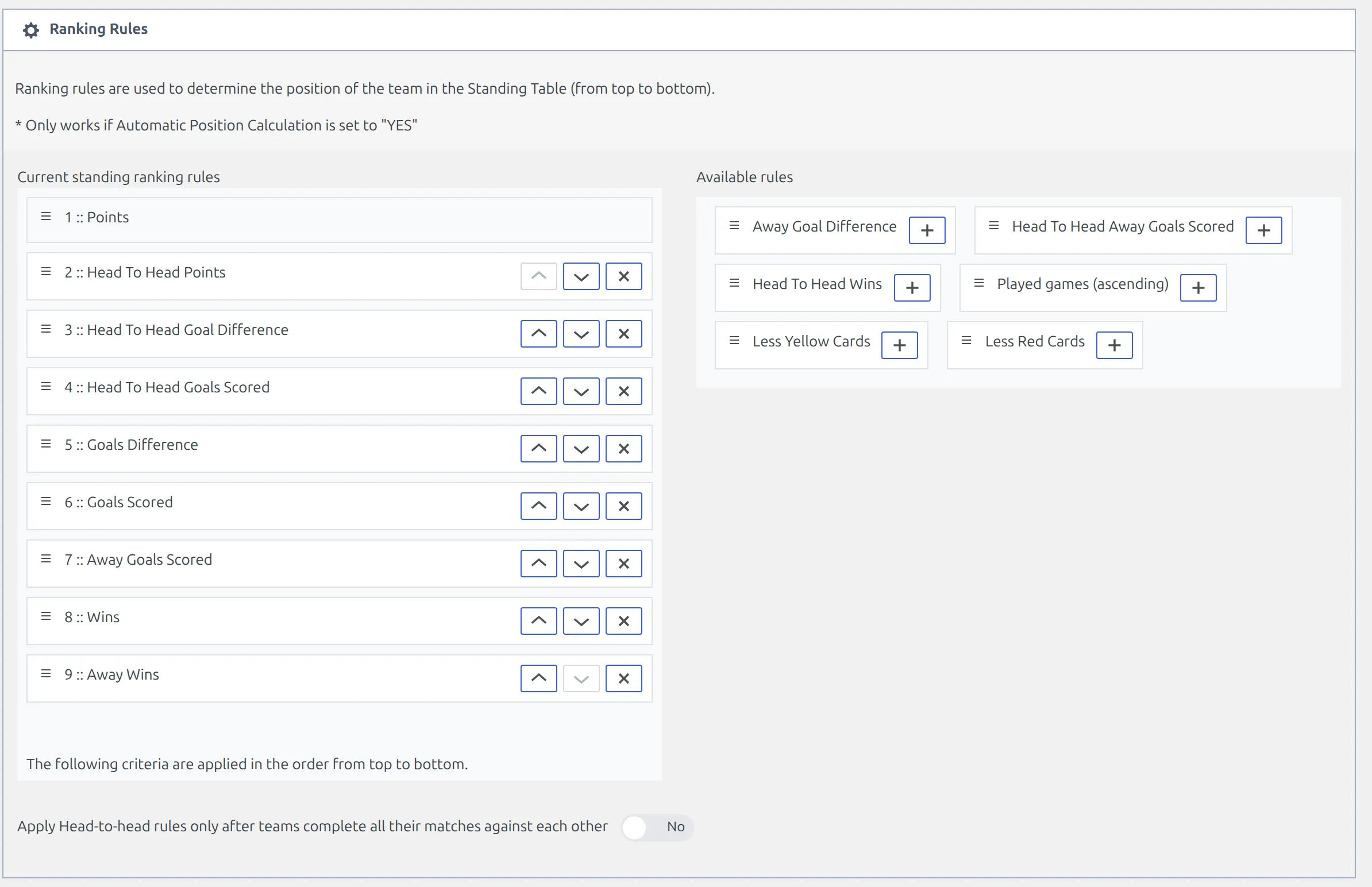
The left-hand list is numbered, and the numbering is the point of it. 1 :: Points is fixed at the top and can’t be moved or removed. Everything you add is applied in the order shown, from top to bottom, and only when the rule above it came out level.
Automatic Position Calculation has to stay on
The switch sits in the settings strip above the table. Set it to Disable and the plugin keeps the positions you arranged by hand instead of working them out, so your ranking rules stop having any effect. There’s a second catch on the front end: the All / Home / Away buttons are still drawn on such a table, but they can’t load anything and spin on the spot. Leave Automatic Position Calculation enabled unless you’re deliberately ordering the table yourself, and switch the Home / Away buttons off for that table if you are.
The fourteen rules
Seven are in the free plugin. The seven marked PRO need Football Leagues PRO – they’re simply not in the available pool without it.
| Rule | What it compares | Plugin |
|---|---|---|
| Goals Difference | Goals scored minus goals conceded, whole table | Free |
| Goals Scored | Goals scored, whole table | Free |
| Wins | Matches won, whole table | Free |
| Away Goals Scored | Goals scored in away matches only | Free |
| Head To Head Points | Points won in the matches between the tied clubs | Free |
| Head To Head Goal Difference | Goal difference in those matches | Free |
| Head To Head Goals Scored | Goals scored in those matches | Free |
| Away Goal Difference | Goal difference in away matches only | PRO |
| Away Wins | Matches won away from home | PRO |
| Head To Head Wins | Wins in the matches between the tied clubs | PRO |
| Head To Head Away Goals Scored | Away goals in those matches | PRO |
| Played games (ascending) | Fewest matches played goes higher | PRO |
| Less Yellow Cards | Fewest yellow cards goes higher | PRO |
| Less Red Cards | Fewest red cards goes higher | PRO |
Three of them rank the lowest number first, which is what their names say: fewer games played, fewer yellows, fewer reds. Every other rule ranks the highest number first.
The two card rules read the card totals recorded on each match in the table. Less Red Cards counts straight reds plus second yellows; Less Yellow Cards counts yellow cards. A second yellow is treated as a red here whichever way you’ve set card counting elsewhere on the site.
Played games (ascending) is the odd one out and it’s there for a reason. In an amateur league where clubs are several fixtures apart, it puts the club with games in hand above the club that’s already played them – the same idea a “games in hand” note conveys, applied to the sort.
The list above is the whole list. There is no rule for goals conceded on its own, no goals-scored-to-conceded ratio, and no fair-play or disciplinary points table. Goals Difference covers most of what a conceded-goals rule would do, since the two clubs being compared are already level on points.
🚀 Orders that match real competitions
Copy whichever of these matches your rulebook, then adjust. The order of the list is the order of the tiebreak.
| Competition style | Rules, in order |
|---|---|
| English and Spanish top-flight style – goal difference first | Goals Difference, Goals Scored |
| Italian and Spanish style – the clubs’ own results first | Head To Head Points, Head To Head Goal Difference, Goals Difference, Goals Scored |
| European group stage – head-to-head, then away goals | Head To Head Points, Head To Head Goal Difference, Head To Head Goals Scored, Goals Difference, Goals Scored, Away Goals Scored, Wins |
| Cup group with a disciplinary decider | Head To Head Points, Goals Difference, Goals Scored, Less Red Cards, Less Yellow Cards |
| Amateur league with uneven fixture counts | Played games (ascending), Goals Difference, Goals Scored |
Two or three rules are enough for most leagues. A long list isn’t more accurate – it just means more rules that will never be reached, because the tie was already broken further up.
Setting the same rules on eight cup groups by hand is tedious. Configure one table, then use the Clone link on the Standing Tables list for the rest – the rules, notes, colours and initial points all come across.
Head-to-head rules
A head-to-head rule looks only at the matches played between the clubs that are tied. If three clubs finish on 12 points, it builds a mini-table out of the six matches those three played against each other and ranks them on that.
Head To Head Points uses the same points-per-result values as the main table, so a league playing 2 points for a win gets a mini-table on 2 points for a win too.
Clubs that aren’t tied on points are never involved. That means a head-to-head rule does nothing at all until at least two clubs land on the same points total, which is exactly as it should be, but it also means you can’t preview its effect on a table where everyone is separated.
The “only after all their matches” switch
Below the two rule lists there’s a switch: Apply Head-to-head rules only after teams complete all their matches against each other. It’s off by default.
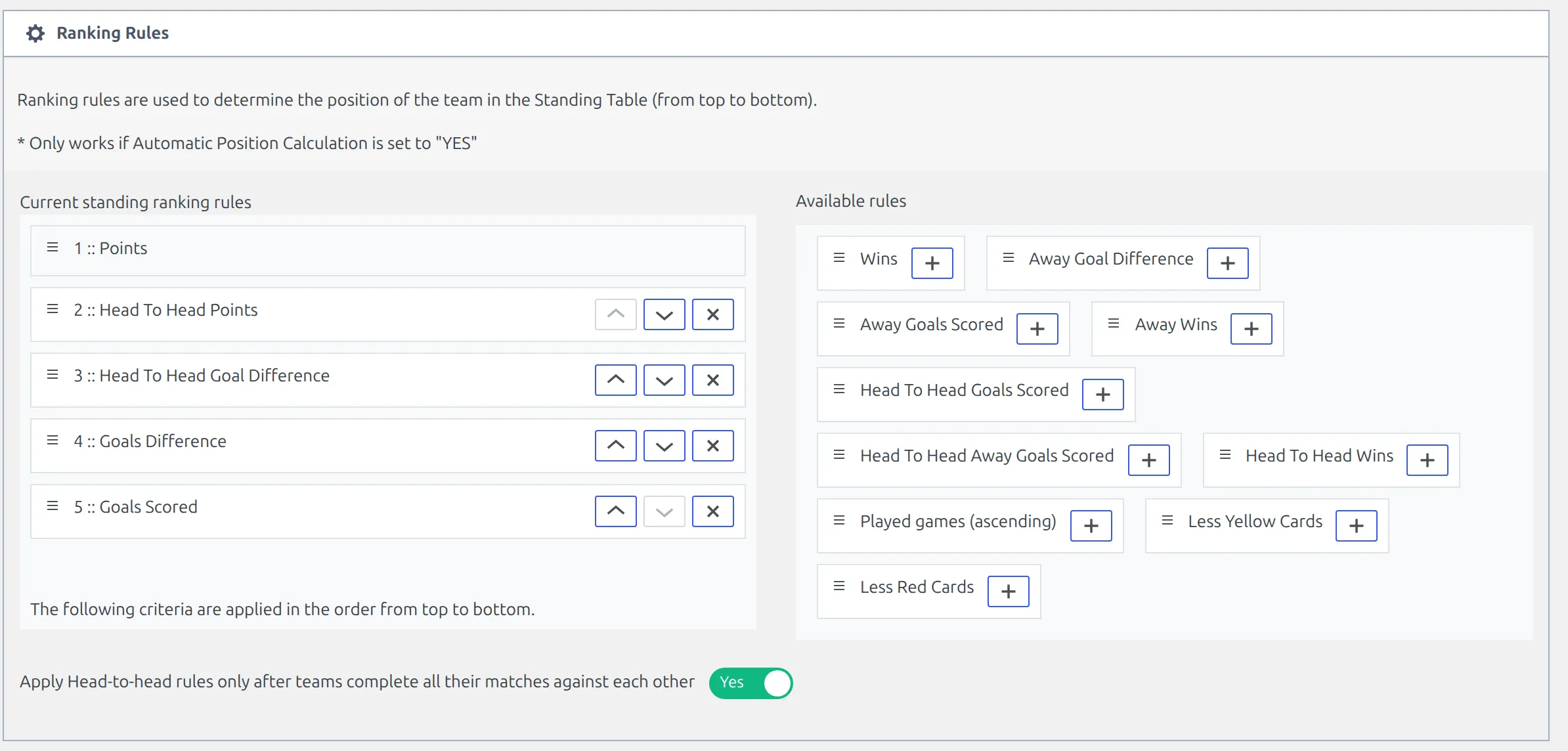
Turn it on and a tied group is ranked head-to-head only once every club in it has played every other club both ways – home and away. Until then the head-to-head rules contribute nothing for that group and the tie falls through to the next rule in your list. It’s built for a league where clubs meet twice: in November, two clubs who have played each other once are separated on goal difference; in April, once the return fixture is played, the head-to-head result takes over.
Leave it off if clubs meet only once
The condition is home and away, so a single round-robin – a cup group, or a league where each pair meets once – can never satisfy it. With the switch on, such a table gets no head-to-head separation at any point in the season, and ties drop straight through to the rules below head-to-head, or to the club name if there aren’t any. On a single round-robin, keep it off and the head-to-head rules work normally.
Points, deductions and bonus points
Two blocks in the same editor decide the points a club has before any rule is applied.
Points per result
The Points block holds three numbers: points for a win, a draw and a loss. They ship as 3, 1 and 0. Change them for a league on 2 points for a win, or for a format that gives a point for a defeat.
These are per table, and they’re also what Head To Head Points uses.
Re-check them after cloning a table. A clone carries your ranking rules, notes, colours and initial points across, but picking the competition and group on the clone and saving sets the three points values back to 3 / 1 / 0. If your league doesn’t use 3 / 1 / 0, type them in again after that first save.
Point deductions and starting points
The Initial Standing Table Data block has an Initial points list. Click add points, pick a club, and type a number. It can be negative – -10 for a ten-point deduction – or positive, for a league that carries points forward from a first phase.
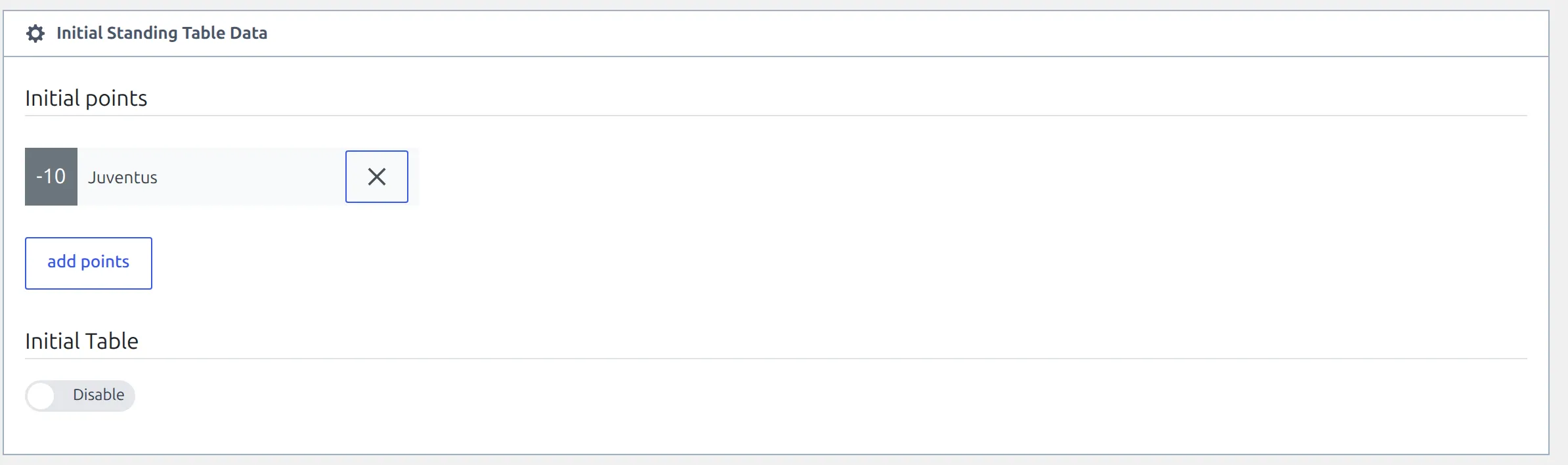
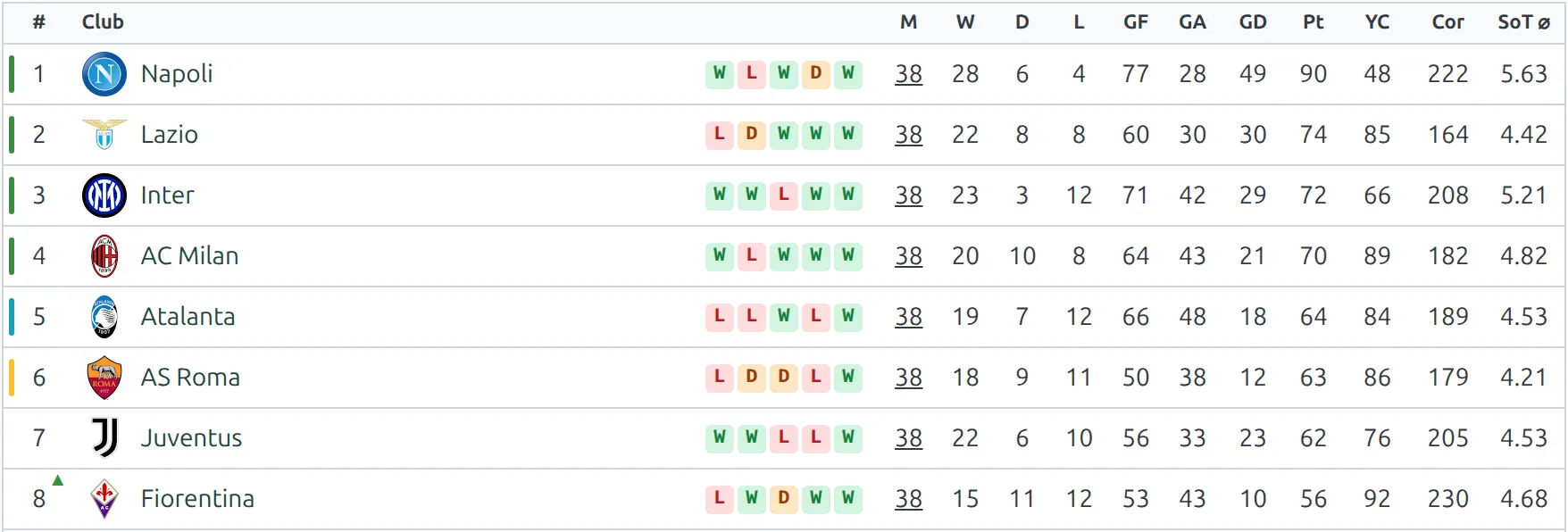
The adjustment is added to the club’s points total before the table is sorted, so a deduction really does move the club down. Nothing on the front end announces it – the Points column simply shows the adjusted number – so explain it in Table Notes underneath the table.
The second half of the same block, Initial Table, is a different tool: it adds whole rows of played, won, drawn, lost, goals and points on top of what your matches produce. Use it when a competition starts from a carried-over table rather than from zero.
When the table is re-sorted
Changing a rule doesn’t reorder the table on its own – the table is stored, not worked out on every page view. It’s rebuilt when:
- you save the standing table itself;
- a match in the competition and group is saved in the admin;
- a match is saved from the front-end game editor, or by the live-score screen;
- the API import brings in a result.
The Data Import tool is the exception, on purpose. Pasting 300 rows of results would otherwise rebuild the same table 300 times, so it marks the affected tables instead and rebuilds them once, when you say so.
A marked table shows a red Needs recalculation flag in two places: next to its name on the Competitions > Standing Tables list, and in the competition strip at the top of the editor, beside the last recalculation time. To clear it:
- On Settings & Tools > Data Import, a yellow bar appears above the grid – “3 standing tables need recalculation” – with a Recalculate now button. It works through them one at a time and reports how many it did.
- Or tick the tables on the Standing Tables list, choose Recalculate from the Bulk actions menu and click Apply.
- Or just open a table and click Update, which rebuilds that one.
🆘 Troubleshooting
Two clubs on the same points are in the wrong order
Open the table and look at the rule list. If it’s empty, that’s your answer – the tie was broken on club name. If it isn’t, read it top to bottom against the two clubs’ numbers: the first rule where they differ is the one that decided it, and every rule below it was never consulted.
I added a rule and nothing moved
Three things to check, in order. Did you click Update? Are the two clubs actually level on points – a rule below Points is never reached otherwise? And is Automatic Position Calculation still enabled? With it disabled the positions are the ones stored on the table and no rule applies.
My head-to-head rules never do anything
Check the Apply Head-to-head rules only after teams complete all their matches against each other switch at the foot of the block. If your clubs meet once rather than twice, that switch stops head-to-head working for the whole season. Set it to No.
Half my rules aren’t in the list
The available pool holds seven rules in the free plugin and fourteen with PRO. Away Goal Difference, Away Wins, Head To Head Wins, Head To Head Away Goals Scored, Played games, Less Yellow Cards and Less Red Cards are the PRO seven.
A finished match didn’t change the table
Only matches marked Finished, in the same competition and the same group as the table, are counted. If the match is right and the table still hasn’t moved, look for the Needs recalculation flag beside its name – a result that arrived through the Data Import tool waits for you to run the recalculation.
📚 Related
- Round-Robin Competitions – creating the competition and the table the rules belong to
- Multistage Competitions – one table per group, each with its own rules
- Manual Standing Data Edit (PRO) – typing the numbers in yourself instead, which switches the whole engine off
- Standing Columns (PRO) – which columns the table shows, and in what order
- Standing Conferences (PRO) – splitting one table into divisions, still ranked by these rules
- Standing shortcode – putting the table on a page