

Generate professional game reviews and match predictions automatically using AI. The AI Writer supports two workflows: Finished Games (post-match reviews) and Upcoming Games (pre-match predictions).
Requirements
- PHP 8.2 or higher
- Football Leagues Premium plugin (v0.16.20+)
- OpenAI API key (optional – required only for direct AI generation)
Changelog
v0.16.20 – added AI Writer
v0.17.0 (Work In Progress) – improved UI and design, added ability to generate prediction/preview, added option to export JSON data to use in other AI chat
Getting Started
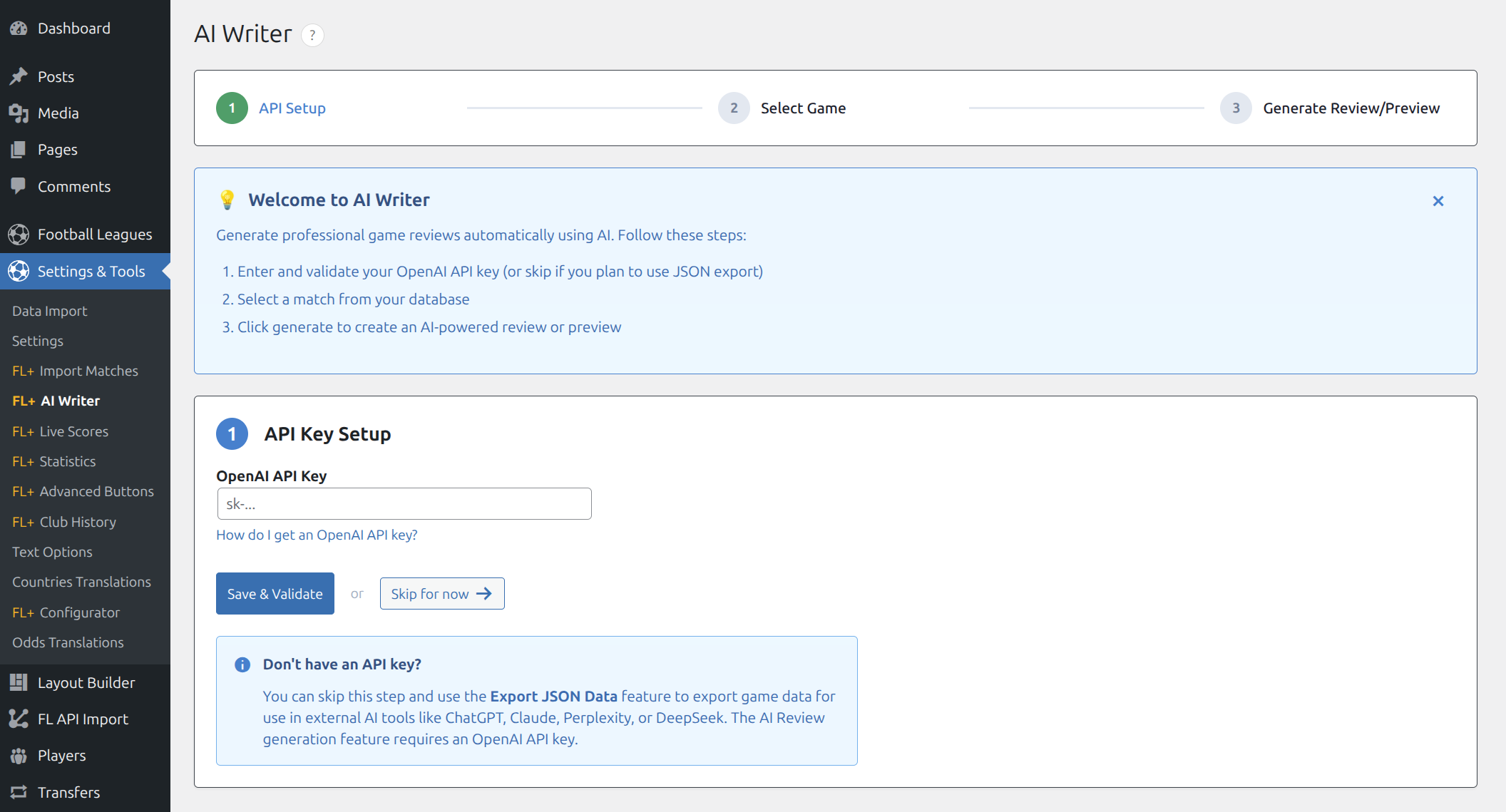
Navigate to Settings & Tools → AI Writer in your WordPress admin panel. The AI Writer uses a simple three-step workflow:
- API Setup – Enter your OpenAI API key (or skip to use Export mode)
- Select Game – Choose a match from your database
- Generate Review/Preview – Create content or export data
Step 1: API Key Setup
You have two options for using AI Writer:
Option A: With OpenAI API Key (Full Features)
Generate reviews and predictions directly within the plugin.
- Create an account at platform.openai.com
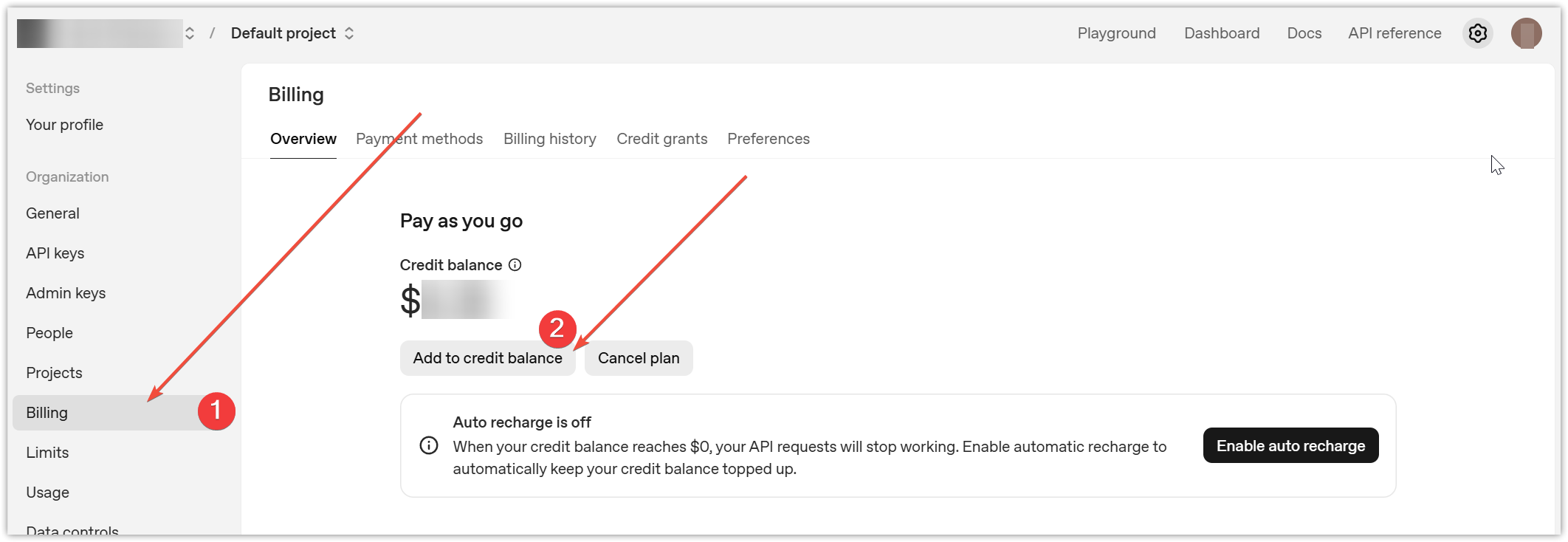
- Add credit balance via Your Profile → Billing (minimum $5 recommended)
- Generate an API key in the API Keys section
- Paste the key (starts with
sk-) into the AI Writer API Key field - Click Save & Validate
Option B: Without API Key (Export Mode)
Export game data as JSON and use it with external AI tools like ChatGPT, Claude, Perplexity, or DeepSeek.
- Click Skip for now on the API Setup screen
- You’ll be able to export structured game data
- Paste the exported JSON into your preferred AI tool
Tip: Export mode is recommended for predictions – it gives you better cost control and allows you to use AI tools with free tiers.
Step 2: Select a Game
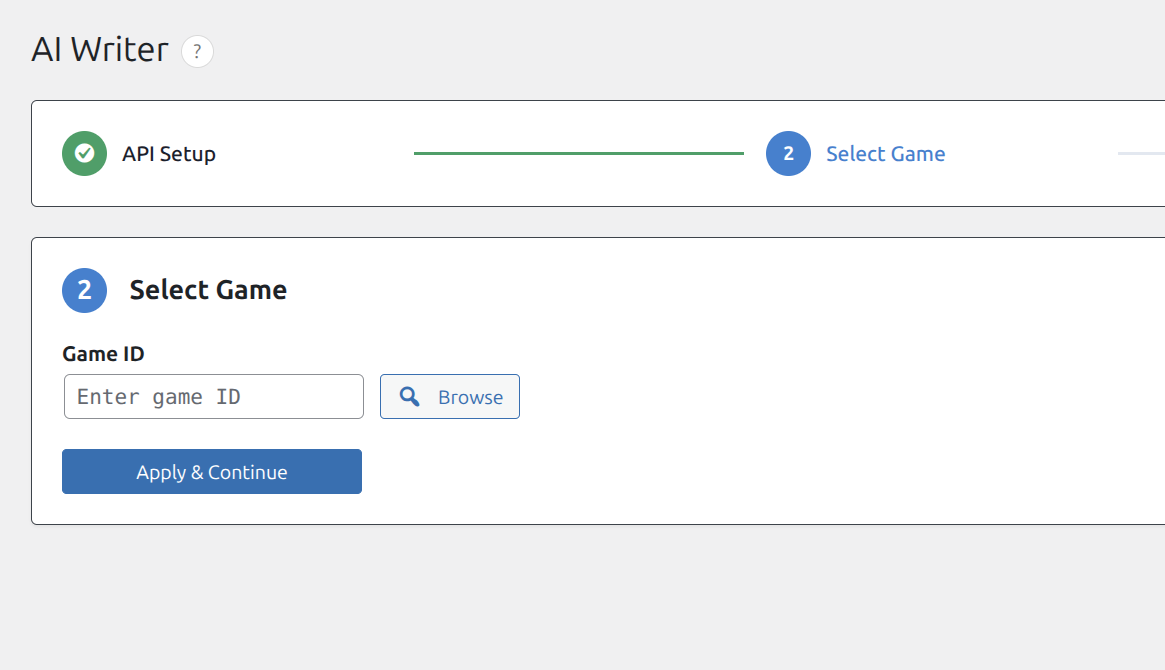
Enter a Game ID or click Browse to search your matches.
Finding the Game ID:
- Method 1: Click the Browse button and use the match selector
- Method 2: Go to Matches → All Matches, hover over a match, and check the URL:
post=123 - Method 3: Open any match in edit mode – the ID is in the browser address bar
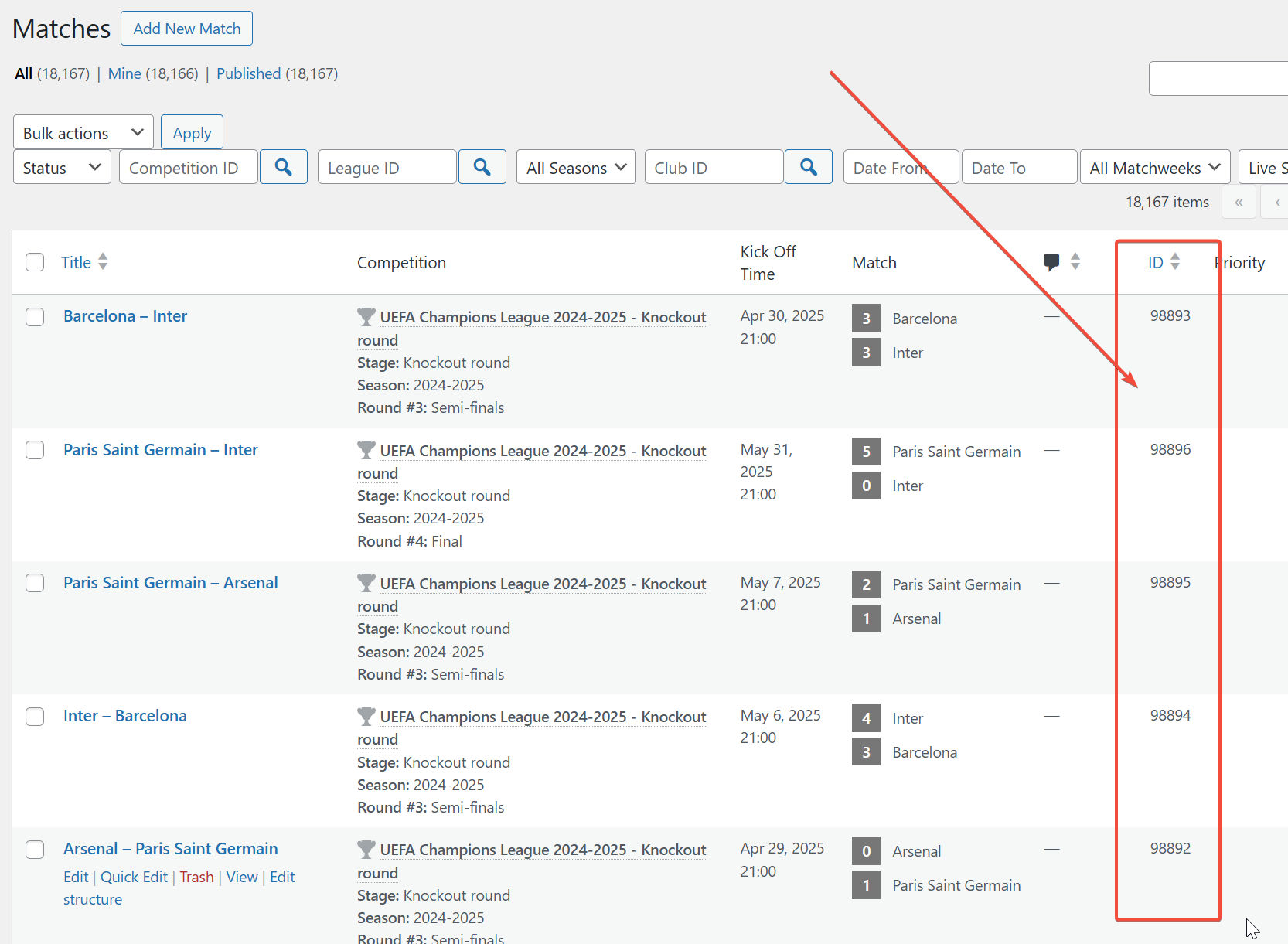
Click Apply & Continue to load the game data.
Working with Finished Games (Post-Match Reviews)
For completed matches, AI Writer generates detailed game reviews based on match statistics and events.
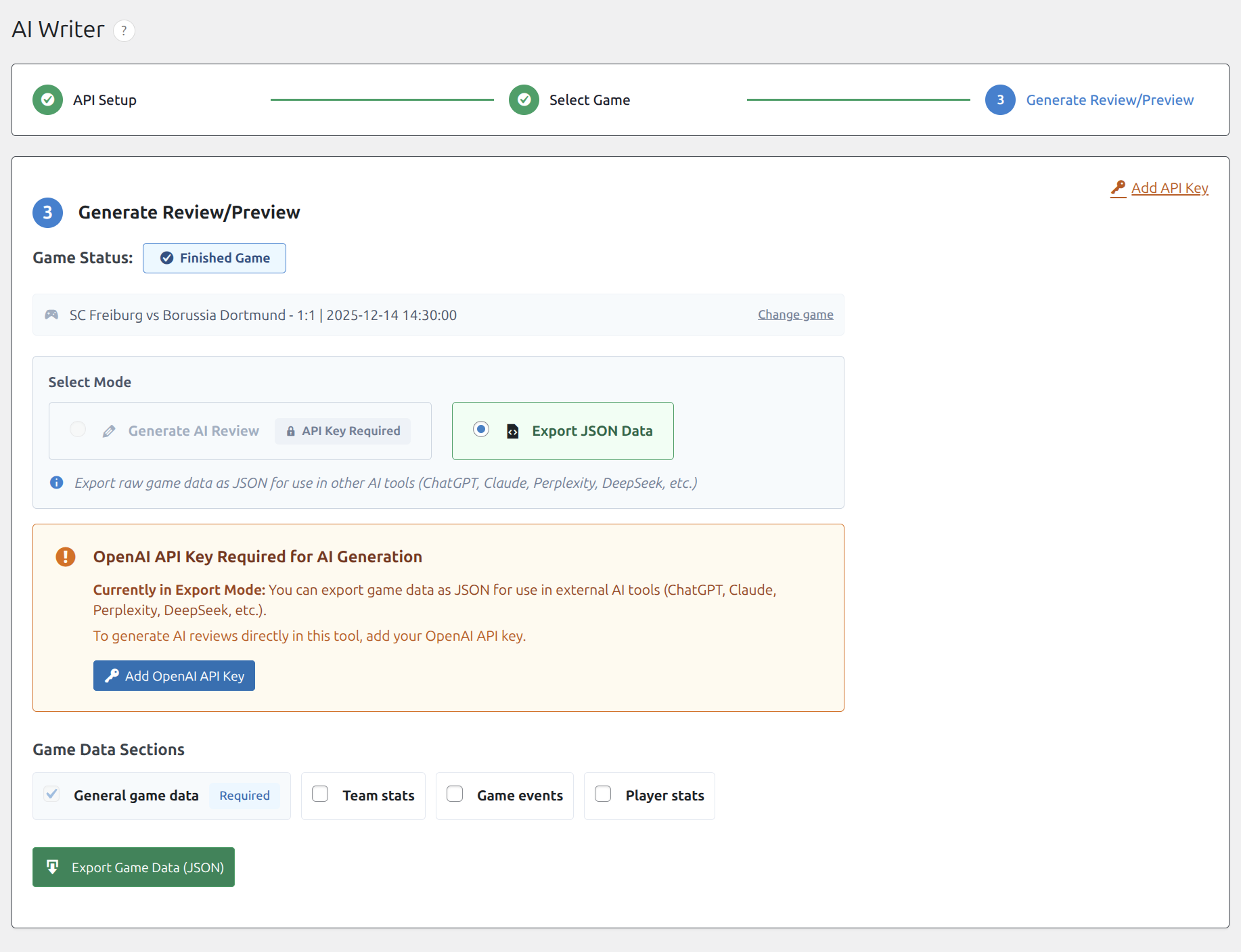
Select Mode
Choose between two modes:
- Generate AI Review – Creates a complete game review using OpenAI (API key required)
- Export JSON Data – Exports raw game data for external AI tools (no API key needed)
Game Data Sections
Select which data to include in your review or export:
- General game data (always included) – Teams, score, date, competition
- Team stats – Possession, shots, passes, fouls, etc.
- Game events – Goals, cards, substitutions with timestamps
- Player stats – Individual player performance data
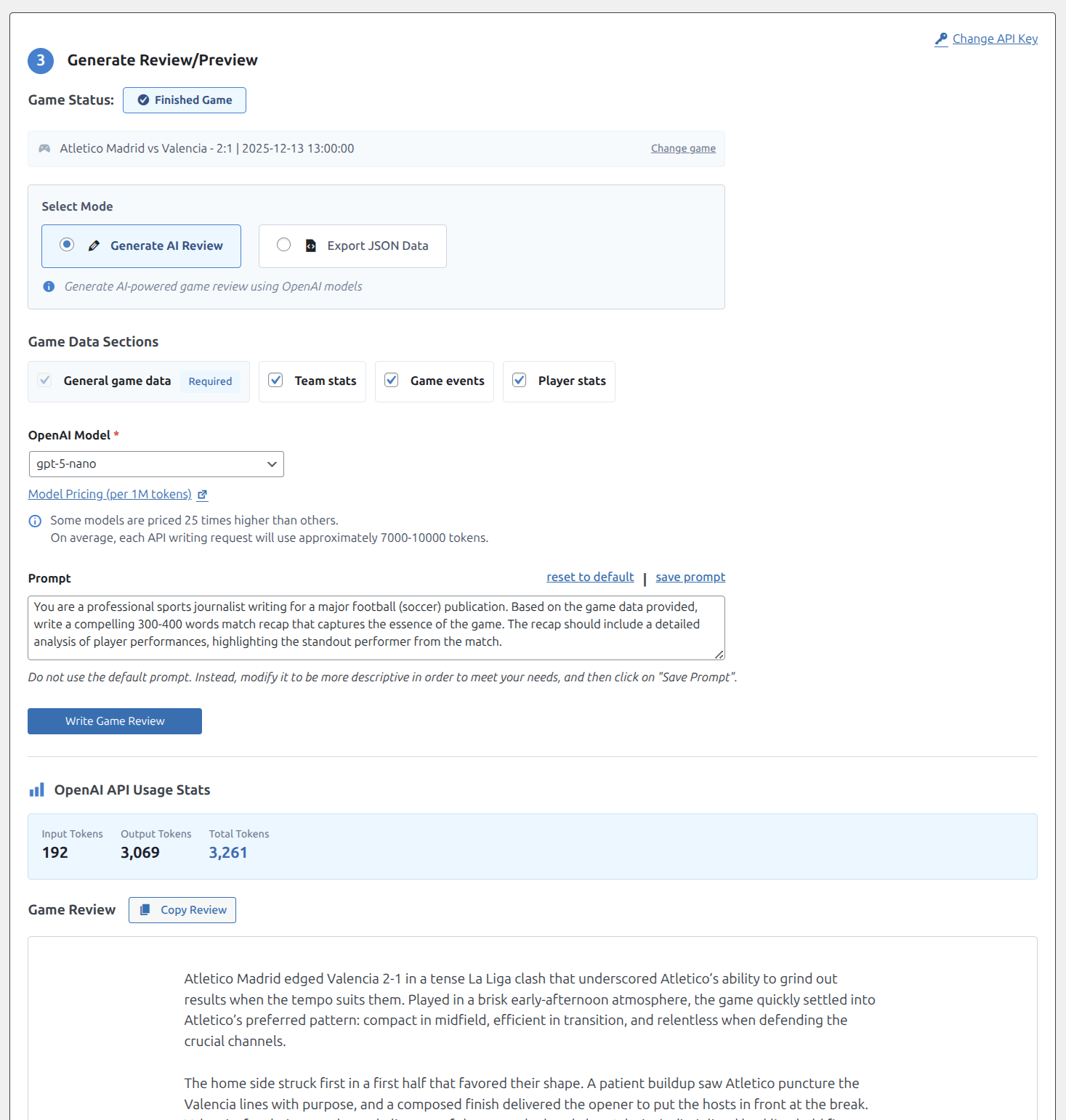
Generating AI Reviews
- Select Generate AI Review mode
- Check the data sections you want to include
- Select an OpenAI Model from the dropdown
- Customize the Prompt to match your writing style
- Click Write Game Review
Model Selection
Available models vary in capability and cost. Check OpenAI pricing for current rates.
gpt-5-nano– Simple reviews, budget-consciousgpt-5-mini– Most tasks, good balance of quality and costgpt-5– Complex analysis, highest quality
Important: Each review request uses approximately 7,000-10,000 tokens. Check OpenAI pricing for current rates.
Customizing the Prompt
The prompt controls the style and content of generated reviews. Modify it to match your site’s tone:
- Specify the desired length (300-500 words recommended)
- Define the writing style (professional, casual, analytical)
- Request specific elements (quotes, statistics, predictions)
- Click save prompt to remember your customization
Important: Customize Your Prompts
Never use default or example prompts without modification. When many sites use identical prompts, AI generates similar content structures and phrasing, which can hurt your SEO rankings and make your content feel generic. Create a unique prompt that reflects your site’s voice, preferred structure, and specific requirements.
Using the Generated Review
After generation:
- The review appears in the Game Review section
- Token usage statistics are displayed (input, output, total)
- Click Copy Review to copy the text to clipboard
- Create a new post in WordPress (Posts → Add New)
- Paste the content into the editor
- Add images, format as needed, and publish
Gutenberg Tip: If you’re using the Gutenberg editor, ask AI to generate content in HTML format for easier insertion. Add this line to your prompt:
Output the article in HTML format with proper heading tags (h2, h3), paragraphs, and lists for WordPress Gutenberg editor.Then paste the HTML directly into a Custom HTML block or switch to Code Editor view.
Working with Upcoming Games (Match Predictions)
For scheduled matches, AI Writer generates pre-match predictions based on historical data, team form, and head-to-head statistics.
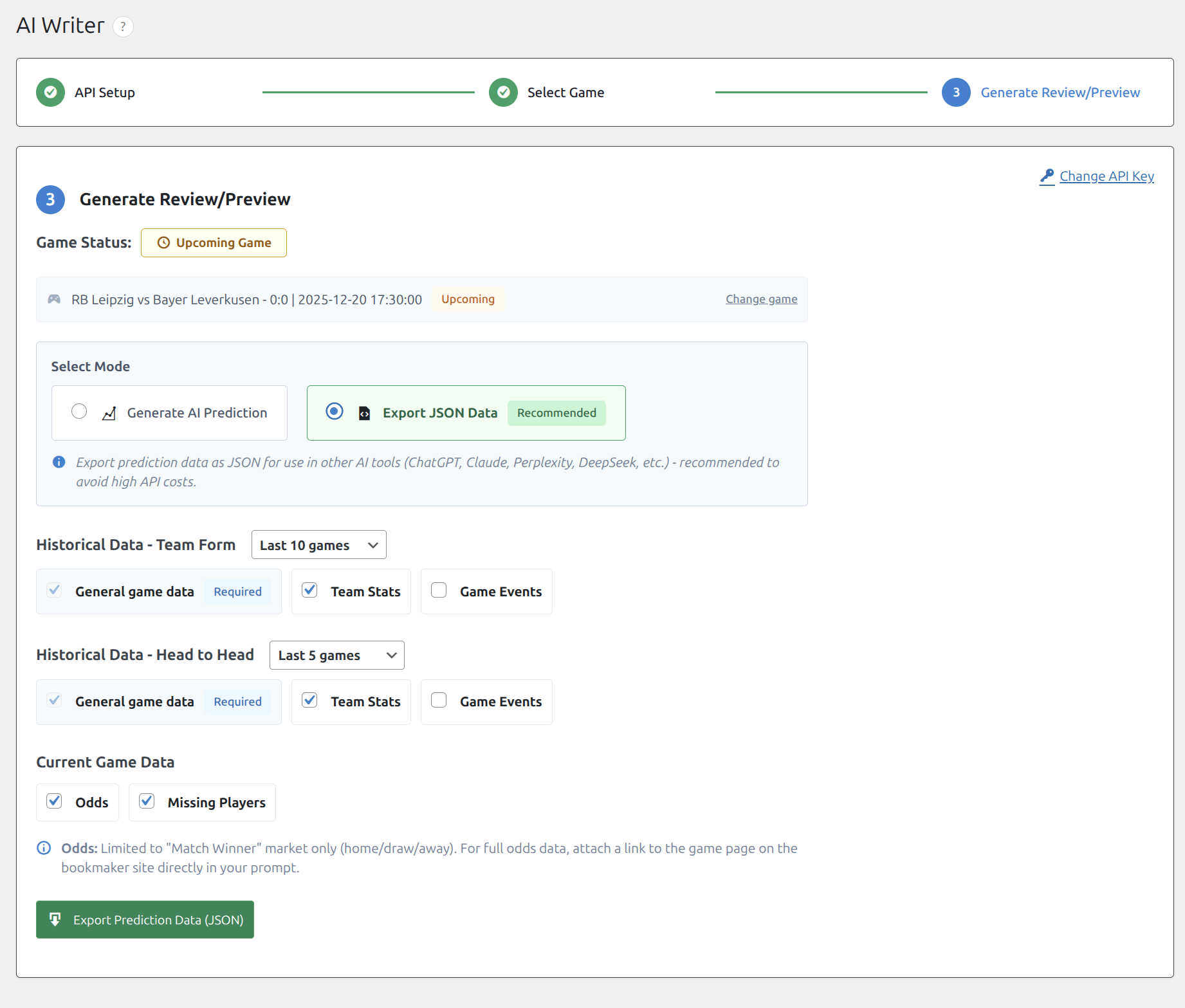
Select Mode
Choose between two modes:
- Generate AI Prediction – Creates a match prediction using OpenAI (higher token cost)
- Export JSON Data – Exports historical data for external AI tools (Recommended – better cost control)
Cost Warning: Prediction generation includes extensive historical data and can use 15,000-50,000+ tokens per request. Export mode is strongly recommended to control costs.
Historical Data Configuration
Configure which historical data to include:
Team Form
Recent performance for both teams:
- Select number of recent games: Last 10, Last 20, or Last 30
- General game data (always included) – Scores, dates, opponents
- Team Stats – Match statistics for each game
- Game Events – Goals, cards, substitutions
Head to Head
Previous meetings between the two teams:
- Select number of games: Last 5, Last 10, or Last 15
- General game data (always included)
- Team Stats – Statistics from previous encounters
- Game Events – Events from previous meetings
Current Game Data
- Odds – Match winner market (home/draw/away)
- Missing Players – Injured or suspended players
Note: Odds data is limited to the “Match Winner” market. For detailed betting odds, include a link to a bookmaker page in your prompt.
Generating Predictions
- Select Generate AI Prediction mode
- Configure historical data options (team form, H2H)
- Select current game data (odds, missing players)
- Choose an OpenAI model
- Customize the prediction prompt
- Click Generate Prediction
Example Prediction Prompt
Use this comprehensive prompt template for professional match predictions:
You are an experienced sports journalist and betting analyst writing a comprehensive game preview/prediction article.

## Article Structure (1000-1500 words)

1. **Introduction & Match Context** (150-200 words)
   - Fixture significance, competition, date, kickoff, venue
   - Betting odds context with implied probabilities
   - What's at stake

2. **Home Team Form Analysis** (200-250 words)
   - W/D/L record, goals for/against
   - Home vs away form split, trajectory, scoring patterns
   - xG, possession style, shot conversion (if stats available)

3. **Away Team Form Analysis** (200-250 words)
   - Same depth as home team
   - Focus on away form specifically
   - Attacking threats, defensive vulnerabilities

4. **Statistical Deep Dive** (150-200 words)
   - xG comparison, possession styles, defensive metrics
   - Set piece threat, discipline/cards per game

5. **Injuries and Team News** (100-150 words)
   - List missing players, analyze impact of each absence

6. **Head-to-Head Analysis** (150-200 words)
   - Historical record, recent meetings detail
   - Venue patterns, key moments

7. **Key Factors & Match Deciding Elements** (100-150 words)
   - 3-5 decisive factors: form, home advantage, injuries

8. **Prediction & Betting Insights** (200-250 words)
   - Probabilities for all three outcomes (must sum to 100%)
   - Predicted scoreline with reasoning
   - Additional betting angles: Over/Under, BTTS, cards
   - Confidence level: High / Medium / Low

## Output Format

End with formatted prediction box:

**PREDICTION**
- **Most Likely Outcome:** [Home Win / Draw / Away Win]
- **Probability:** Home Win X% | Draw X% | Away Win X%
- **Predicted Score:** [X-X]
- **Confidence:** [High / Medium / Low]
Important: Make It Your Own
This example prompt is a starting point only. Modify it significantly to create unique content that stands out. Add your site’s personality, preferred terminology, specific sections you want (or don’t want), and any unique angles that differentiate your coverage from competitors.
Exporting Prediction Data
To use external AI tools:
- Select Export JSON Data mode
- Configure historical data options
- Click Export Prediction Data (JSON)
- Save the downloaded JSON file
- Open ChatGPT, Claude, or your preferred AI tool
- Paste the example prompt above (or your own custom prompt)
- Attach the JSON file to your message
- Send and wait for the generated prediction
- Copy the generated prediction
- Create a new post in WordPress (Posts → Add New)
- Paste the content and publish
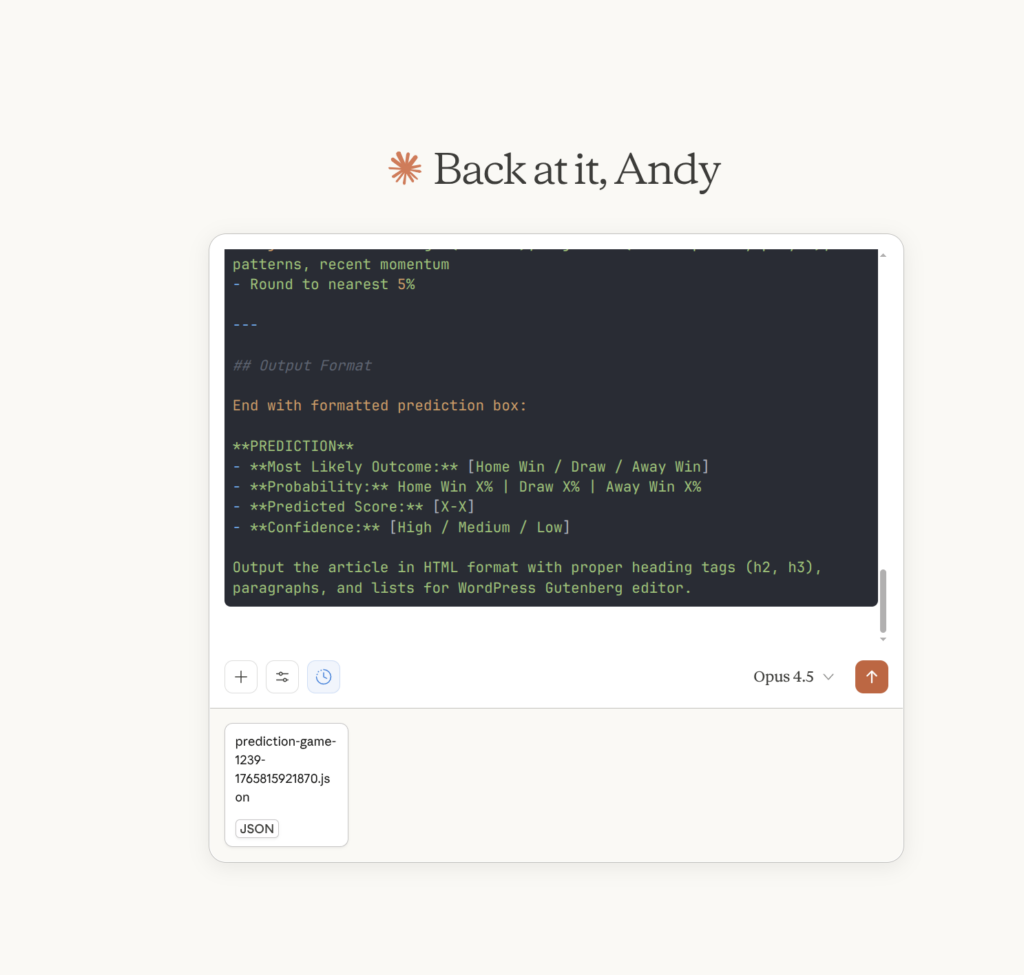
Gutenberg Tip: When using external AI tools, add this line to your prompt for WordPress-ready output:
Output the article in HTML format with proper heading tags (h2, h3), paragraphs, and lists for WordPress Gutenberg editor.Then paste the HTML into a Custom HTML block or use the Code Editor view in WordPress.
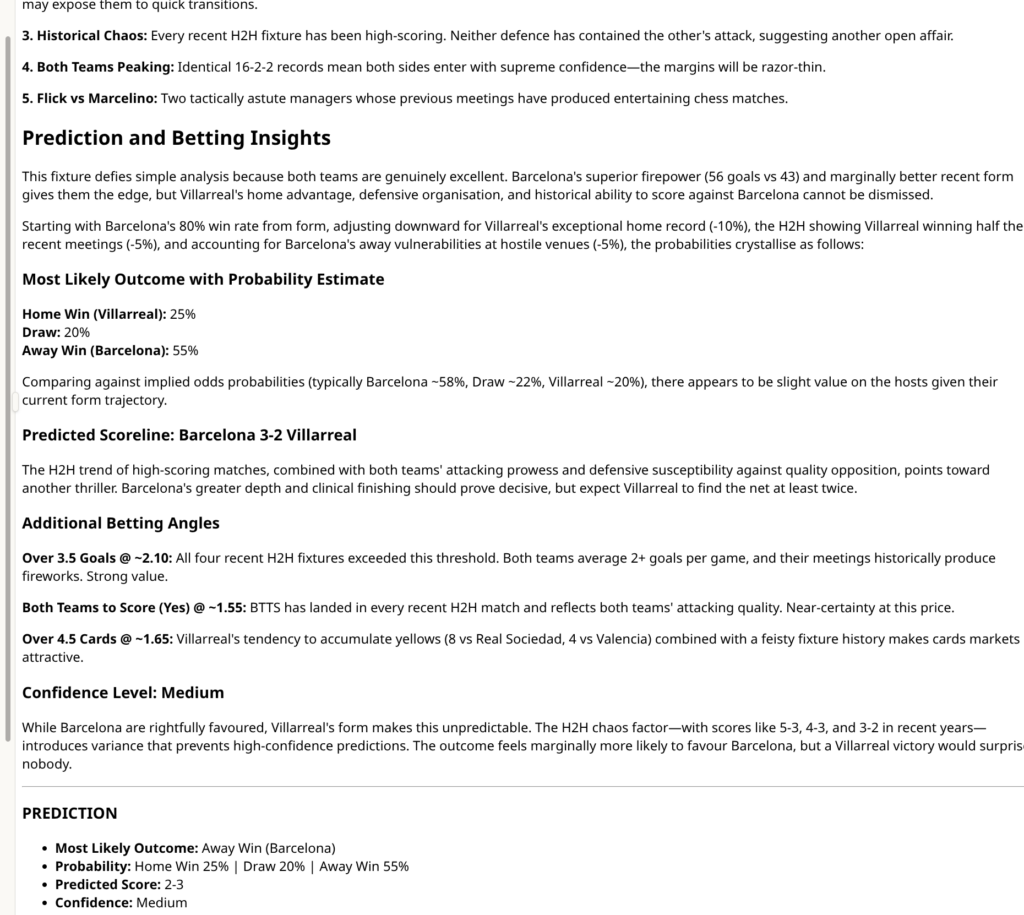
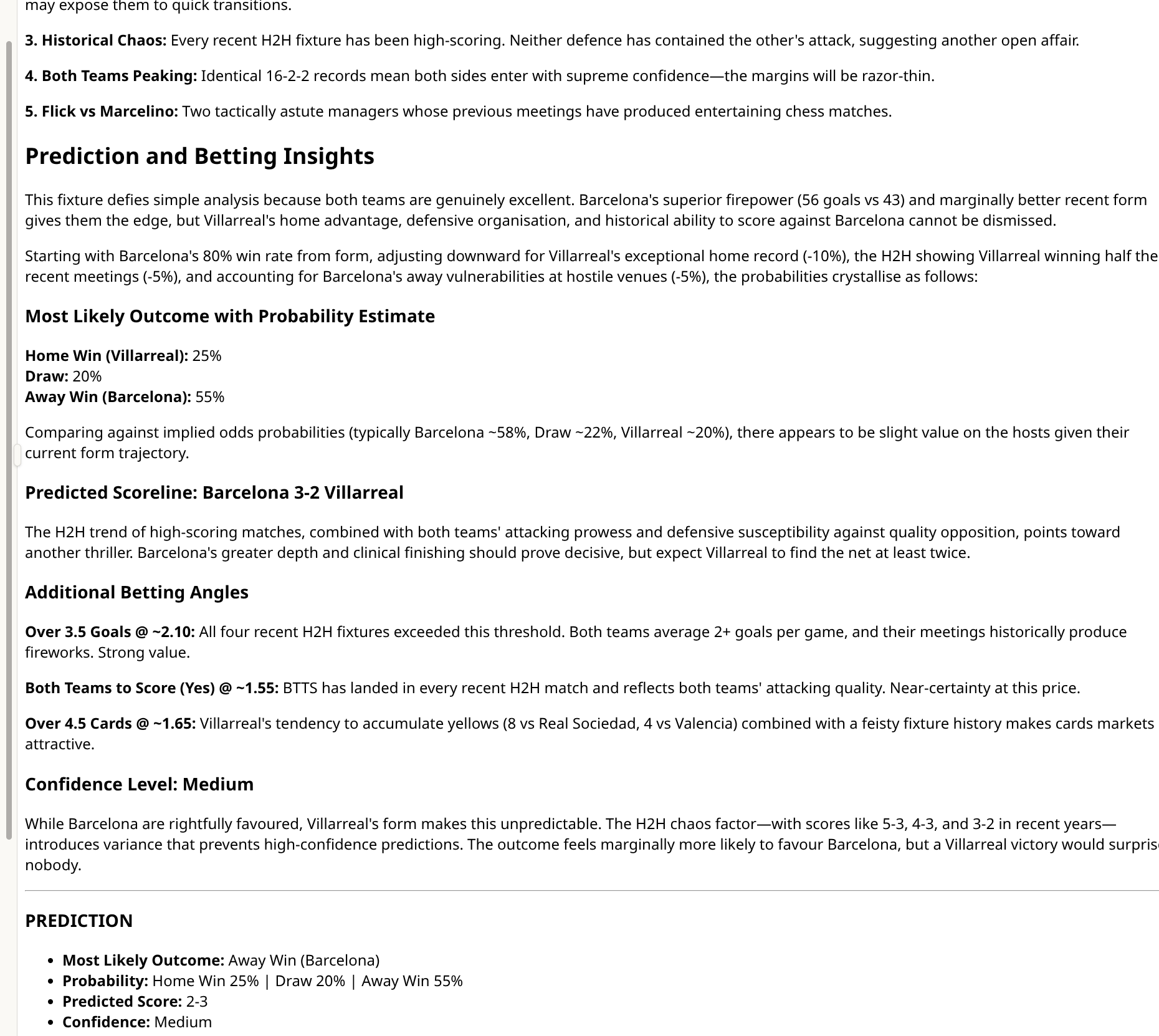
Example: Generated Prediction
The AI will generate a comprehensive prediction article including:
- Team form analysis and statistical deep dive
- Head-to-head historical patterns
- Probability estimates for all outcomes (e.g., Home Win 25% | Draw 20% | Away Win 55%)
- Predicted scoreline with reasoning
- Additional betting angles (Over/Under goals, BTTS, cards)
- Confidence level assessment
Managing Your API Key
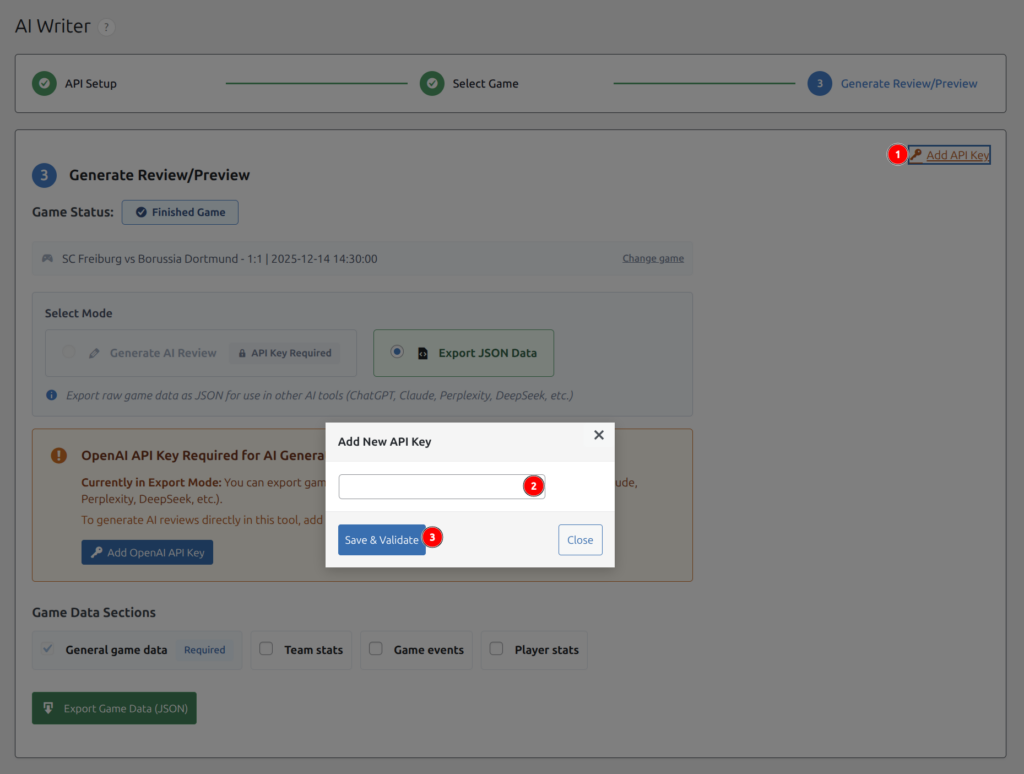
After initial setup, you can manage your API key from the Step 3 screen:
- Change API Key – Click the link in the top-right corner to update your key
- Add API Key – If you skipped setup initially, click to add a key later
Troubleshooting
API Key Issues
“API key appears to be invalid”
- Verify the key starts with
sk- - Check that you’ve added billing credit to your OpenAI account
- Ensure the API key hasn’t expired or been revoked
“Rate limit exceeded”
- Wait a few minutes and try again
- Consider upgrading your OpenAI tier for higher limits
Generation Issues
“No Review Content Generated”
- Try generating again – API calls can occasionally fail
- Check that the game has data (stats, events)
- Select fewer data sections to reduce token usage
Review is too short or generic
- Include more data sections (team stats, events, player stats)
- Customize your prompt with specific requirements
- Try a more capable model (gpt-5 instead of gpt-5-mini)
Cost Concerns
High API costs
- Use
gpt-5-miniorgpt-5-nanofor most tasks - Use Export mode and external AI tools with free tiers
- Reduce historical data range for predictions
- Uncheck unnecessary data sections
Best Practices
For Game Reviews
- Include team stats and game events for comprehensive reviews
- Customize your prompt once and save it
- Start with
gpt-5-mini– usegpt-5-nanofor budget orgpt-5for higher quality - Review and edit generated content before publishing
For Match Predictions
- Use Export mode to control costs
- Include both team form and head-to-head data for better predictions
- Add odds and missing players for more accurate analysis
- Experiment with different AI tools using the exported JSON
Pro Tip: Create a workflow: Export JSON → Paste in ChatGPT/Claude → Generate multiple prediction angles → Compile the best insights. This approach gives you more control and often better results than direct API generation.
Need Help?
If you encounter issues not covered in this tutorial, please contact our support team with:
- Your WordPress and plugin version
- The exact error message (if any)
- Steps to reproduce the issue