

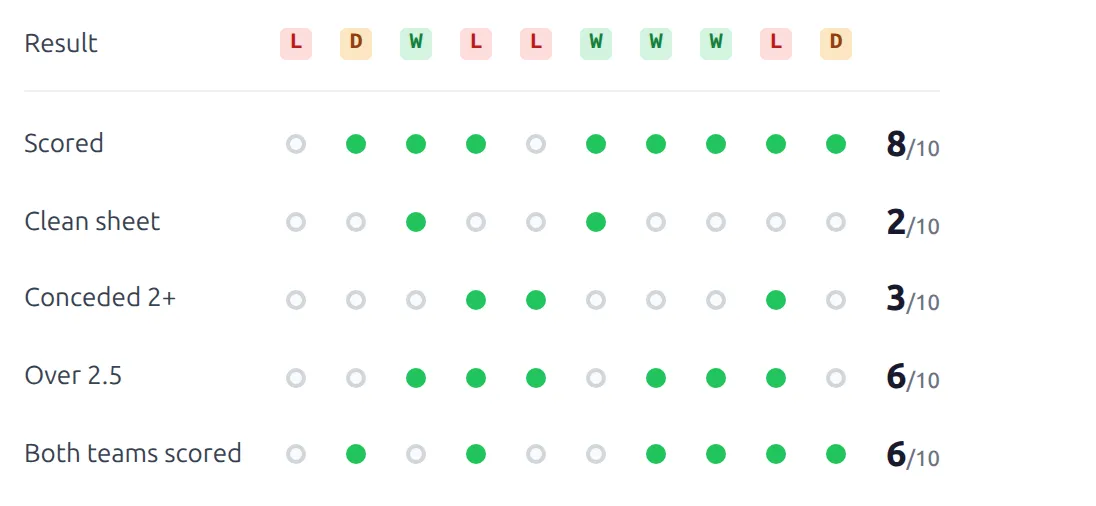
[anwpfl-club-form-trends] shows a club’s last few games as a grid. Each column is one game, oldest on the left and newest on the right. Each row is a trend – the result, whether the club scored, kept a clean sheet, saw over 2.5 goals – and the count at the end of the row says how often it happened.
It’s the form guide for a match preview or a betting-style club page: the pattern at a glance, the numbers on the right.
Premium Feature
This shortcode requires the Football Leagues Premium plugin.
🚀 Basic usage
[anwpfl-club-form-trends club_id="45"]That’s all it needs. You get the club’s last 10 finished games across every competition, with six rows: Result, Scored, Clean sheet, Conceded 2+, Over 2.5 and Both teams scored.
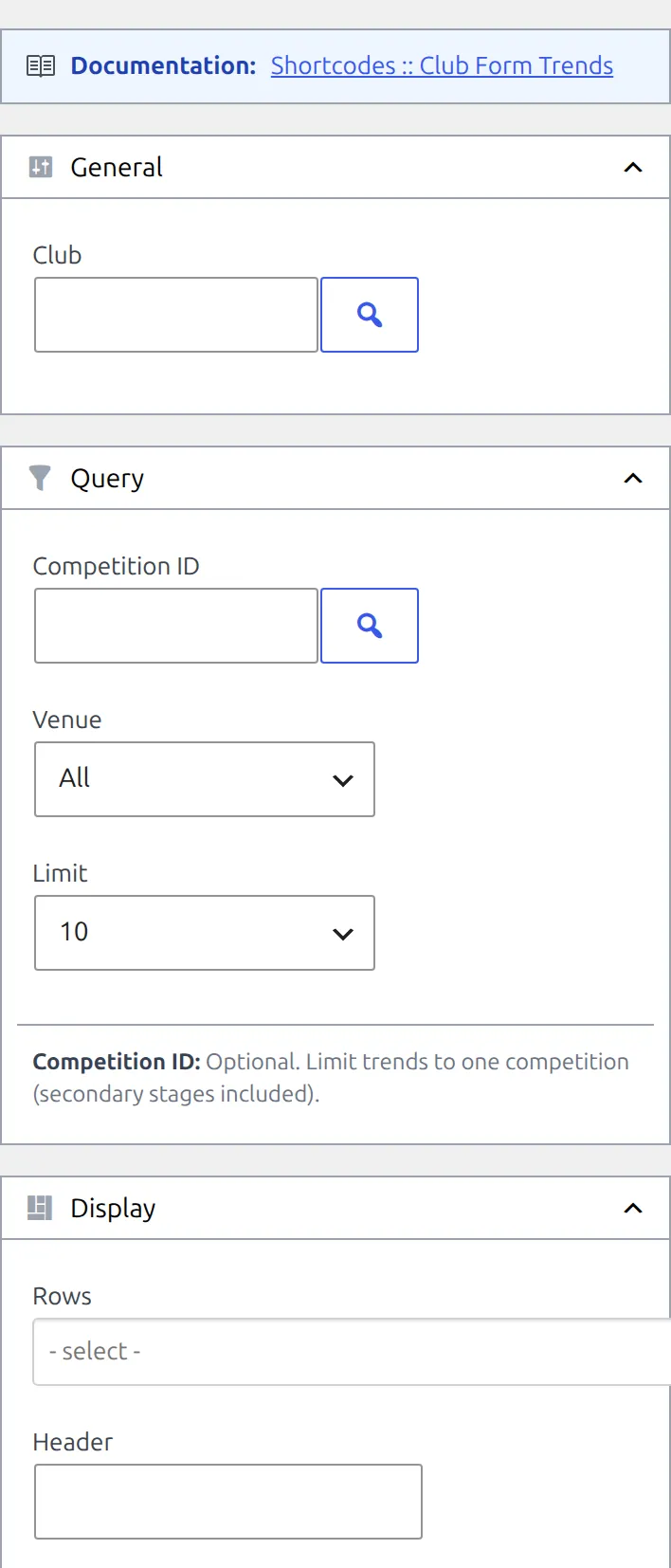
To build one with a live preview, go to Football Leagues > Shortcodes and pick Club Form Trends. Leave Rows empty for the same six rows, or pick the ones you want and drag them into order.
On versions before FL+ 0.18.4, a shortcode copied from the builder with Rows left empty shows all 14 rows – pick your rows there, or update.
Reading the grid
| You see | It means |
|---|---|
| Green W, amber D, red L badge | The result of that game. Hover a badge for a small game card with both clubs and the score. |
| Green dot | Yes – the trend happened in that game |
| Grey ring | No – it didn’t |
| A dash | No data – only on the half-time rows, for a game with no half-time score |
| 7/10 at the end of a row | It happened in 7 of the 10 games that have data for that row |
The Result row has no count, and a thin line separates it from the rows below. If your site calls them something other than W, D and L, change the letters at Settings & Tools > Settings > Content > Text & Labels > Outcome Letters.
The grid works in narrow spaces too. When it doesn’t fit, it scrolls sideways with the row names pinned on the left and the counts pinned on the right, and in containers under 480px the dots and columns shrink.
Which games count
Only finished, official games. Friendlies and fixtures are never included. The shortcode takes the newest ones by kickoff – 10 unless you set limit – and lays them out oldest first.
There’s no season option. The window is always “the last N games”, so early in a season it reaches back into the previous one. To keep it to one season, set competition_id: competitions are per season, so the grid then only uses that competition’s games.
Extra time and penalties
The Result row reads the final score, extra time included. Every goal-based row reads the 90-minute score instead. So a cup game that was 2-2 after 90 minutes and finished 4-2 after extra time is a W, but counts as 2-2 for Clean sheet, Over 2.5, Scored 2+ and the rest.
Penalty shootout goals aren’t part of the score, so a tie decided on penalties shows as a D whoever won the shootout.
Rows
Fourteen rows are available. Pass their IDs in rows, comma-separated, and they show in the order you list them. “For” is the club’s goals, “against” is the opponent’s.
| ID | Label | Green dot when | Default |
|---|---|---|---|
outcome | Result | Shows the W, D or L badge instead of a dot | Yes |
scored | Scored | 1 or more goals for | Yes |
failed_to_score | Failed to score | 0 goals for | |
clean_sheet | Clean sheet | 0 goals against | Yes |
conceded | Conceded | 1 or more goals against | |
conceded_2plus | Conceded 2+ | 2 or more goals against | Yes |
scored_2plus | Scored 2+ | 2 or more goals for | |
over_1_5 | Over 1.5 | 2 or more goals in the game | |
over_2_5 | Over 2.5 | 3 or more goals in the game | Yes |
over_3_5 | Over 3.5 | 4 or more goals in the game | |
btts | Both teams scored | Both clubs scored at least once | Yes |
won_to_nil | Won to nil | Won and conceded nothing | |
leading_ht | Leading at HT | Ahead at half-time | |
comeback | Comeback | Behind at half-time and didn’t lose |
The two half-time rows need half-time scores. Games without one get a dash and are left out of that row’s count. If none of the games in the grid has a half-time score, the row is hidden rather than showing 0.
Parameters
| Parameter | Default | Description |
|---|---|---|
club_id * | (required) | The club. Without it nothing is printed. |
competition_id | (all) | Only games from this competition. Pass the main competition and its stages are included too, such as the group stage and knockout rounds of a multistage cup. A stage ID narrows it to that stage only. |
venue | all | home for the club’s home games, away for away games |
limit | 10 | How many games. The builder offers 5, 10 and 15, but any number from 1 to 50 works when typed by hand. |
rows | the six marked Default above | Row IDs, comma-separated, in display order. Empty uses the default six. |
header | (empty) | A heading above the grid |
class | (empty) | An extra CSS class on the wrapper. Not in the builder – add it by hand. |
* Required parameter
Examples
Home form in the league, with half-time rows
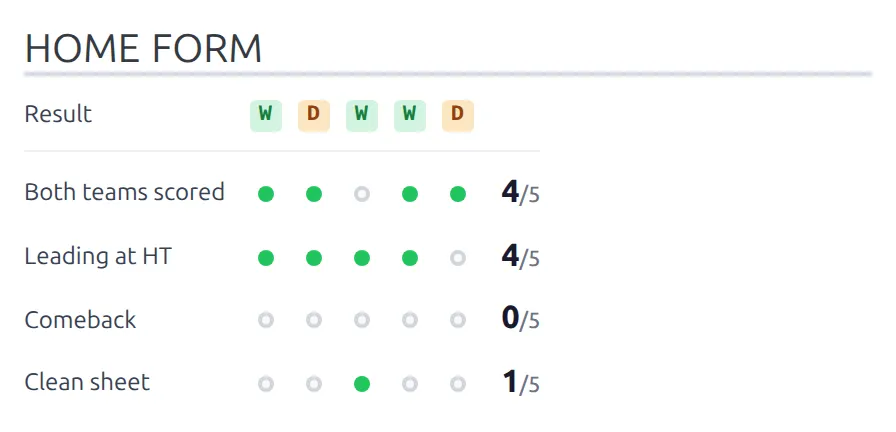
[anwpfl-club-form-trends club_id="45" competition_id="12" venue="home" limit="5" rows="outcome,btts,leading_ht,comeback,clean_sheet" header="Home form"]The last 5 home league games, with a heading and the rows in exactly this order.
Goals-heavy view over 15 games
[anwpfl-club-form-trends club_id="45" limit="15" rows="outcome,scored_2plus,over_3_5,won_to_nil"]Fifteen games across all competitions, with the rows a goals market would care about.
On a club page in the Layout Builder
[anwpfl-club-form-trends club_id="%club_id%" venue="away" header="Away form"]Put this in a Shortcode block in a team or club layout and %club_id% becomes the ID of whichever club page is open. It’s how you show a second, away-only grid next to the built-in Form Trends block.
The same grid elsewhere
The grid also appears in two other places. Both draw the same rows with the same rules, but they don’t behave exactly like the shortcode.
The Form Trends block in a Layout Builder v2 team layout
- It adds pills above the grid: one row of competitions (with All) and one of venues (Home & Away, Home, Away), so visitors can switch without a page reload.
- It can open on one competition instead of All. Its Default Competition setting picks the club’s highest-priority competition type, and in the default team layout that’s the league. This is the usual reason a club page and a shortcode show different games – the shortcode starts from all competitions.
- Its Items to Show setting goes from 1 to 20, and its Metric Rows checkboxes always show rows in the order of the table above, not the order you ticked them. None ticked means the default six.
More on the v2 team page: Team Layout (v2).
The Form Trends section of the Club shortcode
[anwpfl-club club_id="45" sections="form-trends"]A fixed version with no pills and nothing to set: all competitions, home and away, 10 games, the default six rows. Use [anwpfl-club-form-trends] when you need any of the options above.
Not the same thing: the Form Trends block in a v2 player layout is a bar chart of a player’s rating, goals and assists, and the form dots in the v2 Team Header are a plain last-results strip.
🆘 Troubleshooting
Nothing renders at all
The shortcode prints nothing – no message, no heading – when it has no games to show. Check:
club_idis set and is a real club.- The club has finished, official games. Friendlies don’t count, and neither do games still marked as fixtures.
- The filters leave something. A
competition_idthe club didn’t play in, orvenue="away"in a competition with no away games yet, leaves the grid empty.
All 14 rows appear
Every ID in rows is misspelt. Unknown IDs are dropped, and when none are left the grid falls back to all 14 rows. Copy the IDs from the Rows table above, or pick them in the builder.
A half-time row is missing
None of the games in the grid has a half-time score, so Leading at HT and Comeback hide themselves. Add half-time scores to those games, or leave the rows out.
A count reads 6/8 when the grid has 10 games
That row has data for only 8 of them. It happens on the half-time rows when some games lack a half-time score – the dash cells aren’t counted.
The club page shows different games from my shortcode
The v2 Form Trends block opens on the club’s league, while the shortcode uses all competitions. Click All in the block’s competition pills to compare like with like, or set competition_id on the shortcode.
📚 Related
- Team Layout (v2) – the Form Trends block and the rest of the modern club page
[anwpfl-club]– the Club shortcode and its sections- Shortcode Builder – building shortcodes with a live preview
[anwpfl-stats-clubs]– season totals for clubs, ranked in a table