

[anwpfl-stat-players] ranks players by one statistic: top scorers, most assists, best average rating, most clean sheets, or any stat you track yourself. The leader gets a large highlighted row and everyone else follows as a numbered list.
It’s the leaderboard box you put in a sidebar, on a competition page or under a match report.
Premium Feature
This shortcode requires the Football Leagues Premium plugin.
🚀 Basic usage
[anwpfl-stat-players stat="goals" competition_id="12"]That’s the top 10 scorers of competition 12, with the leader highlighted. stat is the only required attribute. Leave it out, or give it a value that doesn’t match a stat, and the shortcode prints nothing at all.
The easiest way to build one is Football Leagues > Shortcodes. Pick 🔸 Stat :: Players (Single Stat Value) from the dropdown and you get the form below with a live preview. Watch the name: 🔸 Stats :: Players, one letter away, is the full statistics table.
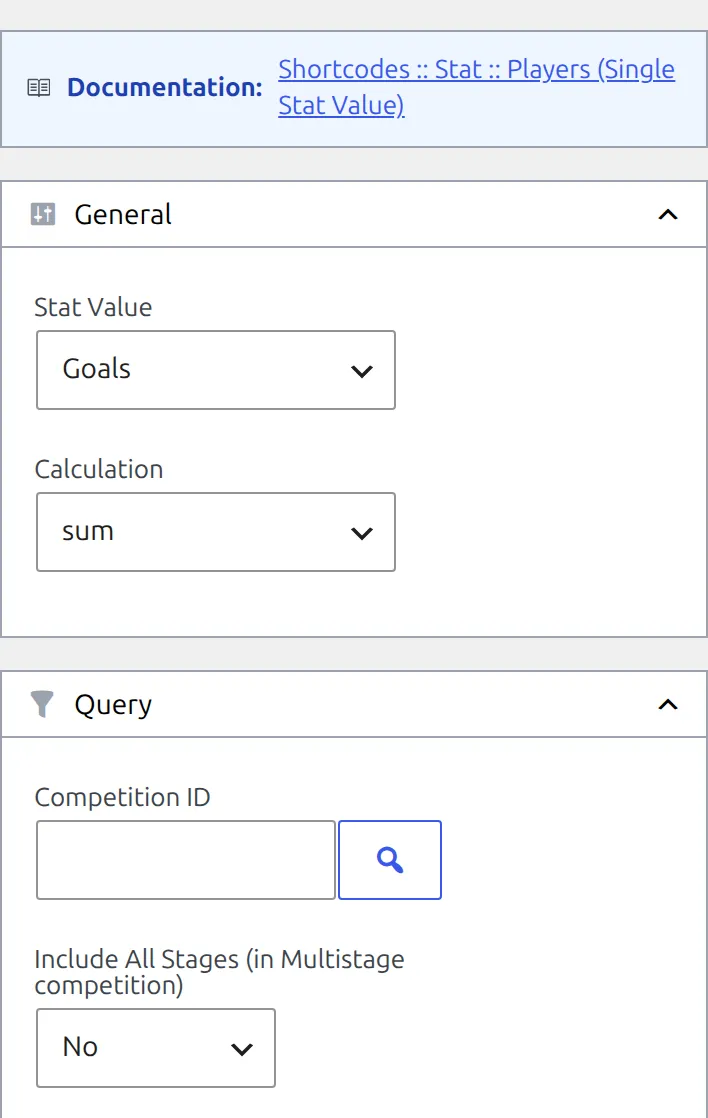
Typed and built shortcodes show photos differently
The builder writes every field into the shortcode, including photos="1". A shortcode you type by hand gets the default instead, which is photos="0" – no photos. If a copied example looks different from the preview, add photos="1".
Stat Players or Stats Players?
Two shortcodes, similar names, different jobs. One number per player, ranked: this page. Many numbers per player in a table: Stats Players.
| Shortcode | Shows | Use it for |
|---|---|---|
[anwpfl-stat-players] | One statistic, ranked, with the leader highlighted | “Top scorers”, “Most assists”, “Best rated” boxes |
[anwpfl-stats-players] | A paged table with a column per statistic | A full statistics page for a competition or club |
[anwpfl-stats-players-custom] | A table with your own columns and filters | An interactive stats table |
[anwpfl-players] | Scorers or assists only | The free version |
Choosing the statistic
Built-in stats
stat | Counts |
|---|---|
appearance | Games played – started or came on |
started | Games in the starting line-up |
minutes | Minutes on the field |
goals | Goals |
goals_penalty | Goals from penalties |
goals_own | Own goals |
assists | Assists |
goals_conceded | Goals conceded |
clean_sheets | Games where a goalkeeper conceded nothing and either played the whole match or was taken off after two-thirds of it. A keeper who came on isn’t credited. |
cards_y | Yellow cards |
cards_r | Red cards, including second yellows |
cards_all | Yellows, second yellows and reds added together |
Yellow cards follow Settings & Tools > Settings > Configuration > General, Second yellow in player stats in the Statistics & Display group. With the default, Yellow + Yellow/Red card, a second yellow also counts as a yellow. Switch it to Yellow/Red card and a player sent off for two bookings gets no yellow for that match.
Your own stats
Any custom player column of type Simple, Calculated or Formula works too, referenced by its numeric ID from the Statistics Configurator. They’re listed in the builder’s Stat Value dropdown after the built-in ones, so you rarely need to look the ID up. Time and Composed columns aren’t supported, and neither is the ID of a Default column – use the slug from the table above instead.
- Rating. If the column is the one set as your Player Rating Field, the value shows as a coloured rating badge. Use
calculation="avg_game"– it averages only the games that have a rating, so unrated appearances don’t drag it down. - Colour scale. A column with Color BG turned on shows its value as a coloured pill.
- Ratios and percentages. For a Calculated column using ratio or ratio (%), use an average. Both
avg_gameandavg_90give the season-long ratio;sumadds up each game’s ratio, which isn’t a number anyone wants.
Totals, averages and bests
calculation | Value per player |
|---|---|
sum (default) | The total across every game in scope |
avg_game | Total divided by games played |
avg_90 | Total per 90 minutes played |
max | The best single game |
min | The lowest single game |
Set digits with an average. It defaults to 0, so 0.81 goals per game prints as 1. digits only affects avg_game and avg_90; for the other calculations a custom column uses its own Digits setting from the Statistics Configurator.
Averages need a minimum
A player who came on once and scored tops a goals-per-game list with 1.00, above a striker on 0.81 after 31 games. Add min_games, min_games_percent or min_minutes to every average and rating list.
Parameters
Which games count
| Parameter | Default | Description |
|---|---|---|
competition_id | (empty) | One or more competition IDs, comma-separated. The builder’s picker lists main stages only – type a stage’s ID by hand to rank a single stage. |
multistage | 0 | 1 includes every stage of a multistage competition. With 0, a multistage competition’s ID counts only the games of its first stage. Makes no difference on a single-stage competition. |
season_id | (empty) | Season ID |
league_id | (empty) | League ID |
matchweeks | (empty) | Comma-separated matchweek numbers, or round IDs in a knockout stage |
stadium_id | (empty) | Games at one stadium |
date_from / date_to | (empty) | YYYY-MM-DD. Both days are included. |
days_offset | (empty) | Relative start date. -7 = from 7 days ago. |
days_offset_to | (empty) | Relative end date, not included. 1 = up to the end of today. |
include_ids / exclude_ids | (empty) | Comma-separated game IDs to count only, or to leave out |
Only finished games count. Friendlies are left out when you don’t set competition_id – so a season-wide list skips them – but pointing competition_id at a friendly competition includes its games.
Which players count
| Parameter | Default | Description |
|---|---|---|
club_id | (empty) | Only what players did for this club. A player who moved mid-season is ranked on their games for this club alone. |
player_id | (empty) | One player only – handy for a single “25 goals” figure in an article |
type | (empty = all) | g goalkeepers, d defenders, m midfielders, f forwards, or p for everyone except goalkeepers (the builder calls it “Players”). Uses the position on the player’s profile. |
nationality | (empty) | Only players of this country. Checks the main nationality, not a second one. Pick it in the builder. |
exclude_nationality | (empty) | Leave out players of this country |
min_games | (empty) | Minimum games played |
min_games_percent | (empty) | Minimum games as a percentage (0-100) of what the busiest player in the same scope played |
min_minutes | (empty) | Minimum minutes played |
hide_zero | 1 | Leave out players whose value is 0 |
Ranking
| Parameter | Default | Description |
|---|---|---|
stat | (required) | See Choosing the statistic above |
calculation | sum | sum, avg_game, avg_90, max or min |
sort | desc | asc puts the lowest value first. With hide_zero on, that means the lowest value above 0 – set hide_zero="0" to include players on 0. |
limit | 10 | How many players. 0 lists everyone. |
soft_limit | 0 | 1 keeps going past the limit until every player level with the last place is in. Works with totals, averages, ratings and ascending lists. Averages, ratings and ascending lists need FL+ 0.18.4 or later. |
Players on the same value get different position numbers, in no guaranteed order.
Display
| Parameter | Default | Description |
|---|---|---|
first_em | 1 | Show the leader as a large highlighted row with a bigger photo and number |
photos | 0 (builder: 1) | Player photos |
club_logo | 1 | Logo of every club the player appeared for in the selected games |
show_position | 0 | Position under the name |
show_flag | 0 | Nationality flags, second nationality included |
games_played | 0 | Number of games played |
minutes_played | 0 | Number of minutes played |
links | 0 | Link player names to their profiles |
player_name | (empty) | short or full uses the player’s short or full name where one is filled in |
one_line | 0 | A compact row per player: flag before the name, logos on the same line, no position or minutes |
digits | 0 | Decimal places for avg_game and avg_90 |
show_full | 0 | A Show full list button under the block. It opens a window that loads 20 players at a time. |
custom_header | (empty) | Heading text above the list |
custom_header_tag | div | h2, h3, h4 or h5 |
max_width / min_width | (empty) | Block width limits in px |
Three colour attributes aren’t in the builder, so add them by hand: em_bg and em_color set the background and text colour of the highlighted leader, border_color the border. Use hex values, with or without the # – colour names like red don’t work. The Show full list button text can be changed in Settings & Tools > Settings > Content > Text & Labels.
Examples
Top scorers with photos
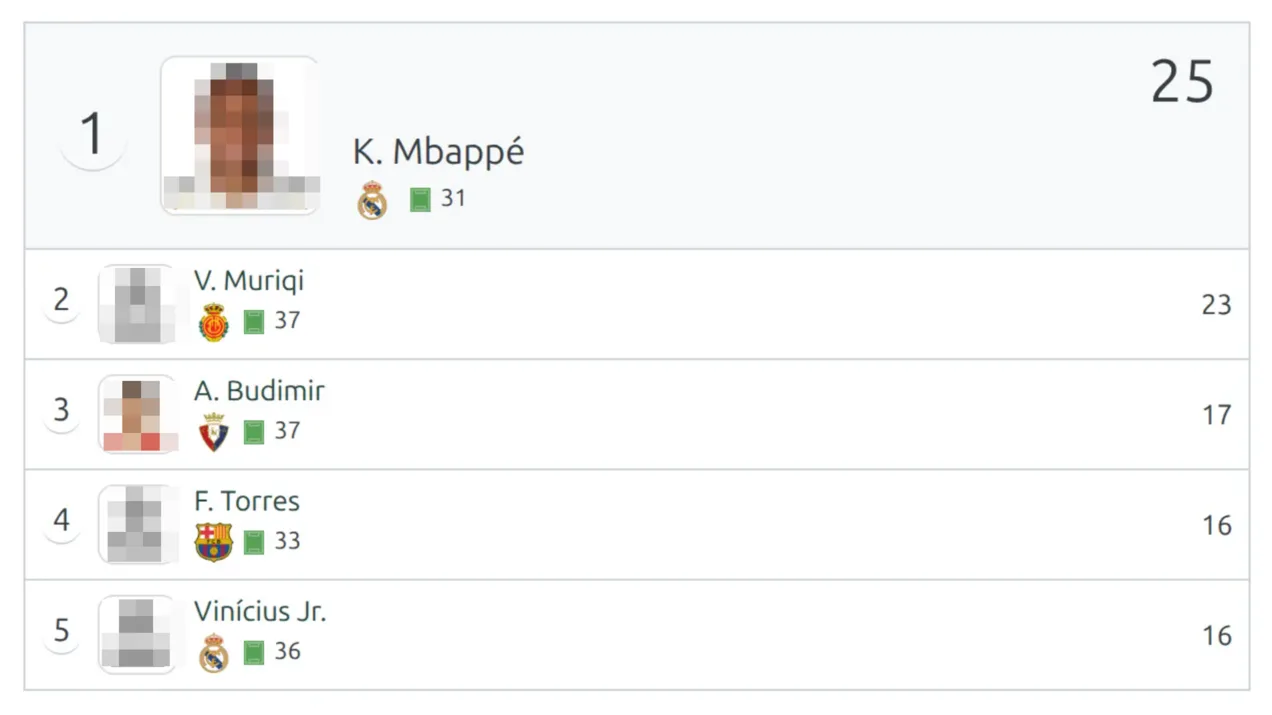
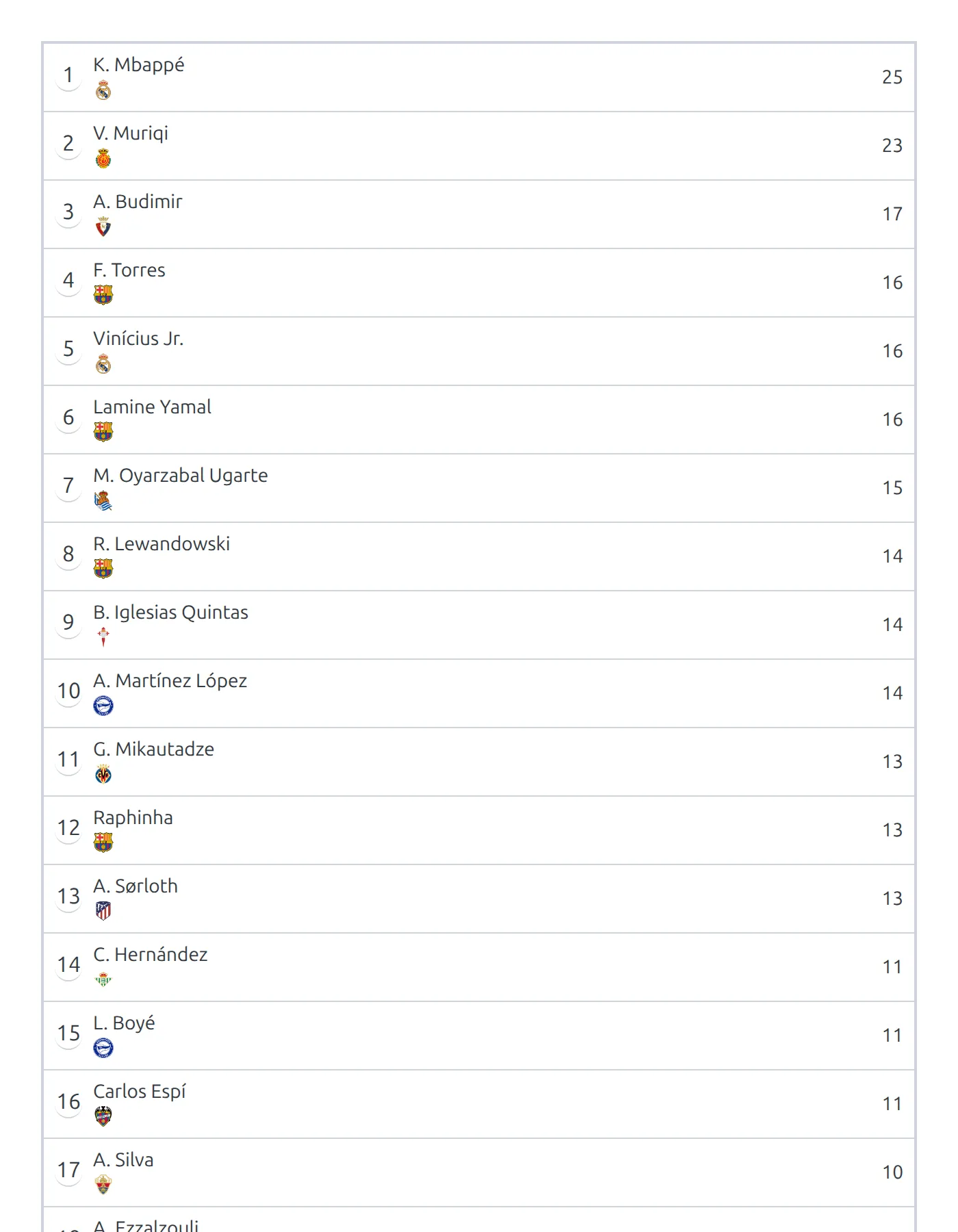
[anwpfl-stat-players stat="goals" competition_id="12" limit="5" photos="1" games_played="1" links="1"]The list at the top of this page.
Best average rating
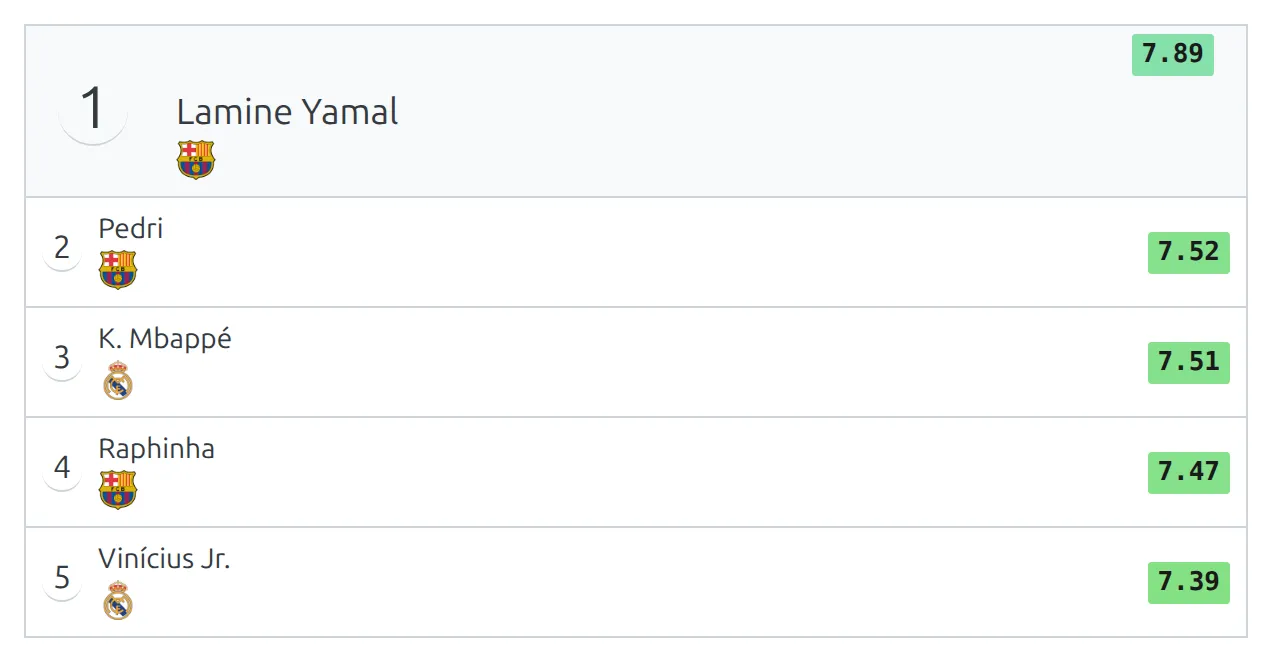
[anwpfl-stat-players stat="14" calculation="avg_game" digits="2" min_games="20" competition_id="12" limit="5"]14 stands for the ID of your rating column. Players need 20 games to qualify.
Goals per 90 minutes
[anwpfl-stat-players stat="goals" calculation="avg_90" digits="2" min_minutes="900" competition_id="12" limit="5"]Only players with at least 900 minutes – ten full games – are ranked.
A compact assists list
[anwpfl-stat-players stat="assists" competition_id="12" limit="5" one_line="1" show_flag="1" first_em="0"]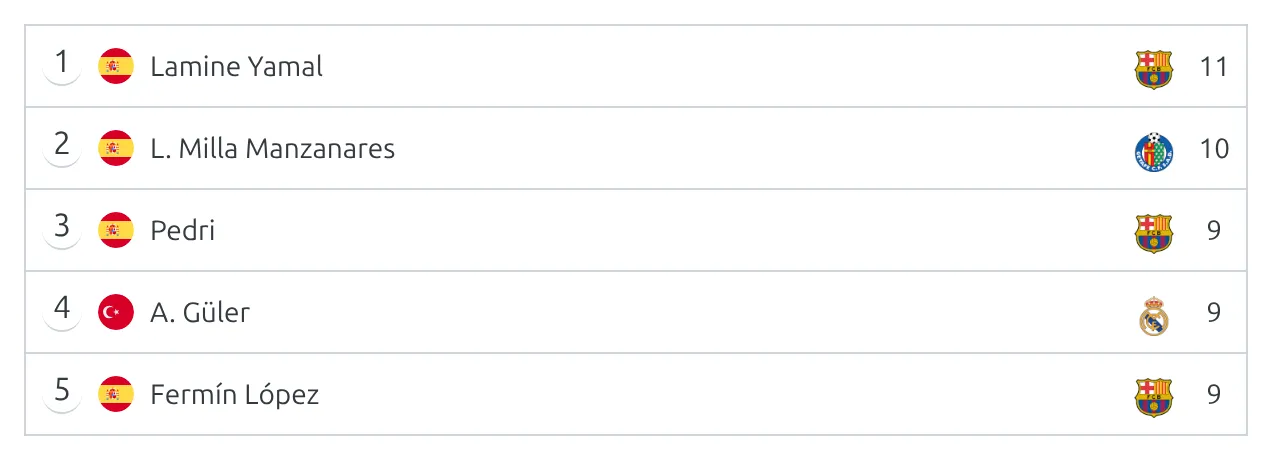
Goalkeepers with the most clean sheets
[anwpfl-stat-players stat="clean_sheets" type="g" competition_id="12" limit="5"]Keep tied players together
[anwpfl-stat-players stat="goals" competition_id="12" limit="4" soft_limit="1"]If three players share fourth place on 16 goals, you get six rows instead of cutting two of them off.
A club’s top scorers
[anwpfl-stat-players stat="goals" competition_id="12" club_id="8" limit="3"]Top scorers of the last 30 days, with a full list
[anwpfl-stat-players stat="goals" days_offset="-30" limit="5" show_full="1"]No competition set, so every official game of the last 30 days counts and friendlies don’t. The button under the list opens everyone else.
Using it in the Layout Builder
On a competition layout, put the shortcode in a Global Shortcode block and let the layout fill in the competition:
[anwpfl-stat-players stat="goals" competition_id="%competition_id%" limit="5"]When multistage is left out, the layout sets it to 1 for you, so a multistage competition counts all its stages. A shortcode copied from the builder carries multistage="0", and a value you write is kept – delete it, or change it to 1. For a whole set of leaderboards in one go, the layout’s own Season Leaders block is the faster option.
Other ways to add it
- Gutenberg block – Stat::Players (Leaders). It draws the same list, but its defaults differ: all stages included, photos and position on, zeros shown, and the leader not highlighted.
- Classic widget – FL+ Stat :: Players (Single Stat Value). Fewer options and no calculation choice. Pick the rating column and it shows the average with one decimal.
🆘 Troubleshooting
Nothing renders
The shortcode prints no message when it has nothing to show. Check, in order:
statis empty or wrong. A typo in a slug, the ID of a deleted column, or the ID of a Default, Time or Composed column all print nothing.- No finished games match. Check the IDs and dates. A competition with no finished games yet has nothing to rank.
- The filters leave nobody.
min_gamesset too high, orhide_zeroon for a stat nobody has recorded.
A multistage competition only shows early-round players
multistage defaults to 0, which counts the first stage only. Add multistage="1".
Averages are whole numbers
Add digits="2". Without it averages are rounded to 0 decimal places.
The list hasn’t updated
Results are cached. Saving any game clears the cache, otherwise a list is kept for up to a week. That matters most for date-relative lists like days_offset="-7" on a site where no game has been saved for a few days – save a game to refresh them.
Notes
When competition_id holds several competitions, the Show full list window currently counts only the first one.
📚 Related
- Stats Players – the full player statistics table
- Custom Player Statistics – adding the columns you can rank by
- Player Match Rating – setting up the rating column
- Stat Clubs – the same leaderboard, for clubs