

The Global :: Shortcode block runs any shortcode inside a Layout Builder v1 layout. It is how you put something on a page that has no block of its own – a chart on a match page, a transfer list on a staff page, a second standings table filtered differently from the first.
What makes it more than a copy-paste box is dynamic variables. A layout is shared by every page of its type, so a hardcoded club ID would show the same club on all of them. Variables let the shortcode pick up whichever club, competition, player or match the visitor is actually looking at.
🚀 Adding one
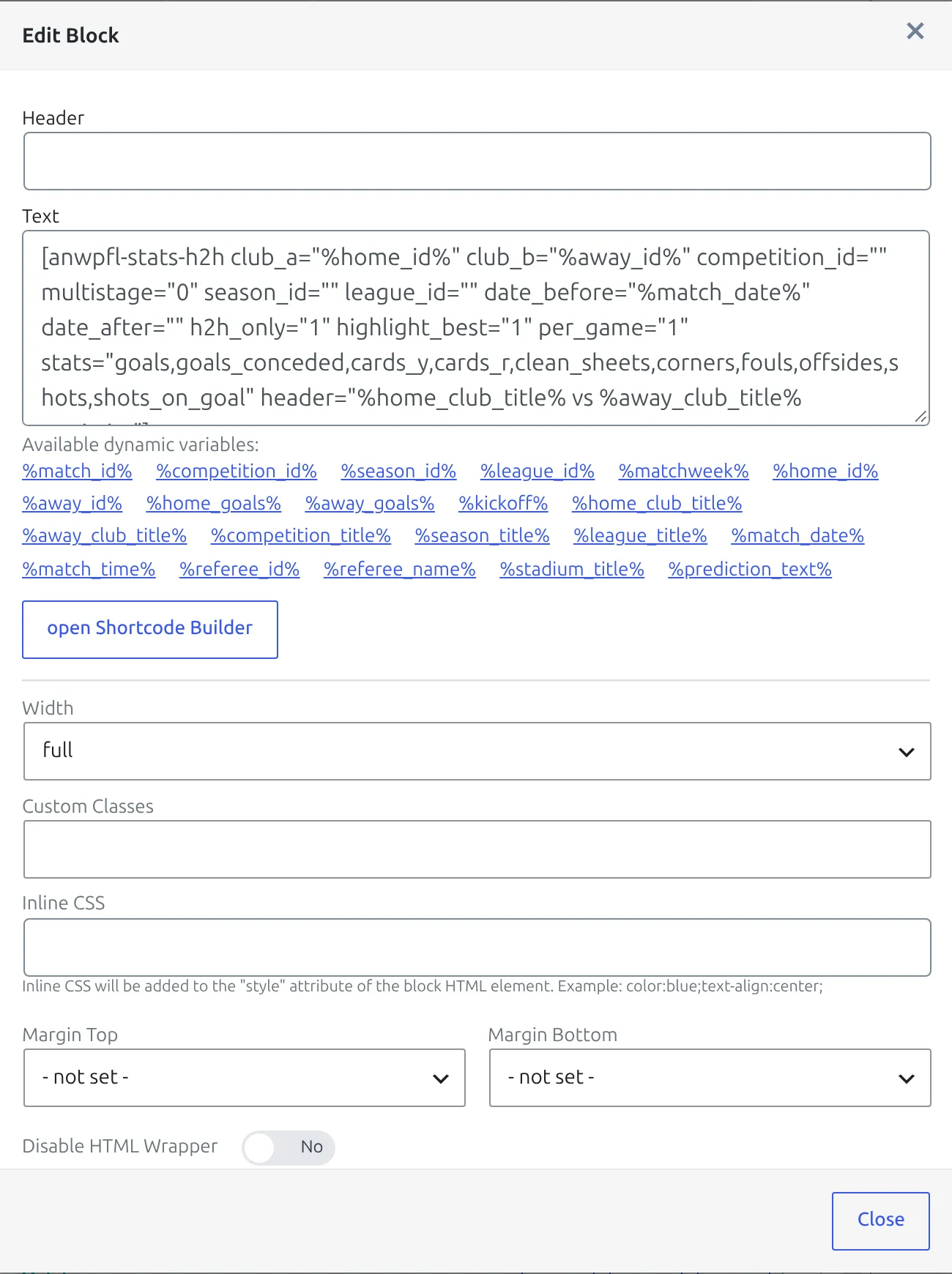
- Open your layout and add a Global :: Shortcode block.
- Click the block’s tools button to open its options.
- Click open Shortcode Builder, pick the shortcode you want and set it up visually, then use Copy and Close.
- Paste it into the Text field.
- Replace the IDs the builder wrote with the matching dynamic variables, then Update the layout.
Step 5 is the one that matters. The Shortcode Builder writes concrete IDs, because it has no idea which page the layout will render on. Swapping club_id="35" for club_id="%club_id%" is what turns a one-off into a layout.
Click, don’t type
The variables available to the current layout type are listed as links right under the Text field. Clicking one inserts it at the cursor, which avoids typos – a misspelled variable is passed through to the shortcode as literal text and the block renders empty or wrong.
Dynamic variables by layout type
Each layout type exposes its own set. A variable from another type is not replaced – it stays in the output as plain text.
Club
%club_id%  %season_id%  %season_name%  %club_title%
%club_city%  %club_country%  %club_home_stadium%
Competition and Competition Multistage
%competition_id%  %season_id%  %season_name%
%league_name%  %league_country%  %competition_title%
Two numbered variables pin a block to one group or one stage. Replace N with the number:
%group_nN%   group ID - both Competition types
%stage_nN%   stage ID - Competition Multistage only
Groups count from 1 in the order the Competition Stages box lists them, and %group_nN% reads the groups of the main stage. %stage_n1% is the main stage and %stage_n2% is the first secondary stage after it. A block only resolves the first %group_nN% and the first %stage_nN% it contains, so put a different group or stage in its own block.
[anwpfl-matches competition_id="%competition_id%" stage_id="%stage_n2%" group_by="matchweek"]Keep competition_id next to them
One layout renders on every competition, and a competition without a stage 3 or a group 5 turns %stage_n3% or %group_n5% into nothing. Always keep competition_id="%competition_id%" in the shortcode: then a missing stage or group falls back to that competition’s own matches. Write competition_id="%stage_n3%" instead and a missing stage leaves the shortcode with no competition filter at all, so it lists every match on your site.
Match
%match_id%  %competition_id%  %season_id%  %league_id%  %matchweek%
%home_id%  %away_id%  %home_goals%  %away_goals%  %kickoff%
%home_club_title%  %away_club_title%  %competition_title%
%season_title%  %league_title%  %match_date%  %match_time%
%referee_id%  %referee_name%  %stadium_title%  %prediction_text%
Match LIVE
%match_id%  %competition_id%  %season_id%  %matchweek%
%home_id%  %away_id%  %kickoff%  %home_club_title%  %away_club_title%
%competition_title%  %season_title%  %league_title%
%match_date%  %match_time%
Match LIVE has no score, referee or prediction variables – a live match has no settled result to substitute.
Player
The largest set. Identity and profile first:
%player_id%  %season_id%  %season_name%  %player_name%  %player_full_name%
%player_position%  %player_club%  %club_link%  %squad_number%
%player_nationality%  %player_date_of_birth%  %player_age%
%player_height%  %player_weight%
Then the next and last match:
%next_game%  %next_game_date%  %next_game_time%  %next_game_league%
%last_game%  %last_game_date%  %last_game_time%  %last_game_league%
%last_game_minutes%  %last_game_rating%
And the current season’s running totals:
%current_season%  %current_season_played%  %current_season_started%
%current_season_sub_in%  %current_season_minutes%  %current_season_goals%
%current_season_assists%  %current_season_goals_penalty%
%current_season_own_goals%  %current_season_goals_conceded%
%current_season_clean_sheets%  %current_season_card_y%  %current_season_card_r%
Referee, Stadium and Staff
Referee  %referee_id%  %referee_name%  %referee_job_title%
         %referee_nationality%  %referee_date_of_birth%
         %season_id%  %season_name%

Stadium  %stadium_id%  %stadium_title%  %stadium_address%
         %stadium_city%  %stadium_capacity%  %stadium_clubs%

Staff    %staff_id%  %staff_name%  %staff_job_title%
         %staff_current_club%  %staff_nationality%  %staff_date_of_birth%
Worked examples
Every match of the current club, grouped by competition
On a Club layout:
[anwpfl-matches season_id="%season_id%" limit="0" filter_by_clubs="%club_id%" sort_by_date="asc" group_by="competition" show_club_logos="1" show_match_datetime="1" competition_logo="1"]The competition’s clubs, on the competition page
[anwpfl-clubs competition_id="%competition_id%" logo_size="big" logo_height="50px" logo_width="50px" show_club_name="0"]One block per side on a match page
Two Shortcode blocks at half width sit side by side, one fed %home_id% and the other %away_id%. That pattern is worked through in full on the charts tutorial.
Ready-made snippets
Four layout types carry a snippet panel on the builder screen, under the heading Ready to use “Global::Shortcode” snippets – Club, Competition, Match and Match LIVE. Competition has six, the others one or two. The variables are already in place, so these paste into the Text field unchanged. Look there before writing a shortcode by hand.
🆘 Troubleshooting
The variable name shows on the page
Seeing %club_id% in the rendered output means it was not replaced. Either the variable is misspelled, or it belongs to a different layout type – %club_id% on a Match layout is not substituted, because a match has two clubs. Use %home_id% or %away_id% there.
The shortcode shows the wrong entity on every page
A numeric ID was left in place of a variable. Reopen the block and check that every ID attribute the Shortcode Builder wrote has been swapped for its variable.
The block is empty
Test the same shortcode with real IDs on an ordinary page first. If it is empty there too, the problem is the shortcode’s own settings, not the layout.
📚 Related
- Layout Builder – layouts, tabs and display rules
- Block Types – every block, by layout type
- Charts on match pages – a full worked example
- Shortcode Builder – building a shortcode without typing it