

Football Leagues installs like any other WordPress plugin. This page covers what your site needs first, the two ways to install (free and Premium), and the handful of things worth checking once it’s active.
What your site needs
| Requirement | Minimum |
|---|---|
| WordPress | 6.5 |
| PHP | 7.4 |
| CMB2 plugin | Latest (free, from WordPress.org) |
If your server runs an older PHP version, Football Leagues stays inactive and shows a notice telling you so. Everything else it needs is bundled.
CMB2 is required
CMB2 is a free developer library published on WordPress.org. Football Leagues uses it to build the player, staff, referee and stadium edit screens, some sections of the match editor (text content, media, match duration), the league fields and the Text Strings screen, so it has to be installed and active alongside the plugin.
You don’t have to hunt for it. If CMB2 is missing, Football Leagues puts a notice at the top of every admin page with a button that installs or activates it for you.

CMB2 has no settings and no interface of its own. Install it, activate it, and forget about it.
🚀 Install the free plugin
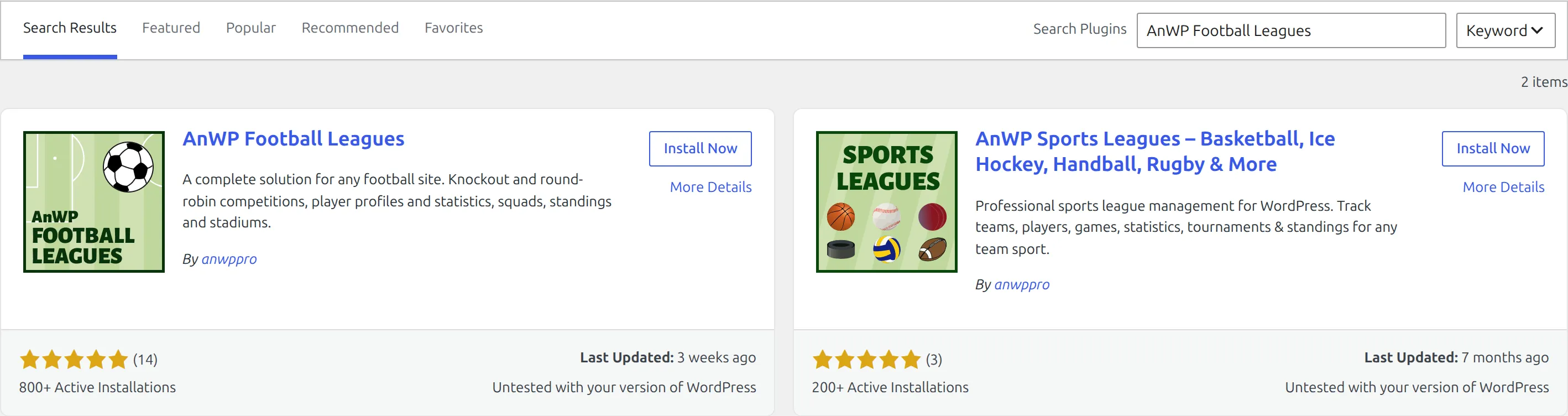
- Go to Plugins → Add New.
- Search for AnWP Football Leagues.
- Click Install Now, then Activate.
Install the Premium plugin
Premium is a separate ZIP you download from your account after purchase. Upload it under Plugins → Add New → Upload Plugin, activate it, and enter your license key when prompted.
Premium already includes the free plugin
Since version 0.18.2 the Premium package ships the core plugin inside it. You do not need to install the free plugin first, and a Premium-only site is a complete install. CMB2 is still required.
If you already run the free plugin
On a single site, activating Premium with a valid license deactivates the separate free plugin for you and explains why in a dismissible notice. Your data is untouched – it lives in the database, not in the plugin folder. You can delete the free plugin afterwards.
One exception: if the free plugin you have installed is newer than your Premium build, it stays active and Premium runs against it. That’s deliberate, so a Premium update can never roll your core version backwards.
On a multisite network nothing is deactivated automatically. You get a notice instead, and the network admin removes the free plugin manually.
After activating
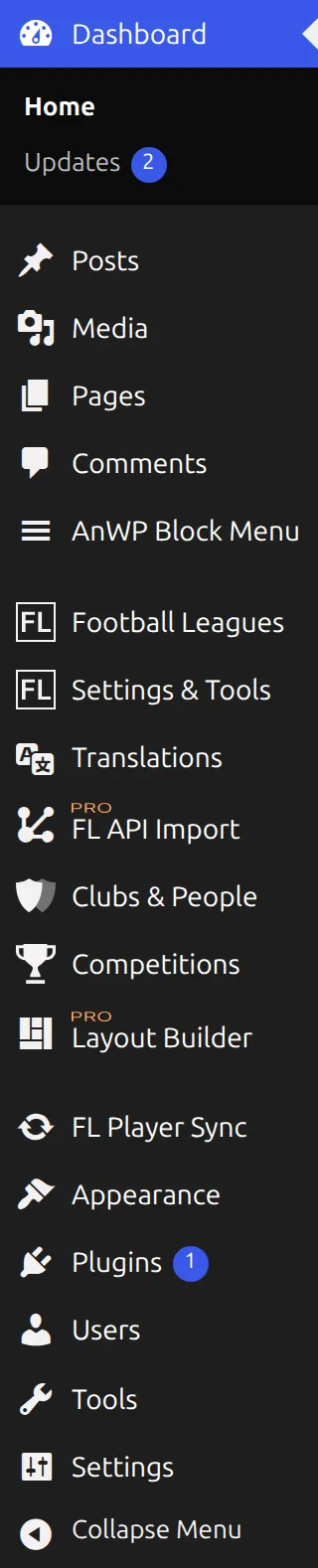
Football Leagues adds several top-level items to the WordPress admin menu:
| Menu | What’s in it |
|---|---|
| Football Leagues | Dashboard, Shortcodes, Support, Plugin Health, Toolbox, Customize |
| Settings & Tools | Data Import, Settings |
| Translations | Text and country name overrides |
| Clubs & People | Clubs, Players, Staff, Referees, Stadiums |
| Competitions | Competitions, Matches, Standing Tables, Leagues, Seasons |
Premium adds further items to these menus.
A fresh install has nothing to migrate, so you should not see any “Database Updater” or migration notices. If one appears on a brand-new site, open Football Leagues → Plugin Health and check what it reports.
🆘 Troubleshooting
The plugin activated but there’s no Football Leagues menu
The Football Leagues, Settings & Tools and Translations menus are for administrators only. Clubs & People and Competitions show for any role that can edit posts, so an editor sees the data menus but not the settings ones. If you see nothing at all, check you’re logged in as an administrator.
“Football Leagues is missing requirements and currently NOT ACTIVE”
Your server’s PHP version is below 7.4. The notice names the version needed. Ask your host to update PHP – most control panels expose this as a one-click setting.
Club, player and match pages return 404
WordPress needs to rebuild its URL rules. Open Settings → Permalinks and click Save Changes without changing anything.
📚 What’s next
With the plugin active, work through the Start Guide – it takes you from an empty install to your first published match.