

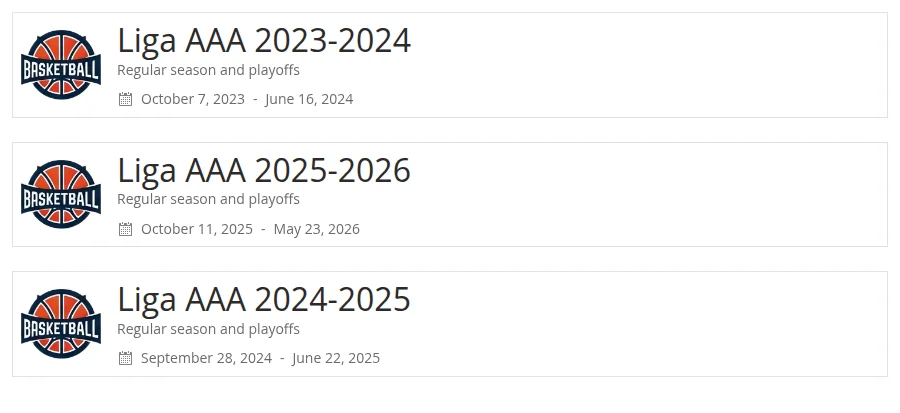
The [sl-tournament-list] shortcode shows a list of your tournaments, one card per tournament. Each card has the tournament logo, title, subtitle and dates, and the whole card links to the tournament page. You can show every tournament, or only finished, active or upcoming ones, a date range, or a hand-picked set.
It’s a core shortcode, so it works in the free plugin. Need a compact list grouped by country, or filtered by league and season? That’s the Premium Tournament List Mini shortcode, a separate shortcode with its own options.
What Each Card Shows
Every card is the same card the Tournament Header shortcode draws with Title as a Link turned on. It takes everything from the tournament’s edit screen:
- Logo: the tournament’s Tournament logo image. No logo set, no image.
- Title: the tournament title.
- Subtitle: the Tournament Subtitle field.
- Dates: “Date From – Date To”, shown only when both dates are filled in. They use the date format from Settings > General.
The whole card is a link to the tournament page. There’s no option to turn the link off, show a season selector or change what the card displays.
The list only includes main tournaments. Stages never get a card of their own, so a tournament with three stages still shows up once.
🚀 Add the Shortcode
The quickest way is to paste it as-is. This lists every main tournament, most recently published first:
[sl-tournament-list]To set options without typing them, use the Shortcode Builder:
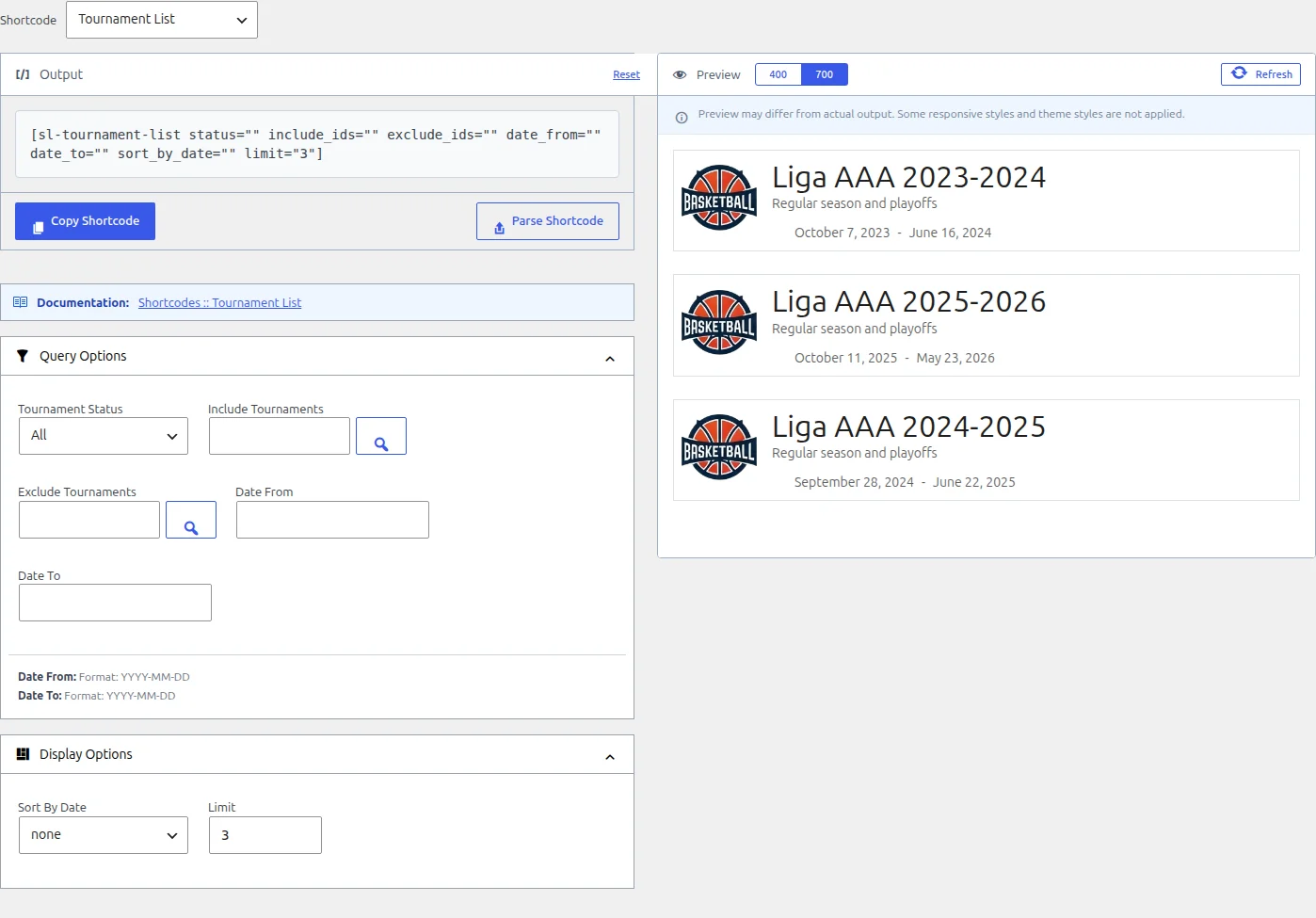
- Go to Sports Leagues > Shortcodes and open the Shortcode Builder tab.
- Pick Tournament List in the Shortcode dropdown.
- Fill in the options under Query Options and Display Options. For Include Tournaments and Exclude Tournaments, click the search button to pick tournaments. The picker lists main tournaments only, and you can narrow it by season and league.
- Check the Preview, then click Copy Shortcode and paste it into your page.
There’s no dedicated Gutenberg block for this list. In the block editor, add a Shortcode block and paste the shortcode into it. The Shortcode Builder page covers the builder, the Classic Editor button and the Parse Shortcode feature in detail.
Parameters
All parameters are optional. Leave one empty and it doesn’t filter anything.
| Parameter | Builder field | What it does | Values | Default |
|---|---|---|---|---|
status | Tournament Status | Shows only tournaments in that state, worked out from their Date From and Date To (see below) | finished, active, upcoming, or empty for all | empty (All) |
include_ids | Include Tournaments | Shows only these tournaments. When it’s set, exclude_ids and limit are ignored | Comma-separated tournament IDs | empty |
exclude_ids | Exclude Tournaments | Leaves these tournaments out | Comma-separated tournament IDs | empty |
date_from | Date From | Only tournaments whose Date From is on or after this date | Date as YYYY-MM-DD | empty |
date_to | Date To | Only tournaments whose Date To is on or before this date | Date as YYYY-MM-DD | empty |
sort_by_date | Sort By Date | Changes the order. In the current version it sorts by the date each tournament was published in WordPress, not by its Date From, and it can leave out some tournaments that have no Date From | asc (oldest first), desc (newest first), or empty | empty (none) |
limit | Limit | Maximum number of cards. 0 shows all. Ignored when include_ids is set | Whole number | 0 |
Need a tournament ID? Go to Tournaments > Tournaments: the ID column is the last one on the right. You can also open the tournament and read the number from the address bar (post=123), or pick the tournament in the builder and read the ID from the generated shortcode. The Standing shortcode page has more on finding IDs.
How the Filters Work Together
Every filter you set has to match, so adding a filter can only make the list shorter. The one exception is include_ids, which also switches off limit (see below). A few details matter:
Status uses today’s date
“Today” is the current date in your site’s timezone (Settings > General).
| Status | A tournament is listed when |
|---|---|
finished | Its Date To is before today |
active | Its Date From is today or earlier, and its Date To is today or later |
upcoming | Its Date From is after today. A tournament that starts today counts as active, not upcoming |
A tournament with no date in the field the status checks never matches. So a tournament with no Date To is never “finished”, and one with no Date From is never “upcoming”. Set both dates on every tournament you want these filters to find.
A date range keeps tournaments that fit inside it
date_from checks the tournament’s start date and date_to checks its end date. With date_from="2025-01-01" date_to="2025-12-31" you get tournaments that start and finish within 2025. A 2024-2025 season that started in October 2024 isn’t in that list. Tournaments without dates are left out as soon as you set either one.
Type dates exactly as YYYY-MM-DD, with leading zeros. A date in any other format (2025-1-1, 01/01/2025) is ignored without a warning, and the list shows as if that field were empty.
Include beats exclude and limit
Once include_ids has IDs in it, the list shows those tournaments only, and exclude_ids and limit do nothing. The status and date filters still apply on top, so an included tournament that doesn’t match them is hidden.
Sort order
With Sort By Date left at “none”, tournaments appear most recently published first. That’s also true for include_ids: the cards don’t follow the order you typed the IDs in. limit keeps the first cards in this order, so limit="5" shows the five most recently published tournaments.
Sort By Date doesn’t sort by tournament dates
In the current version, sort_by_date="asc" lists tournaments oldest-published first and desc newest-published first. It doesn’t look at Date From. It can also drop some tournaments that have no Date From from the list. Leave it at “none” unless that order is what you want.
Examples
Tournaments in progress
[sl-tournament-list status="active"]Every tournament that has started and not yet ended. Swap in status="upcoming" for the ones still to come.
A hand-picked set
[sl-tournament-list include_ids="12,15,20"]Only tournaments 12, 15 and 20, most recently published first.
One year’s finished tournaments, minus one
[sl-tournament-list status="finished" date_from="2025-01-01" date_to="2025-12-31" exclude_ids="34"]Tournaments that started and ended within 2025, except tournament 34.
A short “latest” list
[sl-tournament-list limit="3"]The three most recently published tournaments, for a sidebar or a home page section.
🆘 Troubleshooting
The shortcode shows nothing
When no tournament matches, the shortcode outputs nothing at all, with no “no tournaments” message. Check these:
- You used
status,date_fromordate_to, but your tournaments have no Date From / Date To. Fill them in on each tournament’s edit screen, or remove the filter. - An ID in
include_idsis a stage, not a main tournament. Stages are never listed: use the ID of the tournament the stage belongs to. - The tournament isn’t published. Drafts don’t appear.
Limit or Exclude Tournaments has no effect
You’ve also set Include Tournaments. With include_ids set, both are ignored. Remove the tournaments you don’t want from include_ids instead.
The date filter is ignored
The date isn’t in YYYY-MM-DD form. 2025-03-01 works, 2025-3-1 doesn’t.
No dates on the cards
The card shows dates only when both Date From and Date To are set on the tournament. With one of them empty, the date line is hidden.
A Hidden tournament still appears (Premium)
This list includes tournaments with the Premium Hidden status, and their cards still link to the tournament page. Visitors who click get a 404, because a Hidden tournament has no public page. To keep a tournament off the list, add it to Exclude Tournaments.
📚 Related
- Shortcode Builder: build, preview and edit shortcodes
- Tournament Header shortcode: one tournament card, with a stage link and season selector
- Tournament List Mini shortcode (Premium): a compact list filtered by league and season
- Tournaments: setting up tournaments, stages and their dates