

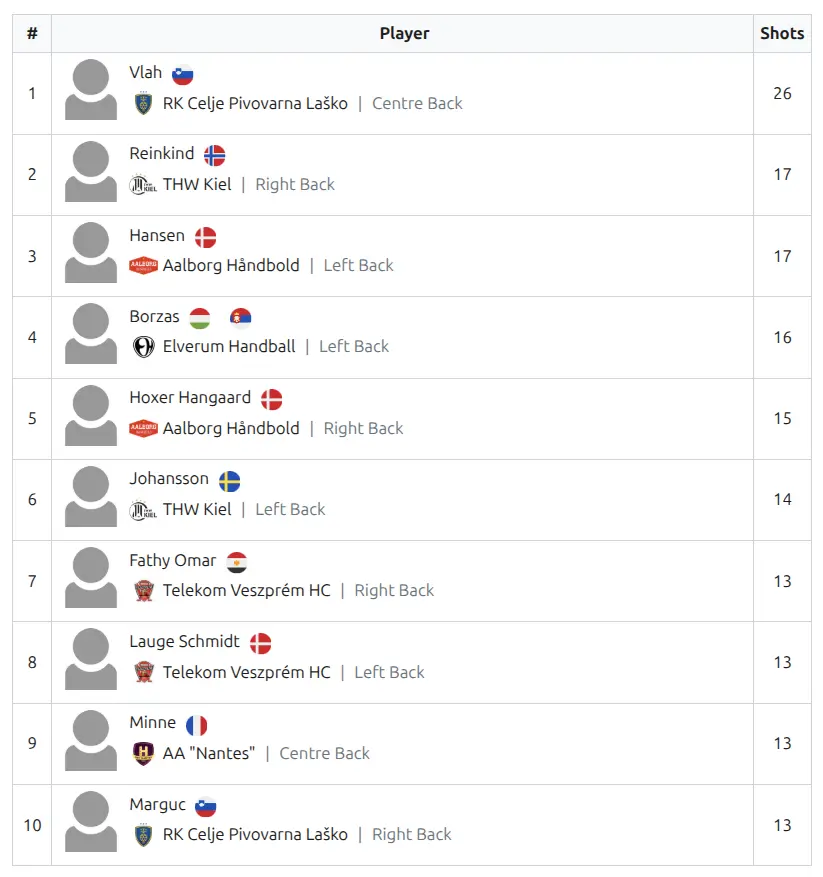
The Advanced Player Statistics shortcode displays ranked player statistics using predefined stat templates. Create leaderboards for goals, assists, cards, or any custom statistic with flexible filtering by tournament, team, position, and date ranges.
Shortcode
[sl-players-stats-advanced]Screenshot
When to Use
- Tournament top scorers
- Season MVP candidates
- Player of the month statistics
- Position-specific leaderboards
- Date-range filtered stats
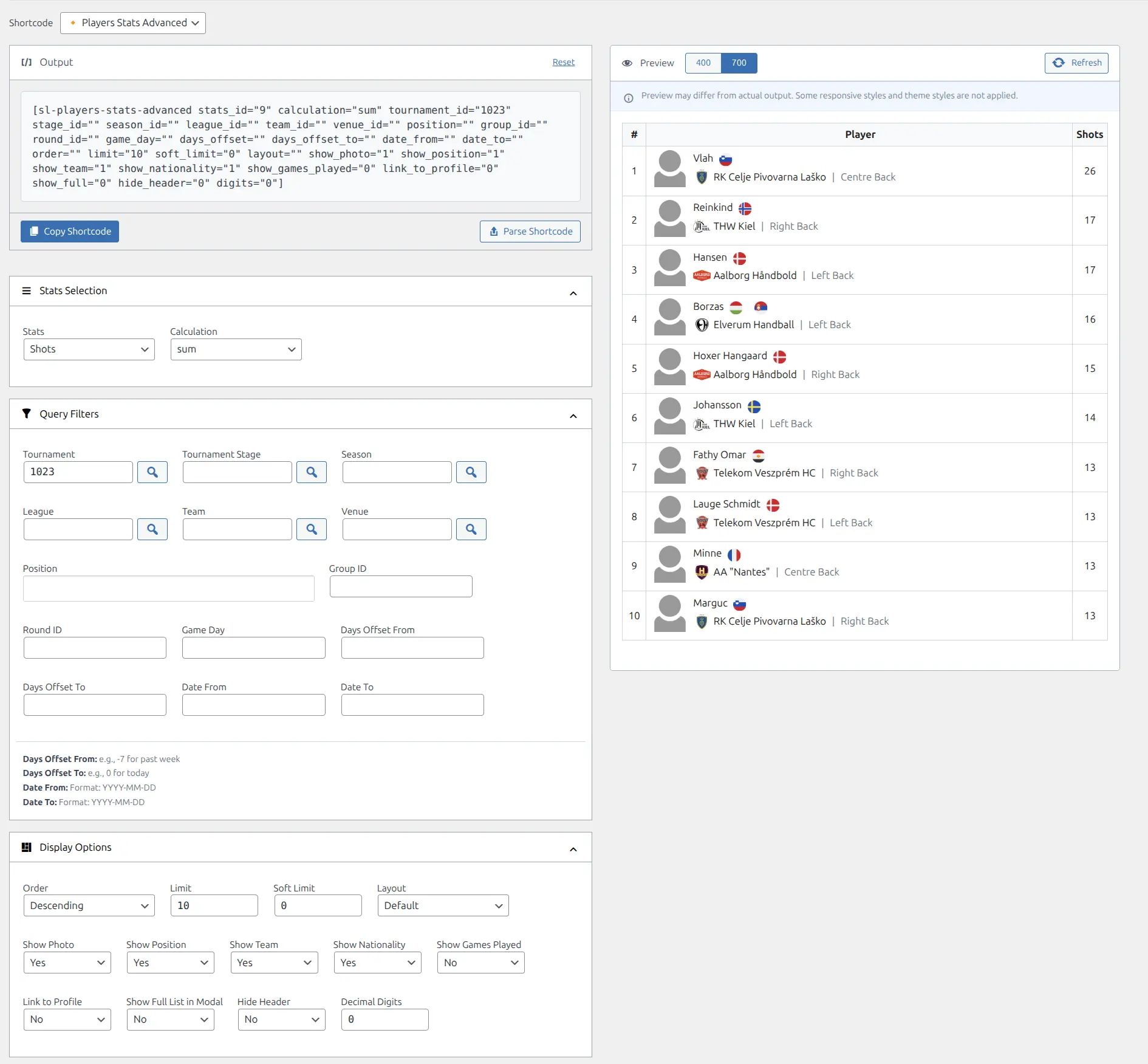
Shortcode Builder
The easiest way to create this shortcode is through the Shortcode Builder in WordPress admin. Navigate to Sports Leagues > Shortcodes, select “Players Stats Advanced” from the list, and configure your options visually.
Parameters
Stats Selection
| Parameter | Default | Description |
|---|---|---|
stats_id | (required) | Predefined stats template ID (configured in Sport Configurator) |
calculation | sum | How to calculate: sum, min, max, or avg_game |
digits | 0 | Decimal places for calculated values (useful with avg_game) |
Query Filters
| Parameter | Default | Description |
|---|---|---|
game_id | – | Filter by specific game ID |
team_id | – | Filter by team ID |
tournament_id | – | Filter by tournament ID |
stage_id | – | Filter by tournament stage ID |
league_id | – | Filter by league ID |
season_id | – | Filter by season ID |
group_id | – | Filter by standing group ID |
round_id | – | Filter by round ID |
venue_id | – | Filter by venue ID |
game_day | – | Filter by specific game day number |
position | – | Filter by player position(s), comma-separated |
days_offset | – | Dynamic date offset from today (negative = past, e.g., -7 for last week) |
days_offset_to | – | Dynamic end date offset from today (e.g., 0 for today) |
date_from | – | Start date filter (YYYY-MM-DD format) |
date_to | – | End date filter (YYYY-MM-DD format) |
Display Options
| Parameter | Default | Description |
|---|---|---|
order | – | Sort order: empty (descending) or ASC (ascending) |
limit | 10 | Maximum players to display |
soft_limit | 0 | Include tied players at limit boundary: 1 (yes) or 0 (no) |
layout | – | Layout style: empty (default) or mini |
show_photo | 1 | Show player photo: 1 (yes) or 0 (no) |
show_position | 1 | Show player position: 1 (yes) or 0 (no) |
show_team | 1 | Show team info: 1 (yes) or 0 (no) |
show_nationality | 1 | Show nationality flag: 1 (yes) or 0 (no) |
show_games_played | 0 | Show games played column: 1 (yes) or 0 (no) |
link_to_profile | 0 | Make player name clickable: 1 (yes) or 0 (no) |
show_full | – | Show “View All” link for modal with full stats |
hide_header | 0 | Hide table header row: 1 (yes) or 0 (no) |
custom_header | – | Custom header text above the table |
custom_header_tag | – | HTML tag for custom header (e.g., h2, h3, h4) |
max_width | – | Maximum table width (CSS value) |
min_width | – | Minimum table width (CSS value) |
class | – | Additional CSS classes for the wrapper |
Examples
Tournament Top Scorers
Display the top 10 goal scorers in a tournament:
[sl-players-stats-advanced stats_id="goals" tournament_id="15" limit="10" custom_header="Top Scorers"]Last 30 Days Leaders
Show top performers from the past 30 days using dynamic date filtering:
[sl-players-stats-advanced stats_id="goals" days_offset="-30" days_offset_to="0"]Team Assist Leaders
Display assist leaders for a specific team:
[sl-players-stats-advanced stats_id="assists" team_id="42" show_nationality="0"]Season Averages
Show per-game averages with decimal precision:
[sl-players-stats-advanced stats_id="goals" season_id="2024" calculation="avg_game" digits="2" show_games_played="1"]Mini Layout
Use the compact mini layout for sidebars:
[sl-players-stats-advanced stats_id="goals" tournament_id="15" layout="mini" limit="5"]Minimal Display
Show only player names and stats (no photos, positions, teams, or flags):
[sl-players-stats-advanced stats_id="goals" tournament_id="15" show_position="0" show_team="0" show_nationality="0" show_photo="0"]Position-Specific Leaderboard
Filter stats by player position:
[sl-players-stats-advanced stats_id="goals" tournament_id="15" position="Forward,Midfielder"]Finding Stats IDs
The stats_id parameter requires a stat ID from your Sport Configuration. To find these:
- Go to Sports Leagues > Settings > Sport Configuration
- Look at the Season Player Statistics section
- Use the stat ID values (e.g., goals, assists, yellow_cards)
Tip
Use the Shortcode Builder to select stats from a dropdown – it will automatically generate the correct stat IDs for you.
Soft Limit for Ties
When soft_limit="1" is enabled, players who are tied at the limit boundary are included. For example, if you set limit="10" and players ranked 10, 11, and 12 all have the same stat value, all three will be shown.
Related
- Shortcode Builder – Visual shortcode generator
- Player Stats Panel – Individual player statistics display
- Teams Stats – Team-level statistics