

Premium users have access to dedicated email support. The Support page in your WordPress admin provides everything you need to submit a ticket, including automatic system info collection.
Menu: Sports Leagues → Support
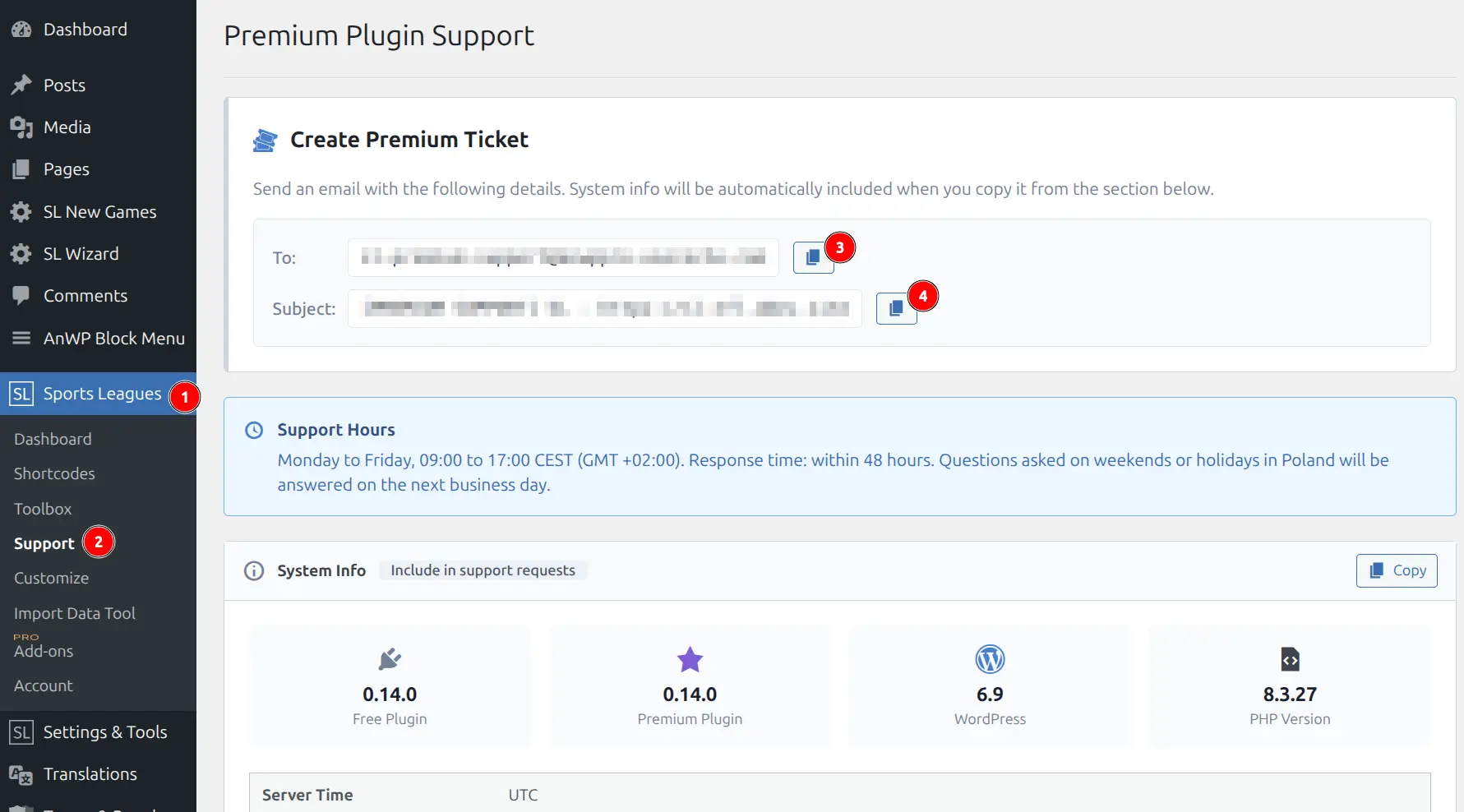
🎯 Creating a Support Ticket
Step 1: Go to Support Page
Navigate to Sports Leagues → Support in your WordPress admin.
Step 2: Copy Email Details
The page displays:
- To: Support email address
- Subject: Pre-formatted with your site URL
Click the copy button next to each field.
Step 3: Copy System Info
Click Copy in the System Info section. This automatically collects:
- Plugin versions (Free + Premium)
- WordPress and PHP versions
- Timezone settings
- Database info
- Active plugins list
- Statistics configuration
Step 4: Send Email
Compose your email including:
| Item | Required | Description |
|---|---|---|
| System Info | Yes | Paste the copied system info |
| Problem URL | Yes | Link to the page with the issue |
| Steps to reproduce | Yes | How to see the problem |
| Screenshot | Recommended | Visual of the issue |
| Expected vs actual | Helpful | What should happen vs what happens |
Support Hours
| Day | Hours (CEST/GMT+2) |
|---|---|
| Monday–Friday | 09:00–17:00 |
| Weekends/Holidays | Next business day |
Response time: Within 48 hours on business days.
Types of Requests
Bug Reports (Priority)
Something isn’t working as expected.
Include:
- System Info (required)
- URL where issue occurs
- Steps to reproduce
- Error messages (if any)
CSS/Theme Conflicts
Display issues caused by theme CSS.
Include:
- URL to affected page
- Screenshot with annotations
- System Info not required
Customization Requests (Lower Priority)
Feature requests or custom modifications.
Note
Customization requests have longer response times and may not be implemented.
System Info Details
The Support page automatically collects diagnostic information to help resolve your issue faster:
| Info | Purpose |
|---|---|
| Free Plugin Version | Compatibility check |
| Premium Plugin Version | Version-specific bugs |
| WordPress Version | WP compatibility |
| PHP Version | Server requirements |
| Server/WP Timezone | Date/time issues |
| Plugin DB Version | Migration status |
| Multisite Status | Network configuration |
| Autoloaded Data | Performance baseline |
| Statistics Records | Data volume |
| Active Plugins | Conflict identification |
| Stats Columns Config | Statistics setup |
| DB Tables | Database integrity |
Expandable sections show detailed configuration (click to view):
- Stats Columns (Game)
- Stats Columns (Season)
- Player Stats Table Structure
- Active Plugins list
- Database Tables list
💡 Tips for Faster Resolution
- Be specific – “Standings show wrong team” is better than “something is broken”
- Include URLs – Always link to the actual page with the issue
- Use screenshots – Annotate what’s wrong
- Check first – Review FAQ and Troubleshooting guides before contacting support
- One issue per ticket – Easier to track and resolve
What Support Covers
| ✅ Covered | ❌ Not Covered |
|---|---|
| Bug fixes | Custom development |
| Configuration help | Theme modifications |
| Usage questions | Third-party plugin conflicts |
| Documentation clarification | Server configuration |
Tip
For third-party plugin conflicts, try disabling other plugins to isolate the issue before contacting support.