

The Custom Player Statistics shortcode creates fully customizable player statistics tables with complete control over columns, sorting, filtering, and display options. Build custom leaderboards with interactive tables featuring sorting, pagination, and frozen columns.
Shortcode
[sl-stats-players-custom]Screenshot
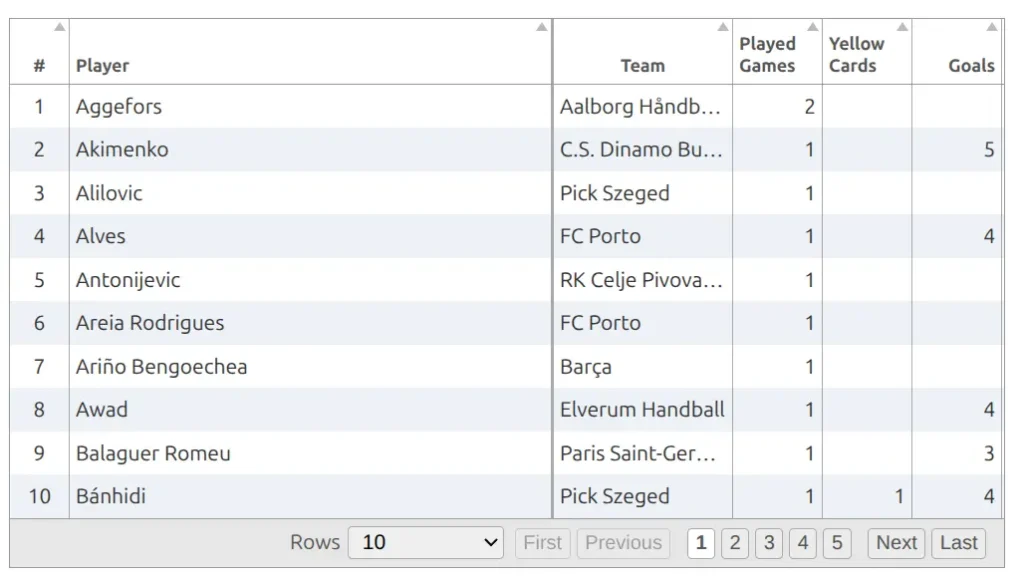
When to Use
- Custom leaderboards (top scorers, assists, cards)
- Season statistics tables with multiple stat columns
- Position-specific stats (goalkeepers, forwards)
- Per-game averages tables
- Multi-stat comparison tables
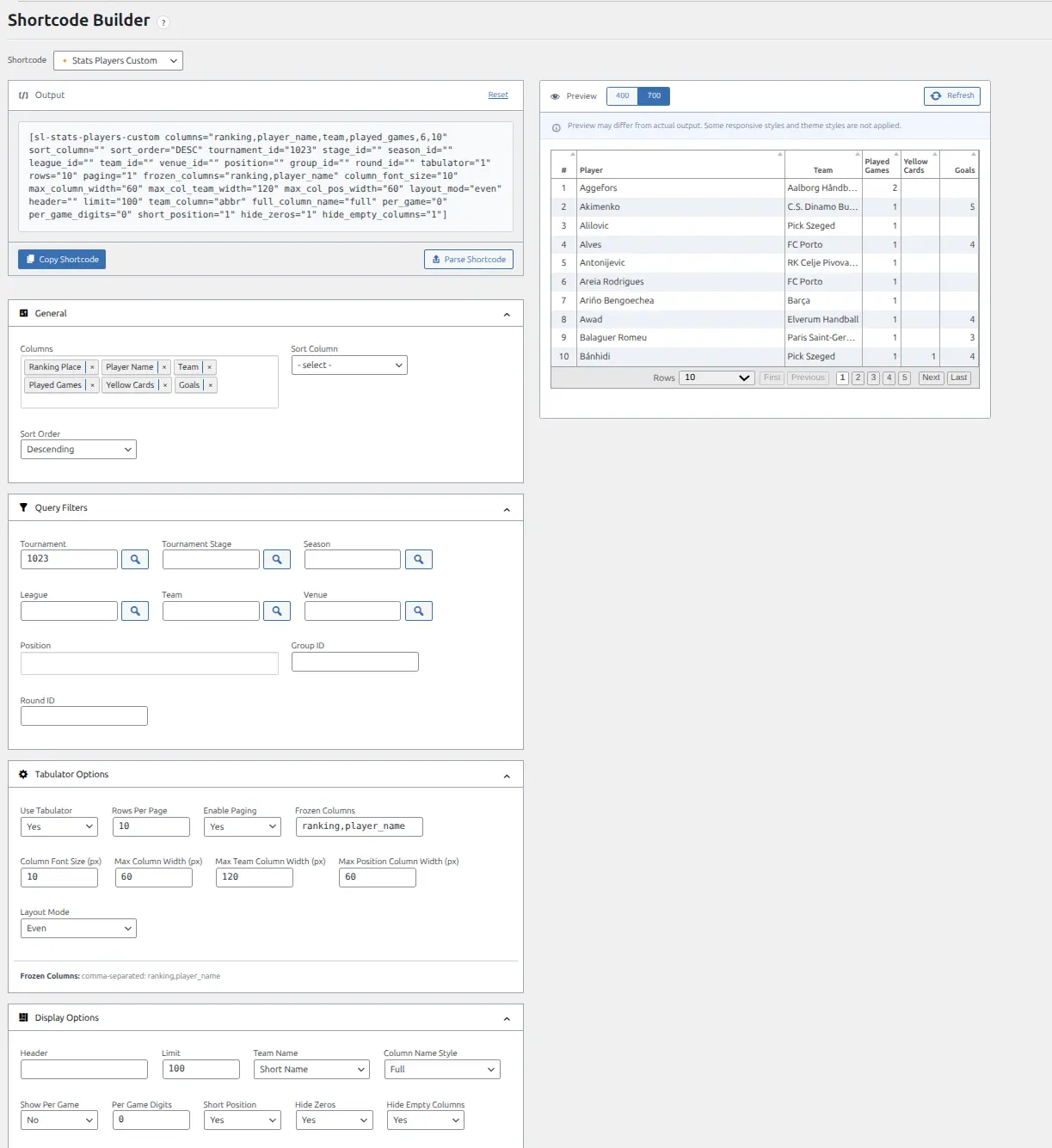
Shortcode Builder
The easiest way to create this shortcode is through the Shortcode Builder. Navigate to Sports Leagues > Shortcodes, select “Stats Players Custom” from the dropdown, and configure your options visually.
Parameters
Column Selection
| Parameter | Default | Description |
|---|---|---|
columns | (required) | Comma-separated stat column IDs to display |
sort_column | – | Column to sort by initially |
sort_order | DESC | Sort order: DESC (descending) or ASC (ascending) |
Available Column IDs:
ranking– Ranking placeplayer_name– Player nameteam– Teamposition– Positionplayed_games– Games played- Plus any configured player statistic IDs from your Sport Configuration
Query Filters
| Parameter | Default | Description |
|---|---|---|
season_id | – | Filter by season ID |
league_id | – | Filter by league ID |
team_id | – | Filter by team ID |
tournament_id | – | Filter by tournament ID |
stage_id | – | Filter by tournament stage ID |
group_id | – | Filter by standing group ID |
round_id | – | Filter by round ID |
venue_id | – | Filter by venue ID |
position | – | Filter by player position(s), comma-separated |
Tabulator Options
This shortcode uses Tabulator.js by default for interactive tables with sorting, pagination, and frozen columns.
| Parameter | Default | Description |
|---|---|---|
tabulator | 1 | Use Tabulator.js: 1 (yes) or 0 (no) |
rows | 10 | Rows per page |
paging | 1 | Enable pagination: 1 (yes) or 0 (no) |
frozen_columns | ranking,player_name | Comma-separated columns to freeze on horizontal scroll |
column_font_size | 10 | Column font size in pixels |
max_column_width | 50 | Maximum stat column width in pixels |
max_col_team_width | 120 | Maximum team column width in pixels |
max_col_pos_width | 60 | Maximum position column width in pixels |
layout_mod | even | Layout mode: even, fitData, or fitDataFill |
Display Options
| Parameter | Default | Description |
|---|---|---|
limit | 10 | Maximum rows to display |
header | – | Custom table header text |
team_column | abbr | Team display format: abbr (abbreviation), title (full name), or code |
full_column_name | full | Column header format: full or short |
per_game | 0 | Show per-game averages: 1 (yes) or 0 (no) |
per_game_digits | 0 | Decimal places for averages |
short_position | 1 | Use short position names: 1 (yes) or 0 (no) |
hide_zeros | 1 | Hide zero values: 1 (yes) or 0 (no) |
hide_empty_columns | 1 | Hide columns with no data: 1 (yes) or 0 (no) |
class | – | Additional CSS classes for the wrapper |
Legacy DataTables Options
For backwards compatibility, DataTables can be used instead of Tabulator.
| Parameter | Default | Description |
|---|---|---|
data_table | 0 | Use DataTables instead of Tabulator: 1 (yes) or 0 (no) |
data_table_page_length | 10 | DataTables page length |
data_table_searching | 1 | Enable search: 1 (yes) or 0 (no) |
data_table_page_menu | 1 | Show page menu: 1 (yes) or 0 (no) |
data_table_info | 0 | Show info: 1 (yes) or 0 (no) |
Examples
Top 10 Scorers
Display the top 10 goal scorers for a season:
[sl-stats-players-custom columns="ranking,player_name,team,goals" season_id="2024" limit="10" sort_column="goals" header="Top Scorers 2024"]Goalkeeper Statistics
Show goalkeeper-specific stats filtered by position:
[sl-stats-players-custom columns="ranking,player_name,team,played_games,clean_sheets,goals_conceded,saves" position="goalkeeper" season_id="2024"]Per-Game Averages
Display per-game averages with decimal precision:
[sl-stats-players-custom columns="ranking,player_name,team,goals,assists,shots" per_game="1" per_game_digits="2" tournament_id="15"]Team-Specific Leaders
Show stat leaders for a specific team:
[sl-stats-players-custom columns="ranking,player_name,position,goals,assists,yellow_cards,red_cards" team_id="42" season_id="2024" sort_column="goals"]Multi-Stat Table with Custom Layout
Create a comprehensive stats table with custom column widths:
[sl-stats-players-custom columns="ranking,player_name,team,position,goals,assists,shots,shots_on_target" season_id="2024" limit="20" frozen_columns="ranking,player_name" column_font_size="11" hide_zeros="1" layout_mod="fitDataFill"]Finding Stat Column IDs
The columns parameter requires stat IDs from your Sport Configuration. To find available stat IDs:
- Go to Sports Leagues > Settings > Sport Configuration
- Look at the Season Player Statistics section
- Use the stat ID values (e.g., goals, assists, yellow_cards)
Tip
Use the Shortcode Builder to select columns from a visual interface – it will automatically generate the correct column IDs for you.
Frozen Columns
When displaying tables with many columns, frozen columns stay visible while scrolling horizontally. By default, the ranking and player name columns are frozen. You can customize which columns freeze using the frozen_columns parameter.
Related
- Shortcode Builder – Visual shortcode generator
- Players Stats Advanced – Predefined stat templates with player photos
- Player Stats Panel – Individual player statistics display
- Teams Stats – Team-level statistics