

The Premium standing table editor unlocks advanced capabilities: a full Columns Builder for custom statistics, Conference & Division support, manual data filling, advanced ranking rules with sort direction control, and new column types like Division Record and Head-to-Head.
User benefit: Build fully customized standings with calculated stats, team game statistics, and complex tiebreaker rules that match your league’s exact requirements.
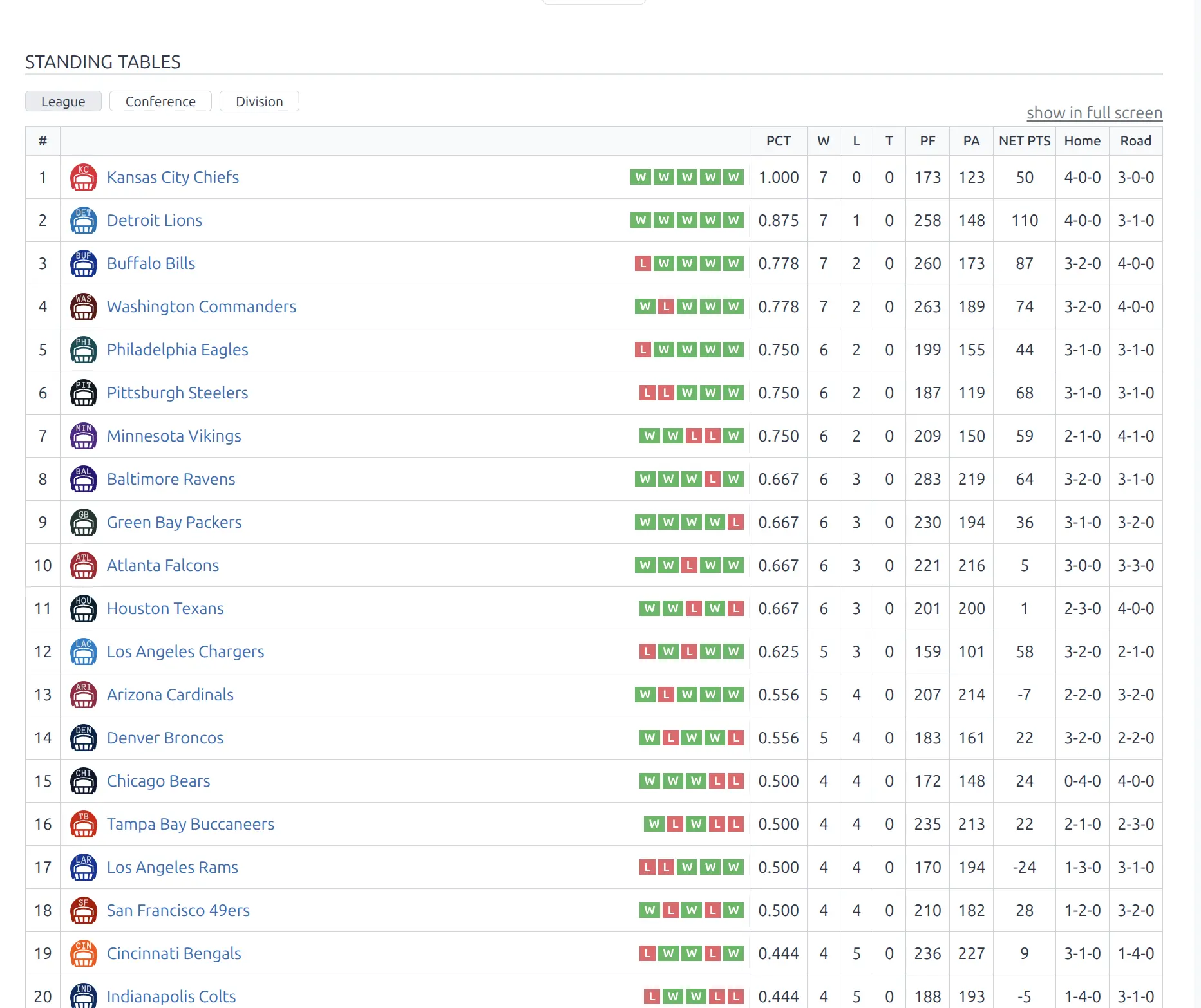
🎯 Pro vs Core Comparison
| Feature | Core | Premium |
|---|---|---|
| Automatic calculation | Yes | Yes |
| Manual position ordering | Yes | Yes |
| Position colors | Yes | Yes |
| Initial points (adjustments) | Yes | Yes |
| Column customization | Reorder predefined | Full Columns Builder |
| Column types | General only | General, Stats, Calculated, Composed |
| Ranking rules | Basic (drag to reorder) | Advanced (with sort direction) |
| Manual data filling | No | Yes |
| Conference & Division support | No | Yes |
| Division/Conference Record columns | No | Yes |
| Head-to-Head columns | No | Yes |
| Streak & Form columns | No | Yes |
🚀 Columns Builder
Create custom standings with any combination of statistics using the visual Columns Builder.
Column Types
| Type | Badge Color | Purpose |
|---|---|---|
| General | Cyan | Core statistics (played, wins, draws, losses, scores, points, streak, records) |
| Stats | Purple | Team game statistics from events (shots, fouls, corners, etc.) |
| Calculated | Magenta | Mathematical operations on other columns (ratio, percentage) |
| Composed | Green | Combine 2-3 columns into one display (e.g., “W-D-L”) |
Adding Columns
- Scroll to Columns Builder section in the standing editor
- Find the column category:
- General columns – Standard standings data
- Team Game Stats – Statistics from game events
- Special columns – Calculated and composed
- Click the + button next to the desired column
- Column appears in the builder – configure its settings
- Drag columns to reorder using the handle icon
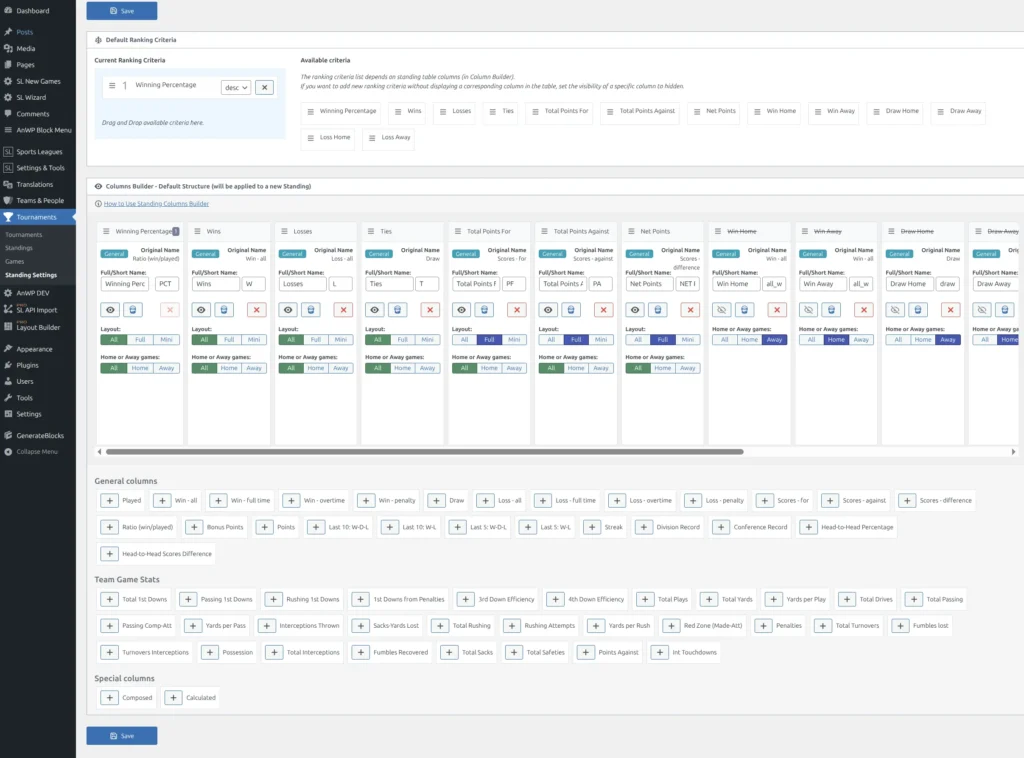
General Columns (Premium Exclusive)
Premium adds these General columns beyond Core:
| Column | Display Format | Description |
|---|---|---|
| Streak | W3, L2, D1 | Current winning/losing/draw streak |
| Last 5: W-D-L | 3-1-1 | Record in last 5 games (with draws) |
| Last 5: W-L | 4-1 | Record in last 5 games (no draws) |
| Last 10: W-D-L | 6-2-2 | Record in last 10 games (with draws) |
| Last 10: W-L | 7-3 | Record in last 10 games (no draws) |
| Division Record | 5-2 | W-L against teams in same division |
| Conference Record | 12-4 | W-L against teams in same conference |
| H2H Percentage | 4-2 | W-L in games between teams in this standing |
| H2H Scores Difference | +8 | Goal/point differential in head-to-head games |
Tip
Division Record and Conference Record require Conference & Division support to be enabled in the standing. The columns automatically filter games against teams in the same division or conference.
Column Settings
All Columns:
- Full Name / Short Name – Display labels for the column
- Visibility – Show/hide (hidden columns still available for ranking)
- Layout – All | Full only | Mini only
- Styling – Background color, border options
General & Stats Columns:
- Home or Away games – All | Home | Away filter
Stats Columns:
- Stats Side – For (team’s stats) | Against (opponent’s stats)
Calculated Columns:
- Field 1 / Field 2 – Source columns for the calculation
- Calculation – Sum | Difference | Ratio | Ratio (%)
- Digits – Decimal places (0-4)
Composed Columns:
- Field 1 / Field 2 / Field 3 – Columns to combine
- Display format: “value1-value2-value3”
⚙️ Advanced Ranking Rules
Premium ranking rules support sort direction control for precise tiebreaker configuration.
Setting Up Ranking Rules
- Find the Ranking Criteria section
- Drag criteria from Available Criteria to Current Ranking Criteria
- Reorder by priority (top = highest priority)
- Set Sort Direction for each rule:
- DESC (descending) – Higher values rank higher
- ASC (ascending) – Lower values rank higher
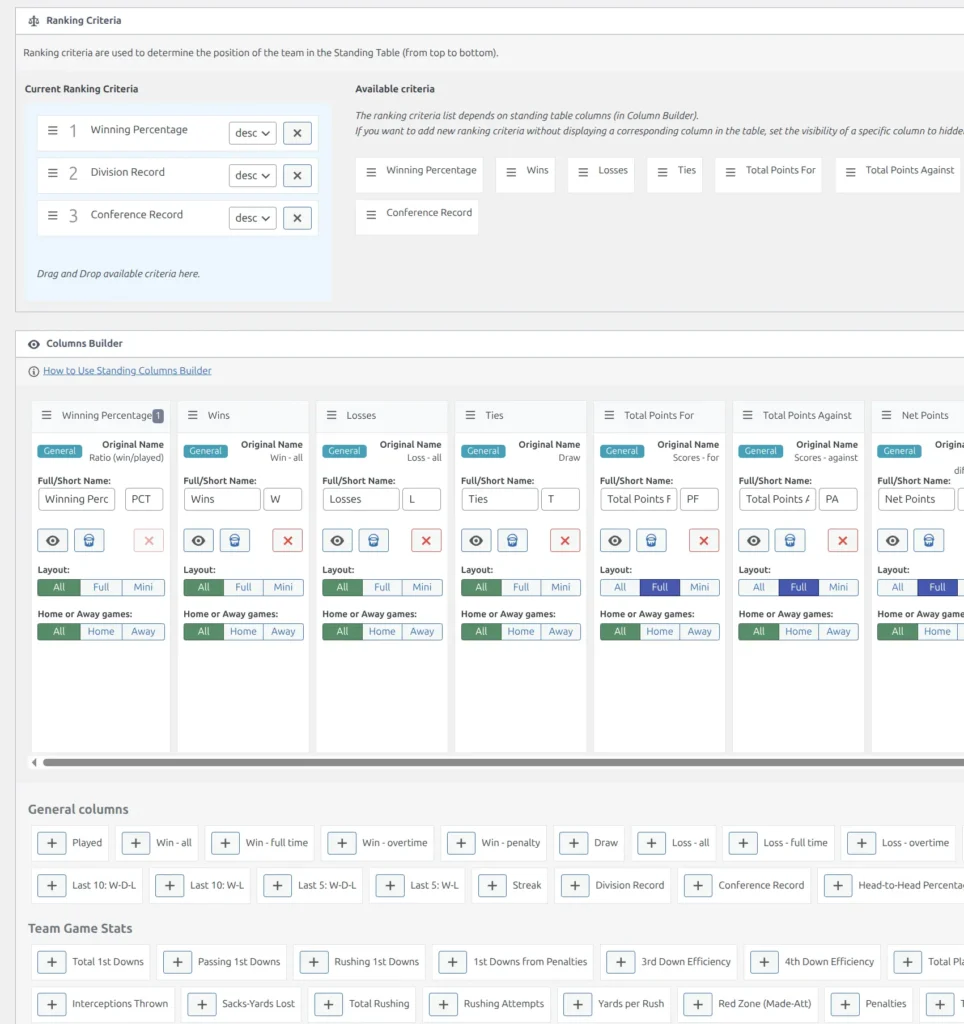
Sort Direction Examples
| Criteria | Direction | Reason |
|---|---|---|
| Points | DESC | More points = better |
| Wins | DESC | More wins = better |
| Win Ratio | DESC | Higher percentage = better |
| Losses | ASC | Fewer losses = better |
| Goals Against | ASC | Fewer conceded = better |
| Goal Difference | DESC | Positive difference = better |
| Division Record | DESC | Win % is calculated internally |
| H2H Percentage | DESC | Win % is calculated internally |
Note
Available ranking criteria are generated from your Columns Builder columns. Only countable column types appear (General, Stats, Calculated). To use a criterion without displaying it, add the column and set its visibility to hidden.
📝 Manual Data Filling
Enter standings data manually instead of calculating from game results.
Enabling Manual Mode
- Find Automatic Data Filling in the Standing Table section
- Set to No
- All column values become editable
- Type values directly in the table cells
When to Use Manual Mode
- Historical seasons with data not in the system
- Exhibition or friendly tournament standings
- Custom scenarios with non-standard calculations
- Importing data from external sources
Warning
When manual filling is enabled, the standing will not update automatically from game results. You must manually update all values.
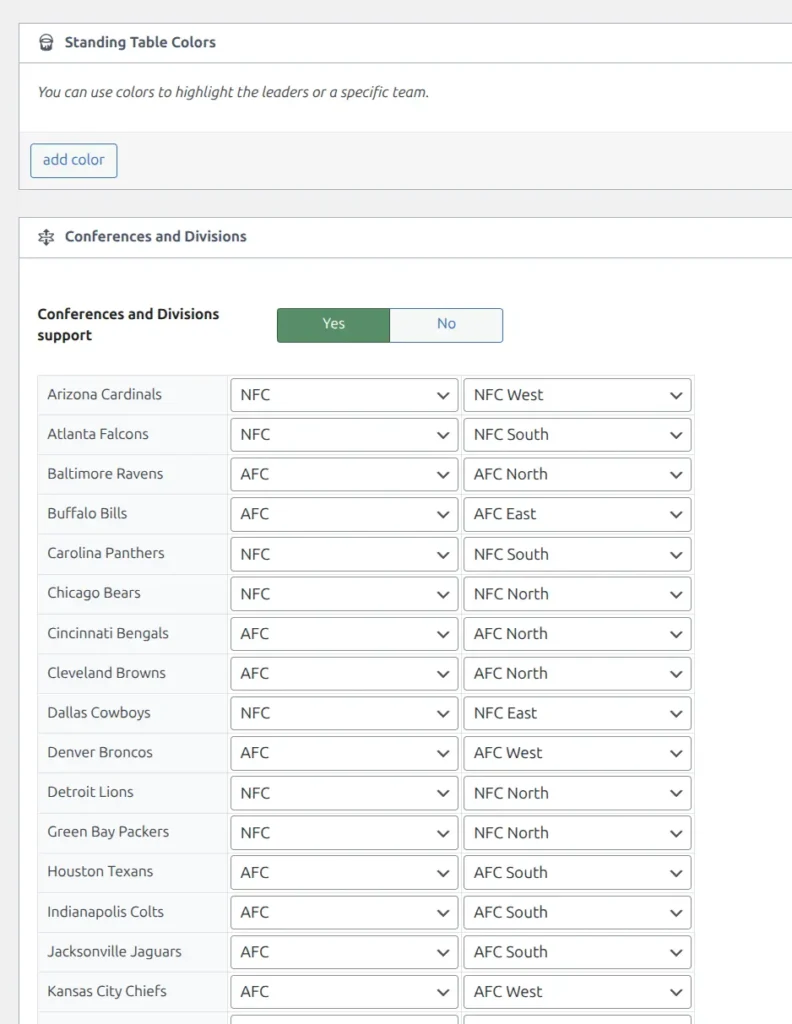
📊 Conferences and Divisions
Organize teams into conferences and divisions within a single standing table for leagues like NFL, NBA, or regional tournaments.
For complete setup instructions, see Conference & Division Support.
Quick Setup
- Tournament: Create conference/division structure in the Tournament edit page
- Standing: Enable division support and assign teams to their divisions
- Display: Standings automatically group teams by conference/division
Partition Switcher
When conferences are enabled, a switcher appears above the standing allowing users to view:
- League – All teams in one table
- Conference – Grouped by conference
- Division – Grouped by division
Shortcode Parameters
Control the partition view via shortcode:
[sl-standing id="123" partitions="c"]    // Show by conference
[sl-standing id="123" partitions="d"]    // Show by division
[sl-standing id="123" partitions_switcher="0"]  // Hide switcher
⚙️ Standing Settings (Pro Defaults)
Configure default settings for newly created standings at Sports Leagues > SL Settings & Tools > Standing Settings.
| Setting | Description |
|---|---|
| Default Ranking Criteria | Advanced rules with sort direction for new standings |
| Columns Builder Structure | Default column configuration for new standings |
Tip
Pro settings define the template for new standings only. Changing settings does not affect existing standings. Each standing can be customized independently after creation.
📋 Example Configurations
Basketball-Style (NBA)
Columns: Wins, Losses, Win% (calculated), Games Behind (calculated), Streak
Ranking: Win% (DESC) > Head-to-Head > Conference Record
Partitions: Eastern/Western conferences with 3 divisions each
Soccer with Advanced Stats
Columns: P, W, D, L, GF, GA, GD, Pts + Stats columns (Shots, Possession, Corners)
Calculated: Shot Accuracy (Shots on Target / Shots as Ratio %)
Ranking: Points (DESC) > Goal Difference (DESC) > Goals For (DESC)
American Football (NFL Style)
Columns: W, L, Win%, PF, PA, Division Record, Conference Record, Streak
Ranking: Win% (DESC) > Division Record (DESC) > Conference Record (DESC) > H2H (DESC)
Partitions: 2 conferences (AFC, NFC) with 4 divisions each
🆘 Troubleshooting
Calculated column shows 0
Problem: Calculated column displays 0 when it should have a value.
Solutions:
- Verify source columns (Field 1 and Field 2) have data
- Check for division by zero (Field 2 is 0 in ratio calculations)
- Ensure games are marked Finished
- Save and recalculate the standing
Stats column is empty
Problem: Team statistics column shows no data.
Solutions:
- Verify team statistics are entered in games
- Check the stat exists in your Events configuration
- Confirm the stat key matches between events and column
Division/Conference Record shows 0-0
Problem: Division or Conference Record columns show 0-0 for all teams.
Solutions:
- Ensure Conference & Division support is enabled in the standing
- Verify all teams are assigned to a division/conference
- Check that games exist between teams in the same division/conference
- Recalculate the standing after making changes
Teams in wrong order
Problem: Teams appear in unexpected positions.
Solutions:
- Check ranking criteria order and priority
- Verify DESC vs ASC direction for each criterion
- Confirm column values are numeric (not text)
- Check if Automatic Position Calculation is enabled
- Recalculate the standing
Column not available for ranking
Problem: A column doesn’t appear in the ranking criteria list.
Solutions:
- Only countable columns appear (General, Stats, Calculated)
- Composed columns cannot be used for ranking
- Ensure the column is added to the Columns Builder
- Save the standing and refresh the page
📚 Related Documentation
- Standing Table (Core) – Basic standing features
- Conference & Division Support – Tournament structure setup
- Text Options – Customize standing column labels