

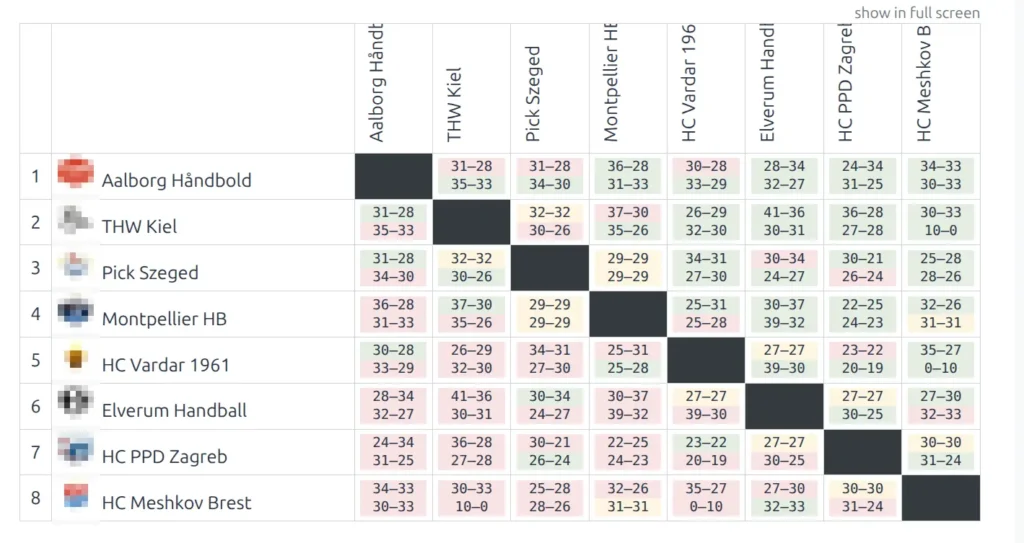
Display a results matrix showing head-to-head results between all teams in a standing. Each cell shows the game scores between the row team and column team, making it easy to see how every team performed against every other team.
Use Cases
- League results grid for season overview
- Round-robin tournament results display
- Conference or division results matrix
- Head-to-head reference table for fans
Using the Shortcode Builder
The easiest way to create this shortcode is through the Shortcode Builder in your WordPress editor.
- Edit any page or post
- Click the SL Shortcodes button in the editor toolbar
- Select Results Matrix from the Premium shortcodes list
- Choose the Standing Table you want to display
- Click Insert to add the shortcode
Parameters
| Parameter | Default | Description |
|---|---|---|
standing_id | (required) | The Standing Table ID to display. All teams from this standing will be included in the matrix. |
Examples
Basic Results Matrix
Display the results matrix for a specific standing:
[sl-results-matrix standing_id="12"]Tip
To find the Standing ID, go to Sports Leagues > Standing Tables in your WordPress admin. The ID is shown in the list or in the URL when editing a standing.
How It Works
- The matrix displays all teams from the selected Standing Table
- Teams are ordered by their standing position (1st place at top)
- Each cell shows the score(s) from games between the row team and column team
- For leagues with home and away games, both results are shown in each cell
- The diagonal cells (team vs itself) are grayed out
Display Settings
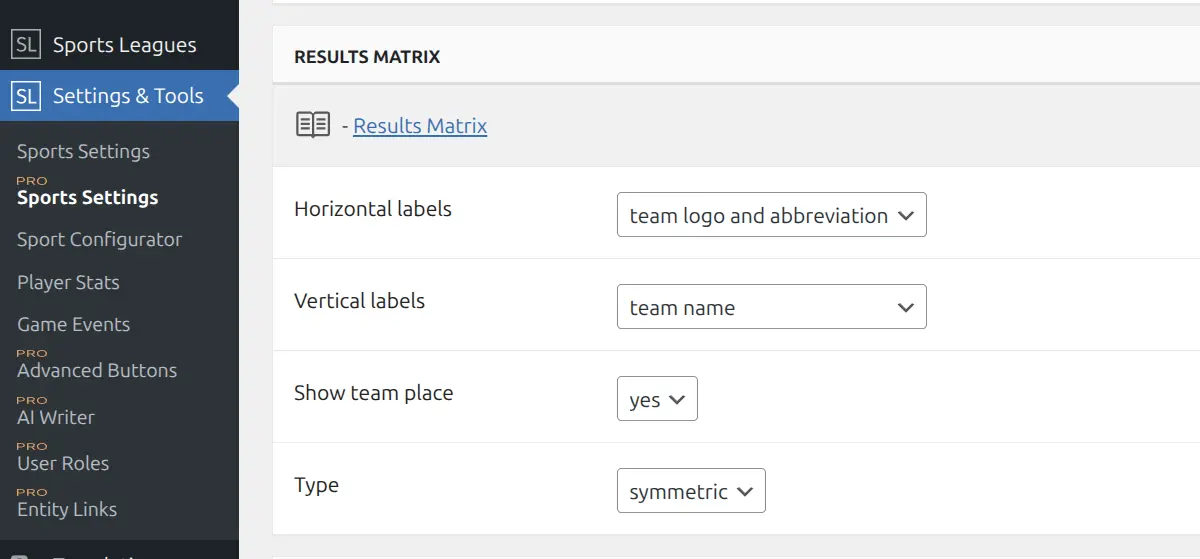
Customize the matrix appearance in Sports Leagues > Settings & Tools > Shortcodes.
Horizontal Labels
Controls how teams are displayed in the column headers (top row):
- Team name – Full team name (best for small leagues with short names)
- Team logo – Logo only (most compact, requires recognizable logos)
- Team abbreviation – Short code like “MAN”, “BAR” (good balance of space and readability)
- Team logo and abbreviation – Both logo and abbreviation (recommended for most leagues)
Vertical Labels
Controls how teams are displayed in the row labels (left column):
- Team name – Full team name (default, most readable)
- Team logo – Logo only
- Team abbreviation – Short code
- Team logo and abbreviation – Both logo and abbreviation
Tip
For mobile-friendly matrices, use compact options like “logo” or “abbreviation” for horizontal labels, and “team name” or “logo and abbreviation” for vertical labels.
Show Team Place
When set to Yes, displays the standing position number (1st, 2nd, 3rd…) next to each team name. This helps viewers quickly identify top and bottom teams in the matrix.
Matrix Type
Choose between two layout styles:
Default – Full matrix showing all matchups. Each cell displays the score from the row team’s perspective. Home and away results may appear in the same cell or separately depending on your league format.
Symmetric – Condensed triangle layout. Upper triangle shows one set of results, lower triangle shows the reverse fixtures. More compact display, ideal for leagues with 12+ teams or for embedding in sidebars.
| Setting | Options | Recommended For |
|---|---|---|
| Horizontal labels | team name, team logo, team abbreviation, team logo and abbreviation | Logo + abbreviation for most leagues |
| Vertical labels | team name, team logo, team abbreviation, team logo and abbreviation | Team name for readability |
| Show team place | yes, no | Yes for leagues, No for tournaments |
| Type | default, symmetric | Default for <12 teams, Symmetric for 12+ |
Reading the Matrix
Each cell in the matrix shows the result from the perspective of the row team:
- Green background – Row team won the game
- Red/Pink background – Row team lost the game
- Yellow/Neutral background – Draw
- Dark/Gray cell – Team cannot play itself (diagonal)
When multiple games exist between two teams (home and away), both scores are displayed in the cell, typically stacked vertically.
Note
The matrix automatically updates as new game results are added. Only finished games with recorded scores appear in the matrix.
Related
- Games H2H – Two-team head-to-head history
- Teams Stats – Team statistics table
- Premium Shortcodes – All premium shortcode options