

The Player Stats Panel shortcode displays comprehensive player statistics with stat blocks and optional progress bar charts. Perfect for player profile pages, Layout Builder, widgets, page builders, or PHP templates.
🎯 Shortcode
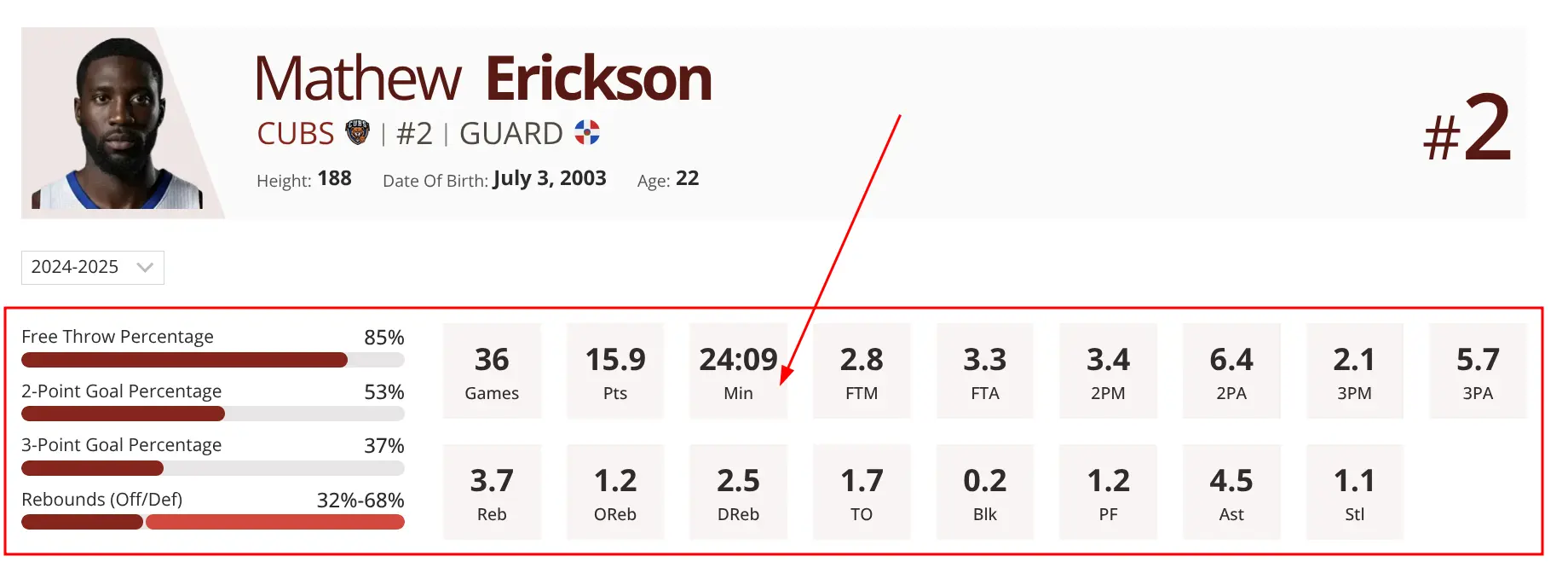
📸 Screenshot
✅ When to Use
Use this shortcode when:
- Building custom player profile pages
- Displaying player stats in widgets
- Using page builders (Elementor, Divi, Beaver Builder)
- Adding stats to PHP templates programmatically
- Creating dynamic stat displays with custom filtering
Don’t use when:
- You can use Gutenberg blocks instead (blocks are easier to configure)
- Displaying team rosters (use Roster (adv) block)
- Showing games (use Games Slider block)
⚙️ Parameters
Required
| Parameter | Type | Description |
|---|---|---|
player_id | Integer | Player ID to display stats for (required) |
Display Options
| Parameter | Default | Description |
|---|---|---|
stat_blocks | – | Comma-separated stat IDs to display as numbered blocks |
stat_charts | – | Stat IDs with labels for visual charts (see format below) |
season_text | auto | Custom season label (overrides auto-detection) |
notes | – | Custom notes/text below statistics |
class | – | Additional CSS classes for styling |
Query Filters
| Parameter | Default | Description |
|---|---|---|
tournament_id | – | Filter by tournament ID (supports CSV for multiple) |
stage_id | – | Filter by tournament stage ID |
season_id | – | Filter by season ID (supports CSV) |
league_id | – | Filter by league ID (supports CSV) |
filter_by_team | – | Filter by team ID |
date_from | – | Start date (format: YYYY-MM-DD) |
date_to | – | End date (format: YYYY-MM-DD) |
📊 stat_charts Format
The stat_charts parameter uses a special format to define chart labels:
stat_charts="ID,Label|ID,Label|ID-ID,Label"Example:
stat_charts="12,Free Throw Percentage|13,2-Point Goal Percentage|14,3-Point Goal Percentage|18-19,Rebounds (Off/Def)"12,Free Throw Percentage– Stat ID 12 with label “Free Throw Percentage”18-19,Rebounds (Off/Def)– Combined stats 18 and 19 with label- Use
|to separate multiple charts
💡 Examples
Basic Usage
With Stat Blocks
With Charts and Blocks
Filtered by Season
Career Statistics
Date Range Filter
🔧 Layout Builder Integration
Use the shortcode in Layout Builder with dynamic variables to automatically display stats for every player:
- Go to Sports Leagues > Layout Builder > Player
- Add Global Shortcode block to your layout
- Use dynamic variables for player and season IDs
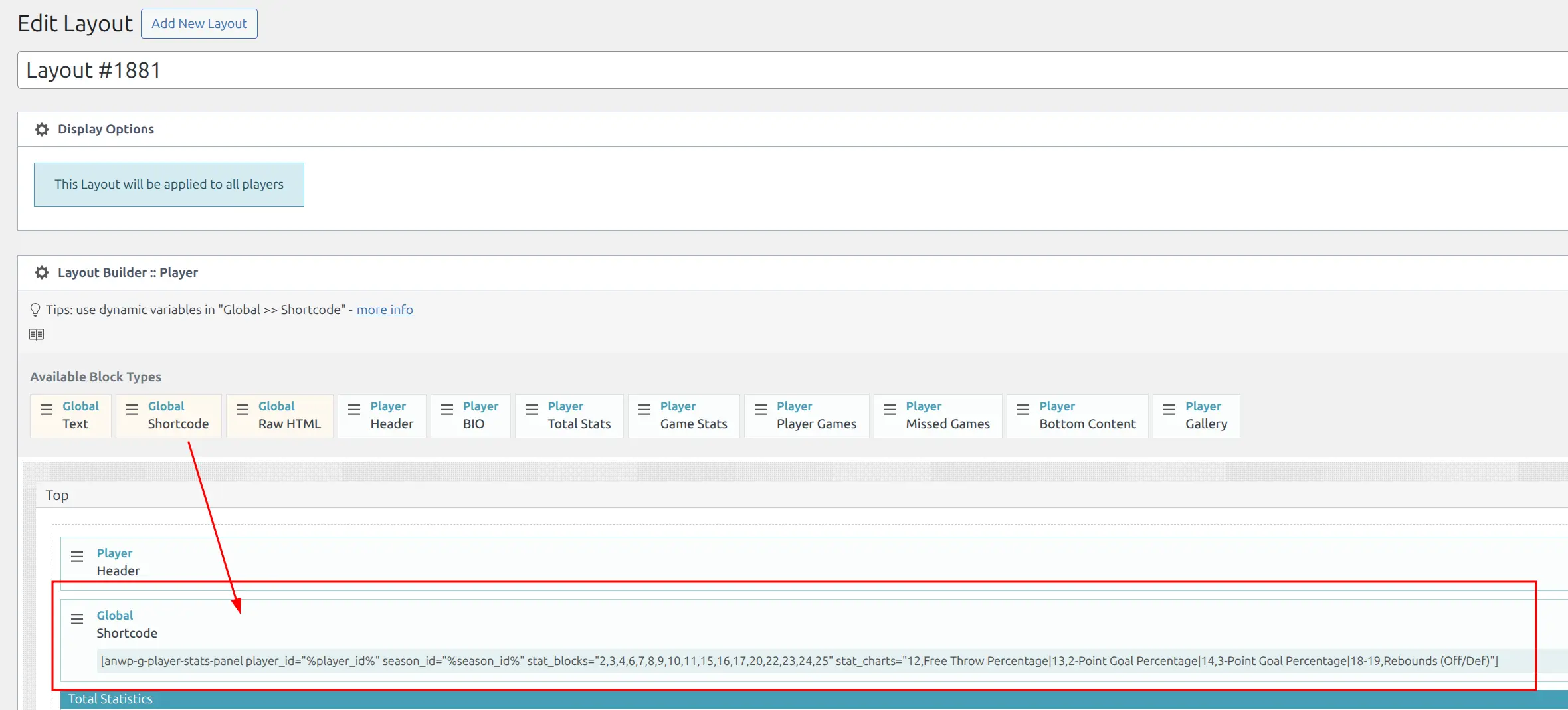
Dynamic variables:
%player_id%– Current player’s ID (auto-filled)%season_id%– Current season ID (auto-filled)
Tip
Use stat IDs instead of names when using Layout Builder. Find stat IDs in Sports Leagues > Statistics.
🏗️ Page Builder Integration
Elementor
- Add Shortcode widget
- Paste shortcode
- Style with Elementor’s CSS options
Divi Builder
- Add Text module
- Paste shortcode in content
- Use Divi styling controls
Beaver Builder
- Add HTML module
- Paste shortcode
- Preview and save
👨💻 PHP Template Integration
Add stats to custom player profile templates:
<?php
// Get current player ID from query
$player_id = get_the_ID();

// Build shortcode dynamically
echo do_shortcode('');
?>
🔍 Finding IDs
Player ID
Navigate to Sports Leagues > Players > Edit Player. The ID is in the URL:
.../wp-admin/post.php?post=42&action=edit
                            ^^
                         Player ID
Stat IDs
Go to Sports Leagues > Statistics to find stat IDs for your sport configuration.
🆘 Troubleshooting
Shortcode displays as plain text
- Ensure you’re in “Text” tab (Classic Editor) or using Shortcode block (Gutenberg)
- Check for extra spaces around shortcode
- Verify AnWP SL Kit plugin is active
No stats showing
- Verify
player_idis correct - Check that player has stats in Sports Leagues plugin
- Ensure filters aren’t too restrictive (try removing all filters temporarily)
Wrong stats showing
- Double-check filter IDs (tournament_id, league_id, etc.)
- Verify date range format is
YYYY-MM-DD
📚 Related
- SL Kit Blocks Reference – Roster (adv), Players Slider, and other SL Kit blocks
- How to Configure Player Statistics – Setting up stats for your sport