

This guide covers installing AnWP Sports Leagues and the required CMB2 plugin on your WordPress site.
Requirements
| Requirement | Minimum | Recommended |
|---|---|---|
| WordPress | 5.9+ | Latest |
| PHP | 7.4+ | 8.0+ |
| MySQL | 5.6+ | 5.7+ |
| Required Plugin | CMB2 | — |
Step 1: Install AnWP Sports Leagues
Option A: From WordPress.org
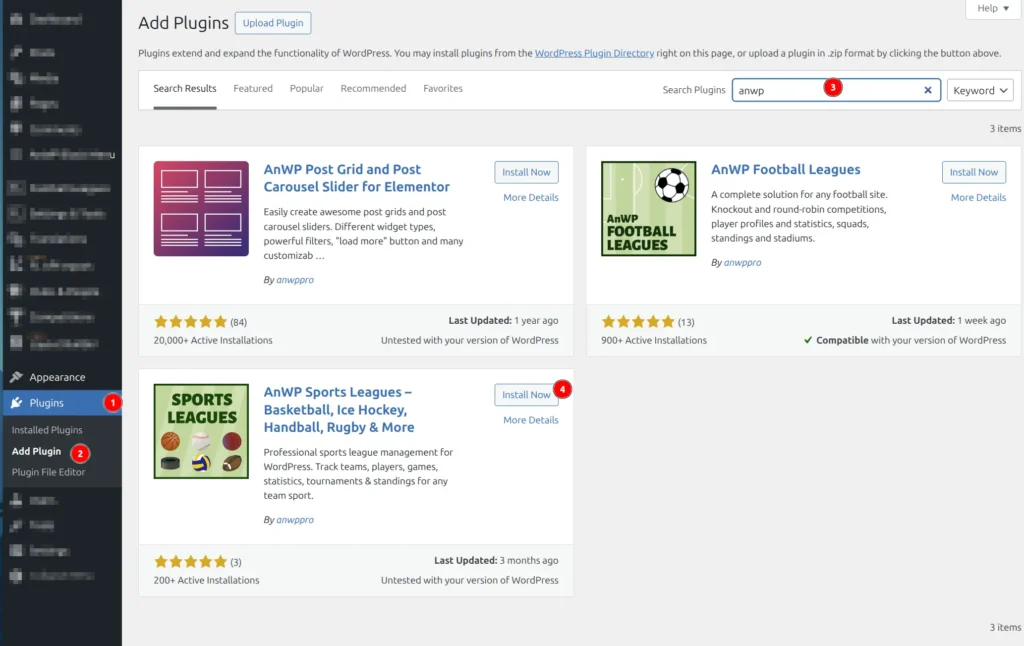
- Go to Plugins > Add New
- Search for “AnWP Sports Leagues”
- Click Install Now then Activate
Option B: Manual Upload
- Download the plugin ZIP file from WordPress.org
- Go to Plugins > Add New > Upload Plugin
- Choose the ZIP file and click Install Now
- Click Activate
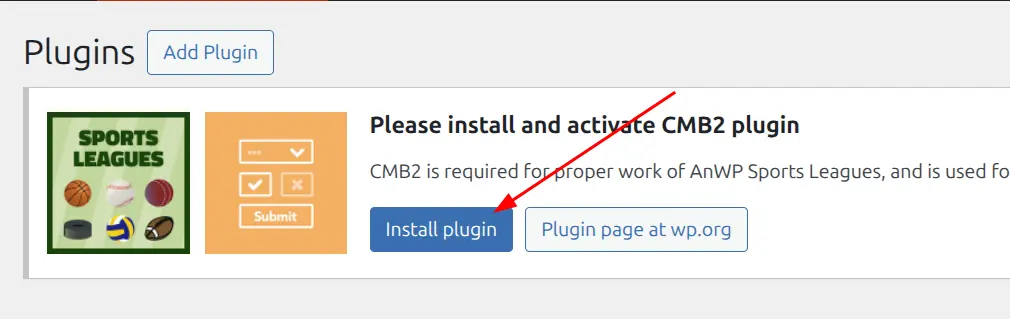
Step 2: Install CMB2 (Required)
CMB2 is a free plugin that powers the custom metaboxes used by Sports Leagues.
- Go to Plugins > Add New
- Search for “CMB2”
- Click Install Now then Activate
Step 3: Flush Permalinks
After activation, you must flush permalinks to register the new custom post types:
- Go to Settings > Permalinks
- Click Save Changes (no need to change anything)
This rebuilds URL rewrite rules for teams, players, games, and other Sports Leagues content types.
Important
If you see 404 errors on team or player pages later, return to Settings > Permalinks and save again.
Verify Installation
After completing these steps:
- Check for Sports Leagues in your admin menu
- Go to Sports Settings > Tools
- Verify no error messages appear
Tip
If the CMB2 notice won’t go away, make sure you’ve installed and activated the CMB2 plugin (Step 2).
Next Steps
Installation complete! Continue with initial setup:
- Getting Started — Configure your sport and create your first league