

The [sl-games] shortcode shows a list of games: fixtures, results, or both. You narrow the list down by tournament, stage, season, team, venue, date or game status, then choose the sort order, how many games to show and whether to split them under day, month, game day or stage headings.
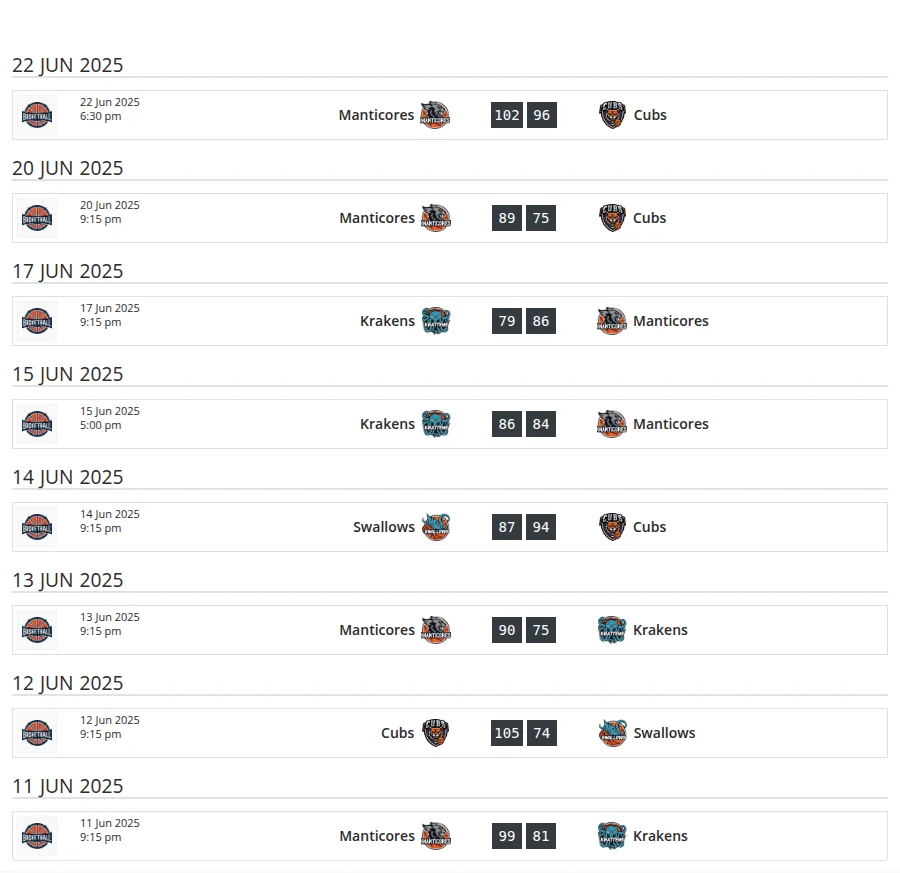
The shortcode is part of the free plugin. A few options do more with Premium, and they’re marked below.
🚀 Add a Games List
With the Shortcode Builder
- Go to Sports Leagues > Shortcodes and pick Games in the shortcode list.
- Fill in the options. The form groups them under Query Filters, Date Filters, Sorting & Grouping, Display Options and Advanced Options.
- Check the live preview, copy the shortcode and paste it into a page, post or Shortcode block.
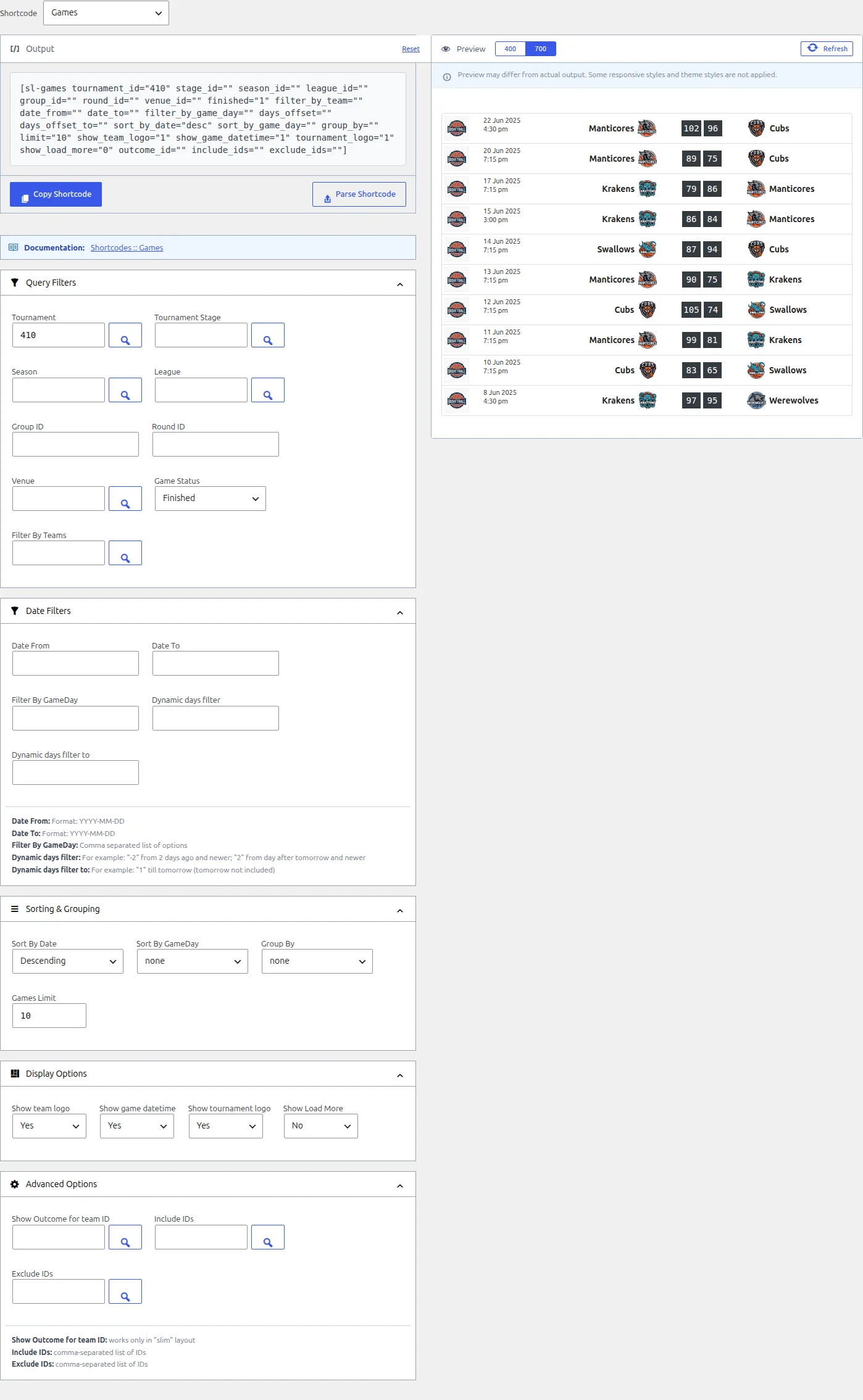
How the builder works (selectors, preview, parsing an existing shortcode) is covered in Shortcode Builder. Five options aren’t in the builder form – game_layout, priority, header_style, header_class and class – so add those to the copied shortcode by hand.
With the block
In the block editor, add the SL Games block from the Sports Leagues category and set the same options in the block sidebar. The block differs from the shortcode in a few ways:
- Games Limit is a slider from 1 to 10. For longer lists, turn on Show Load More or use the shortcode.
- Game Status only offers Finished and Upcoming. A new block shows all games until you pick one.
- It has a Game Layout option (default, Slim, Modern, Classic), but no Priority or heading-style options.
- Tournament ID and Stage ID let you pick several items, but only the first one is used.
Parameters
Every parameter is optional. Leave one out (or empty) and it doesn’t filter anything. IDs are the numbers WordPress gives each tournament, stage, team, venue and game. The Standing shortcode page lists where to find each ID, or you can pick them by name in the Shortcode Builder.
Which games
| Parameter | What it does | Values | Default |
|---|---|---|---|
tournament_id | Games of one tournament (the main tournament, not a stage) | Tournament ID | empty |
stage_id | Games of one tournament stage | Stage ID | empty |
season_id | Games of one season | Season ID | empty |
league_id | Games of one league | League ID | empty |
group_id | Games of one group inside a stage | Group number (1, 2, …) | empty |
round_id | Games of one round inside a stage | Round number (1, 2, …) | empty |
venue_id | Games played at one venue | Venue ID | empty |
finished | Game status. 1 = finished games only, 0 = games not marked as finished | 1, 0 | empty (all) |
filter_by_team | Games where any of these teams plays, home or away | Team IDs, comma-separated | empty |
filter_by_game_day | Games on these game days | Numbers, comma-separated | empty |
include_ids | Only these games (other filters still apply) | Game IDs, comma-separated | empty |
exclude_ids | Leave these games out | Game IDs, comma-separated | empty |
priority | Premium. Games with this Game Priority or higher | 1 to 5 | empty |
Dates
| Parameter | What it does | Values | Default |
|---|---|---|---|
date_from | Games on or after this day (from 00:00) | YYYY-MM-DD | empty |
date_to | Games on or before this day (up to 23:59:59) | YYYY-MM-DD | empty |
days_offset | Games from today plus N days, starting at 00:00. 0 = from today, -2 = from 2 days ago | Whole number | empty |
days_offset_to | Games before today plus N days. That day itself is left out: 1 = up to the end of today | Whole number | empty |
Order, limit and headings
| Parameter | What it does | Values | Default |
|---|---|---|---|
sort_by_date | Sort by kickoff: asc = earliest first, desc = latest first | asc, desc (lowercase) | empty (no sorting) |
sort_by_game_day | Sort by game day first. Overrides sort_by_date | asc, desc | empty |
limit | Maximum number of games. 0 or empty = no limit | Number | empty (all games) |
group_by | Puts a heading above each new day, month, game day or stage | day, month, gameday, stage, round_stage | empty |
header_style | Look of the group headings | header, subheader | header |
header_class | Extra CSS class on each group heading | CSS class | empty |
show_load_more | Adds a Load More button under the list | 1, 0 | 0 |
Display
| Parameter | What it does | Values | Default |
|---|---|---|---|
game_layout | Design of each game row | slim, classic, modern, card-a | slim |
show_team_logo | Show team logos | 1, 0 | 1 |
show_game_datetime | Show the game date and time | 1, 0 | 1 |
tournament_logo | Show the tournament logo. Slim layout only – the other layouts never show it | 1, 0 | 1 |
outcome_id | Adds a win / draw / loss badge for this team to its finished games. Slim layout only. With Premium, Game >> List Item must also be set to Default in the Customizer – the Recommended design has no badge | Team ID | empty |
class | CSS class on the list wrapper | CSS classes | mt-4 |
For the on/off options, 1, yes and true (lowercase) mean on. Anything else means off.
How the Filters Combine
- All filters add up. A game has to match every filter you set. That includes
include_ids:[sl-games tournament_id="10" include_ids="55"]shows game 55 only if it belongs to tournament 10. - Several values inside one filter mean “any of these”.
filter_by_team="12,15"shows every game of team 12 and every game of team 15, not only the games between them. - Date filters stack too. You can use
date_from,date_to,days_offsetanddays_offset_totogether. The list keeps only games that pass all of them. Games without a date passdate_toanddays_offset_to, but neverdate_fromordays_offset. - “Upcoming” means “not finished”.
finished="0"also lists games whose date has passed but that haven’t been marked Finished yet. Adddays_offset="0"to drop those. - There’s no default order. Without
sort_by_dateorsort_by_game_day, games come back in database order, which isn’t date order. Set a sort on any list where the order matters. Withsort_by_date, games without a date go to the end in both directions. - The limit is applied after sorting. So
sort_by_date="desc" limit="5"gives the 5 latest games, andsort_by_date="asc" limit="5"the 5 earliest. - Headings follow the order of the list.
group_bydoesn’t sort anything: it adds a heading each time the day (or month, game day, stage) changes from the previous game. Pairdayandmonthwithsort_by_date, andgamedaywithsort_by_game_day, or the same heading turns up more than once.
Group headings
group_by | Heading text |
|---|---|
day | The date, like “29 Mar 2025” |
month | The month, like “Mar 2025” |
gameday | “Game Day: 5”. Games with no game day get no heading |
stage | The stage name |
round_stage | The stage name. On non-group stages, a round with its own name is added in front (“Final – Playoffs”). Not in the builder or block – type it in the shortcode |
You can change the “Game Day” wording in the text strings settings.
🎯 Recipes
Swap the IDs for your own.
Next 5 fixtures
[sl-games tournament_id="10" finished="0" days_offset="0" sort_by_date="asc" limit="5"]Games not yet finished, from today on, earliest first. days_offset="0" keeps out older games nobody has marked Finished. It also leaves out fixtures that don’t have a date yet.
Latest 5 results
[sl-games tournament_id="10" finished="1" sort_by_date="desc" limit="5"]Without sort_by_date="desc" you’d get 5 finished games in database order, not the most recent ones.
A team’s season, month by month
[sl-games filter_by_team="45" season_id="5" sort_by_date="asc" group_by="month"]A team’s last 5 results with a W/D/L badge
[sl-games filter_by_team="45" outcome_id="45" finished="1" sort_by_date="desc" limit="5"]Premium: the badge only shows when Appearance > Customize > Sports Leagues > Layouts > Game >> List Item is set to Default. The Recommended design doesn’t have it. Without Premium, the badge always shows.
This week, day by day
[sl-games tournament_id="10" days_offset="-3" days_offset_to="4" sort_by_date="asc" group_by="day"]From 3 days ago up to the end of the day 3 days from now (day 4 itself is left out). The list moves forward on its own every day.
A full stage by game day, with Load More
[sl-games stage_id="25" sort_by_game_day="asc" group_by="gameday" limit="10" show_load_more="1"]Shows the first 10 games. Each click on Load More adds the next 20.
Game Layouts
Each game row uses the slim design unless you set game_layout to classic, modern or card-a. Use one of these four values: anything else loads a different template, not a games row.
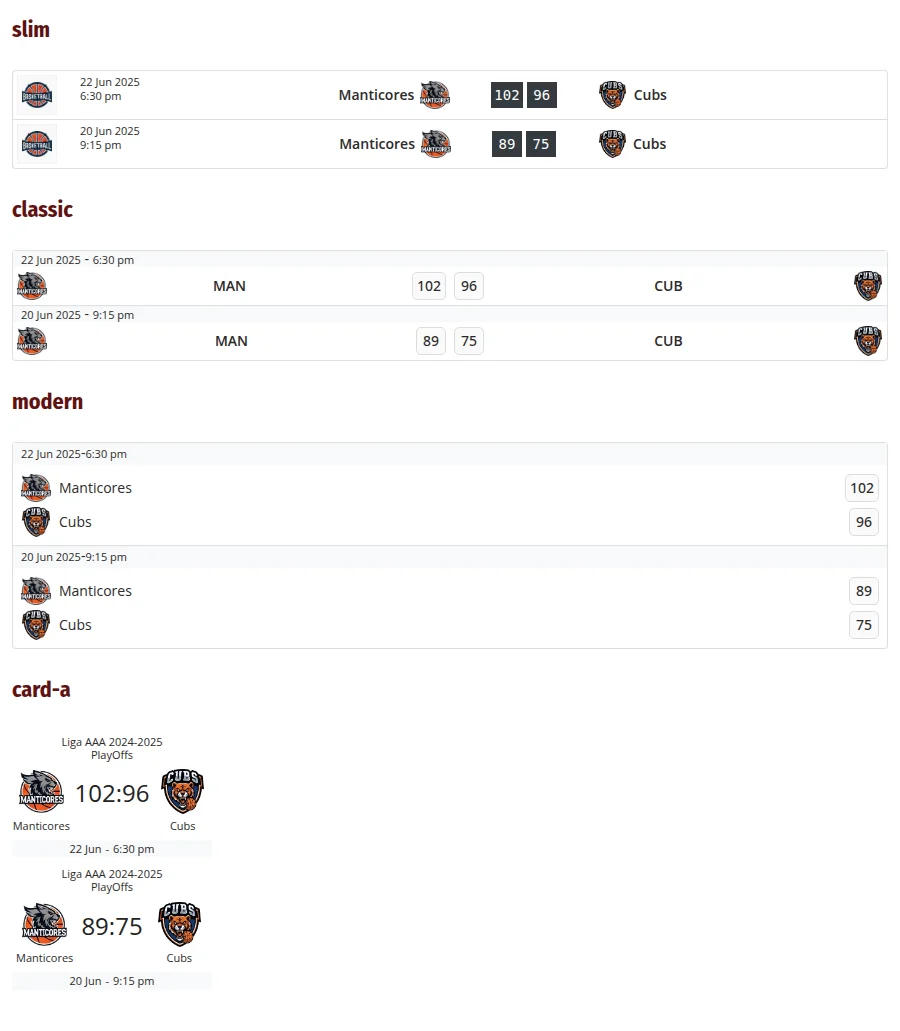
Premium: slim, classic and modern each come in two versions. Pick one in Appearance > Customize > Sports Leagues > Layouts with Game >> List Item, Game >> List Item – Classic and Game >> List Item – Modern. “Recommended” is the default. The Recommended slim design doesn’t have the outcome_id win / draw / loss badge, so switch Game >> List Item to Default if you need it.
Using It in the Layout Builder (Premium)
In a Shortcode block of a Layout Builder layout, dynamic variables fill in the IDs for you. On a Tournament layout, for example, %stage_n2% becomes the ID of the tournament’s second stage:
[sl-games tournament_id="%tournament_id%" stage_id="%stage_n2%" finished="1" sort_by_date="desc" limit="10"]Keep tournament_id next to a stage number
If a tournament has fewer stages than the number you used, %stage_n2% becomes empty. An empty stage_id doesn’t filter anything, so without tournament_id="%tournament_id%" the list shows games from your whole site.
🆘 Common Problems
Nothing shows up
- An empty list prints nothing at all – no “no games” message. Loosen one filter at a time to find the one that excludes everything.
group_by="tournament"isn’t supported: the list shows no games at all. Use one of the five values in the table.priorityonly matches games that have a Game Priority set (Premium). Games without one never match.
“Finished” shows upcoming games (or the other way round)
Use finished="1" and finished="0". Words don’t work: finished="yes" and finished="no" are both read as 0, so both show games that aren’t finished.
The list shows far too many games
- A shortcode with no
limitshows every matching game. The builder starts the limit at 10, but a hand-typed shortcode has none. - A date in the wrong format is ignored, not rejected.
date_from="04/10/2025"drops the date filter, so you get every game. Write dates as2025-10-04. group_idandround_idare numbered inside each stage (1, 2, …), sogroup_id="1"on its own matches group 1 of every stage on your site. Addstage_id.
The order looks random
Add sort_by_date="asc" or sort_by_date="desc", in lowercase. ASC in capitals isn’t recognised and leaves the list unsorted. With sort_by_game_day="desc", games inside the same game day aren’t in date order – use asc if that matters.
Games loaded with Load More look different
The extra games always use the slim layout with logos and dates shown, whatever you set for game_layout, the logo and date options or outcome_id. If that matters, raise limit instead of using Load More. Load More also doesn’t appear when limit is empty or 0, or when you use include_ids.
Day and month headings are in English
The day and month headings use a fixed format (“29 Mar 2025”, “Mar 2025”) with English month names, whatever your site language or date settings. The dates on the game rows are translated and use the plugin’s game date format setting.
The dynamic days filter switches at the wrong hour
days_offset and days_offset_to count “today” from your database server’s clock, which can be in a different time zone than your site. If the list changes over a few hours before or after midnight, that’s why.
📚 Related
- Shortcode Builder: build and preview the shortcode without typing it
- Standing shortcode: the table next to your fixtures, plus where to find each ID
- Games: how games are created and set up
- Games Head to Head shortcode (Premium): only the games between two teams
- Games Scoreboard shortcode (Premium): the same games as a slider