

Text Overrides let you customize every frontend label and abbreviation displayed by the plugin. Game statuses, column headers, stat abbreviations, section titles, button text — any string shown to visitors can be replaced with your own text.
Overview
Go to Settings & Tools > Translations to open the Translations page. The first tab, Text Strings, is where you manage text overrides.
The Translations page has 6 tabs. This page covers the first tab (Text Strings). The remaining 5 tabs — Categories, Leagues, Teams, Players, and Managers — are covered in Entity Translations.
How It Works
The plugin ships with approximately 140 default text strings. Each string has three parts:
| Part | Description |
|---|---|
| Default | The built-in English text (e.g., “Final”) |
| Custom Value | Your override — leave blank to use the default |
| Context | A hint explaining where the string appears on the frontend |
When you enter a custom value for a string, it replaces the default everywhere on the frontend. Leave a field blank to keep the default.
Changes take effect immediately after saving. If you use a caching plugin, you may need to flush the page cache to see updates.
✏️ Finding and Editing Strings
- Go to Settings & Tools > Translations
- The Text Strings tab is selected by default
- Use the Search box to filter by default text, context, or key name
- Type your custom text in the Custom Value column
- Click Save
Unsaved changes are highlighted with an orange left border. The unsaved count is shown next to the Save button.
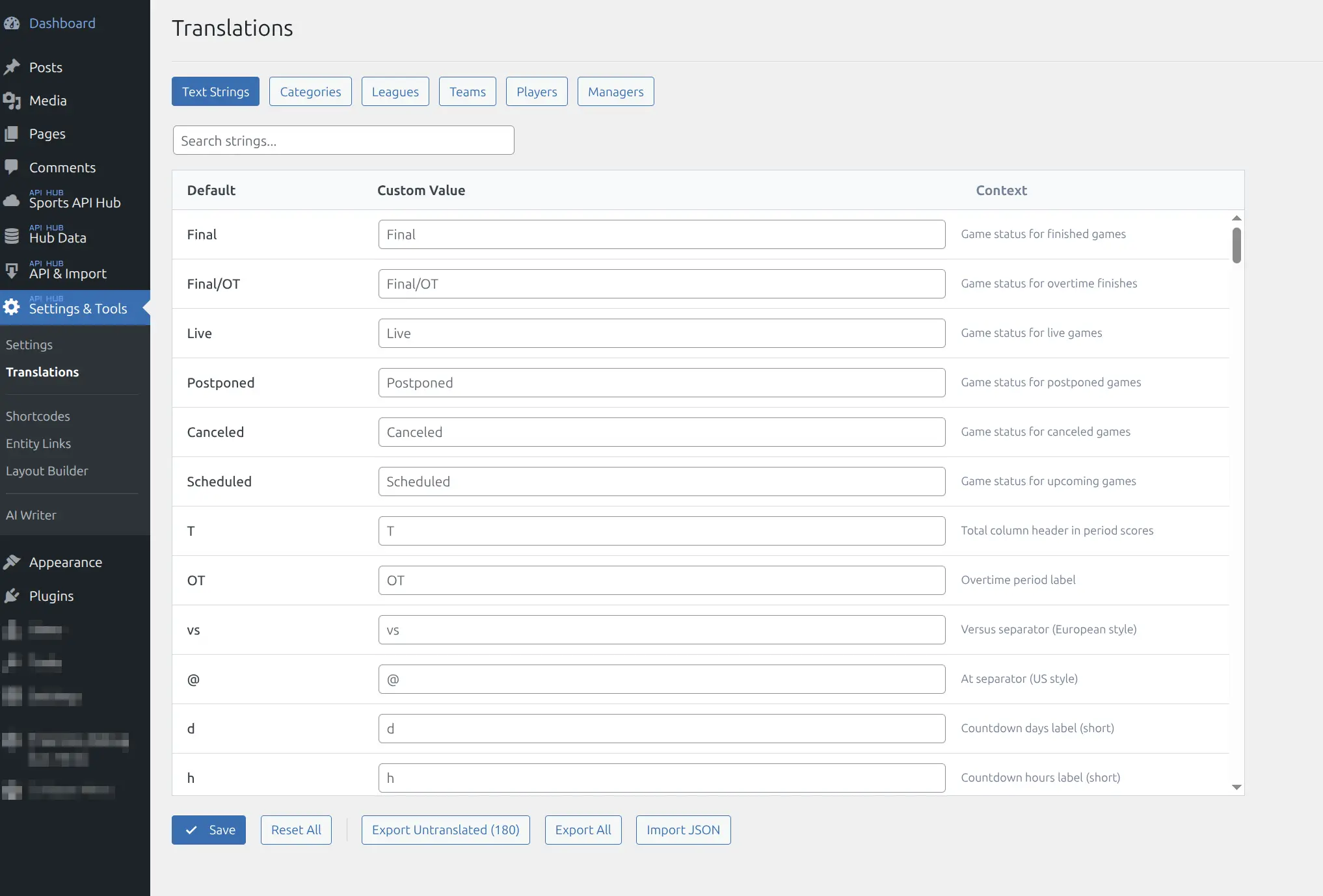
📋 Available Strings
Strings are organized into the following groups. Each table shows the default text and where it appears on the frontend.
Game Status
Status labels shown on game cards, game pages, and calendar views.
| Default | Context |
|---|---|
| Final | Finished games |
| Final/OT | Overtime finishes |
| Live | Live games |
| Postponed | Postponed games |
| Canceled | Canceled games |
| Scheduled | Upcoming games |
Game Display
Labels used in period scores, game headers, and countdown timers.
| Default | Context |
|---|---|
| T | Total column header in period scores |
| OT | Overtime period label |
| vs | Versus separator (European style) |
| @ | At separator (US style) |
| d, h, m, s | Countdown labels (days, hours, minutes, seconds) |
| Venue | Venue label on game page |
| Referee | Referee label on game page |
| Date | Date label on game page |
Team and Player Labels
Labels displayed on team pages, player pages, and entity headers.
| Default | Context |
|---|---|
| Country | Country label on team/player pages |
| Venue | Venue label on team page |
| Roster | Roster tab on team page |
| Matches | Matches tab on team page |
| Statistics | Statistics tab on team page |
| Team | Team label on player page |
| Position | Position label on player page |
| Age, Height, Weight | Player attribute labels |
| Last Win, Last Loss | Date labels in player header |
| Last 10 | Recent form label in player header |
| GP | Games Played label in stat rings |
Player Stage Filter
The Regular Season / Playoffs buttons on player stats blocks. See Player Pages.
| Default | Context |
|---|---|
| Stage | Label above the buttons (also read by screen readers) |
| All | Button: every game in the season |
| Regular Season | Button: regular season games |
| Playoffs | Button: postseason games |
| Other | Button for games tagged neither regular season nor playoffs — rename to “Play-In” for the NBA |
| Not split by stage – all games included. | Career / Advanced Stats footnote for seasons the provider left untagged |
Player Splits and Advanced
| Default | Context |
|---|---|
| Home/Away, Monthly, Wins/Losses | Split type pill labels |
| Wins, Losses | Split row labels |
| Advanced | Advanced stats pill label |
| Per 36 Min | Per 36 minutes pill label |
Standings
Column headers, pill labels, and zone legend text used in standings tables.
| Default | Context |
|---|---|
| Team, GP, W, L, D, Pts, PCT | Core standings column headers |
| GB, STRK, PF, PA, DIFF | Extended standings columns |
| HOME, AWAY | Home/away record columns |
| PPG, OPP PPG | Points per game columns (basketball) |
| OTL, NR, NRR, SW, SL | Sport-specific columns (ice hockey, cricket, volleyball) |
| Total, Home, Away | Standings view pills |
| League, Division, Conference | Standings group pills |
| Playoffs, Play-In, Relegation | Zone legend labels |
Basketball Box Scores
Column headers in basketball box score tables.
| Default | Context |
|---|---|
| Player, Pos | Player name and position columns |
| MIN, PTS, FG, 3PT, FT | Minutes, points, field goals, three-pointers, free throws |
| REB, AST, STL, BLK | Rebounds, assists, steals, blocks |
| TO, PF, +/- | Turnovers, personal fouls, plus-minus |
Baseball Batting
Column headers in baseball batting box score tables.
| Default | Context |
|---|---|
| Hitters | Player name column |
| AB, R, H, RBI, HR | At bats, runs, hits, RBI, home runs |
| BB, SO, LOB | Walks, strikeouts, left on base |
Baseball Pitching
Column headers in baseball pitching box score tables.
| Default | Context |
|---|---|
| Pitchers | Player name column |
| IP, H, R, ER | Innings pitched, hits, runs, earned runs |
| BB, K, HR, PC-ST | Walks, strikeouts, home runs, pitches-strikes |
Play-by-Play
Event badges and labels in the play-by-play timeline. Includes sport-specific badges for basketball, baseball, ice hockey, rugby, and American football.
| Default | Context |
|---|---|
| Play-by-Play | Block header |
| Halftime | Halftime period label |
| 3PT, 2PT, FT | Basketball scoring badges |
| TD, FG, XP, 2PC | American football scoring badges |
| Goal, PP Goal, Penalty | Ice hockey event badges |
| Try, Conv, Yellow Card, Red Card, Sub | Rugby event badges |
| HR, 3B, 2B, RBI, E | Baseball hit/event badges |
| Top, Bot | Baseball half-inning prefixes |
Charts and Section Labels
Headers and toggle labels for charts and team aggregate stats blocks.
| Default | Context |
|---|---|
| Game Flow | Game flow chart header |
| Score Lines, Lead Tracker | Chart toggle labels |
| Scoring, Rebounding, Playmaking | Team stats group titles |
| Discipline, Opponent, Defense | Team stats/rankings group titles |
| Win-loss trend: each win +1, each loss -1 | Form chart subtitle |
| All | Form chart cross-season pill |
Calendar and Scoreboard
Labels for the calendar shortcode and season scoreboard.
| Default | Context |
|---|---|
| Today | Jump-to-today link (calendar and scoreboard) |
| No games scheduled | Empty state text (calendar and scoreboard) |
| All, Live, Finished, Upcoming | Status filter pills (calendar and scoreboard) |
Bracket
Labels for the playoff bracket visualization.
| Default | Context |
|---|---|
| Wins series %s | Finished series result (e.g., “Wins series 4-1”) |
| Leads %s | In-progress series (e.g., “Leads 3-1”) |
| Series tied %s | Tied series (e.g., “Series tied 2-2”) |
| BYE | BYE slot label |
| Champion | Champion label below the final |
| 3rd Place | Consolation match section label |
| TBD | Team not yet determined |
| Final | Finished single game result |
Odds
Market labels and format switcher text in the odds block.
| Default | Context |
|---|---|
| Spread, Moneyline, Total | Core market labels |
| Run Line, Puck Line | Sport-specific spread labels |
| O, U | Over/under abbreviations |
| 1st Half, 1st Qtr | Period market labels |
| Dec, US, Frac | Format switcher labels (decimal, American, fractional) |
| Odds | Section header |
Highlights
| Default | Context |
|---|---|
| Highlights | Section header |
| Load More | Load more button |
| No highlights available | Empty state message |
| All | All leagues filter pill |
General UI
| Default | Context |
|---|---|
| Season | Season label in filters and headers |
| League | League label in filters and headers |
| Games | Games count label in aggregate stats |
| Load More | Load more button on game lists |
| More leagues, Less | Season pills toggle for secondary leagues |
| Other Seasons | Season header navigation dropdown label |
📦 Export and Import
For bulk editing — especially translation workflows — you can export and import strings as JSON files.
Exporting
- Export Untranslated — downloads only strings that have no custom value yet
- Export All — downloads all strings with their current values
The exported JSON file includes the default text, context hint, and your current translation for each string. This is useful for handing off to a translator or an AI translation service.
Importing
- Click Import JSON
- Select a previously exported JSON file
- The imported values appear as unsaved changes (orange highlight)
- Review the imported text, then click Save to apply
The import validates the file format and only applies values for known string keys. Unknown keys are silently ignored.
AI Translation Workflow
You can use any AI translation tool (ChatGPT, DeepL, Claude, etc.) to translate all strings at once:
- Click Export Untranslated to download a JSON file
- Send the file to your preferred translation tool with instructions like: “Translate the translation field of each string to Spanish. Keep the JSON structure intact.”
- Save the translated file
- Click Import JSON to load the translations
- Review and click Save
Tip
Include the context hints in your translation instructions so the AI understands where each string appears. The exported JSON includes these hints automatically.
Resetting Overrides
Click Reset All to clear all custom values and revert to the built-in defaults. This action saves immediately — there is no undo.
Warning
Consider exporting your translations before resetting. Use Export All to create a backup that you can re-import later.
Common Use Cases
| Goal | What to Change |
|---|---|
| Show “FT” instead of “Final” | Override Final with FT |
| Translate all labels to another language | Export, translate with AI, import |
| Use “Matches” instead of “Games” | Override Games with Matches |
| Change “Load More” button text | Override Load More with your preferred text |
| Customize stat abbreviations | Override individual column headers (e.g., change TO to Turnovers) |
| Change bracket labels | Override Champion, BYE, or series text |
Related
- Entity Translations — translate team, player, and league names
- Plugin Settings — display and caching settings