

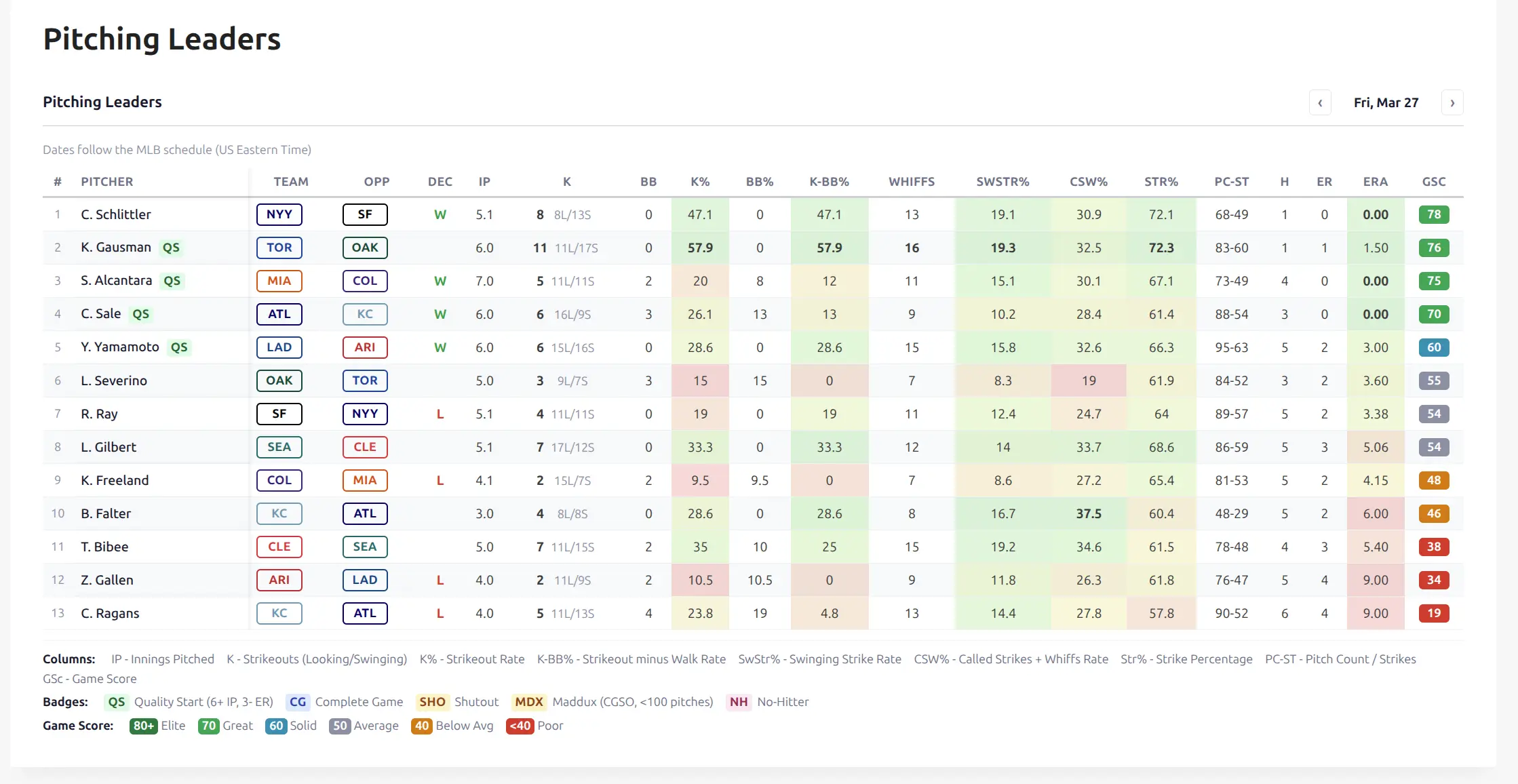
The [anwphub-pitching-leaders] shortcode displays a daily table of MLB starting pitcher performances. It updates automatically from imported box score data – no manual work needed.
⚾ Baseball only. This shortcode uses pitching stats populated during the normal finished game import.
Basic Usage
Add the shortcode to any page or post:
[anwphub-pitching-leaders]This shows yesterday’s pitching leaders sorted by Game Score, with a minimum of 3.0 IP (filters out most relievers).
You can also build the shortcode visually at Settings & Tools > Shortcodes > Pitching Leaders with a live preview.
⚙️ Attributes
| Attribute | Default | Description |
|---|---|---|
sort_by | gsc | Sort order: gsc (Game Score), k (strikeouts), k_bb_pct (K-BB%), era, whiffs |
min_ip | 3 | Minimum innings pitched. 0 = all pitchers, 3 = starters, 5 = quality start candidates |
limit | 30 | Maximum rows to display |
team_display | (text) | Team column display: empty = text codes (NYY), badge-outlined, badge-filled, logo |
show_legend | 1 | Show column/badge legend below table. 1 = yes, 0 = no |
date | (empty) | Fixed date (YYYY-MM-DD). When empty, defaults to yesterday in the visitor’s browser timezone |
season_id | (empty) | Filter to specific season (API season ID) |
league_id | (empty) | Filter to specific league (API league ID) |
class | (empty) | Extra CSS class on the wrapper |
Examples
Sorted by strikeouts with outlined team badges:
[anwphub-pitching-leaders sort_by="k" team_display="badge-outlined"]Quality start candidates only (5+ IP), sorted by ERA:
[anwphub-pitching-leaders sort_by="era" min_ip="5"]All pitchers including relievers, sorted by whiffs:
[anwphub-pitching-leaders sort_by="whiffs" min_ip="0"]Fixed date, no legend:
[anwphub-pitching-leaders date="2026-03-26" show_legend="0"]📊 Columns
The table always shows these columns:
| Column | Description |
|---|---|
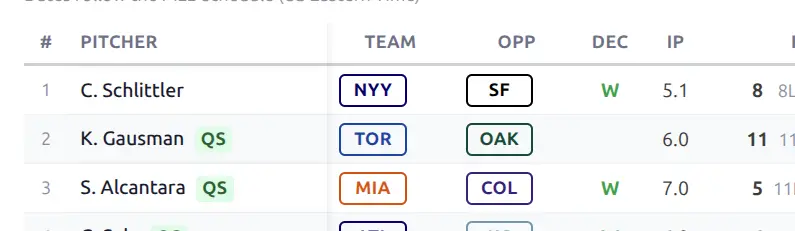
| # | Rank (by sort order) |
| Pitcher | Player name (linked to player page) + milestone badges |
| Team | Pitcher’s team |
| Opp | Opponent team |
| DEC | Decision – W (win), L (loss), or blank (no decision) |
| IP | Innings pitched (e.g., 6.1 = 6 and 1/3 innings) |
| K | Strikeouts with Looking/Swinging split (e.g., 8 3L/5S) |
| BB | Walks |
| K% | Strikeout rate (K / batters faced) |
| BB% | Walk rate (BB / batters faced) |
| K-BB% | Strikeout minus walk rate – key pitching quality metric |
| Str% | Strike percentage (strikes / pitches thrown) |
| PC-ST | Pitch count and strikes (e.g., 95-63) |
| H | Hits allowed |
| ER | Earned runs |
| ERA | Earned run average for this game |
| GSc | Game Score – single-number game quality metric |
Conditional columns (pitch-by-pitch data)
When Pitch-by-Pitch Data is enabled in API Config, three extra columns appear:
| Column | Description |
|---|---|
| Whiffs | Swinging strikes (swing and miss) |
| SwStr% | Swinging strike rate (whiffs / pitches) |
| CSW% | Called strikes + whiffs rate |
These columns show - for games without pitch data (non-MLB or imported before the setting was enabled).
Game Score
Game Score is a single number that measures overall pitching performance. Formula:
40 + 2 × Outs + K - 2 × BB - 2 × H - 3 × ER - 6 × HR| Score | Tier | Badge Color |
|---|---|---|
| 80+ | Elite | Dark green |
| 70-79 | Great | Green |
| 60-69 | Solid | Teal |
| 50-59 | Average | Gray |
| 40-49 | Below Avg | Orange |
| Below 40 | Poor | Red |
The default sort order (Game Score descending) puts the best overall performances at the top.
Milestone Badges
Small colored pills appear next to the pitcher’s name for notable achievements:
| Badge | Meaning | Criteria |
|---|---|---|
| QS | Quality Start | 6+ IP and 3 or fewer ER |
| CG | Complete Game | 9+ IP (27 outs) |
| SHO | Shutout | 9+ IP, 0 ER |
| MDX | Maddux | Complete game shutout in under 100 pitches |
| NH | No-Hitter | 9+ IP, 0 hits |
🔬 Pitch-by-Pitch Data (Optional)
The Whiffs, SwStr%, and CSW% columns require extra API data that’s not part of the standard import.
How to enable
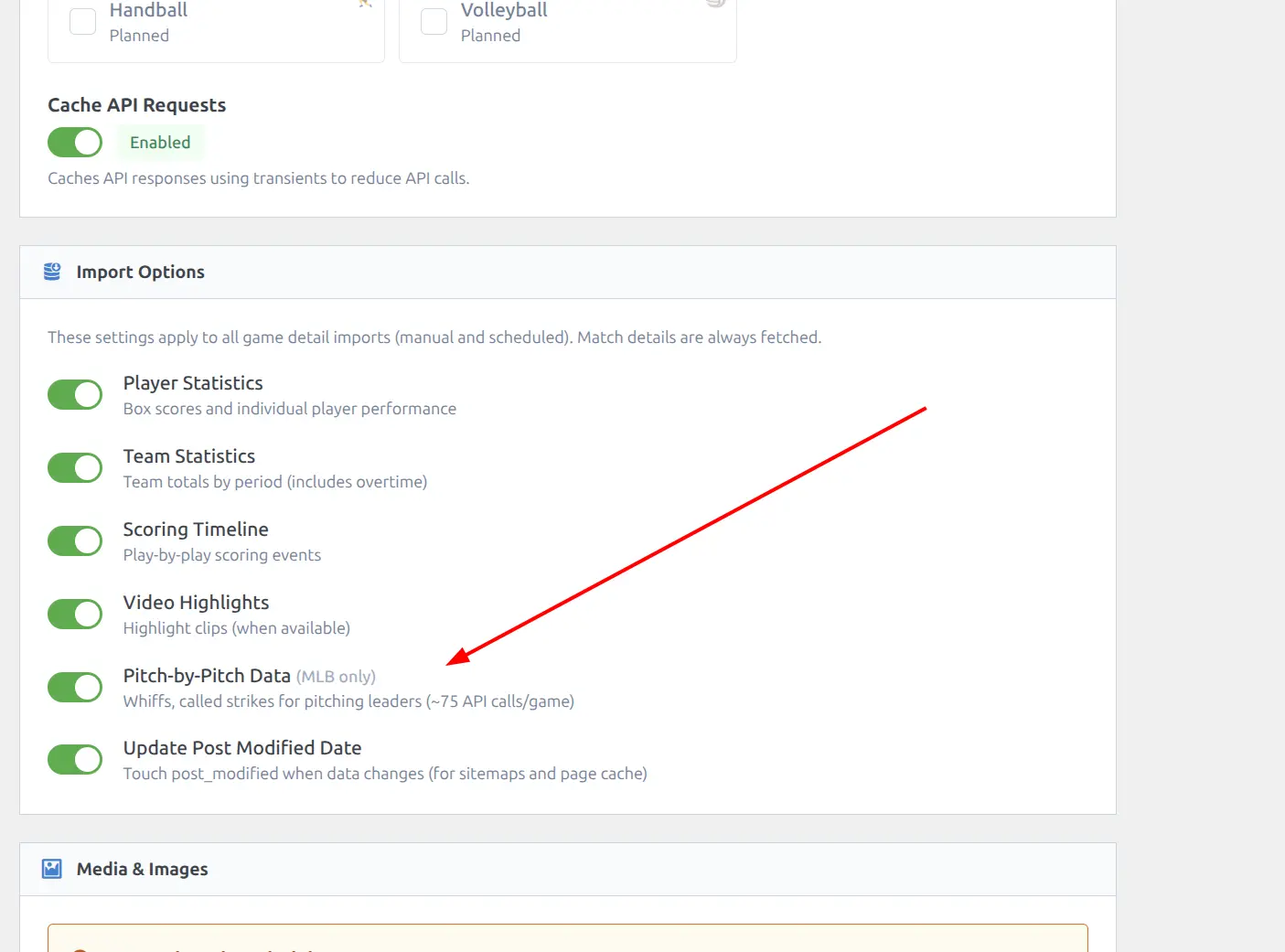
- Go to API & Import > API Config
- In Import Options, turn on Pitch-by-Pitch Data (MLB only)
- Save
How it works
Pitch data is not fetched during the regular game import. It runs as a separate background process:
- Finished games are imported normally (box scores, team stats, incidents)
- After the import batch completes, a background chain starts automatically
- The chain processes one game at a time (with a 30-second gap between games)
- For each game, it fetches play-by-play data, then individual pitch outcomes for each at-bat
- Whiffs and called strikes are counted per pitcher and stored
This means there’s a short delay (a few minutes) between importing a game and seeing the advanced columns. The data appears automatically – no extra action needed.
Server requirements
Each game requires 70-90 API calls (one per at-bat), fetched in parallel. A single game typically takes 30-50 seconds to process.
Important
Your server’s PHP max_execution_time must be at least 60 seconds (120 seconds recommended). The default 30 seconds on many hosts will cause the pitch data process to time out silently. Check with your hosting provider or add this to wp-config.php:
@ini_set( 'max_execution_time', 120 );API cost
About 75 API calls per game (one per at-bat). With a full MLB schedule of 15 games per day, that’s ~1,125 extra calls daily. This is well within the Pro plan limits but adds up – enable only if you want the whiff metrics. See API Usage for more on rate limits.
MLB only
Pitch-by-pitch data is only available for MLB games. Other baseball leagues (KBO, NPB, LMB) don’t have this data in the API. The setting is ignored for non-MLB games.
Retroactive data
Games imported before enabling the setting won’t have pitch data. To add it, use Re-update Finished for the season on the Import page. The background chain will then fetch pitch data for re-updated games. Only games from the re-updated season are processed, not the entire league history.
Date Navigation
The shortcode defaults to yesterday’s date (based on the visitor’s browser timezone). Visitors can navigate with:
- Previous/Next arrows – browse one day at a time
- Yesterday button – appears when navigated away from yesterday, jumps back
Visited dates are cached in the browser for the current page session. Revisiting a date loads instantly.
Timezone Note
For visitors outside the Americas, a note appears: “Dates follow the MLB schedule (US Eastern Time).” Game dates correspond to the MLB schedule date, not the visitor’s local date.
Color Gradients
Several columns use background color gradients to help spot standout values at a glance:
- K% – green for high strikeout rates
- K-BB% – red (negative) through yellow to green (25%+)
- SwStr% – green for high swinging strike rates (12%+ is elite)
- CSW% – green for high combined strike rates (30%+ is elite)
- Str% – green for high strike percentages (65%+ is dominant)
- ERA – green (low) through yellow to red (high)
The best value in each numeric column is shown in bold.
Text Overrides
7 text strings can be customized in Settings & Tools > Translations:
| Key | Default | Context |
|---|---|---|
pitching_leaders__header | Pitching Leaders | Section title |
pitching_leaders__today | Today | Jump-to-today link |
pitching_leaders__yesterday | Yesterday | Jump-to-yesterday link |
pitching_leaders__pitcher | Pitcher | Column header |
pitching_leaders__team | Team | Column header |
pitching_leaders__opp | Opp | Column header |
pitching_leaders__no_data | No pitching data available | Empty state |
📚 Related
- All Shortcodes – overview of all 14 shortcodes
- API Config – import options including Pitch-by-Pitch Data
- Player Pages – individual pitcher profiles and game logs
- API Usage – rate limits and cost estimation