

Games are the central entity in the plugin. Each game belongs to a season and connects two teams with scores, statistics, and play-by-play data.
Admin Menu: Hub Data > Games
Game Data
Each game stores:
| Field | Description |
|---|---|
| Teams | Home and away teams (with logos, colors) |
| Scores | Final score + per-period breakdown |
| Date/Time | Kickoff timestamp (UTC, converted to visitor timezone) |
| Status | Current game state (fixture, live, finished) |
| Venue | Stadium or arena |
| Round | Matchday or round number |
| League & Season | Parent competition |
Period Scores
Period scores are stored dynamically — no fixed limit on the number of periods. Basketball games show 4 quarters (+ overtime), baseball shows 9+ innings, hockey shows 3 periods.
Baseball R/H/E: Baseball games include Runs, Hits, and Errors columns after the innings total. Unplayed innings display as a dash (-).
Display Order
The plugin automatically handles the team display order based on sport conventions:
| Convention | Sports | Display |
|---|---|---|
| Away @ Home | Basketball, Baseball, Ice Hockey, American Football | Away team listed first |
| Home vs Away | Cricket, Rugby, Handball, Volleyball | Home team listed first |
This is controlled automatically per league. Templates always use pre-resolved display order — you never need to think about home/away when customizing templates.
Game Statuses
Games progress through a lifecycle as data is imported:
| Status | Meaning |
|---|---|
| Fixture | Scheduled, not yet started |
| Live | Currently in progress |
| Finished | Game completed, basic scores available |
| Detailed | Full data imported (box scores, stats, timeline) |
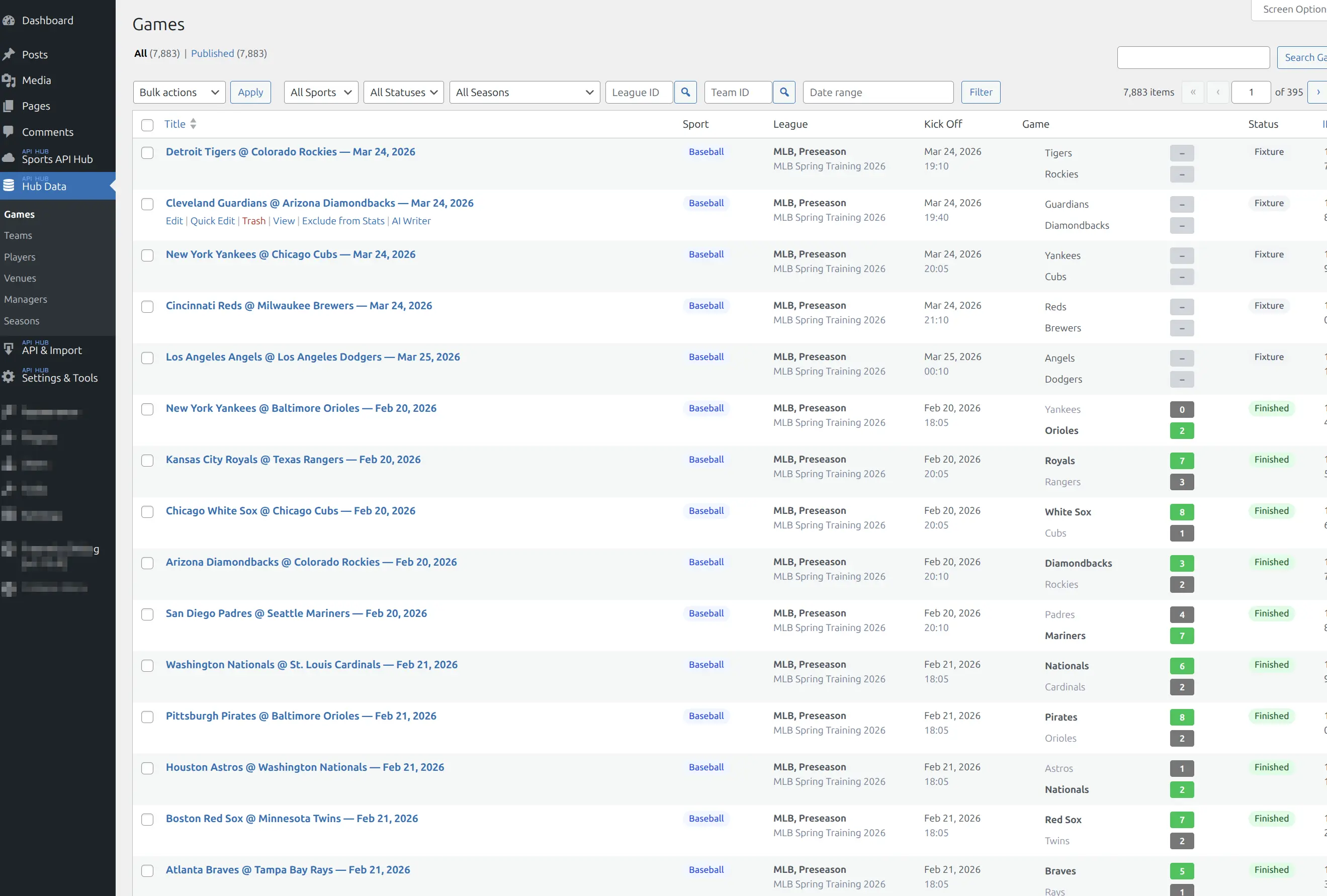
In the admin list, games show color-coded status badges. You can filter by status to find games needing attention.
See the Game Statuses Reference for the full lifecycle.
Game Peek (Hover Preview)
When game scores appear in other contexts — team results, calendar, standings — hovering over a score reveals a game peek popup with:
- Final score with period breakdown
- Team logos and names
- Game date and venue
- Link to full game page
On touch devices, a tap opens the peek instead of hover.
Game Cards
Games displayed in lists and grids use a compact game card format:
- Team logos/badges and names
- Scores (with period breakdown for 5 or fewer periods)
- Game status and date
- League name and round text
Focus team highlighting: When cards appear on a team page, the focus team’s score gets a colored circle — green for wins, red for losses.
W-L Records
Game headers display each team’s season record calculated from imported game data:
- Overall: e.g., 45-22
- Home/Away splits: e.g., 25-10 Home, 20-12 Away
Records update automatically as new games are imported.
🗂️ Admin List
The Games admin list (Hub Data > Games) provides sport and status filters, date range filter, league/season filter, score display with color-coded status badges, and a Re-update row action to re-fetch details for a single game.
📚 Related
- Game Pages — frontend display blocks (header, box scores, timeline, charts)
- Live Scores — real-time score updates
- Import Tasks — how game data is imported
- Game Statuses Reference — full status lifecycle