

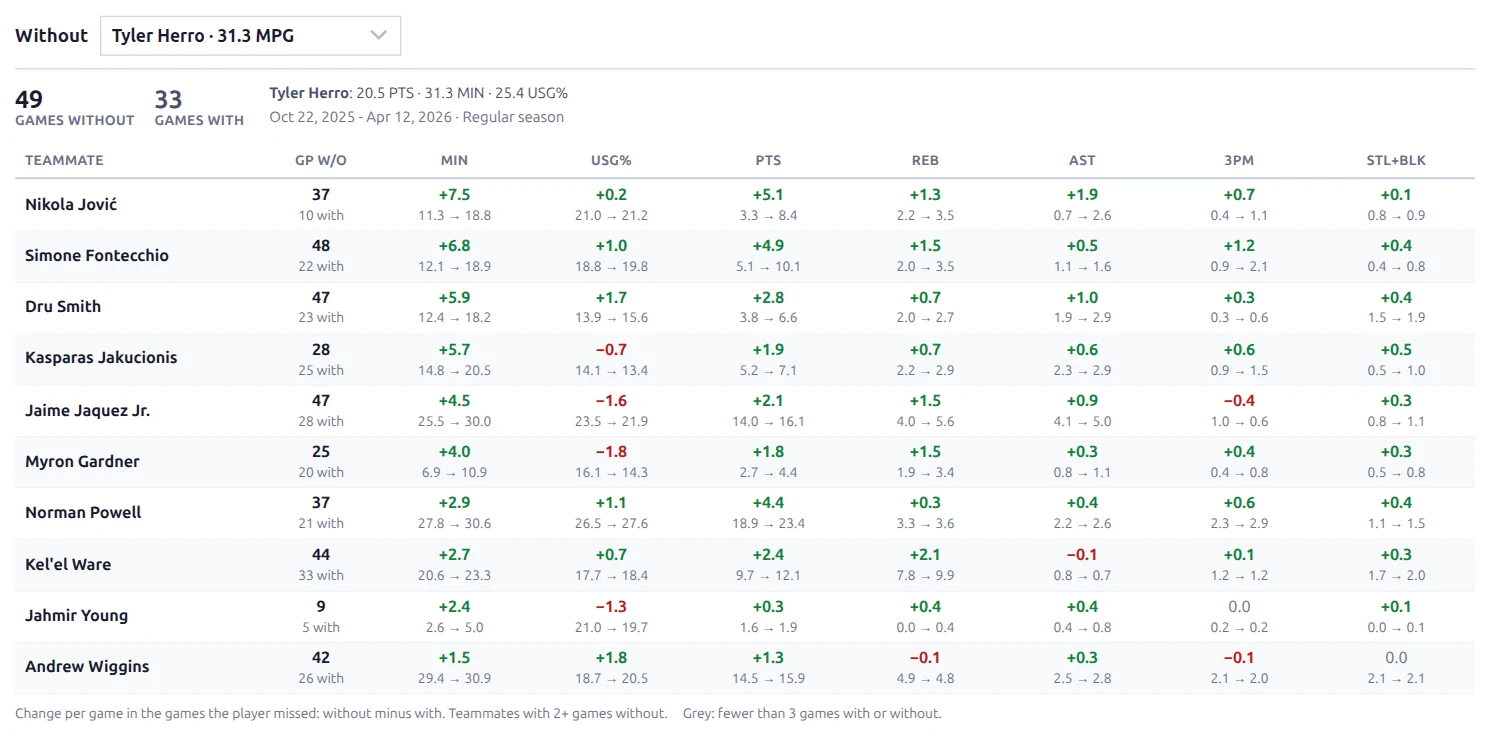
The [anwphub-with-without] shortcode answers “who steps up when the star sits?” Pick a player who missed games, and the table shows how each teammate’s minutes, usage and stats changed in those games.
🏀 Basketball only. It’s built from the box scores of finished games, which the normal game import already saves. It also comes as a team page block (see below).
🚀 Basic Usage
Add the shortcode with a season and a team:
[anwphub-with-without season_id="80229" team_id="3435"]Build it at Settings & Tools > Shortcodes > With / Without. The season, team and player pickers there fill in the IDs for you, and the preview shows the result.
Visitors pick a different player from the Without dropdown above the table. It lists everyone who played for the team that season, sorted by minutes per game (“Tyler Herro · 31.3 MPG”). While the season is running, players listed as injured in the last roster update are marked Injured. Players who were traded away stay in the list too.
Which Player Shows First
- The player you set with
player_id. - While the season is running: the injured player who plays the most minutes. Injury status comes in with the team rosters, so turn on Team Rosters sync and hit Update Rosters on the Import screen when big injury news breaks. From then on the table opens on the player your readers are asking about.
- Otherwise: the team’s minutes leader among its regulars.
Injury status is a snapshot from the last roster update, so the injured pick is skipped once the season is over. A page about last season doesn’t open on whoever is hurt now.
⚙️ Attributes
| Attribute | Default | Description |
|---|---|---|
season_id | (required) | Season ID |
team_id | (required) | Team ID |
player_id | (empty) | The absent player shown first. Empty = injured player, else the minutes leader |
min_games | 3 | Games the player must have missed before the table shows (1-50). Rows with fewer games than this on either side turn grey |
limit | 10 | Most teammates listed (1-30) |
class | (empty) | Extra CSS class on the wrapper |
📊 Reading the Table
The summary on top shows the number of Games without and Games with the player, the player’s own points, minutes and usage in the games they played, and the date range counted.
| Column | Description |
|---|---|
| Teammate | The teammate. Stays visible while the table scrolls sideways on phones |
| GP w/o | Games the teammate played without the absent player, with the “with” count below |
| MIN | Minutes per game |
| USG% | Usage rate: the share of team plays the player finished while on the court (shots, free throws, turnovers) |
| PTS / REB / AST | Points, rebounds and assists per game |
| 3PM | Three-pointers made per game |
| STL+BLK | Steals plus blocks per game |
Each stat cell shows the change on top (+7.5) and the two values below it (11.3 → 18.8, with → without). Green means up, red means down. Teammates are sorted by the change in minutes, then usage.
Small Samples Are Greyed Out
A teammate needs at least 2 games without the player to be listed. If a teammate has fewer than min_games games on either side, the row keeps its numbers but the changes turn grey. A +7.8 minutes jump over 2 games is a hint, not a trend. The legend under the table explains this to visitors.
Which Games Count
A “without” game is a game the team played while the player was on the team but not on the court. The plugin only counts a missed game when it has proof the player was on the team, so a mistake makes the sample smaller, never wrong.
- Regular season only, when the season has a playoff split. Playoff rotations are shorter and would skew the minutes.
- Traded or signed during the season: counting starts at the player’s first game for the team. The summary says “from the player’s first game with the team”.
- Out from opening day: counted from the team’s first game if they played for the team in an earlier season, weren’t with another team earlier this season, and return to play for the team this season.
- Season-ending injury: the games after their last appearance count when they’re still on the team’s roster, or when they played for the team later (playoffs, next season). Otherwise counting stops at their last game, and the summary says “to the player’s last game with the team”.
- Games without box scores are skipped for everyone.
Turn On Team Rosters Sync
The roster check above only trusts a recent roster. Enable the Team Rosters background sync task (every 3-7 days in season), so a star out for the season keeps collecting “without” games.
Examples
Miami without Tyler Herro:
[anwphub-with-without season_id="80229" team_id="3435" player_id="988789"]Top 6 teammates, only once the player has missed 5+ games:
[anwphub-with-without season_id="80229" team_id="3420" player_id="817081" min_games="5" limit="6"]Team Page Block
Basketball team pages can show the same table without a shortcode. Open the team layout in the Layout Builder and add the With / Without block from the Team group.
- It uses the team’s current season and the default player rules above.
- It stays hidden, header included, until the team has box scores in that season. The first days of a new season won’t show an empty box.
- It isn’t in the default team layout yet. Add it where it fits.
Text Overrides
Column headers, the summary labels, the legend and the empty-state messages can be changed in Settings & Tools > Translations. Search for with_without. MIN, PTS, REB and AST share the basketball stat labels used across the plugin.
🆘 Troubleshooting
| Message or problem | What it means |
|---|---|
| Nothing shows | The shortcode needs both season_id and team_id |
| “No player stats for this team this season” | No finished games with box scores yet. Run the finished games import, or wait for the first games |
| “Bam Adebayo missed 2 games. At least 3 are needed.” | Fewer missed games than min_games. Pick another player or lower min_games |
| “No games for this player with the team this season” | The player_id never played for this team in that season |
| A long injury shows few “without” games | The team’s roster is out of date, so counting stopped at the player’s last game. Turn on Team Rosters sync |
📚 Related
- Role Trends shortcode – whose role is growing or shrinking
- Schedule Grid shortcode – games per week, back-to-backs and rest
- Team Pages
- All shortcodes