

Player pages display biographical info, season statistics, and game-by-game performance. The page is built from blocks that you arrange using the Layout Builder. Each sport shows sport-specific stat columns — basketball and baseball are fully supported with dedicated stats tables.
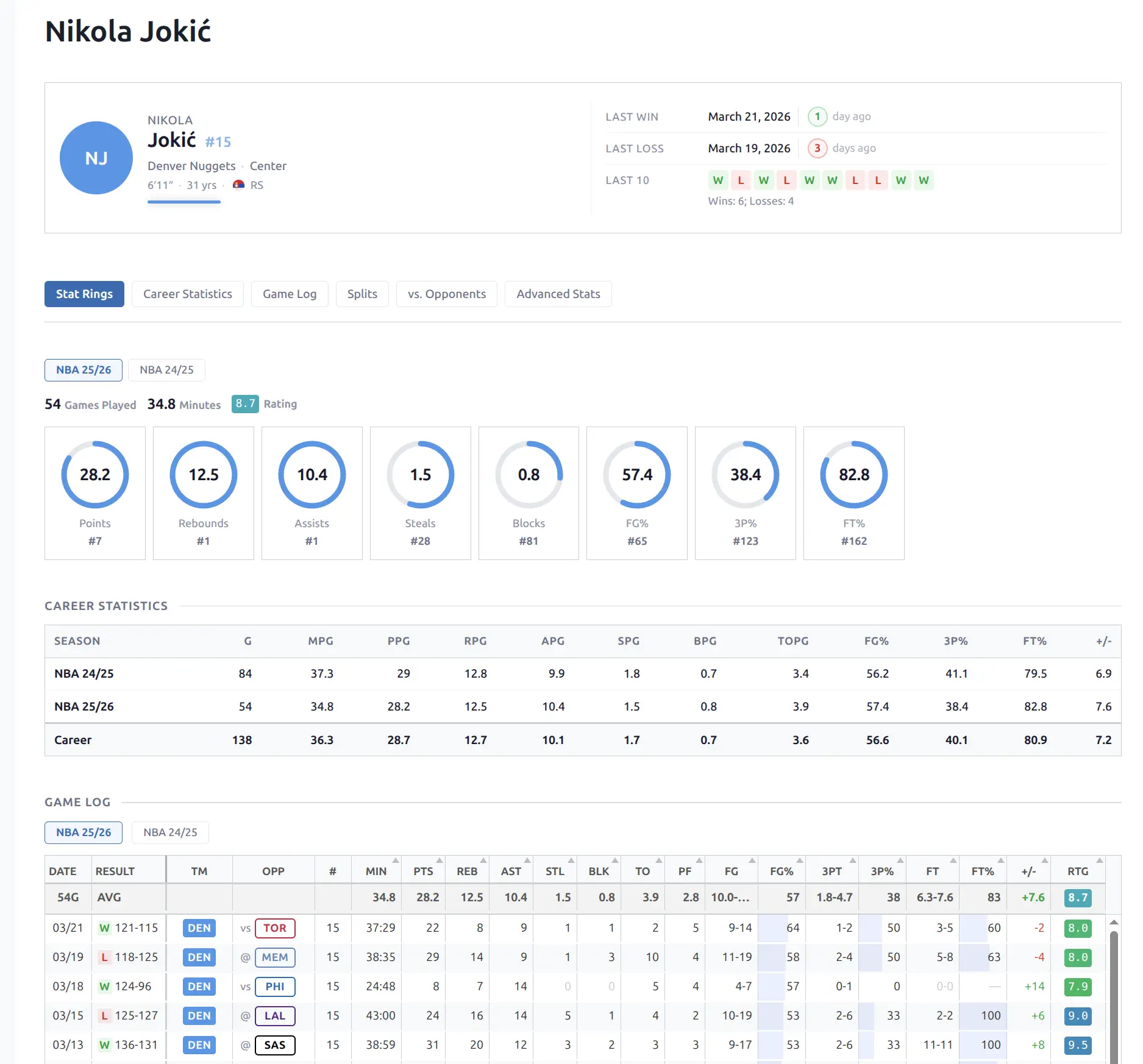
🏀 Available Blocks
| Block | Description |
|---|---|
| Header | Photo, name, team, highlight stats, last win/loss, recent form |
| Stat Rings | SVG ring charts with league rank badges and season switcher |
| Career Statistics | Season-by-season table with career totals |
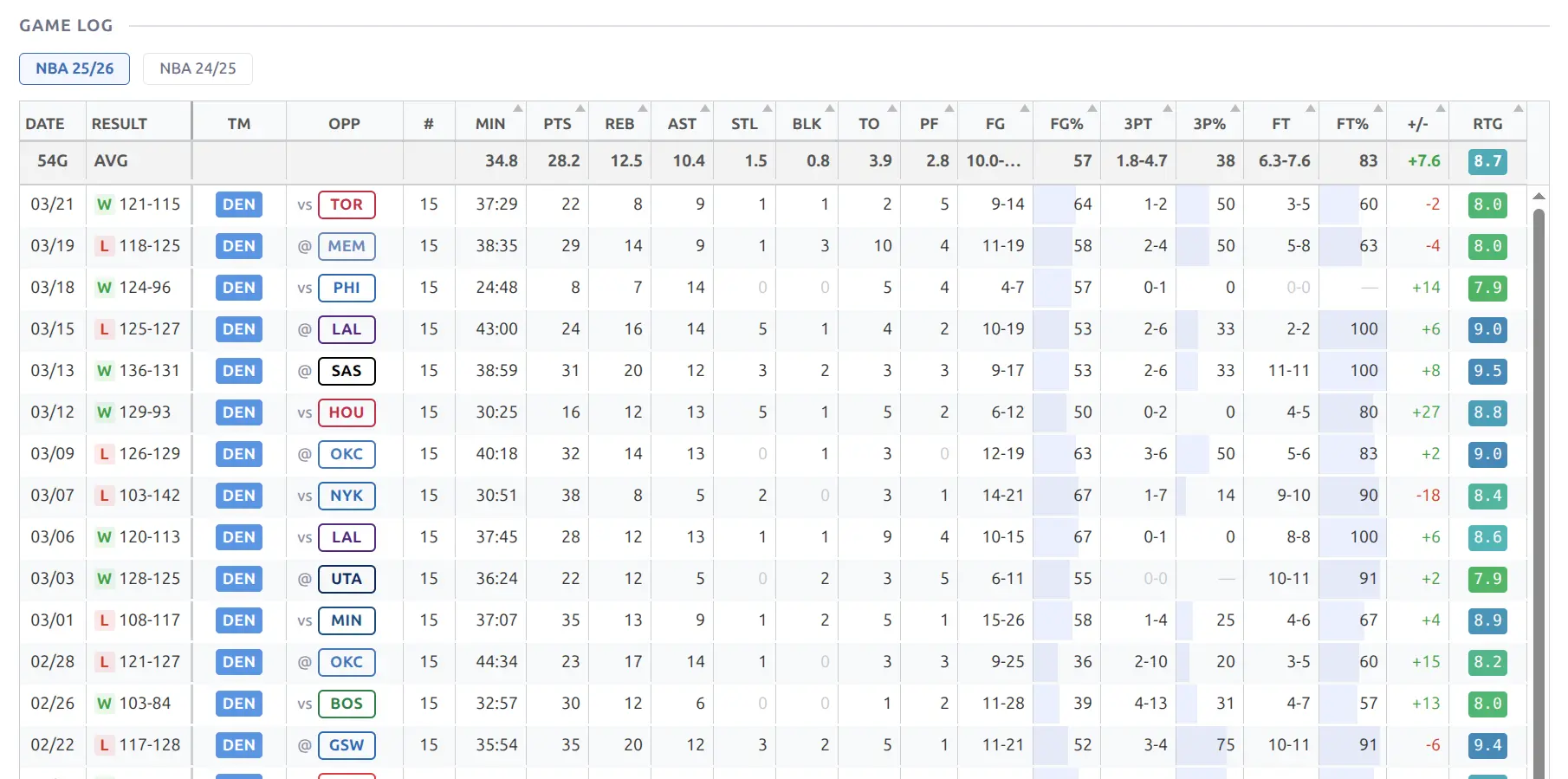
| Game Log | Per-game stat lines with season switcher, sortable columns |
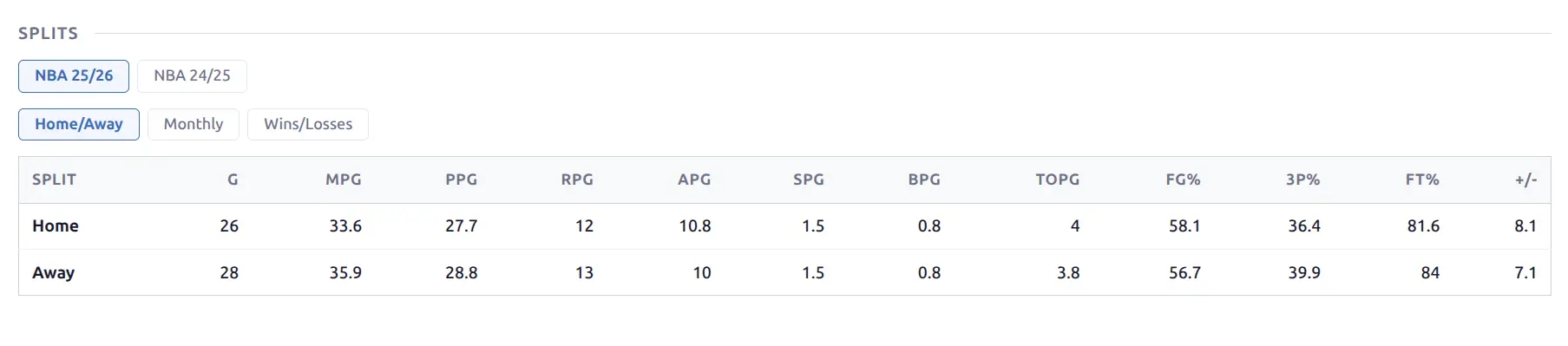
| Splits | Home/Away, Monthly, and Wins/Losses breakdowns |
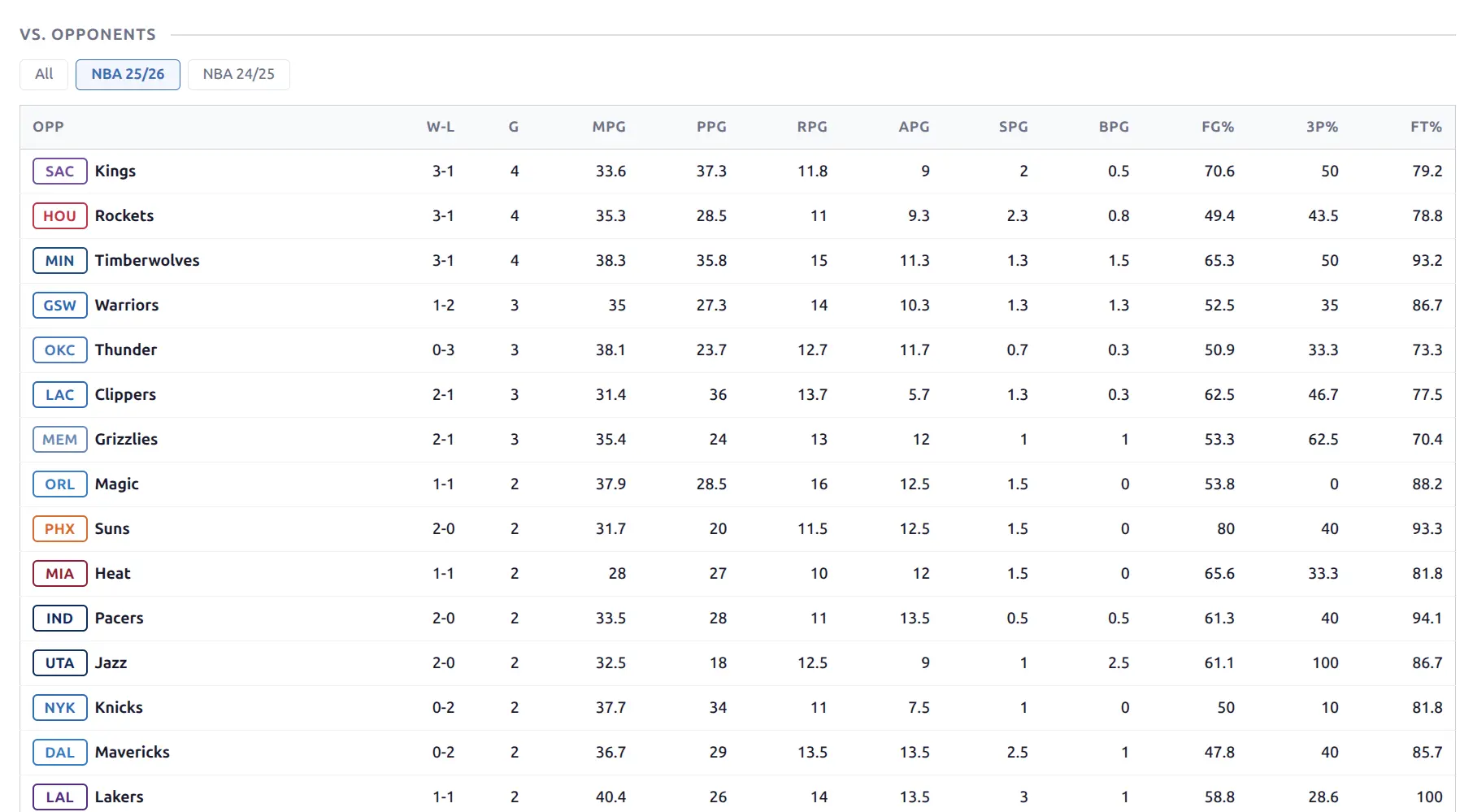
| vs. Opponents | Per-opponent averages with W-L record |
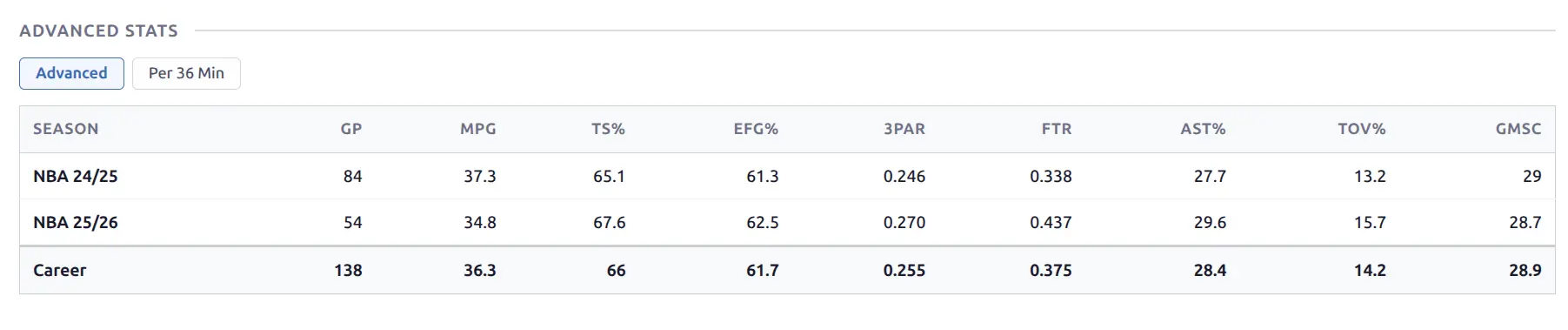
| Advanced Stats | Extended efficiency metrics (basketball only) |
| Info | Detailed metadata grid (height, age, country, contract) |
| Description | Custom content from the WordPress post editor |
Baseball-specific blocks: Season Batting and Season Pitching display current season averages in a stat cell grid format.
🏆 Regular Season / Playoffs Filter
Five blocks carry a stage control – a small STAGE label with All / Regular Season / Playoffs buttons, sitting at the right of the season pill row:
- Stat Rings
- Game Log
- vs. Opponents
- Career Statistics
- Advanced Stats
Blocks open on Regular Season by default, which is what NBA.com, ESPN and Basketball-Reference all report. Change the default under Settings & Tools > Settings > Display, or per block from its Default Stage option in the Layout Builder.
Each block keeps its own control, so a visitor can view Career Statistics for the playoffs while the Stat Rings above still show the regular season.
When the buttons appear
The control shows only when the season’s imported games are fully tagged with their stage and actually span more than one stage. In practice:
| Situation | What you see |
|---|---|
| League tags every game and the postseason has started (NBA, NFL, Euroleague) | Buttons appear |
| Season is still in its regular season | No buttons yet – they appear on their own once the first postseason game is imported |
| Provider doesn’t tag this league’s games | No buttons, all games shown, exactly as before |
A third button labelled Other appears for leagues that report games outside the usual two stages – NBA play-in games, for instance. Rename it to something meaningful for your league (Play-In) under Settings & Tools > Translations. Every stage label is editable there.
Selecting a stage a player has no games in (a player whose team missed the playoffs) shows an empty result with the buttons still in place, so the visitor can switch back.
Career tables and the asterisk
Career Statistics and Advanced Stats span many seasons, and the stage filter applies to every row plus the career total. Some of those seasons may not be tagged by the provider – an MLB career crossing 2025 into 2026 is the common case.
An untagged season keeps all its games in every view rather than disappearing from the table, and is marked with an asterisk plus a footnote reading “Not split by stage – all games included.” The mark appears only where it matters: a season holding nothing but regular-season games reads identically either way, so it stays unmarked under Regular Season.
Why blocks can disagree
Career Statistics looks at every season a player has played, while Stat Rings and Game Log look at one. So a player can show the stage buttons on his career table and none on his rings — that happens when the season currently selected isn’t tagged, and it’s working as intended.

Player Header
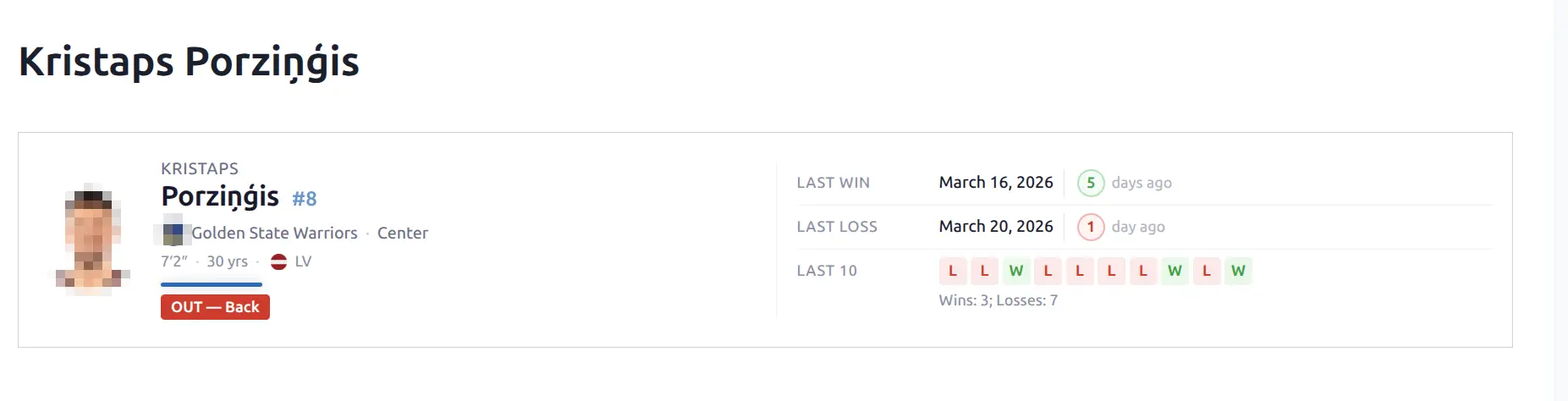
A compact two-column layout with a team color accent bar below the player name.
Left side: Player photo (or team-colored circle with initials), first name and last name, jersey number badge, team logo and name (linked to team page), position, height, age, and country flag. An injury badge appears when applicable (e.g., “OUT — Back”).
Right side: Last Win and Last Loss dates with “days ago” counter, and a Last 10 row showing colored W/L badges with a win/loss summary.
Stat Rings
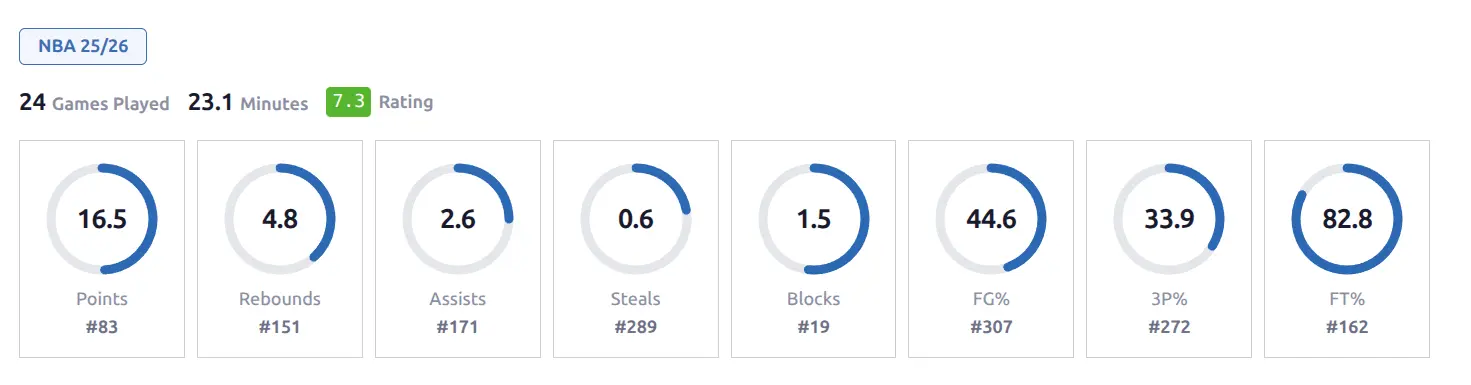
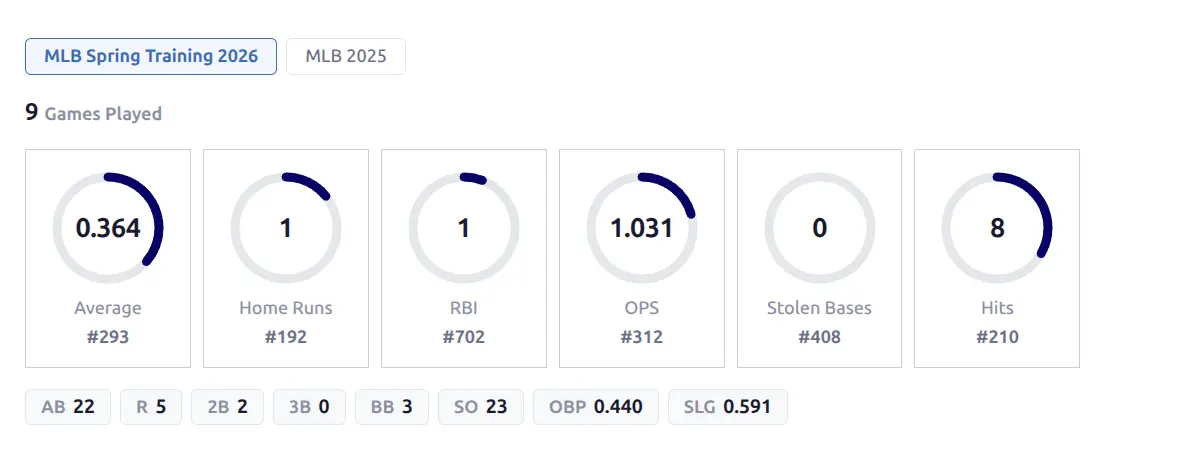
A visual season overview using SVG ring charts. Each ring fills proportionally based on the stat value relative to the league maximum.
Above the rings, a header line shows Games Played, Minutes per Game, and a color-coded Rating badge. Each ring displays the per-game average value in the center, the full stat name below, and a league rank badge (e.g., “#7”).
Season pills above the rings let you switch between seasons — data loads without page reload.
- Basketball (8 rings): Points, Rebounds, Assists, Steals, Blocks, FG%, 3P%, FT%
- Baseball batting (6 rings): Average, Home Runs, RBI, OPS, Stolen Bases, Hits — plus a row of compact stat chips below (AB, R, 2B, 3B, BB, SO, OBP, SLG) with hover tooltips
Career Statistics
A season-by-season statistical table with a career totals row at the bottom.
- Each row shows one season with the league name as a label
- Career totals row with bold styling at the bottom
- Sticky first column for horizontal scrolling on narrow screens
- Official and unofficial seasons displayed separately — exhibition and preseason leagues appear in a muted section below the main table
Basketball: G, MPG, PPG, RPG, APG, SPG, BPG, FG%, 3P%, FT%, +/-
Baseball: Separate batting and pitching sections when both are available. Batting columns: G, AB, R, H, 2B, 3B, HR, RBI, BB, SO, SB, AVG, OBP, SLG, OPS. Pitching columns: G, GS, W, L, SV, IP, H, R, ER, BB, SO, HR, ERA, WHIP.

Game Log
A sortable table showing every game’s stat line for the selected season.
- Season pills — switch between seasons without page reload
- AVG row at top — per-game averages for the season
- TOTAL row at bottom — season totals (where applicable)
- Opponent team with logo and @ (away) / vs (home) prefix
- Game result linked to the game page (hover shows a game peek card)
- Percentage columns (FG%, 3P%, FT%) with gradient fill backgrounds
- +/- values colored green (positive) or red (negative)
- Rating column with a color-coded badge
- Click any column header to sort
Splits
Compare performance across different contexts. The block combines three analysis categories with tab switching.
Season pills (outer row) select which season to view. Category tabs (inner row) switch between:
- Home / Away — side-by-side comparison of home and away performance
- Monthly — per-month breakdown (October, November, December, etc.)
- Wins / Losses — averages in games the team won vs. lost
All three tabs use the same stat columns as career statistics. Baseball shows separate batting and pitching tables per tab. All seasons are pre-rendered inline — switching is instant with no loading delay.
vs. Opponents
Per-opponent statistical breakdown showing how the player performs against each team.
- Opponent team with outlined code badge and full name
- W-L record against each team
- Games played count
- Full stat columns (same as career stats)
- Season pills — “All” shows combined multi-season data, individual pills filter to one season. “All {League}” aggregates across seasons within one league
- Data loads via REST API when switching seasons
Only official seasons are shown — exhibition and preseason leagues are excluded.
Advanced Stats
Basketball only. Extended efficiency metrics calculated from per-game data.
Two views available via tab pills:
- Advanced — TS%, eFG%, 3PAR, FTR, AST%, TOV%, GameScore
- Per 36 Min — all counting stats normalized to 36 minutes of play
Shows season-by-season rows with career totals, same table format as Career Statistics.
Player Info
A metadata grid showing all available player details:
| Field | Notes |
|---|---|
| Height | Imperial (US sports) or metric |
| Date of Birth | With calculated age |
| Country | With flag icon |
| Position | Full position name |
| Jersey Number | Current number |
| Status | Active / Injured / Other |
| Contract / Salary | When available from API |
| Team | With logo, linked to team page |
| League | Current league name |
| Injury Details | When applicable |
Description
Custom content from the WordPress post editor. Useful for adding scouting reports, player profiles, or editorial content not available from the API.
Edit from the player’s post in Hub Data > Players.
📚 Related
- Layout Builder — Arrange and customize blocks on player pages
- Game Pages — Box scores showing player stats
- Team Pages — Team rosters linking to players
- Shortcodes — Embed player-related content anywhere