

If you’re switching from Sports Leagues (SL) Premium to Sports API Hub, this guide walks you through the full migration – including how to preserve your search engine rankings with automatic 301 redirects.
The redirect plugin maps old SL URLs (like /team/miami-heat/) to new Hub URLs (like /basketball/team/miami-heat-38b6fbiha/) automatically. Most teams, players, games, and seasons are matched by their API IDs – no manual work needed. The whole process takes about 30 minutes plus import time.
Before You Start
You’ll need:
- Sports API Hub installed and activated with your API key configured
- Sports Leagues Premium data still in your database (the plugin can be active or deactivated – the data just needs to exist)
- A database backup before starting (standard precaution)
If your SL site used API import from api-sports.io, you’ll get the best results – the redirect plugin matches entities by their API IDs with ~95% accuracy. If you entered data manually, matching is name-based and slightly less accurate (~70-80% for players).
Step 1: Import Your Data into API Hub
Before generating redirects, import your league data into API Hub. The redirect plugin can only create redirects for entities that exist in Hub’s database.
Import every season you want to preserve redirects for. If your SL site had 10 NBA seasons but you only import the latest 2 into Hub, games and players from the other 8 seasons won’t have a redirect target.
For each season, run at least these import tasks:
- Hierarchy – sets up the league and season structure
- Fixtures – imports all games (schedules)
- Teams – imports team data and logos
- Finished Details – imports game results and player stats
See the Import Workflow guide for detailed instructions.
Step 2: Install the Redirect Plugin
- Download the SL to Hub Redirects plugin ZIP file (contact support if you don’t have it)
- Go to Plugins > Add New > Upload Plugin and upload the ZIP
- Activate the plugin
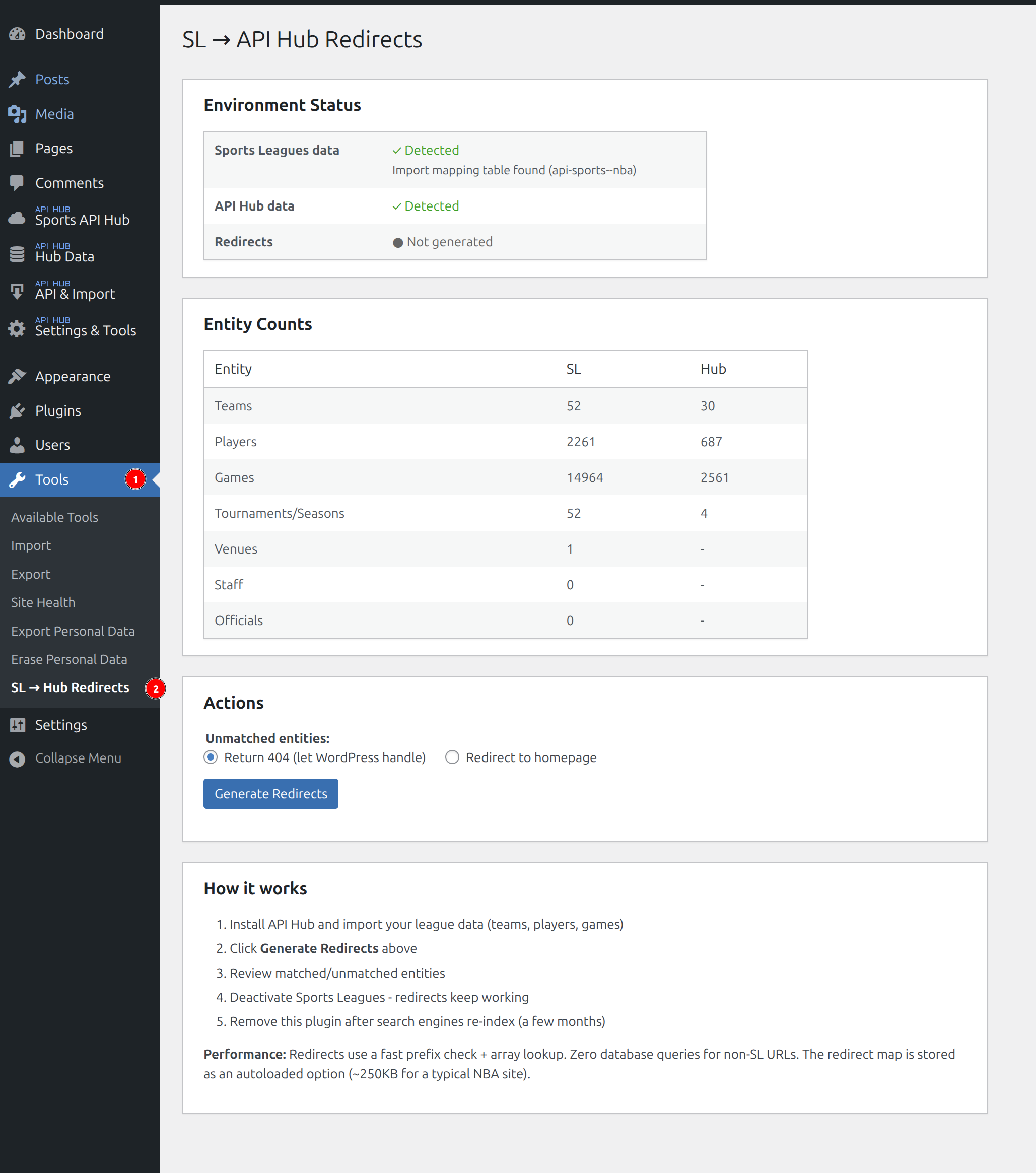
- Find the redirect dashboard at Tools > SL -> Hub Redirects
The dashboard shows the current status – whether SL data and Hub data are detected:
Step 3: Generate Redirects
Choose how to handle URLs that can’t be matched (venues, officials, pre-season players):
- Return 404 – WordPress shows your standard “not found” page (recommended)
- Redirect to homepage – sends all unmatched URLs to your homepage
Click Generate Redirects. The plugin reads both databases and builds the redirect map. This takes 10-30 seconds depending on how much data you have.
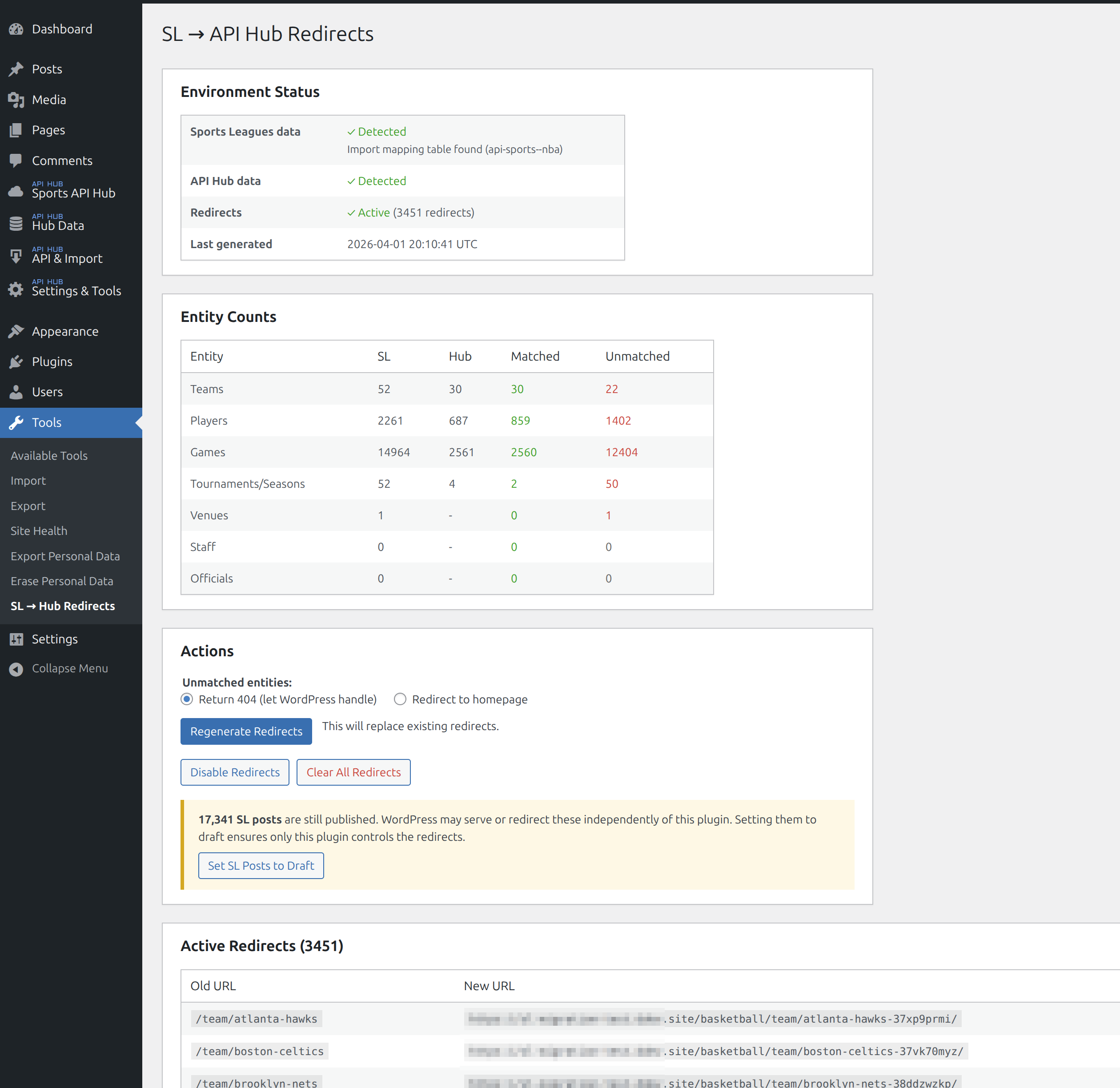
Expected match rates
| Entity | Match Rate | Notes |
|---|---|---|
| Teams | ~100% | Matched by API ID. International pre-season teams match if you import those leagues too |
| Players | 70-85% | SL stores abbreviated names (“L. James”) which limits matching. Active roster players match well |
| Games | ~100% | Matched by date + teams for all imported seasons |
| Seasons | 100% | All imported seasons are matched |
| Venues, Staff, Officials | 0% | Hub doesn’t have standalone pages for these – redirected to homepage or 404 |
Scroll down to the Generation Results section to review individual matches and see which entities couldn’t be matched.
Step 4: Set SL Posts to Draft
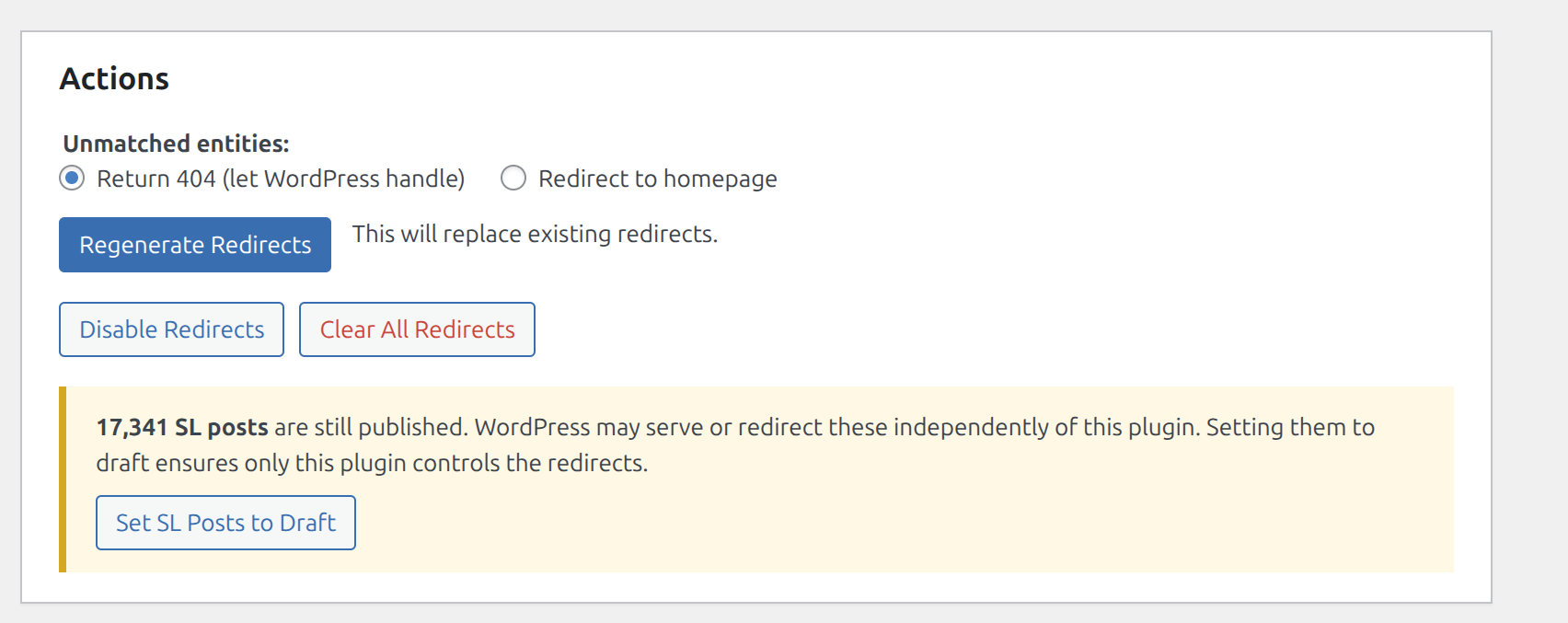
After generating redirects, you’ll see a yellow notice about SL posts still being published. This is important – WordPress may try to serve old SL pages on its own, bypassing the redirect plugin.
Click Set SL Posts to Draft to prevent this. This ensures only the redirect plugin controls where old URLs go.
Tip
Draft posts are NOT auto-deleted. They stay in your database and can be re-published anytime if you need to reverse the migration.
Step 5: Deactivate Sports Leagues
Once redirects are generated and SL posts are set to draft, you can safely deactivate (or delete) the Sports Leagues plugin. The redirect plugin stores all mappings independently – it doesn’t need SL to be active.
Test a few old URLs in your browser to confirm they redirect correctly before removing SL.
Handling Unmatched URLs
Some old SL URLs won’t have a Hub match – pre-season players, unimported seasons, venue pages, staff pages. For these, we recommend the free Redirection plugin (2M+ active installs).
Install it from Plugins > Add New and search for “Redirection” by John Godley.
Redirection automatically logs all 404 errors. After a few days, check the log to see which old SL URLs are still getting traffic. Then create manual redirects for the important ones:
| Old URL Pattern | Redirect To |
|---|---|
Venue pages (/venue/...) | The corresponding team page |
Staff/coach pages (/staff/...) | The corresponding team page |
| Old season pages | The latest season page |
| Pre-season players | Your homepage |
You can also create catch-all rules in Redirection. For example, redirect all remaining /venue/* URLs to your homepage with a single regex rule.
Redirection shows hit counts for each rule – after 3-6 months, remove rules with zero traffic.
Replacing SL Shortcodes
SL shortcodes ([sl-...]) stop working when SL is deactivated. Replace them with Hub equivalents before deactivating SL.
| SL Shortcode | Hub Shortcode | Notes |
|---|---|---|
[sl-games] | [anwphub-games] | Different attributes – use shortcode builder |
[sl-standing] | [anwphub-standings] | standings = compact, standings-full = all groups |
[sl-bracket] | [anwphub-bracket] | Same concept, different attributes |
[sl-players] | [anwphub-leaders] | League-wide stat leaders |
[sl-roster] | [anwphub-roster] | Team roster grid |
[sl-team-stats] | [anwphub-team-stats] | League-wide team comparison |
[sl-calendar] | [anwphub-calendar] | Day-by-day game browser |
[sl-scoreboard] | [anwphub-scoreboard] | Horizontal game carousel |
[sl-highlights] | [anwphub-highlights] | Video highlight grid |
[sl-leagues] | [anwphub-leagues] | League directory |
[sl-game] | [anwphub-game] | Single game embed |
[sl-player-stats] | No direct equivalent | Use player page layout instead |
[sl-team-header] | No direct equivalent | Use team page layout instead |
[sl-standing-mini] | [anwphub-standings] | Compact mode |
Key attribute differences
- SL uses
tournament_id– Hub usesseason_id+league_id - SL uses
club_id(WordPress post ID) – Hub usesteam_id(API ID) - Hub shortcodes require
sport_id(1=Basketball, 2=Baseball, etc.)
Don’t guess the IDs – use the Shortcode Builder (Settings & Tools > Shortcodes). It has a live preview, entity selector for picking the right IDs, and generates the correct shortcode for you.
Post-Migration Cleanup
After migration, monitor for issues:
- Check Google Search Console for crawl errors over the next 2-4 weeks
- Review the Redirection plugin’s 404 log for high-traffic unmatched URLs
- Verify your most important pages (team, player, game pages) redirect correctly
After 3-6 months, once search engines have re-indexed your site:
- Remove the SL to Hub Redirects plugin
- Clean up any Redirection rules for old SL URLs with zero traffic
- Optionally delete SL plugin files and database tables to free space
FAQ
How long until search engines update?
301 redirects tell search engines the move is permanent. Google typically processes them within 2-4 weeks. Keep the redirect plugin active for at least 3-6 months.
Will I lose SEO rankings?
301 redirects pass ~95% of link equity. Some temporary ranking fluctuation is normal during the first few weeks, but your rankings should recover and stabilize.
Can I run both plugins at the same time?
Yes. During migration, Hub and SL can coexist. Only deactivate SL after you’ve verified redirects are working and replaced all SL shortcodes.
I only imported 2 seasons but SL had 10. What happens?
Games and players from unimported seasons won’t redirect. Either import more seasons before generating redirects, or accept those old URLs will return 404 (or redirect to homepage, depending on your setting). You can always import more seasons and regenerate.
My site used SL with manual data entry (no API import). Does this work?
Yes. Without API IDs, the plugin falls back to name-based matching. Teams match well (~90%+). Players match at ~60-80% due to name variations. Review the unmatched list in the admin dashboard and use the Redirection plugin for any important URLs that weren’t matched.
What about SL shortcodes in my blog posts?
SL shortcodes stop rendering when SL is deactivated – your visitors will see the raw shortcode text. Replace them with Hub equivalents before deactivating SL. See the shortcode mapping table above.
I have multiple SL sites for different sports. Can I merge them into one Hub site?
Yes – API Hub supports multiple sports on a single site. Automated tooling for multi-site migration is in development. Contact support and we’ll help you with the migration.
Related
- Import Workflow – detailed import instructions
- Shortcodes – all 14 Hub shortcodes with examples
- Layout Builder – customize game, team, player, and season pages
- Permalinks – configure Hub URL structure
- Support – get help with migration